Going to Tools > Options > Editor > F# > Advanced crashes Visual Studio immediately.
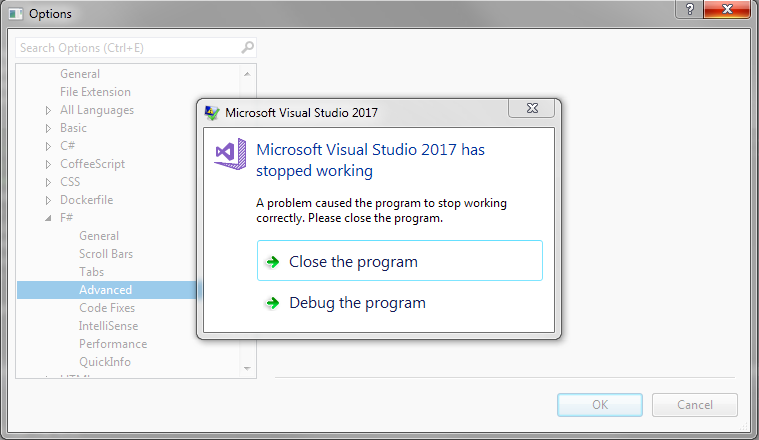
Debugging it shows the following exception:
System.InvalidOperationException: 'A TwoWay or OneWayToSource binding cannot work on the read-only property 'IsOutliningEnabled' of type 'Microsoft.VisualStudio.FSharp.Editor.AdvancedOptions'.'

Repro steps
After updating my Preview instance from 15.7.x to 15.8.2 Preview, going over the options, it just immediately crashed. I restarted with most extensions disabled, but the same happened.
- Regardless of whether there's a solution open or not
- Go to Tools > Options
- Open Editor > F#
- Click "Advanced"
- BOOM!
Expected behavior
Visual Studio should not crash when going through the Options dialog.
Actual behavior
A crash as described above. After I loaded symbols and started VS with debugger attached, the exception changed (strange):
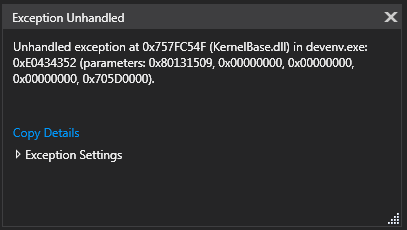
Even when I set the debugger to break on InvalidOperationException, it doesn't do so, it just comes up with the message above. The stack isn't very useful either:

When I attach post-mortem, I see the error as mentioned above, but the stack shows up empty. It's odd that there's such difference.
In fact, I have no idea how to get more information, but hopefully someone here knows better :).
Known workarounds
None, VS2017 completely crashes, no way to get to these settings in the Options dialog.
Related information
- Windows 7, all updates
- Visual Studio 2017 15.8.2 Preview

Going to Tools > Options > Editor > F# > Advanced crashes Visual Studio immediately.
Debugging it shows the following exception:
Repro steps
After updating my Preview instance from 15.7.x to 15.8.2 Preview, going over the options, it just immediately crashed. I restarted with most extensions disabled, but the same happened.
Expected behavior
Visual Studio should not crash when going through the Options dialog.
Actual behavior
A crash as described above. After I loaded symbols and started VS with debugger attached, the exception changed (strange):
Even when I set the debugger to break on InvalidOperationException, it doesn't do so, it just comes up with the message above. The stack isn't very useful either:
When I attach post-mortem, I see the error as mentioned above, but the stack shows up empty. It's odd that there's such difference.
In fact, I have no idea how to get more information, but hopefully someone here knows better :).
Known workarounds
None, VS2017 completely crashes, no way to get to these settings in the Options dialog.
Related information