System Information (please complete the following information):
- ML.Net Model Builder: 16.7.6.2147804 (Main Branch)
- Microsoft Visual Studio Enterprise 2022 Preview: 17.0.0 Preview 4.1
- Notebook Editor [Preview]:0.1.0.2147804
- microsoft.dotnet-interactive:1.0.247702
Describe the bug
- On which step of the process did you run into an issue: SQL Data Source>Adding Notebook on Consume page
- Clear description of the problem: see the error on SQL file, not occurs on File, Folder, Json data sources.
To Reproduce
Steps to reproduce the behavior:
- Select Create a new project from the Visual Studio 2022 start window;
- Choose the C# Console App (.NET Core) project template with .Net 5.0;
- Add model builder by right click on the project;
- Select Data Classification and SQL data source;
- Navigate to Consume page after completed training;
- Click "Add to solution" for Interactive Notebook, and click "Add to solution" on the prompted dialog;
- See error: Prompts Model Builder Error: The method or operation is not implemented.
Expected behavior
No error when adding notebook for all supported data sources.
Screenshots
If applicable, add screenshots to help explain your problem.
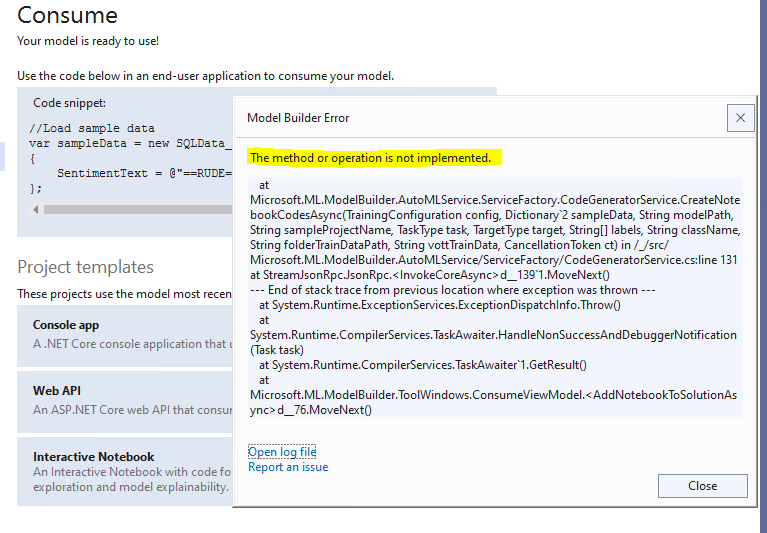
Error Log
SQLData_MLModel1-LV3CDO.txt
mbconfig file
SQLData_MLModel1.zip

System Information (please complete the following information):
Describe the bug
To Reproduce
Steps to reproduce the behavior:
Expected behavior
No error when adding notebook for all supported data sources.
Screenshots

If applicable, add screenshots to help explain your problem.
Error Log
SQLData_MLModel1-LV3CDO.txt
mbconfig file
SQLData_MLModel1.zip