System Information (please complete the following information):
Windows OS: Windows-11-Enterprise-21H2
ML.Net Model Builder 2022: 16.13.10.2251201 (Main Build)
Microsoft Visual Studio Enterprise: 2022(17.3.6)
.Net: 6.0
Describe the bug
- On which step of the process did you run into an issue:
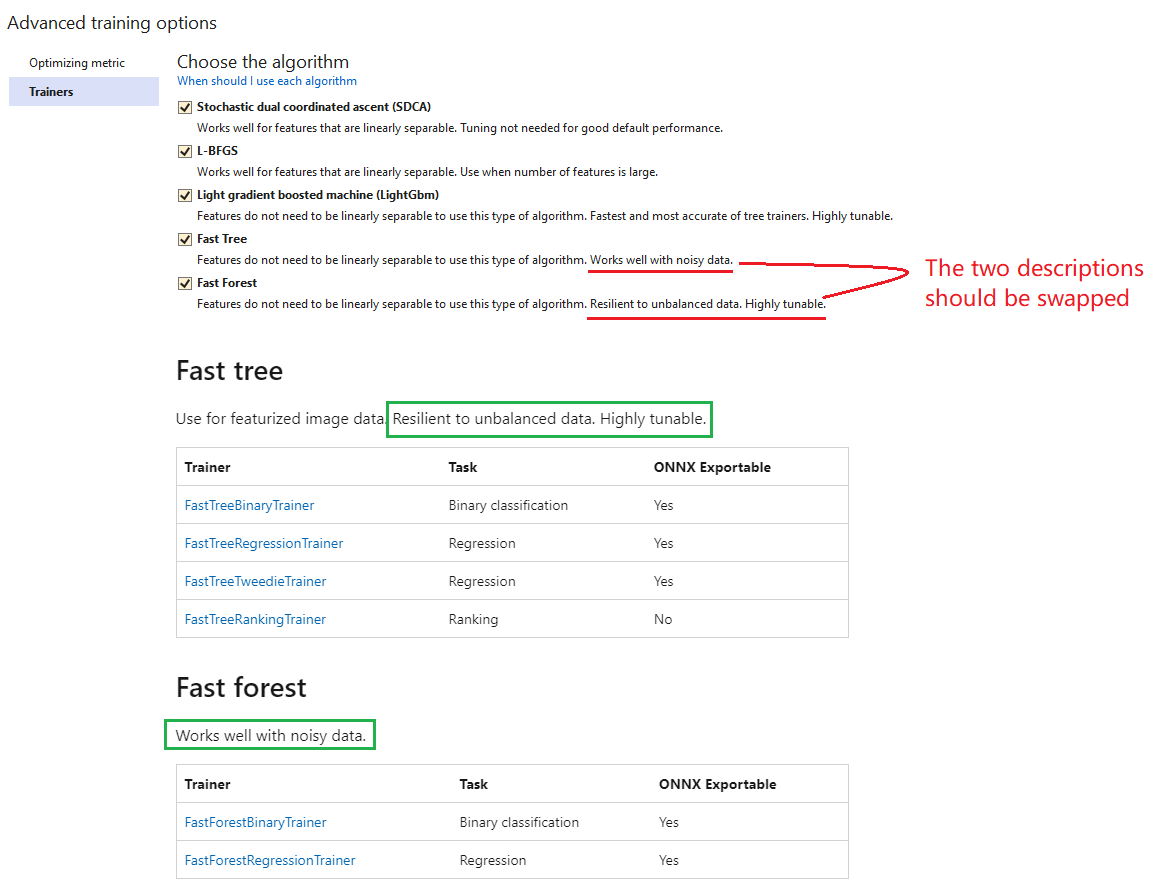
The descriptions of trainers "Fast tree" and "Fast forest" in the "Advanced training options->Trainers" dialog should be swapped for Data classification scenario.
Data Source
https://testpass.blob.core.windows.net/test-pass-data/wikipedia-detox-250-line-data.tsv
To Reproduce
Steps to reproduce the behavior:
- Select Create a new project from the Visual Studio 2022 start window.
- Choose the C# Console App (.NET Core6.0) project template.
- Add model builder by right click on the project.
- Select Data classification scenario.
- On Data page, select the data source and choose Sentiment column as label.
- On the Train page, click "Advanced training options..." link, then click on "Trainers" tab.
- You will see that the descriptions of trainers "Fast tree" and "Fast forest" are incorrect.
Expected behavior
The descriptions of trainers "Fast tree" and "Fast forest" should be swapped.
Screenshot
Additional context


System Information (please complete the following information):
Windows OS: Windows-11-Enterprise-21H2
ML.Net Model Builder 2022: 16.13.10.2251201 (Main Build)
Microsoft Visual Studio Enterprise: 2022(17.3.6)
.Net: 6.0
Describe the bug
The descriptions of trainers "Fast tree" and "Fast forest" in the "Advanced training options->Trainers" dialog should be swapped for Data classification scenario.
Data Source
https://testpass.blob.core.windows.net/test-pass-data/wikipedia-detox-250-line-data.tsv
To Reproduce
Steps to reproduce the behavior:
Expected behavior
The descriptions of trainers "Fast tree" and "Fast forest" should be swapped.
Screenshot

Additional context