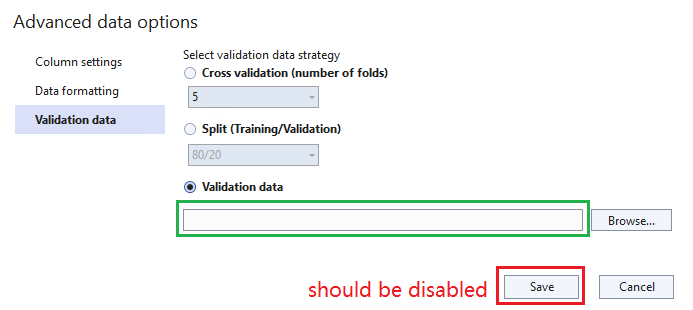
The "Save" button should be disabled if keeping the value empty when choosing the third validation data strategy. #2571


Description

System Information (please complete the following information):
Windows OS: Windows-11-Enterprise-22H2
ML.Net Model Builder 2022: 17.14.4.2317901 (Main Build)
Microsoft Visual Studio Enterprise: 2022(17.5.2)
.Net: 6.0
Describe the bug
- On which step of the process did you run into an issue:
The "Save" button should be disabled if keeping the value empty when choosing the third validation data strategy.
TestMatrix
https://testpass.blob.core.windows.net/test-pass-data/wikipedia-detox-250-line-data.tsv
To Reproduce
Steps to reproduce the behavior:
- Select Create a new project from the Visual Studio start window.
- Choose the C# Console App (.NET Core) project template.
- Add model builder by right click on the project.
- Select any scenario.
- On Data page, choose the data source.
- Click the "Advanced data options..." link, go to the "Validation data" tab.
- Choose the third option and keep the value empty.
Expected behavior
The "Save" button should be disabled.
Screenshot
Additional context