transparency of FontFamily is different from office #7160

Description

- .NET Core Version: 6
- Windows version: win11
- Does the bug reproduce also in WPF for .NET Framework 4.8?: Yes
- Is this bug related specifically to tooling in Visual Studio (e.g. XAML Designer, Code editing, etc...)? If yes, please file the issue via the instructions here.
- Security issues and bugs should be reported privately, learn more via our responsible disclosure guidelines.
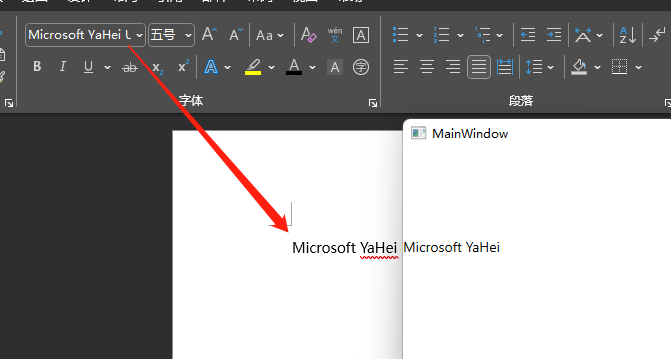
As shown in the picture,The color depth of the same font is inconsistent。
here is MainWindow.XAML:
<TextBlock Grid.Row="0" Text="Microsoft YaHei " Opacity="1" FontFamily="yahei" FontSize="14" Foreground="#000000"></TextBlock>
here is APP.XAML
`
<Application.Resources>
<ResourceDictionary.MergedDictionaries>
            <ResourceDictionary>

                <FontFamily x:Key="yahei">
                    Pack://application:,,,;C:\Windows\Fonts\msyh.ttc
                </FontFamily>
            </ResourceDictionary>

        </ResourceDictionary.MergedDictionaries>
    </ResourceDictionary>
</Application.Resources>
`