Repository navigation
Releases
BatchSlicer 0.22.1

See the web page in action: drop models on it, watch them slice, send them to
your printer.
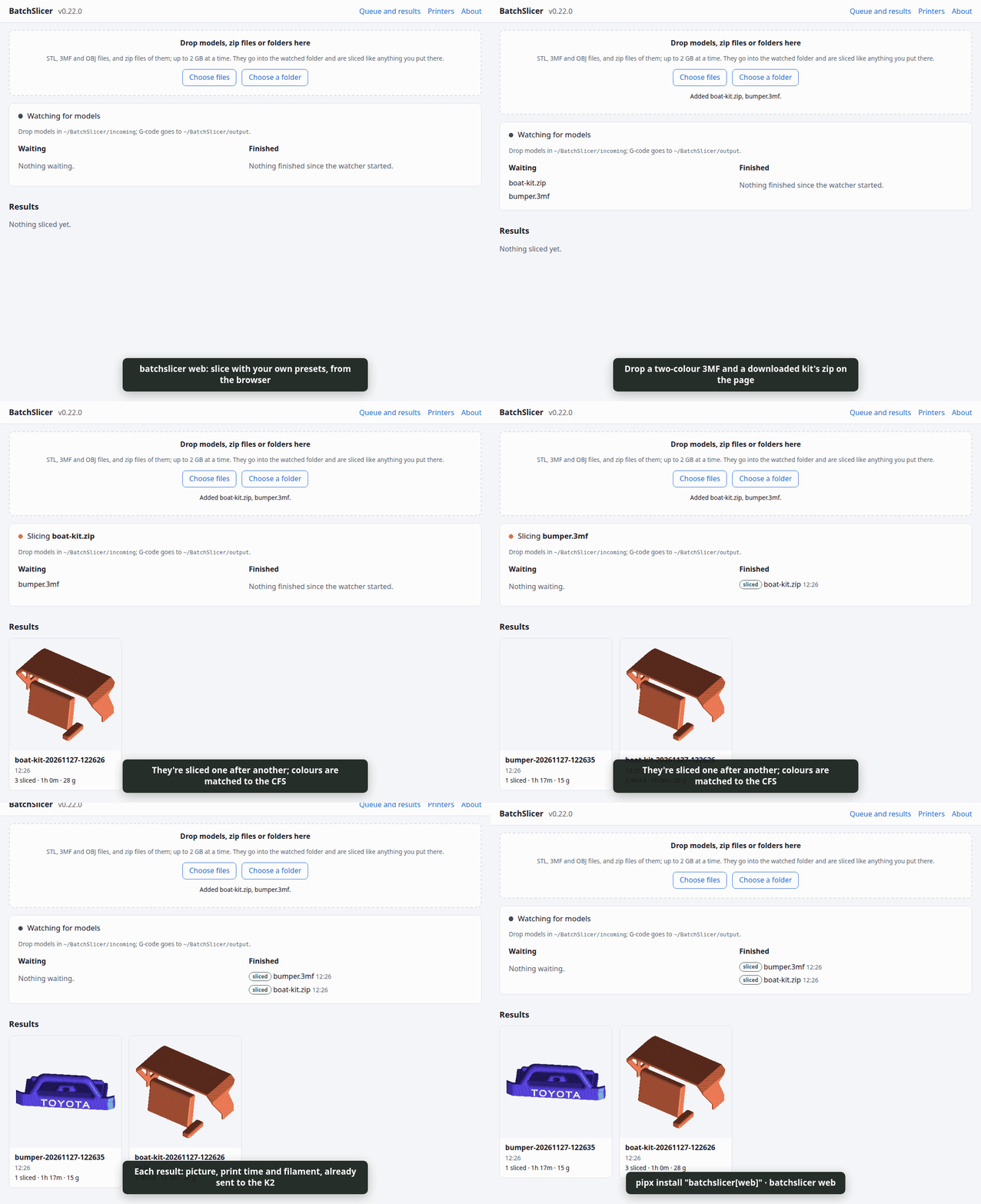
Try it: pipx install --force "batchslicer[web]", then batchslicer web
and open http://127.0.0.1:8765. No change to how BatchSlicer works.
Documentation
- A demo of the web page (
docs/images/web-demo.gif, recorded with the new
docs/demo/web_demo.py): a two-colour 3MF and a kit's zip dropped on the
page, sliced with colours matched to the CFS and sent to the printer, a
result, and the Printers page. - The README and user guide put the web page first: it leads the README's
features and "See it in action", the quick start shows how to start it,
and the user guide's step 9 is now "Slice from your browser, or a watched
folder", pointed to from the introduction for anyone who prefers a browser.
BatchSlicer 0.22.0
G-code names now say the filament and print time, like
bracket_PETG_2h50m.gcode, so the printer's file list tells you what each
file is before you open it.
Upgrade with pipx upgrade batchslicer and slice as usual. Prefer plain
names? Add --no-name-details.
Added
- G-code file names now include the filament type and print time the slicer
wrote into them, as Creality Print names its own files:
bracket_PETG_2h50m.gcode. A multi-material print lists the materials of
the slots it uses (bumper_PLA-TPU_1h17m.gcode); plates keep their number
in front (kit_plate_1_PETG_45m.gcode). On by default;--no-name-details
(orname_details: falsein a profile) keepsbracket.gcode. Re-slicing a
model with another material or settings now gives a new file on the
printer instead of replacing the old one.
BatchSlicer 0.21.1
A fresh demo and screenshots, and a launch kit for anyone who wants to help
spread the word.

No change to how BatchSlicer works; pipx upgrade batchslicer brings the
updated README to PyPI's page.
Documentation
- The demo GIF is recorded again with 0.21.0 (it showed 0.16.1):
--plates
is on the command line, since plates are opt-in, and the kit is sent to the
printer as one file.docs/demo/demo.shno longer hides plates in the
demo profile. - The web page screenshots are retaken with 0.21.0; a result's G-code is now
in the run's folder, not inplates/. - README and user guide: sending puts a batch in one folder (
--folders
keeps the structure), and runs no longer ask about plates. docs/launch-kit/: ready-made posts for forums, Reddit and Discord, the
pictures to use and where to post, linked from the README's Support
section. Not part of the package.
BatchSlicer 0.21.0
Kits now show up in full on the Creality K2's screen, and models go on
shared plates only when you ask.
Upgrade with pipx upgrade batchslicer (or pipx install --force "batchslicer[web]" for the web page). Slice a folder as before: all its
G-code lands in one folder, here and on the printer.
Changed
- A batch's G-code now goes into one folder by default, here and on the
printer (what--flatdid), because the Creality K2's screen does not list
every folder of a deep, mirrored batch.--folders(or--no-flat) mirrors
the input's subfolders as before; a profile saved withflat: falsekeeps
doing so. - Interactive runs and
--watchno longer ask whether to put a folder's
models together on plates, where Enter repeated the last run's answer and
could put a kit on plates unasked. Models are sliced one by one unless you
give--plates(or use a profile that saved it).
BatchSlicer 0.20.0
The web page: upload, follow, download and send from a browser on this
computer.
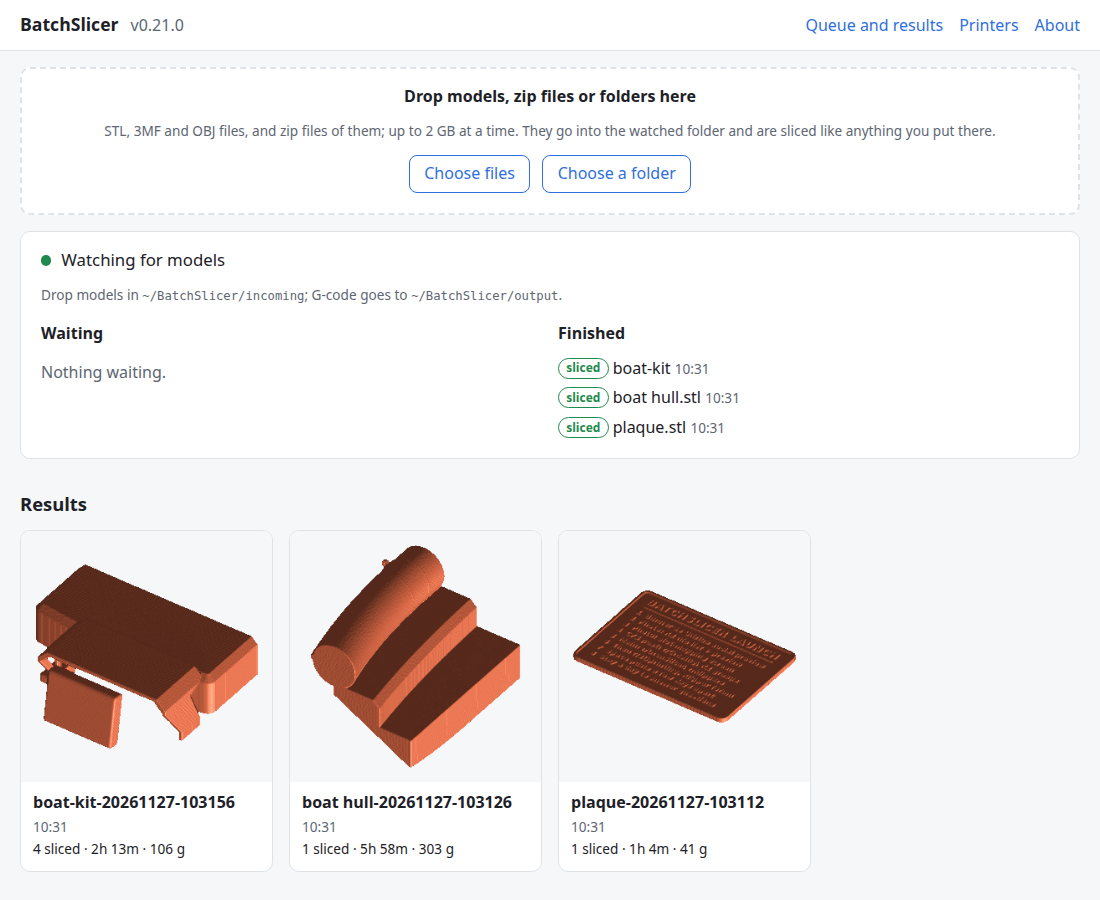
Install or upgrade with the web page: pipx install --force "batchslicer[web]",
then batchslicer web --profile NAME and open http://127.0.0.1:8765. See
Following it in a web page.
Added
batchslicer web(first step of the web page, needs the newwebextra:
pipx install --force "batchslicer[web]"): runs a watch together with a
page on http://127.0.0.1:8765 that shows what is waiting, what is being
sliced (model n of m), the drops finished, and the results in the
output folder with their preview pictures, print time, filament per slot
and the slicer's reason for failures. Drag models, zip files or folders
onto the page (or choose them) to slice them, up to 2 GB at a time; they
reach the watched folder only once complete. Download each G-code file and
the reports, or a whole run as a ZIP. Send a run's G-code to a configured
printer, into the same folders as--send(it is never started), and see
on the Printers page whether each printer answers and what is loaded in
its CFS. An About page shows the settings and runsbatchslicer doctor.
Folders watched by installed services are offered as upload targets, with
what each service is doing. It works only on this computer, and takes
uploads, sends and checks only from the page itself.--portchooses another port.batchslicer service install --webkeeps the web page and its watch
running in the background, as a service namedweb(--portfor another
port).- A watch run keeps
.batchslicer-status.jsonin the watched folder up to
date with what it is doing, for the web page and your own scripts.
BatchSlicer 0.19.0
The background service on every system, API keys from the environment, and a
quick printers-only check.
Added
api_key_env: VARIABLEin a printer's settings reads its API key from that
environment variable, so the key need not be stored in the configuration
file. A missing or empty variable, or setting bothapi_keyand
api_key_env, is explained;batchslicer doctorshows where each key
came from, never the key (#18).batchslicer doctor --printer NAME|ADDRESSchecks only that printer (a
configured name, or any address, even without a configuration): whether it
answers, which software answered, where its key came from and what is
loaded in its CFS. Repeat it for several printers (#19).batchslicer serviceworks on macOS: it installs a launchd agent that
watches while you are signed in, starts at login, starts again after an
error, and writes its output to~/Library/Logs/BatchSlicer/service-NAME.log.
statusanduninstallwork as on Linux; stopping works like Ctrl+C.batchslicer serviceworks on Windows: it registers a Task Scheduler task
that starts when you sign in and runs in your session without a window (so
Bambu Studio slices there), with its output in
%LOCALAPPDATA%\BatchSlicer\logs\service-NAME.log. Stopping asks it to
stop like Ctrl+C before ending it.
Documentation
- The README and User Guide give Linux, Windows and macOS their own
installation steps, and the README has one table per system for where
BatchSlicer keeps its configuration, folders, logs and the slicers'
settings, instead of mixing the three in the same paragraphs.
BatchSlicer 0.18.0
macOS: BatchSlicer runs on macOS with OrcaSlicer, Creality Print and Bambu
Studio, tested on a real Mac (macOS 15.8).
Added
- macOS support. Settings and profiles live in
~/Library/Application Support/BatchSlicer, logs in
~/Library/Logs/BatchSlicerand the cache in~/Library/Caches/BatchSlicer;
models and results in~/BatchSliceras on Linux. batchslicer setupfindsOrcaSlicer.app,BambuStudio.appand
Creality Print.appin/Applicationsand~/Applications, uses the
program inside the app and reads its version from the app'sInfo.plist;
the settings folders are found under~/Library/Application Support.
Built-in presets are read from the app itself.- The automated checks also run on macOS (Python 3.12 and 3.13).
Fixed
- The watch folder's stop hint no longer mentions
systemctlon macOS.
Documentation
- Installing and using BatchSlicer on macOS, in the README (installation,
where setup looks, folders, troubleshooting) and the User Guide; macOS
locations in the architecture, startup sequence and example configuration. batchslicer serviceis Linux-only: on macOS, as on Windows, run--watch
in a Terminal window. macOS's ownpython3(3.9) is too old; Terminal needs
permission to read Desktop, Documents and Downloads.
BatchSlicer 0.17.0
Windows: BatchSlicer runs on Windows 10 and 11 with OrcaSlicer, Creality
Print and Bambu Studio, tested on a real Windows 11 machine.
Added
- Windows support. Settings and profiles live in
%APPDATA%\BatchSlicer,
logs and cache in%LOCALAPPDATA%\BatchSlicer, and models and results in
%USERPROFILE%\BatchSliceras on Linux. batchslicer setupfinds slicers installed in Program Files or
%LOCALAPPDATA%\Programs, and portable copies in Downloads, Desktop and the
other usual folders; their settings folders are found under%APPDATA%.
The version comes from Windows' list of installed programs.- The automated checks also run on Windows (Python 3.12 and 3.13).
Fixed
- Creality Print's hidden migration folders (
.7.3.staging-...,
.migration-7.3) are no longer mistaken for its settings folder. This
could happen on Linux too, once Creality Print 7.3 had moved its settings. - Slicer output is read as UTF-8 on every system, and paths in the
configuration, reports and menus are written with/. - A Windows path written with backslashes inside YAML double quotes gets a
message saying how to write it, instead of a bare YAML error.
Documentation
- Installing and using BatchSlicer on Windows, in the README (installation,
where setup looks, folders, Windows paths in the configuration, running the
watch folder, troubleshooting) and the User Guide; Windows locations in the
architecture, startup sequence and example configuration. - Known limits on Windows:
batchslicer serviceis Linux-only (run--watch
in a terminal window), and Bambu Studio slices only from a signed-in
desktop session, not over SSH or as a background task. - A short terminal demo (
docs/images/demo.gif, recorded with
docs/demo/demo.sh) in the README's "See it in action" and the User Guide.
BatchSlicer 0.16.1
A zip file's name in messages, a demo script, and documentation brought up to date.
Fixed
- A zip file's name is shown in progress and dry-run messages ("Slicing 3
model files from boat-kit.zip"), not its temporary folder.
Documentation
docs/demo/demo.shruns a short, repeatable demo for recording (a dry run,
a multi-colour project matched to the CFS, a kit zip on one plate) in its
own~/demofolder, without touching your configuration.- The README's "How it works" and the startup sequence (
docs/Startup.md)
follow the real order of the steps (the output folder comes last, after
sending and the multi-colour question) and cover zip files,--dry-runand
stopping on a terminate request; the README's feature list includes zip
files and--dry-run; the architecture, data model and coding standards
mention the zip unpacking and the dry run.
BatchSlicer 0.16.0
Zip files: slice a downloaded kit without unpacking it first.
Added
- Zip files:
--input kit.zipand zip files dropped into the watch folder
are unpacked into a temporary folder and sliced like a folder (a kit
downloaded from a model site no longer needs unpacking first). Only model
files are taken out; folders every model shares are left out; archives with
paths outside their folder or an unusual size are refused; a zip without
models fails with the reason.--lastremembers the zip.
Documentation
- Confirmed on a Creality K2 Plus: a single-colour part sliced for one CFS
spool (--loaded-filaments --slot "*=1B") has that spool already selected
on the printer's slot-mapping screen.