Apply Text area (mainly WYSIWYG editor) style updates#68
Conversation


…nt visibility issues)
 zolhorvath
force-pushed
the
task/issue-21
branch
from
zolhorvath
force-pushed
the
task/issue-21
branch
from
0f21ec2 to
e666019
Compare
zolhorvath
changed the title

|
@lauriii, @ckrina: this is ready for the review. Screenshots: Textarea screenshots - Ubuntu and Windows.zip |

|
Disabled editor has to be fixed, see #74 |

 ckrina
left a comment
ckrina
left a comment
ckrina
left a comment
There was a problem hiding this comment.
I've noticed that when you expand the summary for a text area, the summary itself has the correct font size but not the textarea with the WYSIWYG.
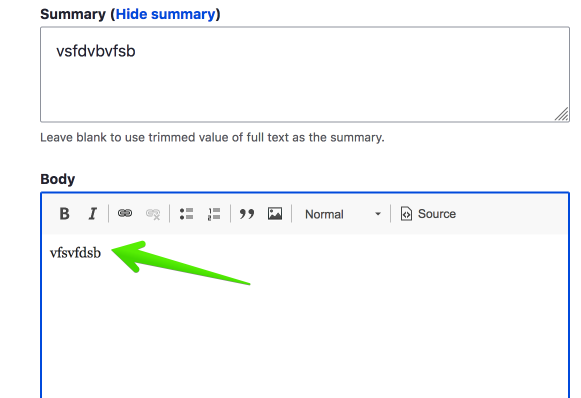
|
@ckrina I added an improvement for the case when Claro is the front end theme. (I think it's a very limited use case, but maybe it's worth to do so.) However, as I see, you're using Bartik as a front end theme. Bartik provides CKEditor stylesheets as well, an in that case, CKEditor inputs are using those to provide a visual feedback for editors about how the text looks on front end theme, see the API doc about this feature (at API features / CKEditor iframe CSS / Front-end theme CSS). |

|
Thanks @zolhorvath ! I just changed the frontend theme to Claro too, but now it takes the styles from the core ckeditor modules and ends up using Arial instead of the system fonts, and it looks really strange having a text area with one font and the other with another one. Is there any way to change this?
|

|
@ckrina did you refreshed the theme? |
|
You're right, sorry! I forgot the yarn command. The everything good for me. |
3 participants


Issue
This PR fix #21.
Screenshots before/after (now Chrome on OSX only)
Todo
Testing instructions
https://github.com/zolhorvath/seven-refresh/asdrupal-profile(sevenrefresh) to a Drupal project.core/themes/seventhemes/custom/sevencore/misctothemes/custom/miscyarn && yarn build:cssin the theme's rootsevenrefresh. This will enable additional field types such astelephoneordate_rangeand enablestyleguidedrupal module as wellAfter that Drupal is installed, Styleguide will be the front page and you'll have the test form at
/contact/textarea.