Repository navigation
Input formats
pycoQC itself reads one thing: a sequencing summary file. Everything else is a
converter that produces one.
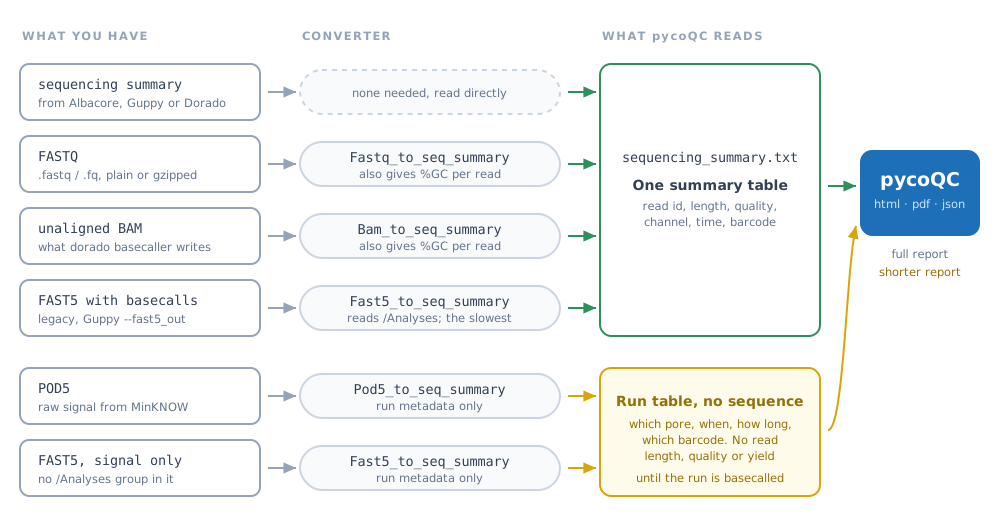
The two at the bottom are raw signal. A converter reads the run metadata out of them
and pycoQC reports on the run itself, but read lengths, quality scores and yield do
not exist until the reads are basecalled.
Written by the basecaller: Albacore 1.0.0+, Guppy 2.1.3+ or Dorado 0.4.1+. This is the preferred input, because it is what the basecaller actually recorded rather than something recomputed afterwards.
Gzipped files are read transparently, so sequencing_summary.txt.gz works.
Columns are detected rather than required, and the report adapts: plots whose columns
are missing are skipped with a note in the log instead of failing. The ones that matter
most are read_id, run_id, channel, start_time, sequence_length_template and
mean_qscore_template.
Barcodes can arrive two ways:
- already in the summary, as a
barcode_arrangementcolumn - in a separate barcoding summary from Guppy's
guppy_barcoderor Deepbinner, passed with-b
Barcodes representing less than --min_barcode_percent of reads (0.1% by default) are
relabelled unclassified, which keeps the per-barcode plots readable when a run has a
long tail of spurious assignments.
Pass a BAM with -a to unlock the alignment plots: aligned length, identity frequency,
coverage and alignment rate. Align against your reference with minimap2 first. The BAM
must contain the same reads as the summary.
For a transcriptome, or any reference with very many sequences, add
--skip_coverage_plot; the coverage plot has one position per reference base and gets
unwieldy.
Fastq_to_seq_summary -f fastq_dir/ -s sequencing_summary.txt -t 8Reads .fastq, .fq, .fastq.gz and .fq.gz, recursively. Metadata is taken from the
Guppy-style header:
@20a271c3-8f4b-466c-92b8-50a469aaa3e4 runid=acfd15dc sampleid=run3 read=2743 ch=207 start_time=2022-06-27T23:14:28Z barcode=barcode17
Missing fields are tolerated and left blank, so plain FASTQ works, just with fewer plots available.
FASTQ input additionally yields %GC per read, which the basecaller summary does not carry, enabling the %GC plots.
Reads under a path containing fail are marked as failing, which matches the
fastq_pass and fastq_fail layout the basecallers write. fail has to be a whole
word, and only the part of the path below the directory you give is considered, so a
run kept under failed_experiments/ or /mnt/failover/ is not read as failing.
Bam_to_seq_summary -f bam_dir/ -s sequencing_summary.txt -t 8For unaligned BAM as produced by dorado basecaller. Metadata comes from the tags
Dorado writes: st (start time), ch (channel), BC (barcode), fn (source file),
plus the read group for the run id, flow cell, device, basecalling model, barcode,
sample id and run start time. Like FASTQ, this gives %GC.
The quality score is recomputed from the per-base qualities rather than taken from the
qs tag, so it is the mean error probability expressed as a phred score, the same
definition the basecaller's own summary uses.
--fields narrows the columns written; by default every field the file carries is
written. --include_path adds a path column. --basecall_id selects one of several
basecall groups inside a FAST5 and means nothing here, so it is ignored with a warning.
Not to be confused with -a/--bam_file on pycoQC, which takes an aligned BAM to add
alignment plots to a report.
Pod5_to_seq_summary -f pod5_dir/ -s sequencing_summary.txt -t 8POD5 is the current raw-signal format, written by MinKNOW and read by Dorado. It holds the signal and the run metadata and no basecalls, so there is no read length and no quality score in it.
A POD5 summary gives a shorter report. There is no read length, no quality score and no base count in it, so the plots built on those are left out and the report covers the run itself instead: how many reads, from which pores, when, how long each one held its pore, and under which barcode.
pycoQCsays so when it reads one:WARNING: no read length or quality score in this summary, so nothing has been basecalled yet. The report will cover the run itself: how many reads, from which pores, when, and under which barcode.Earlier versions filled the length and quality columns with values drawn from a random normal distribution so that
pycoQCwould accept the file. Every length and quality figure in a report built that way was invented, including negative read lengths. Nothing is invented now, and there is deliberately no estimated base count: bases per read can only be guessed from the signal length and a assumed translocation speed, which would be a guess presented as a measurement.
| Plot | Shows |
|---|---|
| General run summary | duration, active channels, run ids, barcodes |
| Signal summary | reads, median time in pore, total pore time, active channels |
| Read duration | distribution of how long each read held its pore |
| Reads over experiment time | cumulative and per interval read counts |
| Time in pore over experiment time | whether reads got shorter as the run went on |
| Activity per channel | which pores were working, and when |
| Reads per barcode | if the file names carry barcodes |
Pass and fail come from the passes_filtering column, which the converter reads from
the file name, since there is no quality score to threshold on.
What the summary does carry, straight from the file:
| Column | Source |
|---|---|
read_id |
the read's UUID |
run_id |
run_info.acquisition_id |
channel |
the pore the read came from |
start_time |
start_sample divided by the run's sample rate, in seconds |
duration |
sample count divided by the sample rate, in seconds |
sample_id, flowcell_id
|
the run info |
read_number |
per-channel read counter |
run_start_time, flow_cell_product_code, sequencing_kit, device_id, software
|
the run info, used for the report's run panel |
barcode_arrangement, passes_filtering
|
read from the file name, see below |
Add --include_path for a path column naming the file each read came from.
That is enough to answer questions about the run itself, which pore produced what and when, before or without basecalling.
POD5 carries neither, so both are read from the file name, which is how MinKNOW lays its output out:
FAW88668_pass_barcode06_1ec22c6e_0.pod5
         ^^^^ ^^^^^^^^^
         flag barcode
A name containing unclassified gives unclassified; a name with no barcode in it at
all leaves the barcode empty, since a run that was never demultiplexed has no barcode.
The pass or fail flag is decided in order: pass anywhere in the name wins and marks
the reads as passing, otherwise fail or skip marks them as failing, and a name
carrying none of the three is treated as passing. Rename files at your own risk;
nothing else in a POD5 carries either value.
Fast5_to_seq_summary -f fast5_dir/ -s sequencing_summary.txt -t 8The legacy raw-signal format, superseded by POD5. Both the single-read and the
multi-read layouts are read; the multi-read form is detected from the file's
file_type attribute.
Guppy's --fast5_out wrote the basecall summary into the file alongside the signal,
under /Analyses. Where that group is present it is used, and the summary then carries
real read lengths and quality scores:
| Column | Read from |
|---|---|
sequence_length_template, mean_qscore_template
|
Analyses/Basecall_1D_000/Summary/basecall_1d_template |
barcode_arrangement |
Analyses/Barcoding_000/Summary/barcoding |
read_id, start_time, duration
|
the Raw group |
channel, sampling rate |
channel_id |
run_id, sample_id, device_id, flow_cell_id
|
tracking_id |
start_time and duration are stored in samples and divided by the channel's sampling
rate, as for POD5. Pass and fail come from the directory the basecaller wrote the file
to, fast5_pass or fast5_fail, matched on whole words and only below the directory
you point the converter at.
If the file was basecalled more than once there will be several Basecall_1D_NNN
groups. --basecall_id selects which one to read, defaulting to 0.
A FAST5 with no /Analyses group holds signal only, and the same limitation as
POD5 applies: no length, no quality, no yield, and so the shorter report described
above.
| Software | Writes basecalls into FAST5 |
|---|---|
| Albacore | yes |
| Guppy, up to roughly 6.4 | yes, with --fast5_out
|
| Guppy, 6.5 onwards | no, the option was removed |
| Dorado | no, it never wrote FAST5 at all |
| MinKNOW, current | no, it writes POD5 |
Oxford Nanopore describe FAST5 writing as deprecated and since removed. This path is therefore for data you already have rather than for anything produced today.
It is also the slowest converter, because every file is opened and walked read by read.
If you still have the basecaller's own sequencing_summary.txt, prefer it.
| You have | Use |
|---|---|
sequencing_summary.txt |
it directly, no conversion |
| Dorado output | Bam_to_seq_summary |
| FASTQ, and want %GC | Fastq_to_seq_summary |
| POD5, before basecalling |
Pod5_to_seq_summary, for a report on the run itself |
| Old FAST5 with basecalls in it | Fast5_to_seq_summary |
| Raw signal, and want a QC report | basecall first, then BAM or FASTQ |
Prefer the basecaller's own summary where you have it. The converters recompute what they can from the reads, which is close but not identical, and they are slower.
