BunkerWeb Integration
Status: Version-specific Documentation baseline: v4.02.11
This page describes the SysWarden side of the planned BunkerWeb plugin integration. It does not claim that a particular plugin release has completed its external BunkerWeb end-to-end test matrix. Check the compatible plugin release notes before enabling it.
The BunkerWeb scheduler can use SysWarden's authenticated HA API to:
- push temporary Layer 7 bans into the host firewall;
- withdraw only bans that belong to the same claimed source and observed peer scope;
- read the effective SysWarden blocklist and whitelist;
- cache bounded status and telemetry for the BunkerWeb UI.
On Linux, the docker_protect nftables chain is attached to the forward hook
and checks both source and destination addresses. A ban can therefore protect
forwarded traffic to containers, not only traffic addressed to the host.
The plugin uses only the HTTPS HA API. It must not edit
/etc/syswarden/lists, invoke syswarden-cli, or access a SysWarden socket.
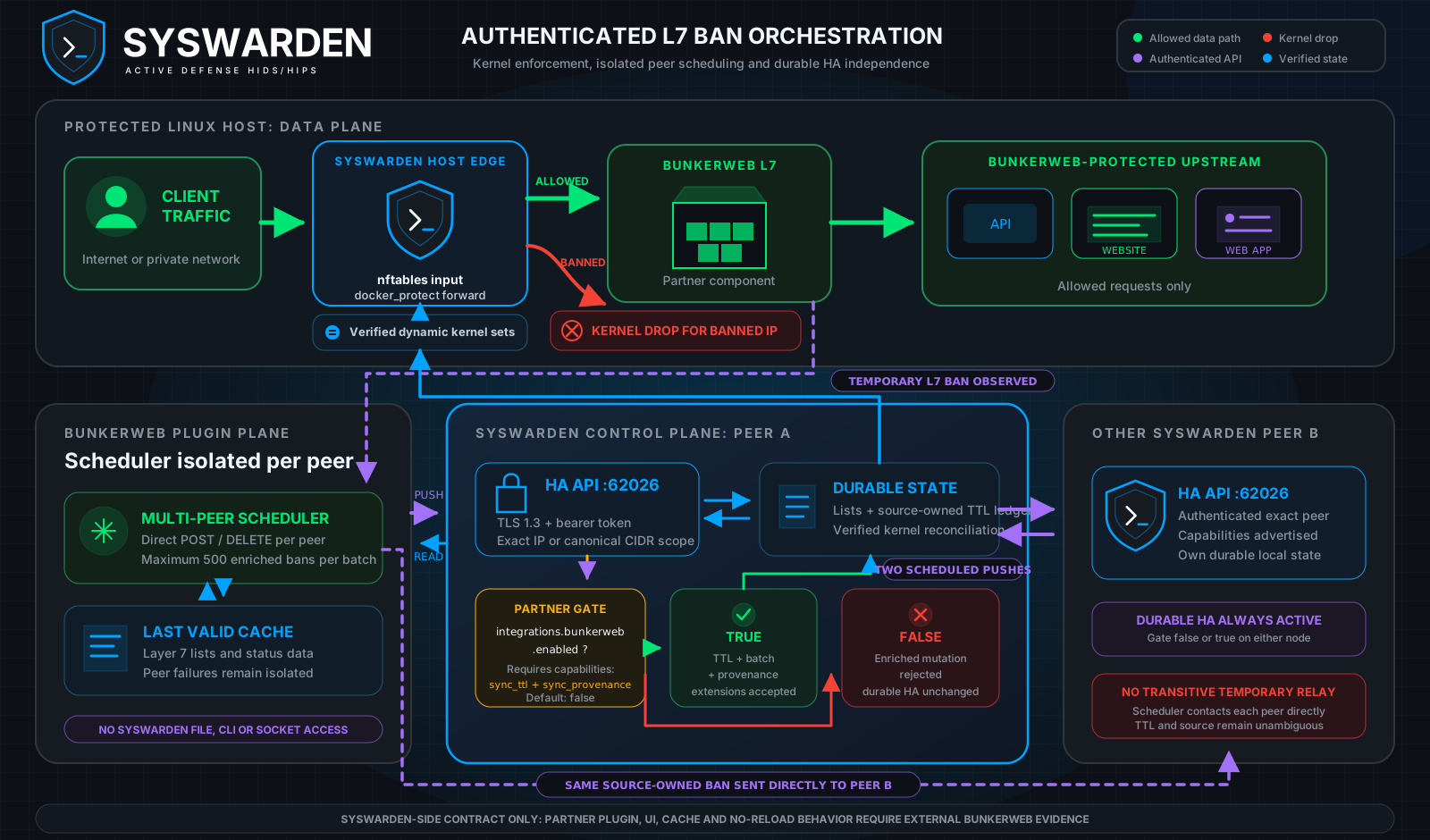
In the "Protected host: data plane", client traffic reaches nftables before BunkerWeb. The A-to-B and B-to-A arrows represent two scheduled pushes, gate false or true, rather than a continuously open synchronization session. Source-owned temporary bans are sent directly by the scheduler to each peer; SysWarden nodes do not relay them.
The final false branch means only that secure SysWarden node-to-node HA stays
available; it does not route partner requests through the other node.
- SysWarden v4.02.11 or later on the participating host.
- A compatible BunkerWeb plugin release.
- Console or out-of-band access before changing firewall or HA settings.
- TCP
62026reachability on a dedicated management or container network. - A high-entropy shared bearer token stored as a secret.
- Either an exact scheduler IP or a canonical CIDR selected by the operator.
- Authenticated distribution of the SysWarden public HA certificate or its fingerprint to the BunkerWeb trust configuration.
The Web-TUI on port 62027 is unrelated to this integration and is not a
substitute for the HA API.
Open option 5, Integrations & HA, in the modular editor:
sudo syswarden configConfigure the HA listener and enable the partner extensions:
[integrations.ha]
enabled = true
peer_ips = ["172.30.0.0/29"]
peer_port = 62026
token = "REPLACE_WITH_A_RANDOM_SHARED_SECRET"

[integrations.bunkerweb]
enabled = true
An exact IP is both an inbound authorization entry and an outbound SysWarden HA destination. A CIDR authorizes inbound clients only and is never converted into an outbound URL. CIDR authorization is useful when Docker assigns a new scheduler address after recreation. The bearer token remains mandatory, so the CIDR is a defense-in-depth scope rather than the primary credential.
Apply the reviewed configuration:
sudo syswarden reloadThe command must fail if HA is disabled, the token is empty or whitespace padded, or the peer list is empty or invalid. Do not continue after such an error.
The HA listener uses TLS 1.3 and a persistent identity:
- public certificate:
/var/lib/syswarden/ha/server.crt - private key:
/var/lib/syswarden/ha/server.key
Never copy server.key to a client. Transfer server.crt through a trusted
out-of-band channel and verify its SHA-256 fingerprint before using it as a
trust anchor:
openssl x509 -in /var/lib/syswarden/ha/server.crt -noout -fingerprint -sha256The planned plugin supports a CA bundle or an explicit certificate fingerprint. Follow the compatible plugin release documentation for its exact secret and volume configuration. Do not enable an insecure TLS bypass in production.
SysWarden's own TUI and ha-sync client use /etc/syswarden/ha-ca.pem as the
exclusive HA trust pool when that file exists; otherwise they use the system
trust roots. An invalid explicit bundle fails closed.
Every request to /ha/sync, /ha/status and /ha/telemetry requires
Authorization: Bearer. An empty server token prevents the listener from
starting.
The scheduler must inspect the authenticated /ha/status capabilities. It may
send the enriched body only when sync_ttl and sync_provenance are both
present. If either is absent, only the authenticated historical HA body is
available; mixed-version compatibility never permits a TLS or bearer-token
downgrade.
The authenticated historical body remains available for durable node-to-node replication:
{"ips":["198.51.100.25","203.0.113.0/28"]}With [integrations.bunkerweb] enabled = true, a temporary ban may be sent as
one record or in a bans array:
{
  "bans": [
    {
      "ip": "198.51.100.25",
      "ttl": 3600,
      "reason": "Layer 7 detection",
      "source": "bunkerweb"
    }
  ]
}
The contract is fail-closed:
- at most 500 records per request;
- integer TTL from 1 to 2,592,000 seconds;
- valid IP or CIDR values, normalized to canonical form;
- source from 1 to 64 approved ASCII characters;
- printable UTF-8 reason from 1 to 512 bytes;
- no unknown fields, duplicate keys or mixed legacy/enriched forms.
source is a caller claim. SysWarden separately records the observed peer IP
and the matched peer_ips scope. Multiple sources can own the same address; a
withdrawal does not remove a remaining source or operator-owned ban.
Setting [integrations.bunkerweb] enabled = false disables only the enriched
partner TTL, batch and provenance API. It does not disable authenticated HA
between SysWarden nodes. Exact peers continue to exchange operator-owned
durable IP/CIDR entries and exact IPs persisted after local Layer 7/WAAP
detections, using TLS 1.3 and the bearer token.
Setting it to true adds the partner extensions without replacing that durable
A-to-B and B-to-A Layer 7/WAAP exchange. Source-owned temporary BunkerWeb bans
are sent directly by its multi-peer scheduler to every SysWarden peer. Nodes do
not relay those temporary records transitively, so their TTL and origin remain
unambiguous and synchronization loops are avoided.
The partner design currently names these settings. Treat the compatible plugin release documentation as authoritative if the names change:
| Setting | Purpose |
|---|---|
SYSWARDEN_PEERS |
SysWarden peers as host or host:port values |
SYSWARDEN_API_TOKEN |
Bearer token supplied through a Docker secret |
SYSWARDEN_CA_BUNDLE |
Trusted CA or certificate bundle |
SYSWARDEN_SSL_FINGERPRINT |
Explicit SHA-256 certificate pin |
SYSWARDEN_ENFORCEMENT |
Partner audit or enforcing behavior |
SYSWARDEN_BAN_CHUNK_SIZE |
Request batch size, never above 500 |
SYSWARDEN_BAN_MAX_ITEMS |
Per-pass limit, planned default 10,000 |
SYSWARDEN_BAN_SCOPE_FILTER |
BunkerWeb services whose bans are propagated |
SYSWARDEN_BAN_MIN_TTL |
Ignore bans that are too short to propagate |
USE_SYSWARDEN_BLOCKLIST |
Enable the downloaded SysWarden blocklist per BunkerWeb service |
USE_SYSWARDEN_WHITELIST |
Enable the downloaded SysWarden whitelist per BunkerWeb service |
Ban push, list retrieval and status display are independent partner features.
Start with SYSWARDEN_ENFORCEMENT=audit, inspect the scheduler request log and
the SysWarden status responses, then enable only the directions approved for
the deployment. A partner-side explicit insecure TLS mode is a diagnostic
exception, not an activation prerequisite, and must never be selected silently.
waap.bruteforce_logs accepts an explicit path. Mount the BunkerWeb Nginx log
directory on the SysWarden host and configure the mounted access-log path. This
lets SysWarden's out-of-band WAAP inspect the same written traffic logs without
giving the plugin access to SysWarden files or the Docker socket.
After enabling the integration in an isolated environment:
- Confirm that the HA listener refuses requests without the bearer token.
- Confirm TLS 1.3 and the expected certificate fingerprint.
- Push a short test ban and inspect
syswarden listfor source, reason, expiry, observed peer IP and matched scope. - Verify the address in the active nftables set and through the
docker_protectforward path. - Wait for expiry or send a source-owned withdrawal, then verify that no operator or second-source ban was removed.
- Recreate the scheduler inside the authorized CIDR and repeat the request.
- Verify that disabling BunkerWeb removes partner capabilities but leaves secure node-to-node HA operational.
The partnership matrix separates evidence produced in this repository from evidence that only a real BunkerWeb stack can provide:
| # | Scenario | SysWarden-side evidence | External partner evidence |
|---|---|---|---|
| 1 | Real Layer 7 attacker is pushed and dropped | Authenticated temporary-ban API and kernel reconciliation | BunkerWeb detection, scheduler request and resulting drop |
| 2 | Temporary ban expires or is withdrawn | TTL bounds, persistent recovery and expiry reconciliation | Partner expiry and withdrawal cycle |
| 3 | Operator entry survives plugin cycles | Source and observed-scope ownership isolation | Multiple scheduler cycles against an operator entry |
| 4 | Audit mode sends no mutation | Not executed here | BunkerWeb audit job and request-log assertion |
| 5 | Downloaded blocklist denies at Layer 7 | Authenticated read API | BunkerWeb cache and HTTP or preread decision |
| 6 | Whitelist wins over blocklist | Authenticated read API | BunkerWeb Lua decision order |
| 7 | Peer outage keeps the last valid cache | Not executed here | BunkerWeb outage and recovery stack |
| 8 | SysWarden state appears in the UI | Bounded authenticated status and telemetry APIs | Scheduler cache and UI rendering |
| 9 | Optional real-time push meets its target | Not executed here | BunkerWeb timing assertion |
| 10 | TLS modes behave as configured | SysWarden TLS 1.3 and CA verification | BunkerWeb CA, fingerprint and explicit diagnostic exception modes |
| 11 | Push-only cycles do not reload Nginx | Not executed here | BunkerWeb scheduler and process-state assertion |
An external-only row is never reported as a SysWarden test success.
Set the partner gate to false and reload:
[integrations.bunkerweb]
enabled = false
Existing temporary records remain reconciled until expiry, preventing orphaned
kernel state. To withdraw a source-owned temporary record before expiry,
briefly re-enable the partner gate, send its authenticated owner-scoped DELETE,
verify the resulting state, and disable the gate again. Node-to-node HA remains
available. To disable HA itself, use a separate reviewed change to
[integrations.ha] enabled, preserve console access, and verify both the
listener and active firewall state.
v4.02.11 does not expose remote whitelist writes or per-client scoped tokens. The shared HA token authorizes the existing routes and must be protected as a secret. Those features require a separate privilege model and release review.