
Review FreeCAD model changes like code


DiffCAD is a FreeCAD workbench for comparing parametric document snapshots. It gives CAD projects a review loop that feels closer to software development: inspect object changes, drill into property updates, stage model work, and commit snapshot data alongside .FCStd files.
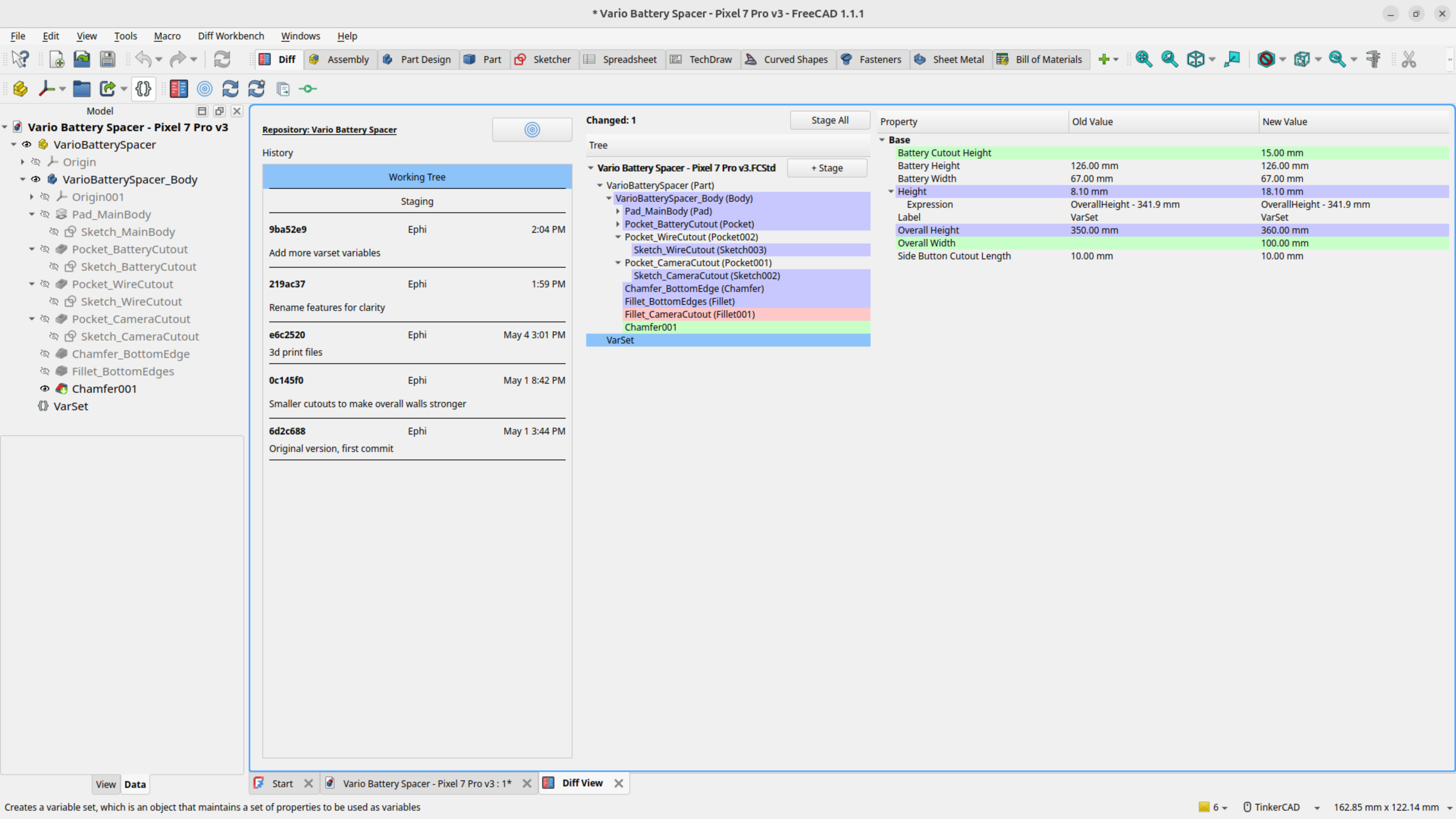
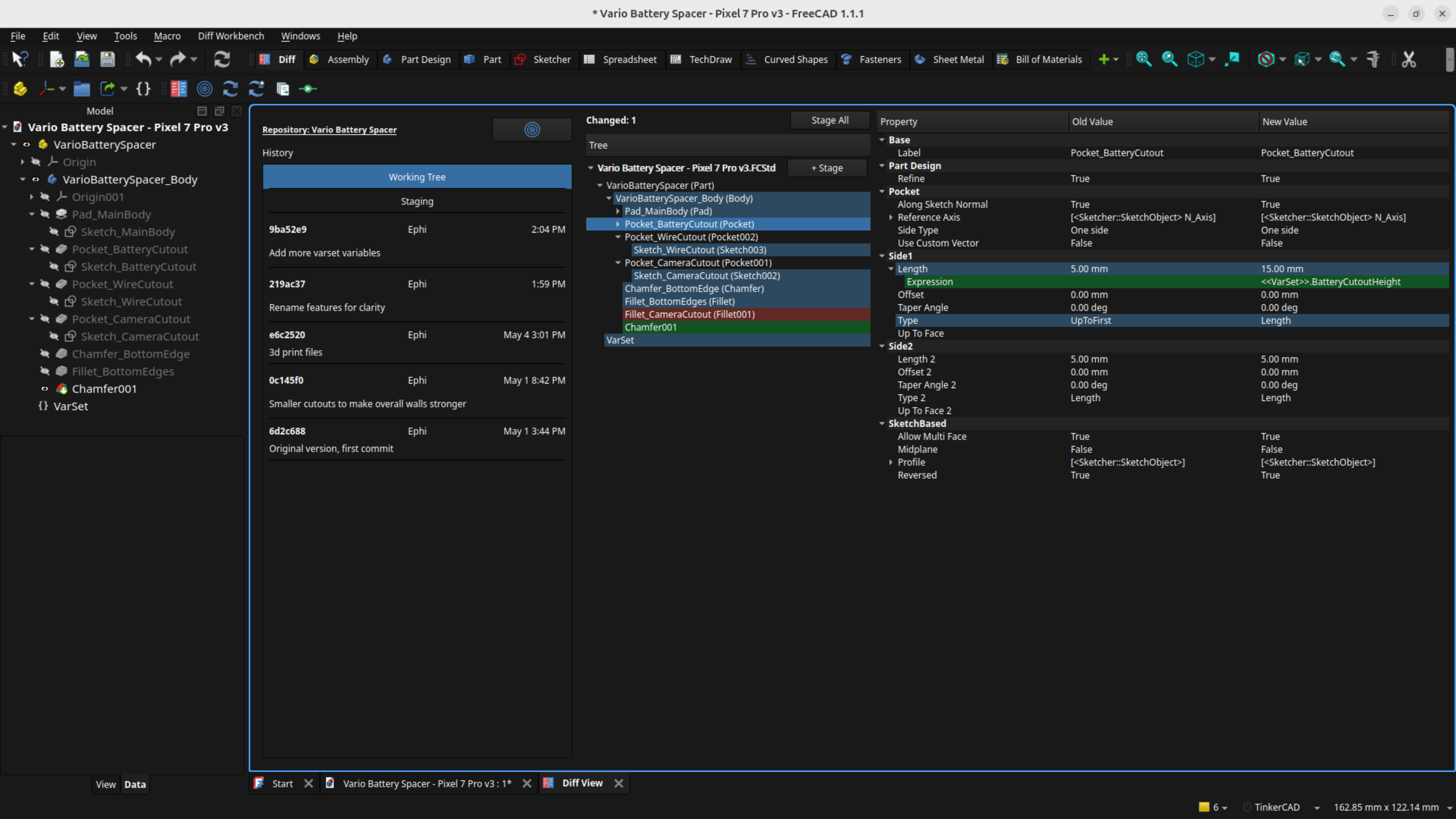
FreeCAD documents are binary archives, so normal text diffs are not useful for model review. DiffCAD records a structured snapshot of each document's feature tree and compares those snapshots across your working tree, staging area, and git history.
Use it when you want to answer questions like:
- Which objects were added, removed, or modified?
- Which dimensions, placements, expressions, or dependencies changed?
- What changed between my working tree and the last commit?
- What exactly am I about to stage or commit?
- Hierarchical diff view: Review object-level changes in a color-coded tree.
- Property-level diffing: Drill into object properties and inspect exact value changes.
- Expression tracking: Compare property values and expressions independently.
- Snapshot-based comparison: Capture document state at meaningful points in time and diff the result.
- Multi-document support: Open and compare multiple FreeCAD documents in one repository.
- Theme-aware highlighting: Keep diff colors readable across FreeCAD light and dark themes.
- Git-aware workflow: Compare the working tree, staging area, and historical commits without replacing your regular git client.
DiffCAD writes text snapshots for FreeCAD documents and stores them next to your project files. Those snapshots are committed with the matching .FCStd files, giving git useful data to compare while keeping the original FreeCAD files intact.
The active git repository is detected from open FreeCAD documents. When you stage or commit through DiffCAD, the workbench saves documents, writes snapshots, and stages the relevant files together.
DiffCAD supplements your existing git client. It intentionally focuses on CAD review and does not try to replace full-featured git tools.
Note
DiffCAD validates parametric CAD changes, not every byte inside an .FCStd archive. A document can change on disk without a detected parametric diff, especially for BREP data, view data, caches, and other generated content. Some complex property types are not fully captured yet.
DiffCAD requires:
- FreeCAD 1.1 or newer (earlier versions may work, but are untested)
- Git installed and available on your global
PATH(see the Git Setup instructions below)
DiffCAD is not yet available in the official FreeCAD Addon Manager repository. Until then, install it as a custom repository:
- Open FreeCAD.
- Go to Edit > Preferences > Addon Manager > Custom repositories.
- Add this repository URL:
https://github.com/eblanshey/DiffCAD - Set the branch to
master. - Open Tools > Addon Manager.
- Search for Diff Workbench and install it.
- Restart FreeCAD.
Don't be intimidated if you've never used Git before! If you have never used the command line, follow these steps exactly.
- Install Git from https://git-scm.com/install, then run installer with default options.
- Open terminal (
PowerShellorCommand Prompton Windows,Terminalon macOS/Linux). - Set identity, which will be used for your commits (savepoints):
git config --global user.name "Your Name"andgit config --global user.email "you@example.com". - Confirm setup:
git --version
From here on you can use the workbench for all operations.
DiffCAD needs baseline snapshots before it can show useful diffs. For an existing project, create those snapshots before making new CAD changes. To more efficiently use disk space for versioning, see the FreeCAD Git Tips section below before making your first git commit.
- (Optional) FreeCAD Compression: to more efficiently use disk space for versioning, see the FreeCAD Git Tips section below.
- Open a project file: Start FreeCAD and open any project document.
- Initialize repository (if needed): If the file is not already in a git repository, click Initialize Git Repository in the Diff Workbench and select its project directory.
- Open project documents: Click Refresh Git Repository first, then click Open All Documents to open all FreeCAD documents in the repository.
- Recompute documents: Click Recompute All to make sure document state is current.
- Generate snapshots: Select Working Tree in the history list. Large projects may take some time.
- Stage everything: Click Stage All. DiffCAD saves documents, writes snapshot YAML files, and adds both to git.
- Commit the baseline: Use the Commit toolbar command or your regular git client.
After that baseline commit, continue modeling normally and use DiffCAD to review new changes.
- Make FreeCAD changes as usual.
- Open the Working Tree view in DiffCAD.
- Review object and property changes.
- Stage finished documents with the Stage buttons.
- Check the Staging Area view for a final review.
- Commit from DiffCAD or your regular git client.
Staging a document through DiffCAD automatically saves the .FCStd file, writes its snapshot, and adds both files to the git staging area.
FreeCAD's Preferences dialog includes a Diff Workbench panel.
Exclusion lists hide noisy generated data from the diff view. They do not affect snapshot generation.
Each exclusion list supports two modes:
- Use default exclusion list: Use DiffCAD's built-in defaults.
- Use custom exclusion list: Provide your own exclusions.
Default values are defined in freecad/diff_wb/domain/config.py.
Enter one FreeCAD TypeId per line, such as App::Origin. Objects of these types and their children are removed from the diff view.
Enter one property name per line, such as TimeStamp. These properties are excluded across all object types.
Enter one mapping per line in the format TypeId -> PropertyName. This excludes one property for one object type while keeping it visible elsewhere.
TechDraw::DrawSVGTemplate -> PageResult
Set the number of decimal places used for floating-point comparison and display. The supported range is 0 to 12; the default is 2.
FreeCAD documents are binary files by default. Small model edits can produce large file changes, and repositories can grow quickly over time.
For a simple git-friendly setup, disable document compression:
- Open Edit > Preferences > General > Document.
- Set Document save compression level to
0. - Save future
.FCStdfiles with less compression.
An .FCStd file is a ZIP archive. With compression disabled, more of the document remains plain XML inside the archive, which makes git storage and external diff tooling behave better.
For large or long-lived CAD repositories, also consider Git LFS for .FCStd files. There is a PR in FreeCAD that addresses file formats for versioning. See this comment for more git-related discussions.
Contributions are welcome. Please open an issue for bugs, confusing diffs, setup problems, documentation gaps, or feature requests. Pull requests that improve reliability, better diffing, FreeCAD compatibility, documentation, contributor tooling, or macOS and Windows development workflows are especially helpful. Development so far has happened on Linux, so additional platform setup notes and test instructions are welcome.
- Development setup: Set up a live FreeCAD workbench checkout, install dependencies, and configure the FreeCAD AppImage runtime for tests.
- Development guidelines: Coding standards, testing strategy, logging, translations, dependency injection, and common contributor workflows.
- Architecture: Layer responsibilities, runtime flow, composition roots, and snapshot/diff pipeline.
- Unstage documents from inside DiffCAD
- Initialize new git repositories from inside DiffCAD
- Move/rename snapshots when FCStd file is moved/renamed
- Visual part diffs
- Manual snapshot mode for simple projects without git
DiffCAD is early software built for real workflows. Expect rough edges, please report issues, and include sample documents when possible if a diff looks wrong.
Bug reports and feature requests: https://github.com/eblanshey/DiffCAD/issues