Blueprint and Rules
This document explains how to create and configure Blueprints for automated Submodel generation using the AAS Generator rules engine.
For German readers: A detailed article about this system is available at XITASO: Automatisierte Erstellung von AAS (German language). Note that the article may reference an older version of the AAS Generator, so please refer to this documentation for the latest features and API details.
Tip: While this documentation covers the API and JSON structure in detail, the Mnestix Browser provides a visual "Templates and Blueprints" section that simplifies blueprint creation and management.
The AAS Generator transforms structured JSON data into AAS-compliant Submodel instances using a three-tier architecture:
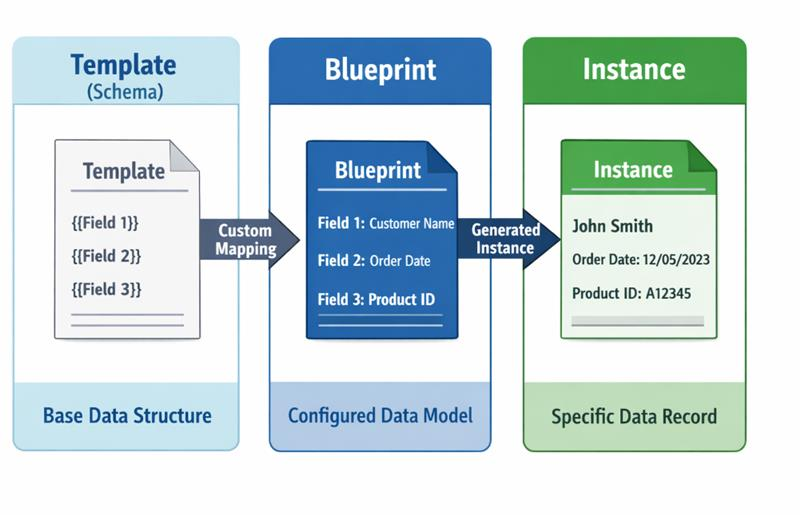
| Tier | Description | Created By |
|---|---|---|
| Template | A base Submodel schema defining the structure. Often based on IDTA standards (e.g., Nameplate, ContactInformation). Has kind: "Template" and placeholder fields. |
API endpoint or imported from standards |
| Blueprint | A Template with added mapping rules (qualifiers) that define how JSON data maps to each field. | Users via Mnestix Browser UI or API |
| Instance | The final generated Submodel with kind: "Instance" and actual data values populated from the input JSON. |
AAS Generator (automatically) |
The following element types support data mapping via qualifiers:
| Element Type | Mapping Support | Notes |
|---|---|---|
Property |
✅ Full | Value mapping via SMT/MappingInfo
|
MultiLanguageProperty |
✅ Full | Multi-language via SMT/MappingInfo/multiLanguage, or single language via SMT/MappingInfo/value
|
Blob |
✅ Partial | Value and contentType mapping (SMT/MappingInfo/value, SMT/MappingInfo/contentType) |
File |
✅ Full | Value and contentType mapping via SMT/MappingInfo/value and SMT/MappingInfo/contentType
|
SubmodelElementCollection |
✅ Full | Supports collection duplication |
SubmodelElementList |
✅ Full | Supports collection duplication |
Entity |
✅ Partial | Multi-field mapping: globalAssetId, entityType, idShort, displayName
|
RelationshipElement |
✅ Partial | Multi-field mapping: first, second, idShort, displayName
|
AnnotatedRelationshipElement |
✅ Partial | Multi-field mapping: first, second, idShort, displayName
|
Elements that are not mappable are always copied unchanged from the blueprint to the generated instance. This allows you to include static content or fixed structures in your blueprints.
Mapping rules are embedded as qualifiers within Submodel elements. The AAS Generator reads these qualifiers during processing to determine how to populate values.
{
  "kind": "TemplateQualifier",
  "type": "SMT/<RuleType>",
  "value": "<rule-configuration>",
  "valueType": "xs:string"
}| Qualifier Type | Purpose |
|---|---|
SMT/MappingInfo |
Map a JSON path or Jsonata expression to an element's value (legacy format) |
SMT/MappingInfo/<FieldName> |
Map data to a specific element field (e.g., idShort, globalAssetId) |
SMT/CollectionMappingInfo |
Duplicate an element for each array item |
SMT/FilterMappingInfo |
Conditionally include/exclude an element based on a boolean expression |
SMT/Cardinality |
Define whether the data is required or optional |
For fields with constant values that don't change between instances, simply set the value directly in the blueprint without any mapping qualifier.
Blueprint:
{
  "modelType": "Property",
  "idShort": "ManufacturerCountry",
  "valueType": "xs:string",
  "value": "Germany"
}
Result: The value "Germany" is copied unchanged to every generated instance.
Maps a JSON path from the input data to an element's value. This is the most common rule type.
Qualifier:
{
  "kind": "TemplateQualifier",
  "type": "SMT/MappingInfo",
  "value": "product.serialNumber",
  "valueType": "xs:string"
}
Blueprint Element:
{
  "modelType": "Property",
  "idShort": "SerialNumber",
  "valueType": "xs:string",
  "value": "",
  "qualifiers": [
    {
      "kind": "TemplateQualifier",
      "type": "SMT/MappingInfo",
      "value": "product.serialNumber",
      "valueType": "xs:string"
    }
  ]
}
Input Data:
{
  "product": {
    "serialNumber": "SN-12345-XYZ"
  }
}
Generated Instance:
{
  "modelType": "Property",
  "idShort": "SerialNumber",
  "valueType": "xs:string",
  "value": "SN-12345-XYZ"
}| Expression | Description | Example |
|---|---|---|
field |
Top-level field | serialNumber |
parent.child |
Nested object access | product.details.name |
array[0] |
Specific array index | contacts[0].name |
array[*] |
Array wildcard (for collections) | contacts[*].email |
Extends path mapping to target specific fields on an element beyond just value. The SMT/MappingInfo (legacy) qualifier maps to value by default. The new format SMT/MappingInfo/<FieldName> allows mapping to any supported field.
Supported Fields:
| FieldName | Target | Applicable Model Types | Notes |
|---|---|---|---|
value |
Element value | Property, Blob, File, MultiLanguageProperty | Default (same as legacy SMT/MappingInfo) |
contentType |
File content type | File, Blob | MIME type string or JSONata expression extracting from URL |
idShort |
Element identifier | All | Auto-sanitized to [a-zA-Z][a-zA-Z0-9_]*
|
globalAssetId |
Entity asset reference | Entity | String (URI) |
entityType |
Entity type enum | Entity |
SelfManagedEntity or CoManagedEntity
|
displayName |
Display name text | All | Sets text for current generation language |
first |
Relationship first reference | RelationshipElement, AnnotatedRelationshipElement | AAS Reference JSON object |
second |
Relationship second reference | RelationshipElement, AnnotatedRelationshipElement | AAS Reference JSON object |
multiLanguage |
Multi-language value | MultiLanguageProperty | JSON object with language keys (see below) |
Blueprint:
{
  "modelType": "Entity",
  "idShort": "PartTemplate",
  "entityType": "SelfManagedEntity",
  "globalAssetId": "",
  "qualifiers": [
    {
      "kind": "TemplateQualifier",
      "type": "SMT/MappingInfo/idShort",
      "value": "component.partNumber",
      "valueType": "xs:string"
    },
    {
      "kind": "TemplateQualifier",
      "type": "SMT/MappingInfo/globalAssetId",
      "value": "'https://asset.example.com/' & component.partNumber",
      "valueType": "xs:string"
    }
  ]
}
Input Data:
{
  "component": {
    "partNumber": "Housing_001"
  }
}
Generated Instance:
{
  "modelType": "Entity",
  "idShort": "Housing_001",
  "entityType": "SelfManagedEntity",
  "globalAssetId": "https://asset.example.com/Housing_001"
}Blueprint:
{
  "modelType": "RelationshipElement",
  "idShort": "HasPart",
  "first": {},
  "second": {},
  "qualifiers": [
    {
      "type": "SMT/MappingInfo/first",
      "value": "relationship.parentRef",
      "valueType": "xs:string"
    },
    {
      "type": "SMT/MappingInfo/second",
      "value": "relationship.childRef",
      "valueType": "xs:string"
    }
  ]
}When mapping to idShort, the generator auto-sanitizes the value to conform to AAS naming rules ([a-zA-Z][a-zA-Z0-9_]*):
- Characters not matching
[a-zA-Z0-9_]are replaced with_ - If the result does not start with a letter (
[a-zA-Z]),iis prepended - A warning is logged when sanitization changes the value
Examples:
- Input
"TE-Housing-123"→ idShort"TE_Housing_123" - Input
"123abc"→ idShort"i123abc" - Input
"_value"→ idShort"i_value"
The File element supports mapping both value (file URL) and contentType (MIME type). You can set contentType in two ways:
Option A: Map from data field
Blueprint:
{
  "modelType": "File",
  "idShort": "ProductImage",
  "value": "",
  "contentType": "",
  "qualifiers": [
    {
      "kind": "TemplateQualifier",
      "type": "SMT/MappingInfo/value",
      "value": "product.image.url",
      "valueType": "xs:string"
    },
    {
      "kind": "TemplateQualifier",
      "type": "SMT/MappingInfo/contentType",
      "value": "product.image.contentType",
      "valueType": "xs:string"
    }
  ]
}
Input Data:
{
  "product": {
    "image": {
      "url": "https://example.com/images/product_photo.png",
      "contentType": "image/png"
    }
  }
}
Option B: Infer contentType from file extension using JSONata
Blueprint:
{
  "modelType": "File",
  "idShort": "CompanyLogo",
  "value": "",
  "contentType": "",
  "qualifiers": [
    {
      "kind": "TemplateQualifier",
      "type": "SMT/MappingInfo/value",
      "value": "companyLogo",
      "valueType": "xs:string"
    },
    {
      "kind": "TemplateQualifier",
      "type": "SMT/MappingInfo/contentType",
      "value": "$lookup({\"svg\":\"image/svg+xml\",\"png\":\"image/png\",\"jpg\":\"image/jpeg\",\"jpeg\":\"image/jpeg\",\"pdf\":\"application/pdf\"}, $split($split(companyLogo,'?')[0], '.')[-1])",
      "valueType": "xs:string"
    }
  ]
}
Input Data:
{
  "companyLogo": "https://www.example.com/logo.svg?v=2"
}
Generated Instance (Option A):
{
  "modelType": "File",
  "idShort": "ProductImage",
  "value": "https://example.com/images/product_photo.png",
  "contentType": "image/png"
}
Generated Instance (Option B):
{
  "modelType": "File",
  "idShort": "CompanyLogo",
  "value": "https://www.example.com/logo.svg?v=2",
  "contentType": "image/svg+xml"
}
Note on Extension Parsing: The JSONata expression
$split($split(companyLogo,'?')[0], '.')[-1]first removes query parameters by splitting on?, then extracts the file extension. Unknown extensions result in an emptycontentTypevalue.
When mapping to value, the generator validates that the mapped value conforms to the element's declared valueType:
| valueType | Validation |
|---|---|
xs:string |
Always passes |
xs:integer, xs:int, xs:long, xs:short
|
Must be a valid integer |
xs:decimal, xs:double, xs:float
|
Must be a valid number |
xs:boolean |
Must be true, false, 0, or 1
|
xs:dateTime |
Must be a valid date-time string |
xs:date |
Must be a valid date string |
xs:anyURI |
Always passes |
| Unknown types | Value passes through with a warning |
Most structural errors in this table are now caught at save time by the Blueprint Validation system. The generation-time errors remain as a fallback for blueprints imported or modified outside the API.
| Condition | Behavior |
|---|---|
| Unknown field name (not in allowlist) | Error: "Unsupported MappingInfo field '<FieldName>'"
|
| Field not applicable to model type | Error: "Field '<FieldName>' is not applicable to model type '<ModelType>'"
|
| Duplicate field mapping on same element | Error: "Duplicate mapping for field '<FieldName>' on element '<idShort>'"
|
| Value type mismatch | Error: "Mapped value '<value>' does not conform to valueType '<valueType>'"
|
Malformed qualifier type (e.g. SMT/MappingInfo/a/b) |
Error: "Malformed qualifier type '...'. Expected 'SMT/MappingInfo' or 'SMT/MappingInfo/<FieldName>'"
|
Multi-field mapping works with SMT/CollectionMappingInfo for dynamic element creation:
{
  "modelType": "Entity",
  "idShort": "ComponentTemplate",
  "entityType": "CoManagedEntity",
  "globalAssetId": "",
  "qualifiers": [
    { "type": "SMT/CollectionMappingInfo", "value": "vec.components[*]" },
    { "type": "SMT/MappingInfo/idShort", "value": "vec.components[*].partNumber" },
    { "type": "SMT/MappingInfo/globalAssetId", "value": "vec.components[*].assetId" },
    { "type": "SMT/MappingInfo/entityType", "value": "vec.components[*].entityType" }
  ]
}
Each duplicated element gets its own idShort, globalAssetId, and entityType from the corresponding array item.
Duplicates a Submodel element for each item in an array. This enables dynamic list generation.
Use Case: You have an array of contacts in your data and want to create a ContactPerson collection for each one.
Qualifier:
{
  "kind": "TemplateQualifier",
  "type": "SMT/CollectionMappingInfo",
  "value": "sourceData.contactPersons[*]",
  "valueType": "xs:string"
}
Blueprint Element:
{
  "modelType": "SubmodelElementCollection",
  "idShort": "contactPerson",
  "qualifiers": [
    {
      "type": "SMT/CollectionMappingInfo",
      "value": "sourceData.contactPersons[*]"
    }
  ],
  "value": [
    {
      "modelType": "Property",
      "idShort": "Name",
      "valueType": "xs:string",
      "qualifiers": [
        {
          "type": "SMT/MappingInfo",
          "value": "sourceData.contactPersons[*].name"
        }
      ]
    },
    {
      "modelType": "Property",
      "idShort": "Email",
      "valueType": "xs:string",
      "qualifiers": [
        {
          "type": "SMT/MappingInfo",
          "value": "sourceData.contactPersons[*].email"
        }
      ]
    }
  ]
}
Input Data:
{
  "sourceData": {
    "contactPersons": [
      { "name": "John Doe", "email": "john@example.com" },
      { "name": "Jane Smith", "email": "jane@example.com" }
    ]
  }
}
Generated Instance:
{
  "value": [
    {
      "modelType": "SubmodelElementCollection",
      "idShort": "contactPerson_0",
      "value": [
        { "idShort": "Name", "value": "John Doe" },
        { "idShort": "Email", "value": "john@example.com" }
      ]
    },
    {
      "modelType": "SubmodelElementCollection",
      "idShort": "contactPerson_1",
      "value": [
        { "idShort": "Name", "value": "Jane Smith" },
        { "idShort": "Email", "value": "jane@example.com" }
      ]
    }
  ]
}- The generator finds all
SMT/CollectionMappingInfoqualifiers - Qualifiers are sorted by nesting depth (shallowest first) - counted by
[*]occurrences - For each array item in the data, the element is duplicated
- The
idShortis suffixed with an index (_0,_1,_2, ...) - Child element paths have
[*]replaced with the actual index ([0],[1], ...) - The process repeats recursively for nested collections
The generator supports nested collections (arrays within arrays). The algorithm processes collections from shallowest to deepest.
Example: Contact persons with multiple phone numbers each.
Blueprint paths:
sourceData.contactPersons[*]                    # Outer collection
sourceData.contactPersons[*].phone_numbers[*]   # Nested collection
sourceData.contactPersons[*].phone_numbers[*].value  # Value in nested collection
Input Data:
{
  "sourceData": {
    "contactPersons": [
      {
        "name": "SpongeBob",
        "phone_numbers": [
          { "name": "Office", "value": "+1 234 56789" }
        ]
      },
      {
        "name": "Squidward",
        "phone_numbers": [
          { "name": "Office", "value": "+2 234 56789" },
          { "name": "Cell", "value": "+2 1907 1234" }
        ]
      }
    ]
  }
}
Result: Creates contactPerson_0 with one phone number, and contactPerson_1 with two phone numbers (phone_numbers_0, phone_numbers_1).
Conditionally includes or excludes an element from generation based on a boolean expression. Evaluated against the input data using Jsonata expressions.
Use Case: You want to include contact information only for certain types of contacts, or include battery specifications only for electric vehicles.
Qualifier:
{
  "kind": "TemplateQualifier",
  "type": "SMT/FilterMappingInfo",
  "value": "vehicle.engineType = 'electric'",
  "valueType": "xs:string"
}
Blueprint Element:
{
  "modelType": "SubmodelElementCollection",
  "idShort": "BatteryInfo",
  "qualifiers": [
    {
      "kind": "TemplateQualifier",
      "type": "SMT/FilterMappingInfo",
      "value": "vehicle.engineType = 'electric'",
      "valueType": "xs:string"
    }
  ],
  "value": [
    {
      "modelType": "Property",
      "idShort": "CapacityKWh",
      "valueType": "xs:integer",
      "qualifiers": [
        {
          "type": "SMT/MappingInfo",
          "value": "vehicle.battery.capacityKWh"
        }
      ]
    }
  ]
}
Input Data:
{
  "vehicle": {
    "engineType": "electric",
    "battery": { "capacityKWh": 85 }
  }
}
Result: Since vehicle.engineType = 'electric' evaluates to true, the BatteryInfo collection is included in the generated instance.
If the condition evaluated to false, the BatteryInfo element would be omitted entirely.
Filter expressions use Jsonata syntax and must evaluate to a boolean value:
| Operator | Description | Example |
|---|---|---|
= |
Equals | type = 'electric' |
!= |
Not equals | status != 'inactive' |
> |
Greater than | quantity > 10 |
< |
Less than | price < 100 |
>= |
Greater than or equal | rating >= 4.5 |
<= |
Less than or equal | age <= 65 |
and |
Logical AND | type = 'electric' and year >= 2020 |
or |
Logical OR | status = 'active' or status = 'pending' |
in |
Value in array | region in ['EU', 'NA'] |
Mapping rules (SMT/MappingInfo) support Jsonata expression syntax, enabling advanced data transformations beyond simple path navigation. Refer to the Jsonata documentation and to the Jsonata.Net.Native GitHub repository for a complete list of functions and operators.
Note that not all exotic Jsonata features may be supported. We recommend constructing your input data as close as possible to the desired blueprint structure to minimize the need for complex transformations.
String Functions:
| Function | Description | Example |
|---|---|---|
$length(str) |
Returns the number of characters | $length(name) |
$substring(str, start[, length]) |
Extracts substring | $substring(code, 0, 3) |
$substringBefore(str, chars) |
Text before first occurrence | $substringBefore(email, '@') |
$substringAfter(str, chars) |
Text after first occurrence | $substringAfter(email, '@') |
$contains(str, pattern) |
Tests if pattern exists (returns boolean) | $contains(description, 'waterproof') |
$split(str, separator) |
Splits string into array | $split(tags, ',') |
$join(array, separator) |
Joins array elements | $join(parts, '-') |
$uppercase(str) |
Converts to uppercase | $uppercase(code) |
$lowercase(str) |
Converts to lowercase | $lowercase(code) |
$trim(str) |
Removes whitespace | $trim(input) |
$replace(str, pattern, replacement) |
Replaces occurrences | $replace(text, 'old', 'new') |
Numeric Functions:
| Function | Description | Example |
|---|---|---|
$number(value) |
Converts to number | $number('42') |
$string(value) |
Converts to string | $string(42) |
$abs(number) |
Absolute value |
$abs(-5) returns 5
|
$floor(number) |
Rounds down |
$floor(3.7) returns 3
|
$ceil(number) |
Rounds up |
$ceil(3.2) returns 4
|
$round(number[, precision]) |
Rounds to decimal places |
$round(3.14159, 2) returns 3.14
|
$power(base, exponent) |
Base raised to power |
$power(2, 3) returns 8
|
$sqrt(number) |
Square root |
$sqrt(16) returns 4
|
Example 1: Extract part of a code
{
  "type": "SMT/MappingInfo",
  "value": "$substring(sku, 0, 3)"
}
Input: "sku": "ABC-12345" → Output: "ABC"
Example 2: Convert number to string
{
  "type": "SMT/MappingInfo",
  "value": "$string(quantity)"
}
Input: "quantity": 42 → Output: "42"
Example 3: Check if text contains substring (returns boolean)
{
  "type": "SMT/MappingInfo",
  "value": "description ~> $contains('wireless')"
}
Input: "description": "wireless charging pad" → Output: true
Example 4: Compare numeric values (returns boolean)
{
  "type": "SMT/MappingInfo",
  "value": "price > 1000"
}
Input: "price": 1500 → Output: true
Example 5: Combine string operations
{
  "type": "SMT/MappingInfo",
  "value": "$uppercase($substringBefore(email, '@'))"
}
Input: "email": "john.doe@example.com" → Output: "JOHN.DOE"
The pipe operator passes the left operand as the argument to the right function:
"John Smith" ~> $split(' ') ~> $join('-')
Equivalent to: $join($split("John Smith", ' '), '-') → Result: "John-Smith"
Defines whether a mapped value is required or optional.
| Value | Behavior |
|---|---|
One |
Mandatory - Generation fails with error if data is missing |
ZeroToOne |
Optional - Empty value is set if data is missing |
OneToMany |
Mandatory collection - At least one item required |
ZeroToMany |
Optional collection - Empty collection if data is missing |
Values are case-sensitive. The validator rejects any other value.
Qualifier:
{
  "kind": "TemplateQualifier",
  "type": "SMT/Cardinality",
  "value": "One",
  "valueType": "xs:string"
}
Complete Element with Cardinality:
{
  "modelType": "Property",
  "idShort": "SerialNumber",
  "valueType": "xs:string",
  "value": "",
  "qualifiers": [
    {
      "type": "SMT/Cardinality",
      "value": "One"
    },
    {
      "type": "SMT/MappingInfo",
      "value": "product.serialNumber"
    }
  ]
}
If product.serialNumber is missing in the input data:
- With
"One": Error thrown, generation fails - With
"ZeroToOne": Element created with empty value
Here's a complete blueprint demonstrating filters, collections, and Jsonata expressions:
{
  "modelType": "Submodel",
  "kind": "Template",
  "id": "https://example.com/blueprints/product-info-v2",
  "idShort": "ProductInformation",
  "submodelElements": [
    {
      "modelType": "Property",
      "idShort": "ProductName",
      "valueType": "xs:string",
      "value": "",
      "qualifiers": [
        {
          "kind": "TemplateQualifier",
          "type": "SMT/Cardinality",
          "value": "One",
          "valueType": "xs:string"
        },
        {
          "kind": "TemplateQualifier",
          "type": "SMT/MappingInfo",
          "value": "product.name",
          "valueType": "xs:string"
        }
      ]
    },
    {
      "modelType": "Property",
      "idShort": "ProductCode",
      "valueType": "xs:string",
      "value": "",
      "qualifiers": [
        {
          "kind": "TemplateQualifier",
          "type": "SMT/MappingInfo",
          "value": "$uppercase($substring(product.sku, 0, 3))",
          "valueType": "xs:string"
        }
      ],
      "description": [
        {
          "language": "en",
          "text": "First 3 characters of SKU in uppercase, using Jsonata transformation"
        }
      ]
    },
    {
      "modelType": "Property",
      "idShort": "HasWarranty",
      "valueType": "xs:boolean",
      "value": "",
      "qualifiers": [
        {
          "kind": "TemplateQualifier",
          "type": "SMT/MappingInfo",
          "value": "$string(product.warranty.monthsIncluded) ~> $contains('24')",
          "valueType": "xs:string"
        }
      ],
      "description": [
        {
          "language": "en",
          "text": "Returns true if warranty includes 24 months"
        }
      ]
    },
    {
      "modelType": "SubmodelElementCollection",
      "idShort": "BatteryInfo",
      "qualifiers": [
        {
          "kind": "TemplateQualifier",
          "type": "SMT/FilterMappingInfo",
          "value": "product.type = 'battery-powered'",
          "valueType": "xs:string"
        }
      ],
      "value": [
        {
          "modelType": "Property",
          "idShort": "CapacityMah",
          "valueType": "xs:integer",
          "qualifiers": [
            {
              "type": "SMT/MappingInfo",
              "value": "product.battery.capacityMah"
            }
          ]
        },
        {
          "modelType": "Property",
          "idShort": "ChargingTimeHours",
          "valueType": "xs:decimal",
          "qualifiers": [
            {
              "type": "SMT/MappingInfo",
              "value": "$string(product.battery.chargingTimeMinutes) ~> $number($) / 60",
              "valueType": "xs:string"
            }
          ]
        }
      ]
    },
    {
      "modelType": "SubmodelElementCollection",
      "idShort": "CertificationInfo",
      "qualifiers": [
        {
          "kind": "TemplateQualifier",
          "type": "SMT/FilterMappingInfo",
          "value": "product.certifications ~> $length($) > 0",
          "valueType": "xs:string"
        }
      ],
      "value": [
        {
          "modelType": "SubmodelElementCollection",
          "idShort": "Certification",
          "qualifiers": [
            {
              "kind": "TemplateQualifier",
              "type": "SMT/CollectionMappingInfo",
              "value": "product.certifications[*]",
              "valueType": "xs:string"
            }
          ],
          "value": [
            {
              "modelType": "Property",
              "idShort": "Name",
              "valueType": "xs:string",
              "qualifiers": [
                {
                  "type": "SMT/MappingInfo",
                  "value": "product.certifications[*].name"
                }
              ]
            },
            {
              "modelType": "Property",
              "idShort": "IsValid",
              "valueType": "xs:boolean",
              "qualifiers": [
                {
                  "type": "SMT/MappingInfo",
                  "value": "product.certifications[*].expiryDate > '2025-01-01'",
                  "valueType": "xs:string"
                }
              ]
            }
          ]
        }
      ]
    },
    {
      "modelType": "SubmodelElementCollection",
      "idShort": "Contacts",
      "value": [
        {
          "modelType": "SubmodelElementCollection",
          "idShort": "Contact",
          "qualifiers": [
            {
              "kind": "TemplateQualifier",
              "type": "SMT/CollectionMappingInfo",
              "value": "company.employees[*]",
              "valueType": "xs:string"
            }
          ],
          "value": [
            {
              "modelType": "Property",
              "idShort": "FullName",
              "valueType": "xs:string",
              "qualifiers": [
                {
                  "type": "SMT/MappingInfo",
                  "value": "company.employees[*].fullName"
                }
              ]
            },
            {
              "modelType": "Property",
              "idShort": "Email",
              "valueType": "xs:string",
              "qualifiers": [
                {
                  "type": "SMT/MappingInfo",
                  "value": "company.employees[*].email"
                }
              ]
            },
            {
              "modelType": "Property",
              "idShort": "EmailDomain",
              "valueType": "xs:string",
              "qualifiers": [
                {
                  "type": "SMT/MappingInfo",
                  "value": "company.employees[*].email ~> $substringAfter('@')",
                  "valueType": "xs:string"
                }
              ],
              "description": [
                {
                  "language": "en",
                  "text": "Extracted domain from email using Jsonata"
                }
              ]
            },
            {
              "modelType": "Property",
              "idShort": "Phone",
              "valueType": "xs:string",
              "qualifiers": [
                {
                  "type": "SMT/Cardinality",
                  "value": "ZeroToOne"
                },
                {
                  "type": "SMT/MappingInfo",
                  "value": "company.employees[*].phone"
                }
              ]
            }
          ]
        }
      ]
    }
  ]
}
Corresponding Input Data:
{
  "product": {
    "name": "PowerPack Pro",
    "type": "battery-powered",
    "sku": "ABC-12345",
    "warranty": {
      "monthsIncluded": 24
    },
    "battery": {
      "capacityMah": 5000,
      "chargingTimeMinutes": 120
    },
    "certifications": [
      { "name": "CE", "expiryDate": "2026-06-15" },
      { "name": "FCC", "expiryDate": "2025-12-31" }
    ]
  },
  "company": {
    "employees": [
      {
        "fullName": "Alice Johnson",
        "email": "alice@example.com",
        "phone": "+1-555-0101"
      },
      {
        "fullName": "Bob Williams",
        "email": "bob@example.com"
      }
    ]
  }
}
Key Features Demonstrated:
-
Filter Rules:
BatteryInfoandCertificationInfoare only included when conditions are met -
Jsonata Functions: String transformations (
$uppercase,$substring,$substringAfter) and numeric operations - Collections with Filtering: Certifications collection with filter checking if array is not empty
- Nested Collections: Contact collection with multiple properties including computed fields
-
Invalid Date Comparison:
expiryDate > '2025-01-01'shows filtering by date
When a filter rule is evaluated:
- The Jsonata expression is evaluated against the input data
- If the expression evaluates to
true(or truthy), the element is included in the output - If the expression evaluates to
false(or falsy), the element is excluded from the output
This is useful for:
- Only including optional sections when data is present
- Showing specifications only for relevant product types
- Creating conditional sections based on status or configuration
Example: Include only for specific type
{
  "type": "SMT/FilterMappingInfo",
  "value": "product.type = 'electrical'"
}
Example: Check if array has items
{
  "type": "SMT/FilterMappingInfo",
  "value": "certifications ~> $length(certifications) > 0"
}
Example: Multiple conditions
{
  "type": "SMT/FilterMappingInfo",
  "value": "product.type = 'battery' and product.warranty.monthsIncluded >= 12"
}The AAS Generator expects input data as a homogeneous JSON structure. Before calling the API, transform your source data appropriately.
| Source | Transformation Needed |
|---|---|
| ERP Systems (SAP, etc.) | Export to JSON, flatten nested structures |
| Excel/CSV | Convert to JSON array of objects |
| Engineering Tools (PLM, CAD) | Use tool's JSON export or build integration |
| Databases | Query and serialize to JSON |
- Flatten deeply nested structures where possible
- Use consistent field names across all records
- Ensure arrays contain homogeneous objects (same fields in each item)
- Handle null/missing values before submission (or rely on cardinality rules)
Example transformation:
Excel Row:
| Product | Serial | Contact1_Name | Contact1_Email | Contact2_Name | Contact2_Email |

Transformed JSON:
{
  "product": "Widget",
  "serial": "W-001",
  "contacts": [
    { "name": "...", "email": "..." },
    { "name": "...", "email": "..." }
  ]
}
MultiLanguageProperty elements support two mapping approaches:
Maps a JSON object where keys are language codes and values are the translated texts. This allows multiple languages in a single generation call without requiring a language parameter in the request.
Blueprint:
{
  "modelType": "MultiLanguageProperty",
  "idShort": "CompanyName",
  "value": [],
  "qualifiers": [
    {
      "kind": "TemplateQualifier",
      "type": "SMT/MappingInfo/multiLanguage",
      "value": "company.name",
      "valueType": "xs:string"
    }
  ]
}
Input Data:
{
  "company": {
    "name": {
      "de": "Xitaso Software Lösungen",
      "en": "Xitaso Software Solutions"
    }
  }
}
Generated Instance:
{
  "modelType": "MultiLanguageProperty",
  "idShort": "CompanyName",
  "value": [
    { "text": "Xitaso Software Lösungen", "language": "de" },
    { "text": "Xitaso Software Solutions", "language": "en" }
  ]
}
Behavior:
- The expression must resolve to a JSON object (e.g.,
{"en": "Hello", "de": "Hallo"}). - Each property becomes a language entry: key →
language, value →text. - Entries where the value is
nullor an empty string are skipped. - If all entries are empty/null, the element is treated as missing (respects cardinality rules).
- Non-string values (numbers, booleans) are converted to their string representation.
Maps a scalar value and wraps it with the language parameter from the API request. Only one language per generation call.
⚠️ Deprecation Warning: This is the legacy behavior and is still supported for backward compatibility, but usingSMT/MappingInfo/multiLanguageis recommended for new blueprints. This feature might be deprecated in the future.
Request:
{
  "blueprintsIds": ["my-blueprint"],
  "data": { "description": "Product description text" },
  "language": "en"
}
Blueprint:
{
  "modelType": "MultiLanguageProperty",
  "idShort": "Description",
  "value": [],
  "qualifiers": [
    {
      "kind": "TemplateQualifier",
      "type": "SMT/MappingInfo",
      "value": "description",
      "valueType": "xs:string"
    }
  ]
}
Generated MLP:
{
  "modelType": "MultiLanguageProperty",
  "idShort": "Description",
  "value": [
    { "language": "en", "text": "Product description text" }
  ]
}
Note: Using
SMT/MappingInfo/value(or the legacySMT/MappingInfo) on aMultiLanguagePropertyrequires thelanguageparameter in the API request. If your data already contains language codes as keys, preferSMT/MappingInfo/multiLanguageinstead.
POST /api/v2/Blueprints
Content-Type: application/json

{
  // Your blueprint JSON (see example above)
}POST /api/v2/DataIngest/{base64EncodedAasId}
Content-Type: application/json
{
"blueprintsIds": ["https://example.com/blueprints/contact-info-v1"],
"data": {
"company": {
"name": "ACME Corporation",
"employees": [...]
}
},
"language": "en",
"debug": true
}Set "debug": true to receive detailed logs about the generation process. This helps diagnose mapping issues.
Response with debug info:
{
  "results": [
    {
      "blueprintId": "contact-info-v1",
      "success": true,
      "generatedSubmodelId": "https://example.com/submodels/abc123",
      "debugInfo": {
        "logs": [
          "Started DuplicateCollectionsStep",
          "Processing collection at path 'company.employees[*]' (depth: 1, mandatory: false, elements: 2)",
          "Successfully duplicated 2 elements for collection with mapping path 'company.employees[*]'",
          "Finished DuplicateCollectionsStep",
          "Started ResolveMappingExpressionsStep",
          "Finished ResolveMappingExpressionsStep",
          "Started AssignMappedFieldsStep",
          "Successfully mapped value 'ACME Corporation' from path 'company.name' to field 'value'",
          "..."
        ]
      }
    }
  ]
}When saving a blueprint via the API (Create or Update), the system validates the qualifier structure to catch errors that would inevitably cause generation failures. This provides immediate feedback instead of failing silently at AAS generation time.
The following checks are performed on all qualifiers in the blueprint:
| Rule | Description |
|---|---|
| InvalidQualifierSegmentCount | Qualifier type has more than 3 segments (e.g. SMT/MappingInfo/value/extra) |
| EmptyMappingExpression | Qualifier value is empty or missing |
| UnknownFieldName | Field name (3rd segment) is not recognized |
| FieldNotApplicableToModelType | Field is not valid for the element's model type |
| UnsupportedModelType | Element's model type is not supported for mapping |
| DuplicateMappingField | Two qualifiers target the same field on the same element |
| MlpValueAndMultiLanguageConflict | Both value and multiLanguage mappings on same MultiLanguageProperty |
| InvalidJsonataSyntax | JSONata expression cannot be parsed |
| Rule | Description |
|---|---|
| EmptyFilterExpression | Qualifier value is empty or missing |
| InvalidFilterJsonataSyntax | JSONata expression cannot be parsed |
| Rule | Description |
|---|---|
| EmptyCollectionPath | Qualifier value is empty or missing |
| InvalidCollectionJsonPath | JSONPath expression cannot be parsed |
| CollectionPathMissingWildcard | Path does not end with [*]
|
| InvalidCollectionParentModelType | Parent element is not SubmodelElementCollection, SubmodelElementList, or Entity |
| Rule | Description |
|---|---|
| InvalidCardinalityValue | Value is not one of: One, ZeroToOne, OneToMany, ZeroToMany
|
Not all fields can be mapped on every element type. The following matrix defines what is allowed:
| Model Type | Allowed Fields |
|---|---|
Property |
value, idShort, displayName
|
MultiLanguageProperty |
value, idShort, displayName, multiLanguage
|
Blob |
value, contentType, idShort, displayName
|
File |
value, contentType, idShort, displayName
|
Entity |
idShort, displayName, globalAssetId, entityType
|
RelationshipElement |
idShort, displayName, first, second
|
AnnotatedRelationshipElement |
idShort, displayName, first, second
|
SubmodelElementCollection |
idShort, displayName
|
SubmodelElementList |
idShort, displayName
|
ReferenceElement |
idShort, displayName
|
Range |
idShort, displayName
|
Model types not in this list (e.g. Operation, BasicEventElement, Capability) are unsupported for mapping qualifiers.
On a MultiLanguageProperty, the following combinations are invalid:
-
SMT/MappingInfo(bare) +SMT/MappingInfo/multiLanguage— both write to thevaluefield with incompatible semantics -
SMT/MappingInfo/value+SMT/MappingInfo/multiLanguage— same conflict -
SMT/MappingInfo+SMT/MappingInfo/value— aliases for the same field (treated as duplicate)
Use either value (scalar + language parameter) or multiLanguage (language-keyed object), not both.
When validation fails, the API returns 422 Unprocessable Entity with all detected issues:
{
  "errors": [
    {
      "rule": "FieldNotApplicableToModelType",
      "path": "Nameplate > SerialNumber",
      "message": "Field 'first' is not valid on model type 'Property'. Allowed fields: value, idShort, displayName."
    },
    {
      "rule": "InvalidJsonataSyntax",
      "path": "Nameplate > ManufacturerName",
      "message": "Invalid JSONata syntax: Expected ']' at position 6."
    }
  ]
}
The path field uses the element's idShort breadcrumb trail. If an element lacks an idShort, the array index is used as fallback.
Note: These validations also run at generation time as defense-in-depth, since blueprints can be imported or modified outside the API.
| Error | Cause | Solution |
|---|---|---|
Mandatory mapping 'path' not found |
Required field missing in input data | Add data or change cardinality to ZeroToOne
|
could not find matching value field |
Malformed qualifier or element structure | Verify blueprint JSON structure |
parent must be SubmodelElementCollection or SubmodelElementList |
Collection qualifier on wrong element type | Move qualifier to SMC or SML element |
{
  "results": [
    {
      "blueprintId": "my-blueprint",
      "success": false,
      "message": "Mandatory mapping 'product.serialNumber' not found.",
      "errorInfo": {
        "logs": ["...processing steps before error..."],
        "qualifier": "SMT/MappingInfo",
        "qualifierPath": "product.serialNumber"
      }
    }
  ]
}- API Documentation - Complete REST API reference
- Rules Engine Architecture - Internal pipeline architecture (for developers)
- XITASO Article - Detailed explanation (German)