[OSX] Button(SWT.CHECK) nested within composite is wrongly displayed #438

Description

Describe the bug
This is properly displayed on Windows, but wrong in OS X.
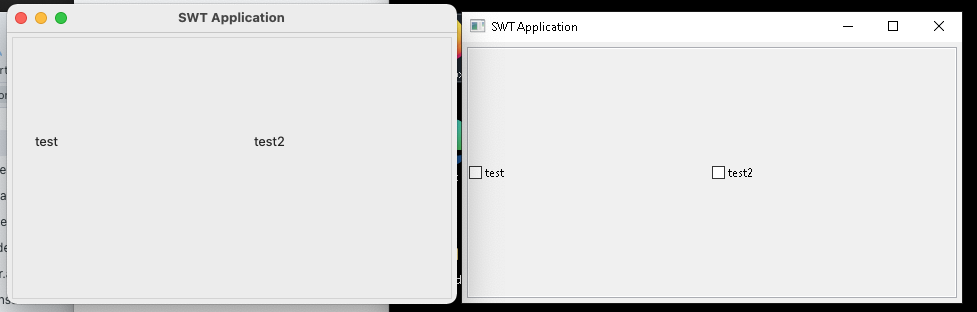
if the size of the OS X Dialog is changed, the dialog turns into this
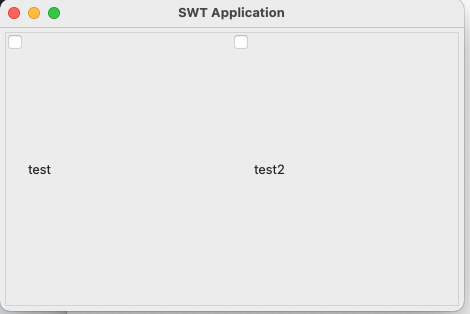
with the buttons located on the wrong place.
To Reproduce
Please use the following simple code to re-enact:
public class TestShell extends Shell {

	public static void main(String args[]) {
		try {
			Display display = Display.getDefault();
			TestShell shell = new TestShell(display);
			shell.open();
			shell.layout();
			while (!shell.isDisposed()) {
				if (!display.readAndDispatch()) {
					display.sleep();
				}
			}
		} catch (Exception e) {
			e.printStackTrace();
		}
	}

	public TestShell(Display display) {
		super(display, SWT.SHELL_TRIM);
		setLayout(new FillLayout(SWT.HORIZONTAL));

		Composite typeComp = new Composite(this, SWT.NONE);
		typeComp.setLayout(new GridLayout(1, false));

		Composite cTypes = new Composite(typeComp, SWT.BORDER);
		cTypes.setLayoutData(new GridData(SWT.FILL, SWT.FILL, true, true, 1, 1));
		cTypes.setLayout(new FillLayout());

		Button btn = new Button(cTypes, SWT.CHECK);
		btn.setText("test");

		Button btn2 = new Button(cTypes, SWT.CHECK);
		btn2.setText("test2");

		createContents();
	}

	protected void createContents() {
		setText("SWT Application");
		setSize(450, 300);

	}

	@Override
	protected void checkSubclass() {
		// Disable the check that prevents subclassing of SWT components
	}
}
Expected behavior
WIndows on MAC OS X should display the elements properly.
Screenshots
see above
Environment:
- Select the platform(s) on which the behavior is seen:
-
- All OS
-
- Windows
-
- Linux
-
- macOS
- Additional OS info (e.g. OS version, Linux Desktop, etc)
macOS Big Sur 11.7
- JRE/JDK version
Java 17
Version since
SWT as tested 3.121.0 (osx) and 3.117.0 (windows)
Workaround (or) Additional context