Repository navigation
Releases
Penumbra 0.7.0

Projects, like ChatGPT's project folders.
What's new
The folder button at the top of the chat list makes a project: a group of chats that share
- Instructions every chat in the project follows.
- A local folder, used by the file and terminal tools unless a chat has its own.
- Sources: text files or notes the model knows in every chat. They go into the prompt while they fit (up to about a third of the context); a longer one is cut to an excerpt and the model reads the rest with a new
project_sourcetool.
Drag chats onto a project or use their right-click menu (Move to project, Remove from project). The + on a project's row starts a chat in it, and a chip at the top of the chat opens the project's settings. Deleting a project keeps its chats. Projects are part of backups (the Backup tab, incremental backups, and the single-chat backup).
The tutorial and the guided demo cover projects.
The full list of changes is in the changelog.
Download
| Platform | File |
|---|---|
| macOS, Apple Silicon | Penumbra-0.7.0-mac-arm64.dmg |
| macOS, Intel | Penumbra-0.7.0-mac-x64.dmg |
| Windows | Penumbra-Setup-0.7.0.exe (picks x64 or ARM64 automatically) |
| Linux | Penumbra-0.7.0-linux-x86_64.AppImage, or the .deb for Debian/Ubuntu (ARM64 builds included) |
Updating: install over the old version; your chats and settings are kept. These builds aren't code-signed yet, so see the 0.5.0 notes for the one-time first-launch step.
If Penumbra is useful to you, you can support it on Ko-fi ☕
Penumbra 0.6.0
Orchestrator runs can now be edited and run again.
What's new
- Edit plan. A finished or cancelled orchestrator run has an Edit plan button. Change its goal and any task's instructions or agent, remove or add tasks, and add new agents (name, purpose, model, tools, instructions). Nothing changes until you press Save or Save and run.
- Nothing is lost. Tasks you leave alone keep their results. Changed tasks, and the ones that use them, run again, and the final answer is written again. The old result of a task stays under Earlier results on its card, and old final answers under Earlier answers.
- Run again runs just the tasks that didn't finish.
- The tutorial and the guided demo cover it.
The full list of changes is in the changelog.
Download
| Platform | File |
|---|---|
| macOS, Apple Silicon | Penumbra-0.6.0-mac-arm64.dmg |
| macOS, Intel | Penumbra-0.6.0-mac-x64.dmg |
| Windows | Penumbra-Setup-0.6.0.exe (picks x64 or ARM64 automatically) |
| Linux | Penumbra-0.6.0-linux-x86_64.AppImage, or the .deb for Debian/Ubuntu (ARM64 builds included) |
Updating: install over the old version; your chats and settings are kept. These builds aren't code-signed yet, so see the 0.5.0 notes for the one-time first-launch step.
If Penumbra is useful to you, you can support it on Ko-fi ☕
Penumbra 0.5.2
A small fix to 0.5.1.
What's changed
- Replies after a chat was summarized. Some models (Qwen's, for one) failed with "System message must be at the beginning" once a chat had a summary, and others ignored the summary. The summary now goes inside the single system message.
- Compact now works again after an error: before, once it said it couldn't summarize, it did nothing on later tries.
- README. The Download section, with the installers, is now first.
The full list of changes is in the changelog.
Download
| Platform | File |
|---|---|
| macOS, Apple Silicon | Penumbra-0.5.2-mac-arm64.dmg |
| macOS, Intel | Penumbra-0.5.2-mac-x64.dmg |
| Windows | Penumbra-Setup-0.5.2.exe (picks x64 or ARM64 automatically) |
| Linux | Penumbra-0.5.2-linux-x86_64.AppImage, or the .deb for Debian/Ubuntu (ARM64 builds included) |
Updating: install over the old version; your chats and settings are kept. These builds aren't code-signed yet, so see the 0.5.0 notes for the one-time first-launch step.
If Penumbra is useful to you, you can support it on Ko-fi ☕
Penumbra 0.5.1
A small update to 0.5.0.
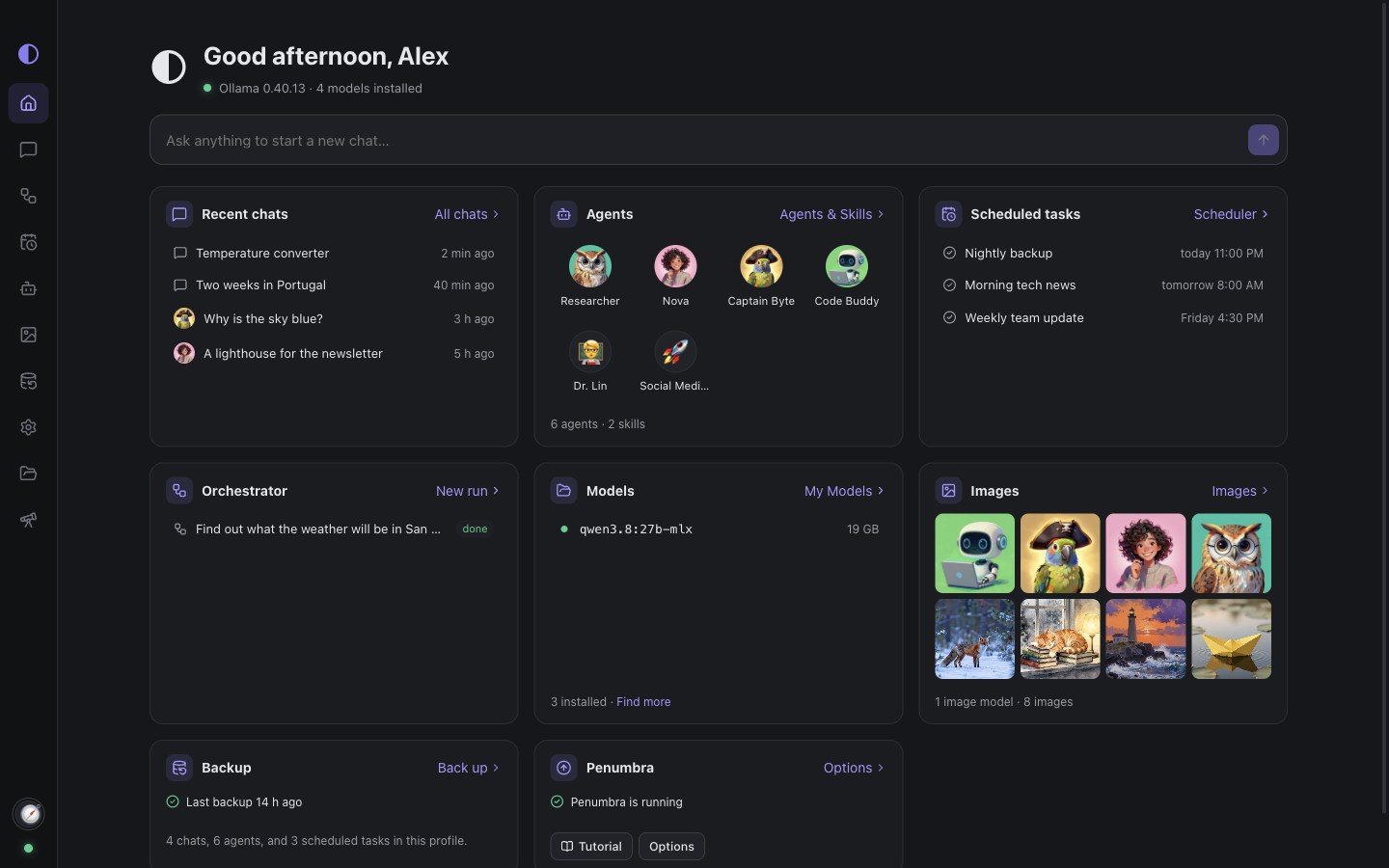
What's changed
- Compact now summarizes everything but the last few messages, so it makes room even in a chat that isn't long yet.
- Guided demo (Options → Guided demo): it starts on Home, and a new "Long chats" section compacts a chat and shows a reply cut off at Max Tokens and then continued. Its Backup and Scheduler steps cover incremental and scheduled backups.
- New screenshots in the README, including Home, a summarized long chat, and an incremental backup.
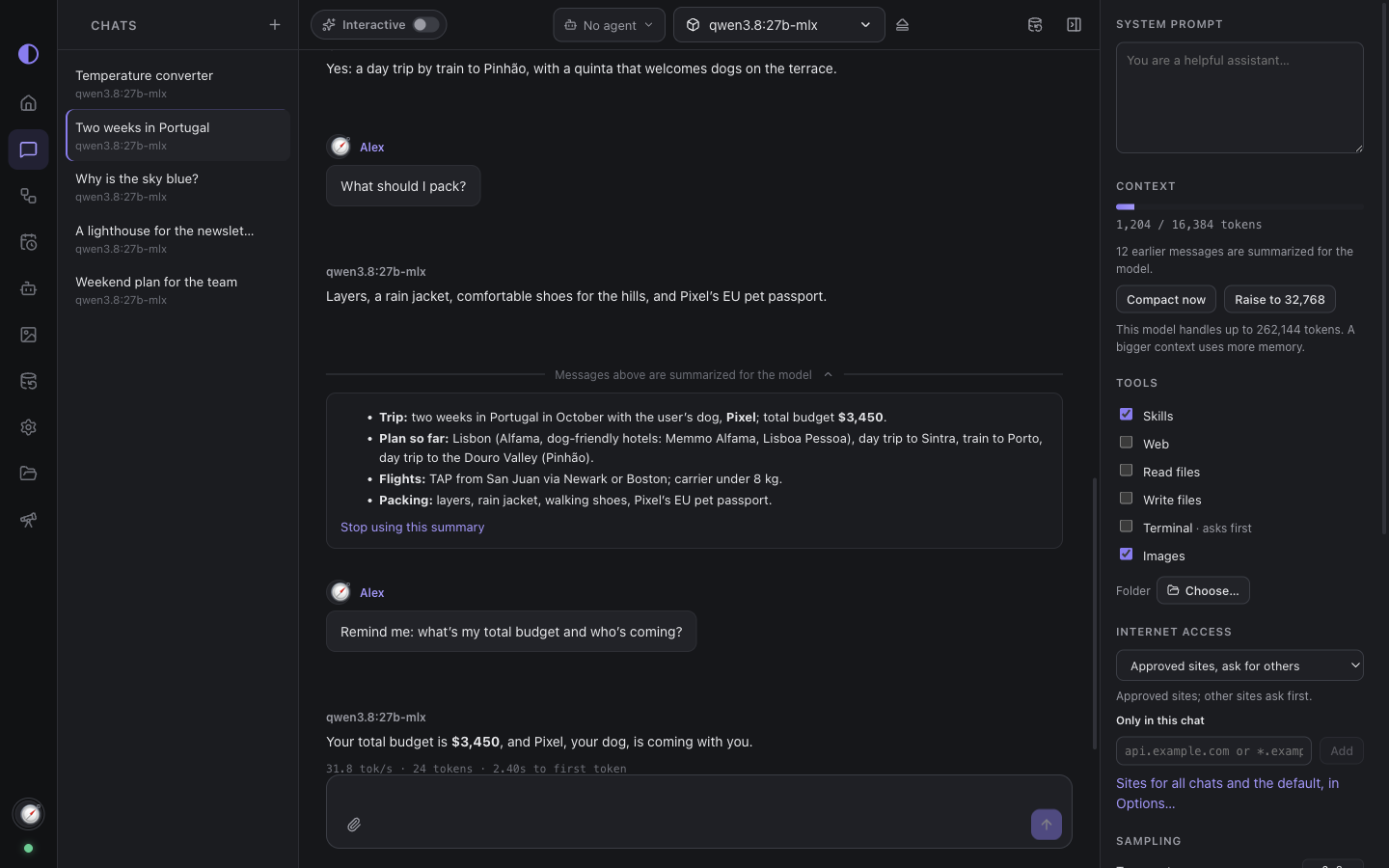 |
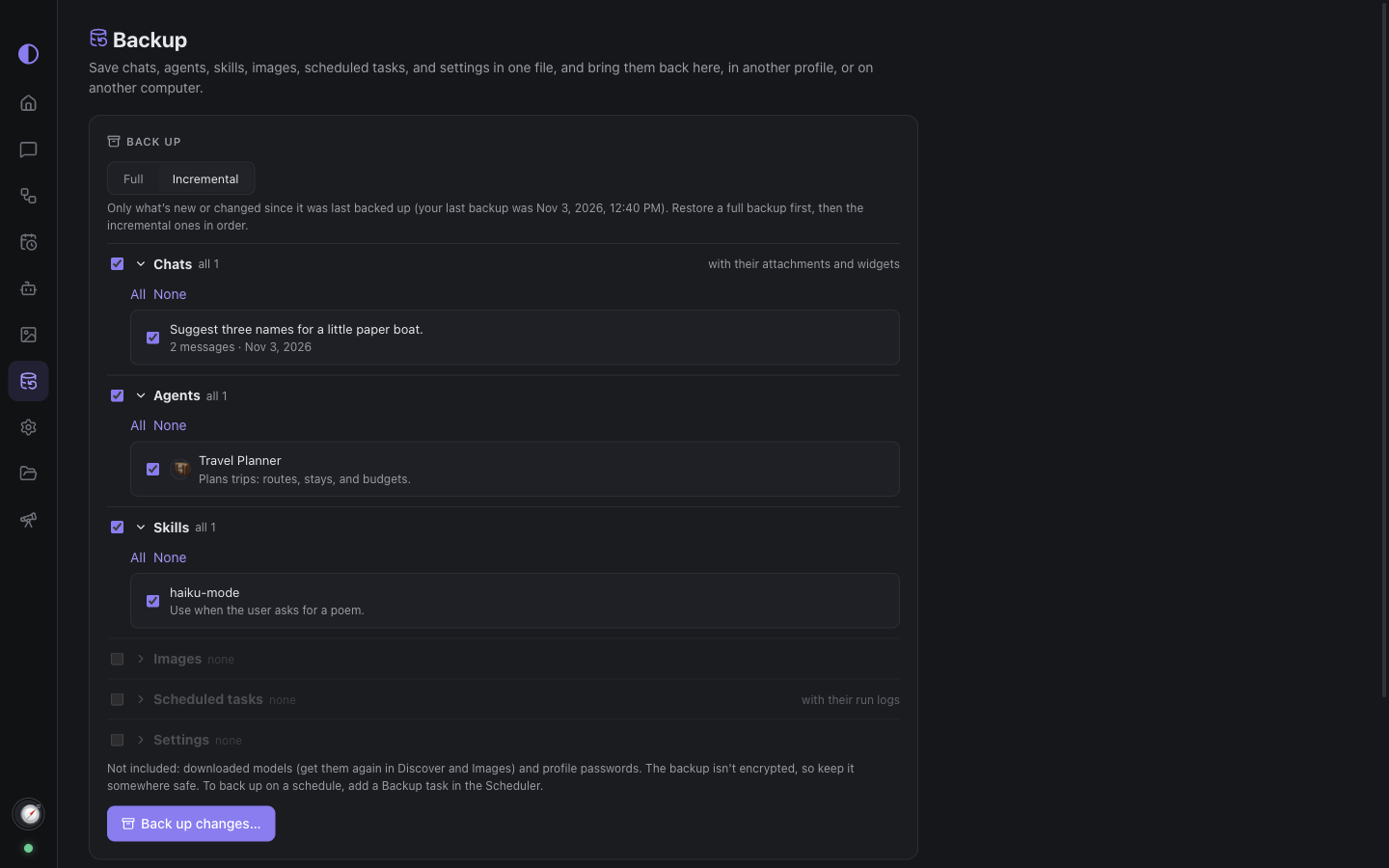 |
| A long chat, summarized to fit | An incremental backup |
The full list of changes is in the changelog.
Download
| Platform | File |
|---|---|
| macOS, Apple Silicon | Penumbra-0.5.1-mac-arm64.dmg |
| macOS, Intel | Penumbra-0.5.1-mac-x64.dmg |
| Windows | Penumbra-Setup-0.5.1.exe (picks x64 or ARM64 automatically) |
| Linux | Penumbra-0.5.1-linux-x86_64.AppImage, or the .deb for Debian/Ubuntu (ARM64 builds included) |
Updating: install over the old version; your chats and settings are kept. These builds aren't code-signed yet, so see the 0.5.0 notes for the one-time first-launch step.
If Penumbra is useful to you, you can support it on Ko-fi ☕
Penumbra 0.5.0
Penumbra 0.5.0 opens on a new Home dashboard, keeps long chats going past the model's context, and backs up on a schedule. Everything still runs locally with Ollama.
Highlights
- Home. Penumbra now opens on a dashboard: ask something to start a chat right away, and see every tab at a glance (recent chats, agents to chat with, upcoming scheduled tasks, orchestrator runs, loaded models and downloads, recent images, your last backup, and updates), each a click away.
- Long chats keep going. Chats no longer quietly lose their beginning when they outgrow the model's context. Older messages are sent in a shorter form (widget code, attached files, and images become short notes), and when a chat still won't fit, the model first summarizes the older part and uses that summary from then on. A line in the chat shows where the summary ends, and you can read it. Compact now, a warning when the context is nearly full, and Raise to… (up to the model's own maximum) are in the settings panel.
- Continue a cut-off reply. When a reply stops at the Max Tokens limit, it says so and offers Continue, which picks it up exactly where it stopped.
- Incremental and scheduled backups. Make a Full backup or an Incremental one with only what changed since the last. A new Backup task in the Scheduler saves full or incremental backups into a folder you choose, on its own. Restoring can use the backup's version for items already there, so a full backup and its incremental ones restore in order.
The full list of changes is in the changelog.
Download
| Platform | File |
|---|---|
| macOS, Apple Silicon | Penumbra-0.5.0-mac-arm64.dmg |
| macOS, Intel | Penumbra-0.5.0-mac-x64.dmg |
| Windows | Penumbra-Setup-0.5.0.exe (picks x64 or ARM64 automatically) |
| Linux | Penumbra-0.5.0-linux-x86_64.AppImage, or the .deb for Debian/Ubuntu (ARM64 builds included) |
You need Ollama installed and running.
Updating: Penumbra shows an arrow at the bottom of the sidebar; it opens the Updates tab, which downloads the installer for you. Install over the old version: your chats and settings are kept.
First launch
These builds aren't code-signed yet, so your OS will warn you once:
- macOS: open the app, then go to System Settings → Privacy & Security → Open Anyway
- Windows: on the SmartScreen prompt, click More info → Run anyway
- Linux (AppImage):
chmod +x Penumbra-*.AppImage, then run it
If Penumbra is useful to you, you can support it on Ko-fi ☕
Penumbra 0.4.0
Penumbra 0.4.0 adds backups, internet access you can set for each chat, and a way to frame your agents' pictures. Everything still runs locally with Ollama.
Highlights
- Backup tab. Save chats (with their attachments and widgets), agents, skills, images, scheduled tasks (with their run logs), and settings in one
.zipfile: everything, or the items you pick from each list. Restore adds what you choose from a backup to the current profile, here or on another computer, without replacing anything: items already there are skipped, changed ones come back as copies, chats keep their agents and images, and restored scheduled tasks start paused. - Back up one chat. A button at the top of each chat (and Back up this chat… in its right-click menu) saves that chat with its agent, the agent's skills, and the images it shows.
- Internet access per chat. Each chat's settings panel has its own Internet access, Approved sites, ask for others or Whole internet, and sites only that chat may use. New chats start with the default from Options, and every chat checks your sites in Options first, then its own. A widget asking for a new site offers Always in this chat next to Always in all chats.
- Adjust an agent's picture. Adjust image under an agent's card opens a preview of the card: drag the picture to choose what shows and zoom in. The round avatar uses the same framing, and new image avatars are saved at a higher resolution so they stay sharp.
The tutorial and the guided demo (Options → Guided demo) show the new features too.
The full list of changes is in the changelog.
Download
| Platform | File |
|---|---|
| macOS, Apple Silicon | Penumbra-0.4.0-mac-arm64.dmg |
| macOS, Intel | Penumbra-0.4.0-mac-x64.dmg |
| Windows | Penumbra-Setup-0.4.0.exe (picks x64 or ARM64 automatically) |
| Linux | Penumbra-0.4.0-linux-x86_64.AppImage, or the .deb for Debian/Ubuntu (ARM64 builds included) |
You need Ollama installed and running.
Updating: Penumbra shows an arrow at the bottom of the sidebar; it opens the Updates tab, which downloads the installer for you. Install over the old version: your chats and settings are kept.
First launch
These builds aren't code-signed yet, so your OS will warn you once:
- macOS: open the app, then go to System Settings → Privacy & Security → Open Anyway
- Windows: on the SmartScreen prompt, click More info → Run anyway
- Linux (AppImage):
chmod +x Penumbra-*.AppImage, then run it
If Penumbra is useful to you, you can support it on Ko-fi ☕
Penumbra 0.3.1
A small update to 0.3.0.
What's changed
- Updates tab. The arrow icon in the sidebar now opens an Updates tab instead of a small card, so the release notes are easy to read (screenshots included) and the buttons no longer get cut off. The download and its progress, and Skip this version, are there too.
The full list of changes is in the changelog.
Download
| Platform | File |
|---|---|
| macOS, Apple Silicon | Penumbra-0.3.1-mac-arm64.dmg |
| macOS, Intel | Penumbra-0.3.1-mac-x64.dmg |
| Windows | Penumbra-Setup-0.3.1.exe (picks x64 or ARM64 automatically) |
| Linux | Penumbra-0.3.1-linux-x86_64.AppImage, or the .deb for Debian/Ubuntu (ARM64 builds included) |
Updating: install over the old version; your chats and settings are kept. These builds aren't code-signed yet, so see the 0.3.0 notes for the one-time first-launch step.
If Penumbra is useful to you, you can support it on Ko-fi ☕
Penumbra 0.3.0
Penumbra 0.3.0 makes pictures on your computer, keeps separate profiles for different people or uses, and shows you around with a tutorial. Everything still runs locally with Ollama.
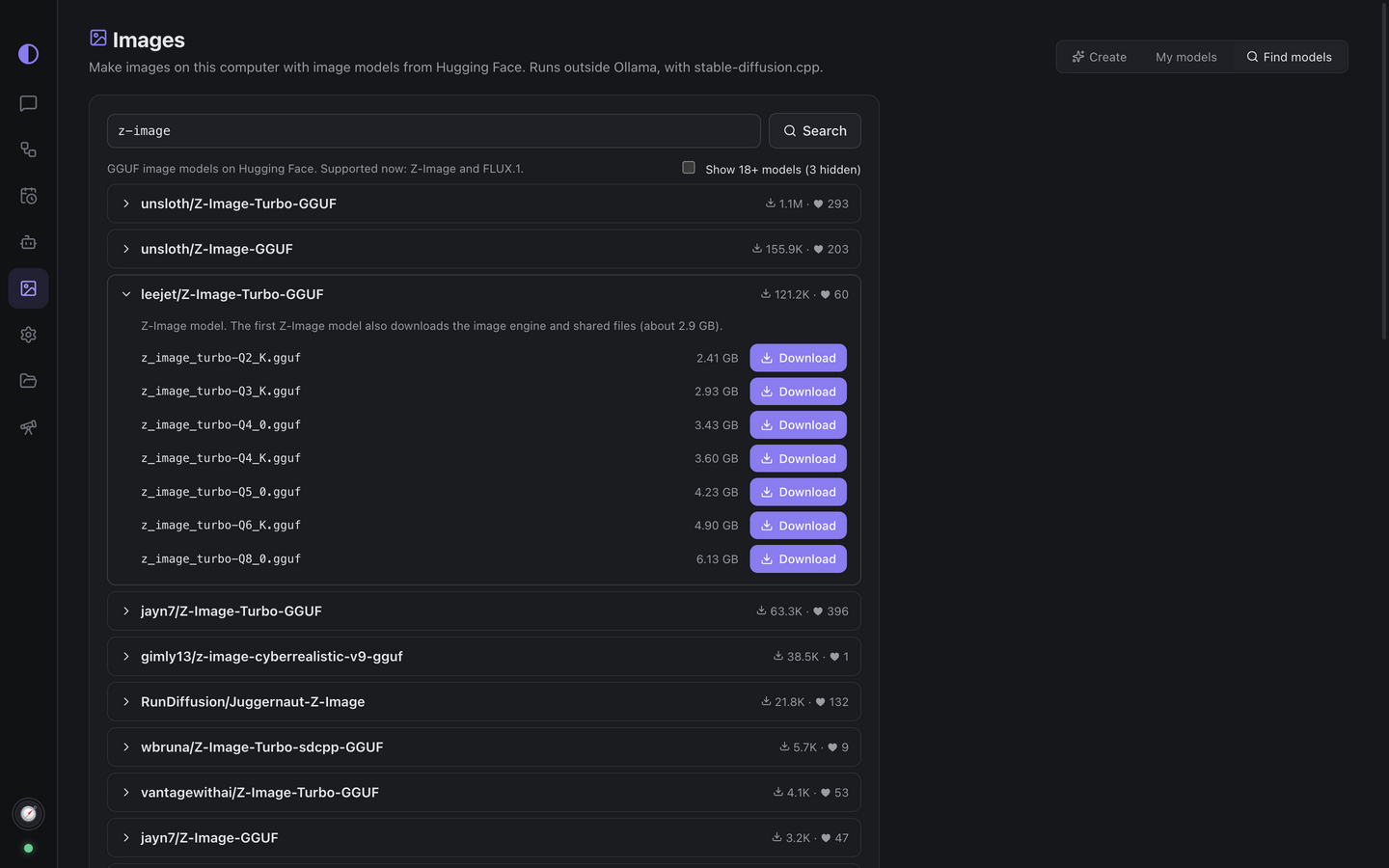
Highlights
- Images tab. Make pictures on your computer, outside Ollama. Search Hugging Face for image models (Z-Image and FLUX.1 today), download one, and generate with stable-diffusion.cpp, which Penumbra downloads the first time. Downloads resume if interrupted and are checked against the published hashes. Models marked 18+ are hidden unless you choose to show them.
- Images in chats and agents. Ask for a picture in any chat, or give an agent the new Images tool, and it appears in the reply. Images are saved in Pictures/Penumbra (you can change that), or in the chat's folder if it has one. Generate… in the avatar menu makes avatars too.
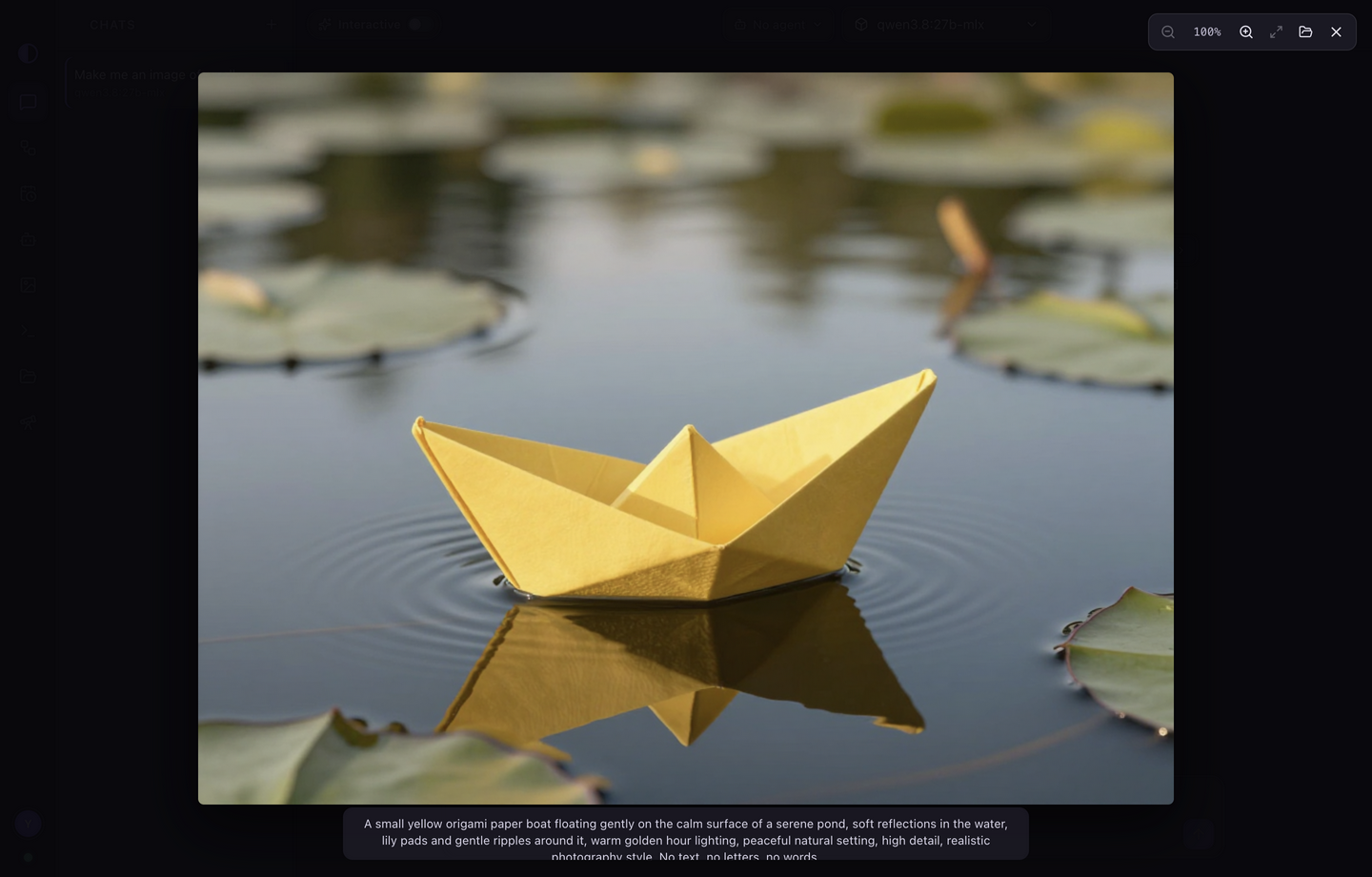
- Image viewer. Click any image to open it full-window: zoom with the wheel or a pinch, drag around, step through a set, and copy its prompt.
- Profiles. Keep separate chats, agents, skills, settings, scheduled tasks, and images, each optionally behind a password (an app lock). Move chats between profiles and pick the one that opens at startup. Your existing data becomes the first profile.
- Tutorial. A guided tour of every tab the first time you open Penumbra, and in each new profile, until you choose not to see it again.
- Your own approved sites for widgets and agents, in the new Options tab (formerly Developer).
 |
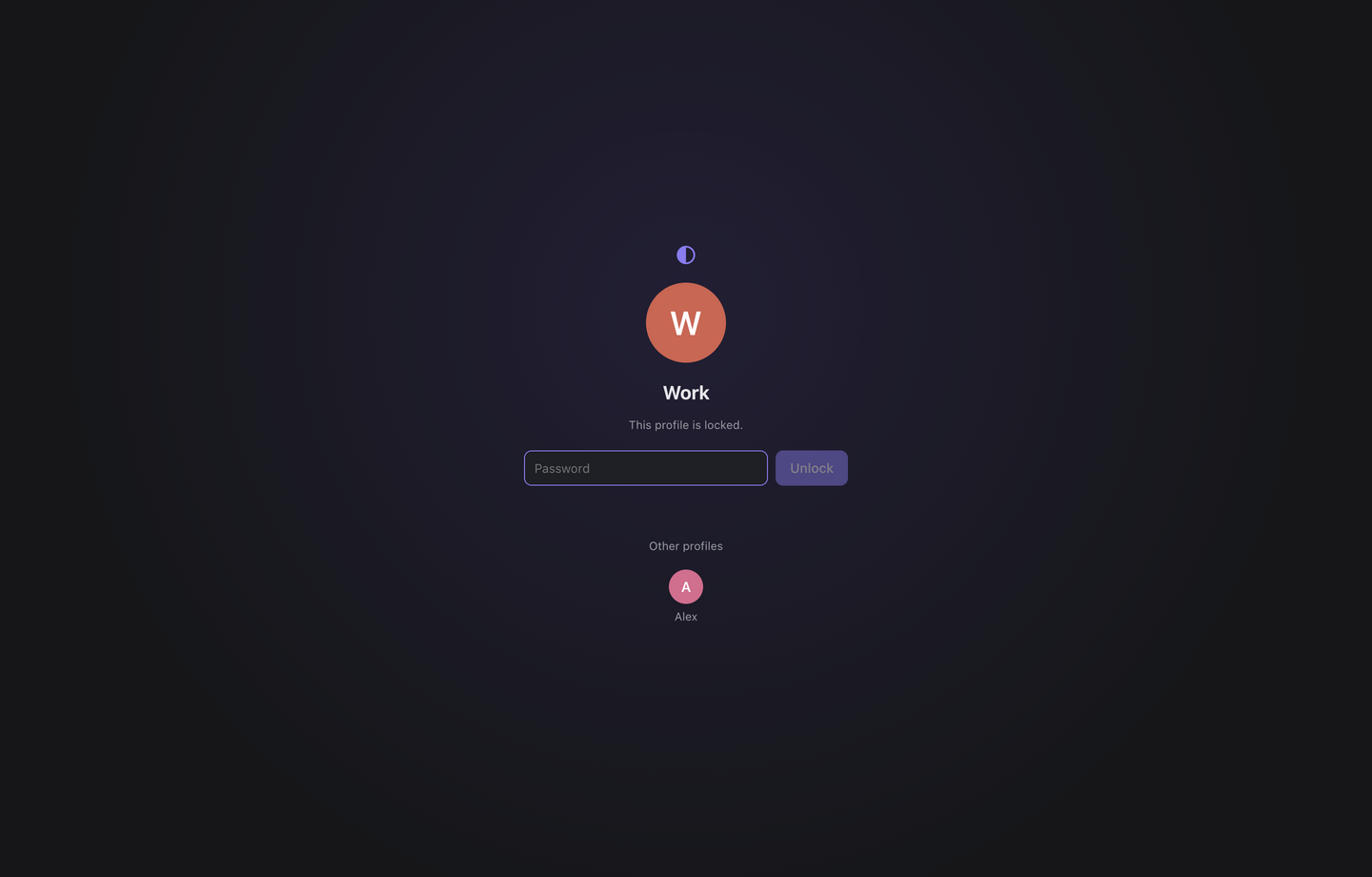 |
| The image viewer | A locked profile |
The full list of changes is in the changelog.
Download
| Platform | File |
|---|---|
| macOS, Apple Silicon | Penumbra-0.3.0-mac-arm64.dmg |
| macOS, Intel | Penumbra-0.3.0-mac-x64.dmg |
| Windows | Penumbra-Setup-0.3.0.exe (picks x64 or ARM64 automatically) |
| Linux | Penumbra-0.3.0-linux-x86_64.AppImage, or the .deb for Debian/Ubuntu (ARM64 builds included) |
You need Ollama installed and running. Image generation runs on Apple Silicon Macs, and x64 Windows and Linux; image models take about 3 to 13 GB, plus a few GB of shared files for the first model of each family.
Updating from 0.2.0: Penumbra shows an arrow at the bottom of the sidebar; it downloads the installer for you. Install over the old version: your chats and settings are kept.
First launch
These builds aren't code-signed yet, so your OS will warn you once:
- macOS: open the app, then go to System Settings → Privacy & Security → Open Anyway
- Windows: on the SmartScreen prompt, click More info → Run anyway
- Linux (AppImage):
chmod +x Penumbra-*.AppImage, then run it
If Penumbra is useful to you, you can support it on Ko-fi ☕
Penumbra 0.2.0
Penumbra 0.2.0 turns a chat app into a small workshop: models can answer with live apps, and you can build agents with their own persona, let an orchestrator split work between them, and schedule tasks to run on their own. Everything still runs on your computer with Ollama.
Highlights
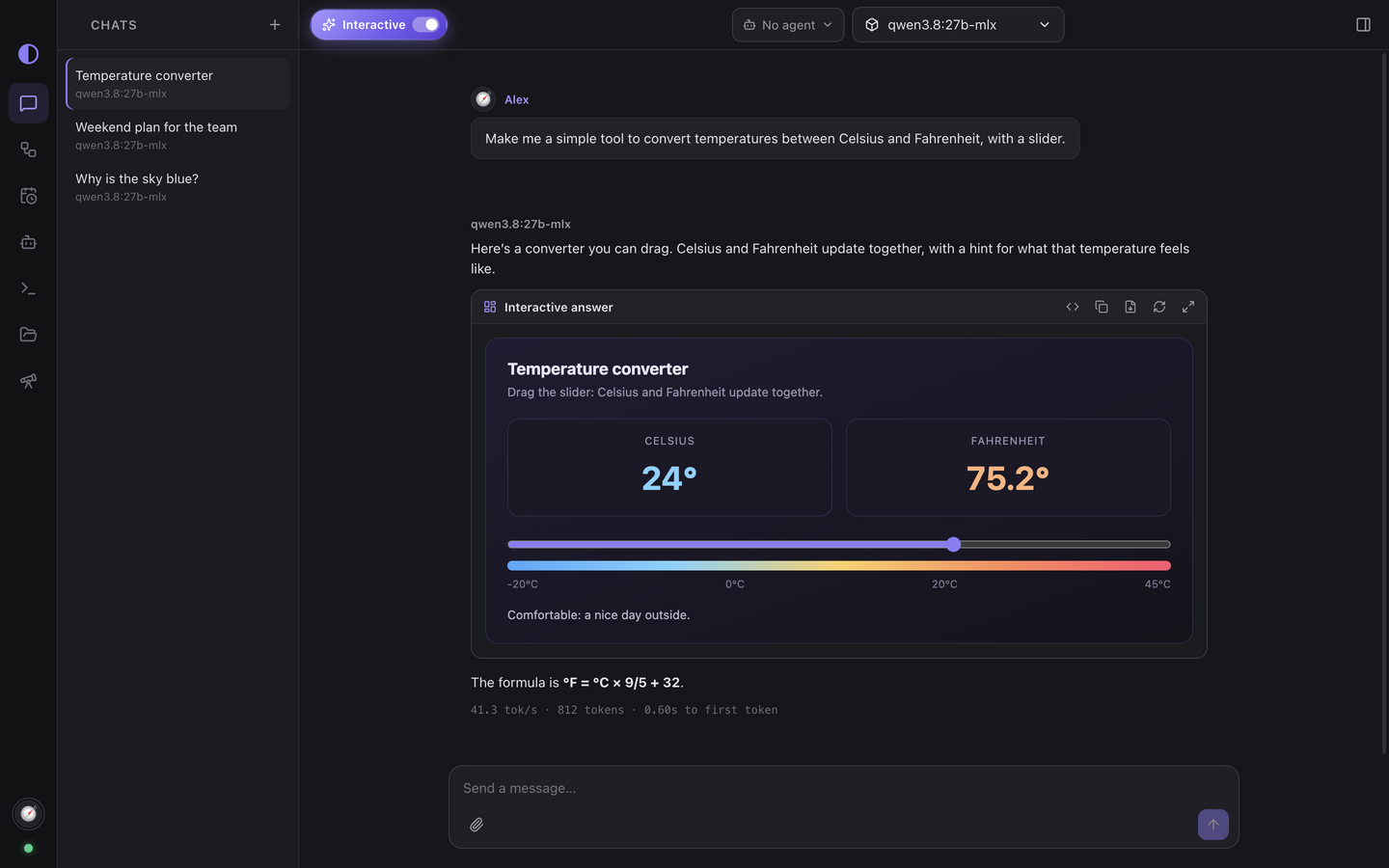
- Interactive answers. The model can reply with small live apps right in the chat: calculators, charts, diagrams, 3D views, quizzes. Chart.js, D3, and Three.js are built in, so they work offline. If one breaks, Ask model to fix sends the error back for a corrected version.
- Widgets with internet. Maps and live public data (weather, earthquakes, exchange rates, Wikipedia). Approved sites work right away, any other site asks first, and every widget has a network log. Widgets can only download: no uploads, cookies, or local network.
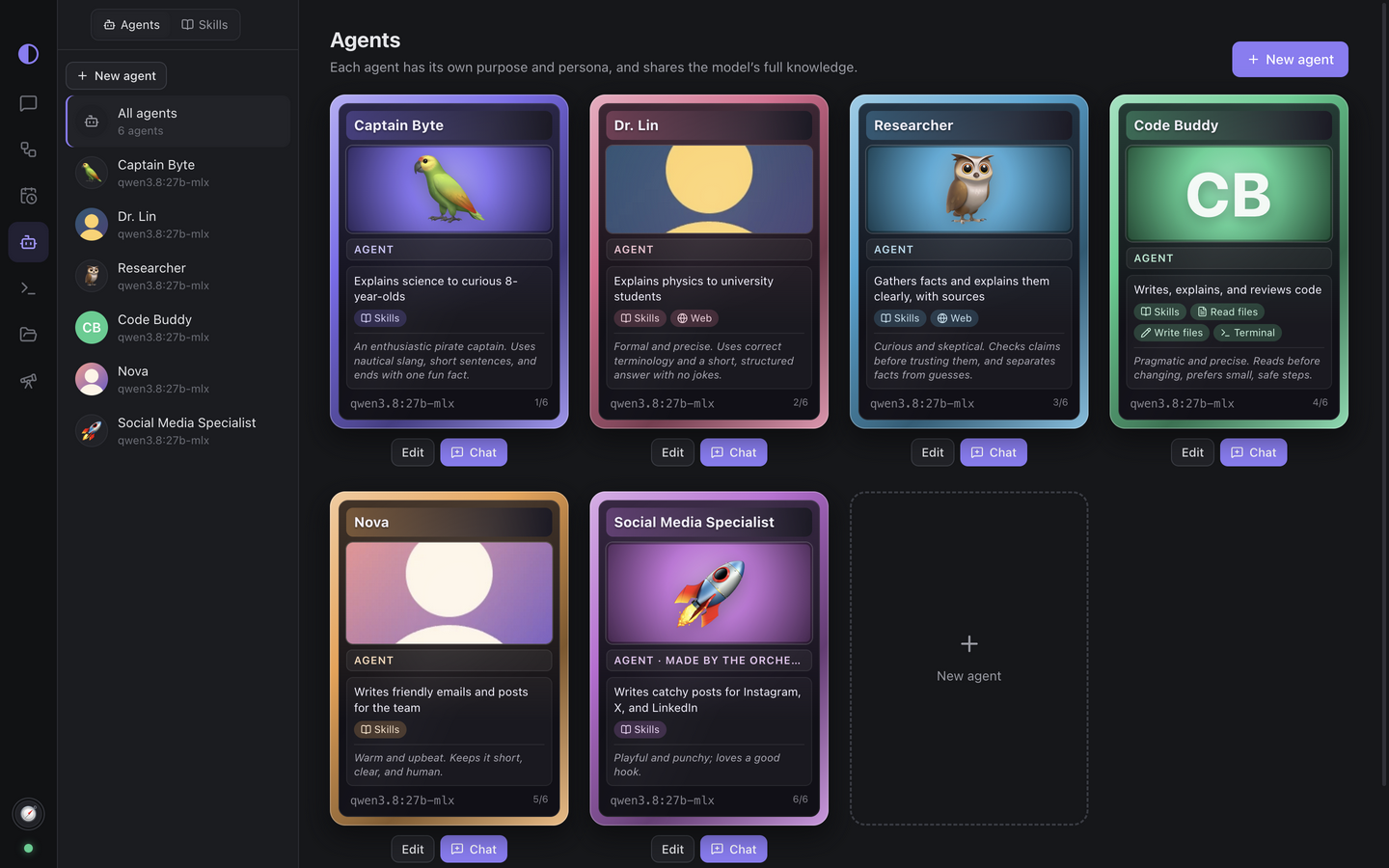
- Agents with personas. A short wizard gives each agent a purpose, a name, and a persona. They all share the model's knowledge; the persona shapes how each one talks and works. Give them an avatar, and see them as trading cards.
- Skills and tools. Skills in Claude's
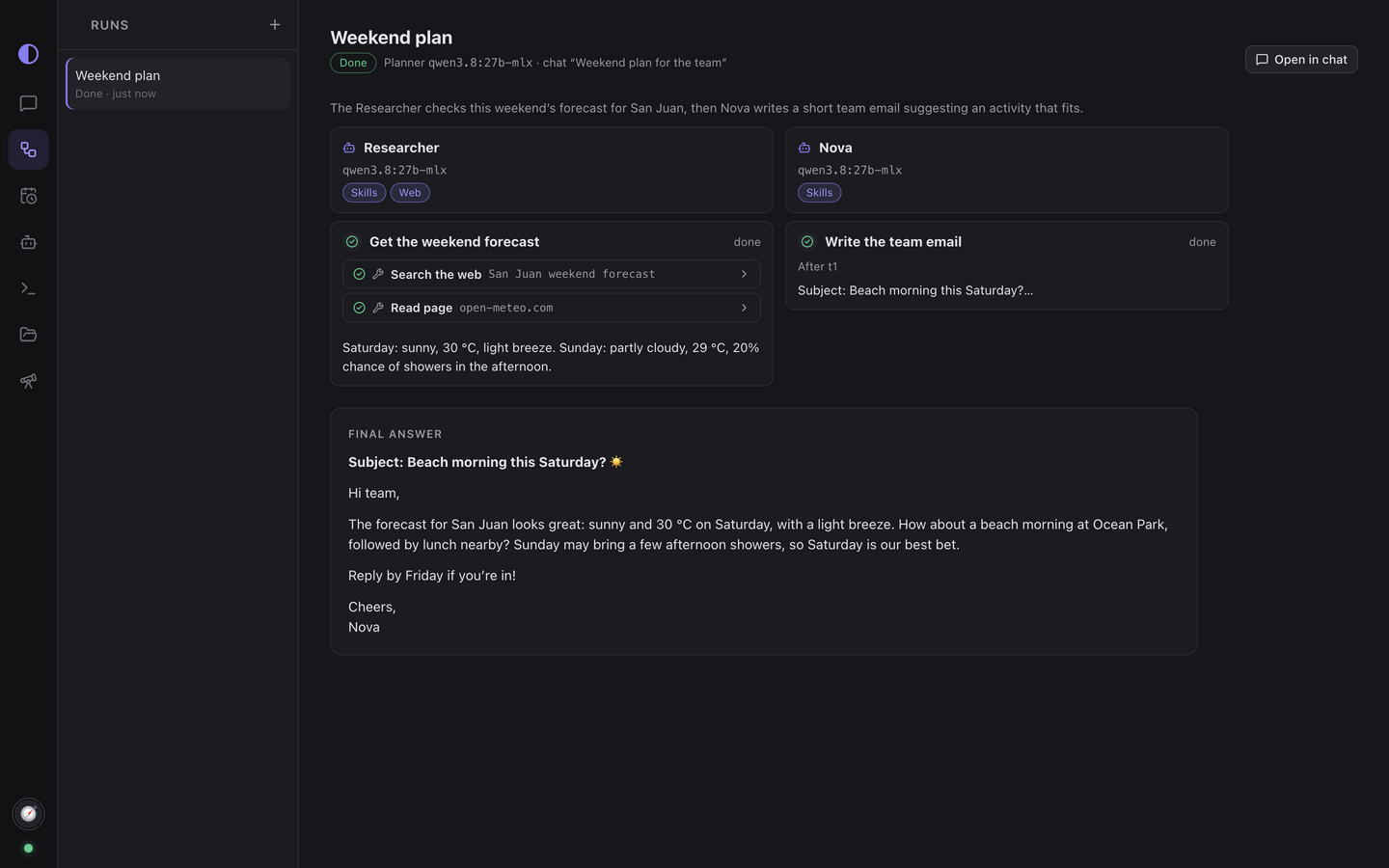
SKILL.mdformat, loaded only when a task needs them. Tools for the web, reading and writing files in a folder you choose, and terminal commands, which always ask you first. - Orchestrator. Give it a goal: it plans the tasks, creates the agents it needs, lets you review the plan, runs each task on its agent, and writes the final answer.
- Scheduler. Run prompts, agents, orchestrator goals, or commands at set times or on repeat, with a chat and a run log for each task. Penumbra can keep running in the menu bar so tasks run on time.
- And more: your own name and avatar on your messages, a quiet update check in the sidebar, a guided demo of every feature (Developer → Guided demo), and replies that keep streaming when you switch tabs.
 |
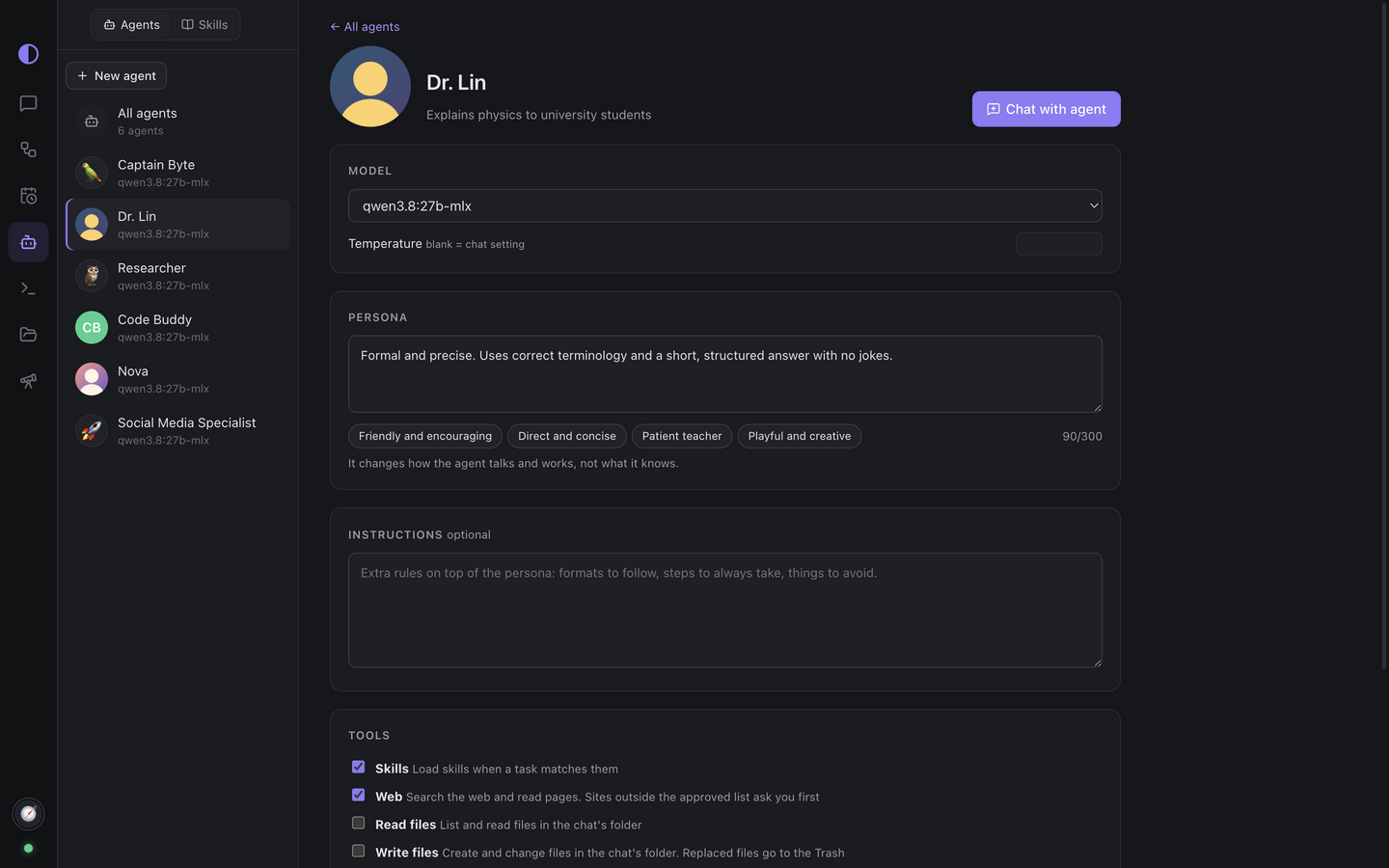 |
| Agents as trading cards | Purpose, persona, and avatar |
 |
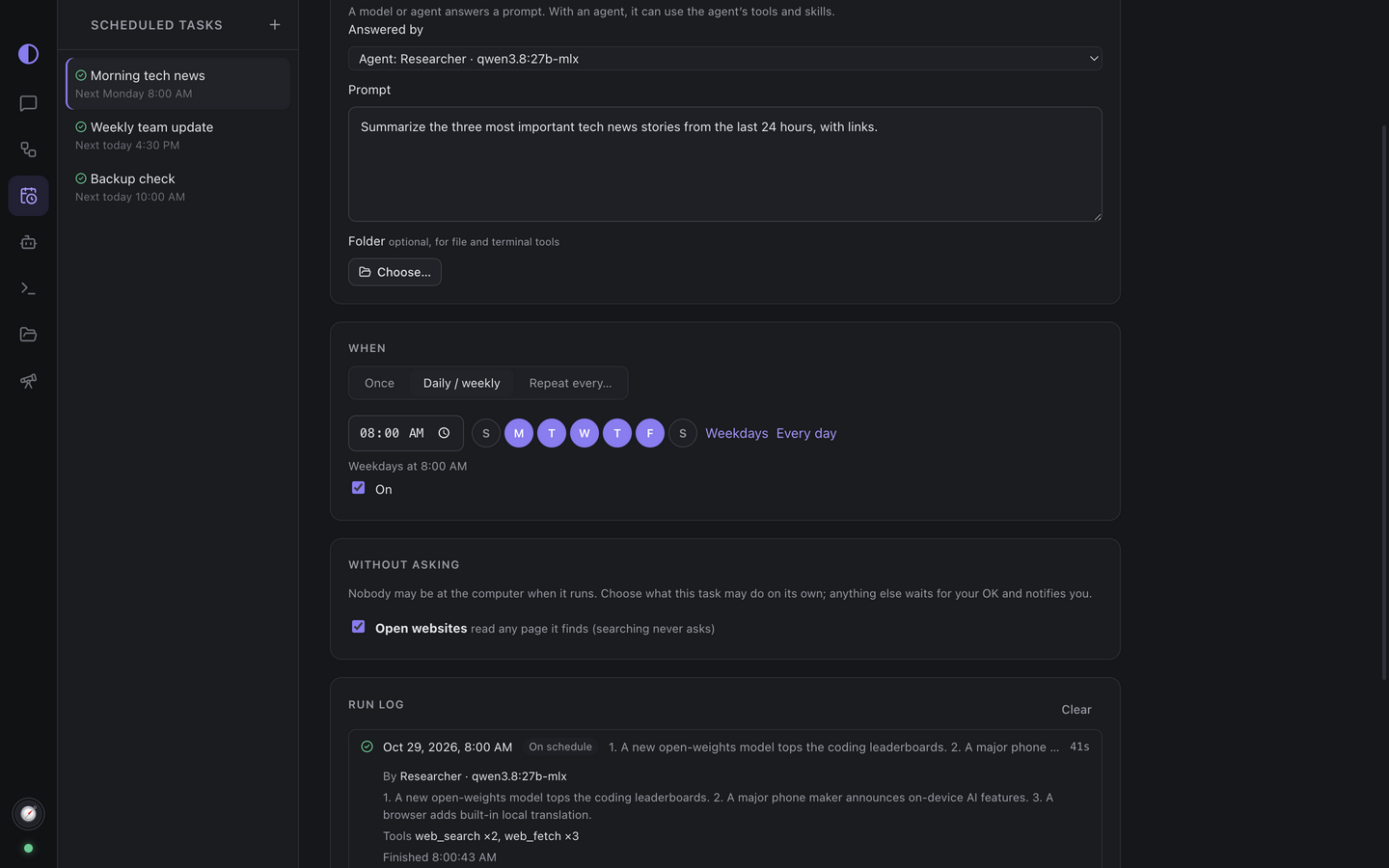 |
| An orchestrator run | A scheduled task and its run log |
The full list of changes, including the security details, is in the changelog.
Download
| Platform | File |
|---|---|
| macOS, Apple Silicon | Penumbra-0.2.0-mac-arm64.dmg |
| macOS, Intel | Penumbra-0.2.0-mac-x64.dmg |
| Windows | Penumbra-Setup-0.2.0.exe (picks x64 or ARM64 automatically) |
| Linux | Penumbra-0.2.0-linux-x86_64.AppImage, or the .deb for Debian/Ubuntu (ARM64 builds included) |
You need Ollama installed and running. Interactive answers and agents work best with models of 7B or more.
Updating from 0.1.0: install over it. Your chats and settings are kept. From 0.2.0 on, Penumbra tells you itself when a new version is out.
First launch
These builds aren't code-signed yet, so your OS will warn you once:
- macOS: open the app, then go to System Settings → Privacy & Security → Open Anyway
- Windows: on the SmartScreen prompt, click More info → Run anyway
- Linux (AppImage):
chmod +x Penumbra-*.AppImage, then run it
If Penumbra is useful to you, you can support it on Ko-fi ☕
Penumbra 0.1.0
The first release of Penumbra, a desktop app for Ollama: chat with local models, manage them, and download new ones from the Ollama library or Hugging Face.
Highlights
- Chat: streaming replies with Markdown and syntax-highlighted code, a collapsible thought process for reasoning models, tokens/sec stats, edit & resend, regenerate, branch a chat, image attachments for vision models
- Models: a picker that loads the model into memory, VRAM usage, load/eject/delete, model details, and sampling controls (temperature, top-k/p, min-p, context length, and more)
- Downloads: the Ollama library plus Hugging Face GGUF search with a quant picker; pause, resume, and retry, with speed and time remaining
- Everywhere: right-click menus and keyboard shortcuts
Download
| Platform | File |
|---|---|
| macOS, Apple Silicon | Penumbra-0.1.0-mac-arm64.dmg |
| macOS, Intel | Penumbra-0.1.0-mac-x64.dmg |
| Windows | Penumbra-Setup-0.1.0.exe (picks x64 or ARM64 automatically) |
| Linux | Penumbra-0.1.0-linux-x86_64.AppImage, or the .deb for Debian/Ubuntu (ARM64 builds included) |
You need Ollama installed and running.
First launch
These builds aren't code-signed yet, so your OS will warn you once:
- macOS: open the app, then go to System Settings → Privacy & Security → Open Anyway
- Windows: on the SmartScreen prompt, click More info → Run anyway
- Linux (AppImage):
chmod +x Penumbra-*.AppImage, then run it
If Penumbra is useful to you, you can support it on Ko-fi ☕