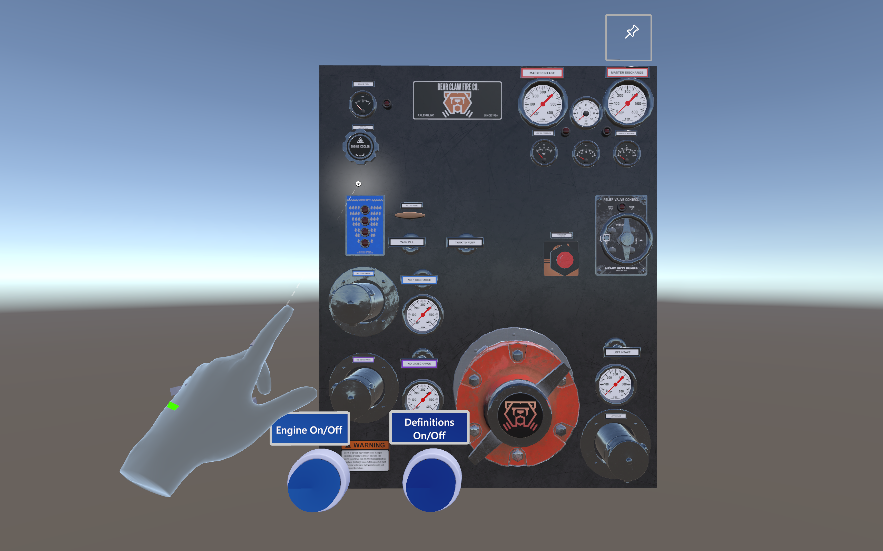
FRAR (First Responder Augmented Reality) is a HoloLens 2 app for trainee fire fighters to practice using a pump panel. This project was funded by a NIST grant and developed at RTI International in collaboration with White Cross Volunteer Fire Department. FRAR is not complete but is able to run well within Unity.
We developed for HoloLens with the assumption that trainees would want to use their hands while interacting with the pump panel. In hindsight, this should have been built for VR or for use on phones. HoloLens is a fascinatingly frustrating piece of equipment that hints at an exciting future but is unfortunately hindered by several shortcomings, including the high price tag. The biggest takeaway from developing and testing this project is that tactile and auditory feedback are crucial for first responders, and HoloLens by its nature does not have any haptic feedback. Should this project continue, it's my belief that it will require a pivot towards VR, or accepting that this proof of concept functions within the limits imposed by HoloLens, and isn't the best training tool.
Follow these instructions if you have a build to sideload onto a HoloLens 2. You'll have to make a build from within Unity if I haven't given you one already. If you feel comfortable enough with Unity to make a build, then follow these incredibly helpful instructions from Microsoft. From there, navigate to all apps, and tap FRAR to launch.
Unity has some pretty nifty keyboard and mouse controls for simulated HoloLens actions within the engine. You can read a very helpful guide with all the keybindings here. Scroll down to How to use MRTK Input simulation and go from there. The bad news is that it's pretty cumbersome to do certain actions (though to be fair, the same is true on HoloLens).
- If this is someone's first time using HoloLens, then select Tutorial from the floating menu. They can learn various hand motions and experiment with interacting with holograms before using the pump panel.
- Explore the Pump Panel is where users can interact with the panel and learn about what each component does.
- Quiz Mode should be launched after they've tried out the panel and read definitions.
- The number in the top right of the UI in Quiz Mode is your score. There was some confusion about this throughout testing. The UI for Quiz Mode is not the most polished but it's functional.
- Users can quit at any time by pressing the quit button.
- The panel can be pinned in place by either pressing or air tapping the pin icon in the upper right corner.
- Point at panel components to show a UI popup with definitions for the currently selected component.
- You can show/hide definitions by pressing the show/hide definitions button.
- The engine on/off button will, as you might imagine, turn the engine on and off.
- Levers can be pulled by hovering over one and either pinching or closing your fist. It's quite finicky so YMMV. It's oddly enough more reliable in Unity.
- Interactable components glow orange when your hand hovers over one.
- The engine throttle and Discharge Relief Valve can be grabbed and rotated like in the real world.
- Finally, the panel itself can be grabbed, resized, and placed wherever the user finds it comfortable.
Joost van Schaik's blog was invaluable. I'm using his code from "Controlling a Unity animation using HoloLens 2 hand tracking" to enable lever pull and pushes.
Several CC licensed audio tracks are used within the quiz game. You can find an attribution file within the source code.