A smart and minimal Chrome extension to help you stay focused by blocking distracting websites and saving tab sessions. Built with HTML, CSS, and JavaScript — no user tracking, no data collection.
Focus Mode: Block distracting sites (like YouTube, Twitter, TikTok, etc.) while working.
Custom Block List: Add or remove your own blocked websites easily.
Session Saver: Save your open tabs and restore them later with one click.
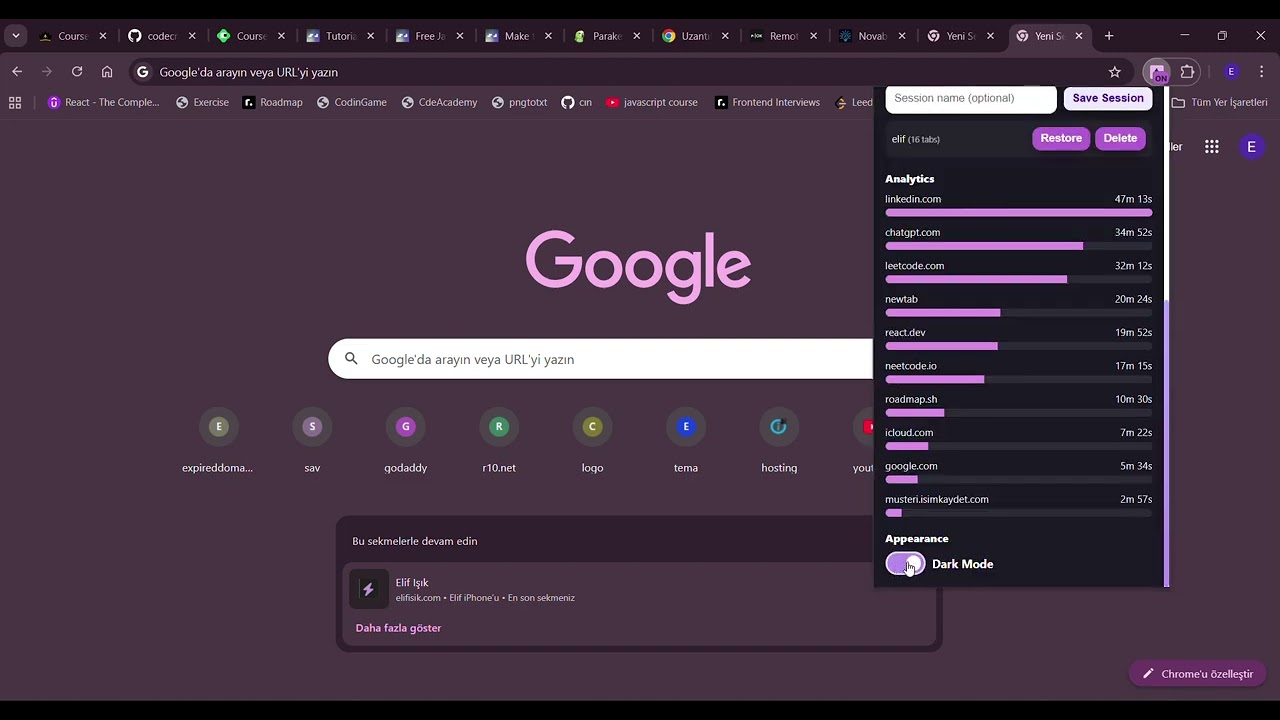
Productivity Analytics: See where you spend most of your browsing time.
Dark/Light Theme: Clean interface that adapts to your preference.
Tab Focus

Focus Mode-Blocked Sites

List Tabs

Session Saver-Analytics View

Dark Mode

Download or clone this repository:
git clone https://github.com/eliffisik/tabfocus.git
Open chrome://extensions in your browser.
Enable Developer mode (top right).
Click Load unpacked and select the project folder.
Enjoy distraction-free browsing
TabFocus does not collect, transmit, or share any personal data. All settings are stored locally using Chrome’s storage.local API. Read the full policy here: Read the full policy here: Privacy Policy
HTML, CSS, JavaScript
Chrome Extension Manifest V3
Chrome APIs: tabs, storage, scripting, activeTab
tabs: Used to list and manage open tabs for session saving and focus mode.
activeTab: Allows activating or switching between user tabs.
storage: Saves blocked site list, theme, and focus settings locally.
scripting: Injects lightweight logic for blocking focus mode sites.
host_permissions: Needed to detect URLs of open tabs to determine if a site is blocked.
Developed by Elif Işık elifisik.com
Open-source & privacy-first. No trackers. No ads. Just focus.