Facilitating the work of university administrators by performing operations such as adding and deleting faculties, departments and students through a single program.
We decided to do this project because we thought it was a project where we could better understand Database and GUI, Constructor, inheritance processes and improve ourselves.


btn_manager_login.addActionListener(new ActionListener() {

	@Override
	public void actionPerformed(ActionEvent e) {
		if (txt_manager_mail.getText().length() == 0 || txt_manager_password.getText().length() == 0) {
			Helper.showMessage("Lütfen tüm alanları doldurunuz!");
		} else {

			try {
				Connection con = connection.connDb();
				Statement st = con.createStatement();
				ResultSet myRs = st.executeQuery("SELECT * FROM admins");
				boolean kontrol = false;
				while (myRs.next()) {
					if (txt_manager_mail.getText().equals(myRs.getString("admin_mail"))
							&& txt_manager_password.getText().equals(myRs.getString("password"))) {
						kontrol = true;
						Instructor instructor = new Instructor();
						instructor.setId(myRs.getInt("id"));
						instructor.setFirst_name(myRs.getString("first_name"));
						instructor.setLast_name(myRs.getString("last_name"));
						instructor.setMail(
								instructor.getFirst_name() + "." + instructor.getLast_name() + "@edu.tr");
						instructor.setIdentityNumber(myRs.getString("tc_no"));
						instructor.setPassword(myRs.getString("password"));
						System.out.println("Hoşgeldiniz " + instructor.getFirst_name());
						ManagerGUI managerGUI = new ManagerGUI(instructor);
						managerGUI.setVisible(true);
						dispose();
					}
				}
				if (kontrol == false) {
					Helper.showMessage("Girdiğiniz bilgiler yanlıştır!");
					txt_manager_mail.setText("");
					txt_manager_password.setText("");
				}

			} catch (SQLException e1) {
				// TODO Auto-generated catch block
				e1.printStackTrace();
			}
		}

	}
});
The student list (getAll Students) previously created from the database is filtered with stream().filter() and the desired student object is found. Afterwards, login is provided.
public ArrayList<Student> getAllStudents() {

		ArrayList<Student> list = new ArrayList<Student>();
		Student obj;
		try {

			state = conn.createStatement();
			rs = state.executeQuery("SELECT * FROM students");

			while (rs.next()) {

				obj = new Student(rs.getInt("id"), rs.getString("first_name"), rs.getString("last_name"),
						rs.getString("tc_no"), rs.getDouble("score"), rs.getString("school_number"),
						rs.getString("birth"), rs.getInt("faculty_id"), rs.getString("faculty_name"),
						rs.getInt("department_id"), rs.getString("department_name"));
				list.add(obj);
			}
		} catch (SQLException e) {
			e.printStackTrace();
		}
		return list;

	}
The information in the database is retrieved one by one with the relevant query, and an object is created using the previously created object, and this object is assigned to a list for later use.
public class Person {

	private String first_name;
	private String last_name;
	private String identityNumber;
	private String password;
	private String birth;
	private int age;
	static DBConnection connection = new DBConnection();

	public Person() {
	}

	public Person(String first_name) {

		this.first_name = first_name;
	}

	private int id;

	public Person(int id, String first_name, String last_name, String identityNumber, String birth) {
		this.id = id;
		this.first_name = first_name;
		this.last_name = last_name;
		this.identityNumber = identityNumber;
		this.password = identityNumber;
		this.birth = birth;
	}
public class Student extends Person {

	private String student_mail;
	private int facultyId;
	private String facultyName;
	private int departmentId;
	private String departmentName;
	private double score;
	private String number;

	Faculty fc = new Faculty();
	Department dp = new Department();

	static Connection conn = connection.connDb();
	static Statement state = null;
	static ResultSet rs = null;
	PreparedStatement preparedStatement = null;

	public Student() {
	}

	public Student(String first_name) {

		super(first_name);
	}

	public Student(int id, String first_name, String last_name, String identityNumber, double score, String number,
			String birth, int facultyId, String facultyName, int departmentId, String departmentName) {
		super(id, first_name, last_name, identityNumber, birth);
		this.score = score;
		this.number = number;
		this.student_mail = number + "@ogrenci.edu.tr";
		this.facultyId = fc.getFetch(facultyName).getFacultyId();
		this.facultyName = facultyName;
		this.departmentId = dp.getFetch(departmentName).getId();
		this.departmentName = departmentName;
	}
public class Instructor extends Person{

	private String instructor_mail;
	private String degree;
	private int facultyId;
	private String facultyName;
	private int departmentId;
	private String departmentName;
	Faculty fc = new Faculty();
	Department dp = new Department();

	Connection conn = connection.connDb();
	Statement state = null;
	ResultSet rs = null;
	PreparedStatement preparedStatement = null;

	public Instructor() {
	}

	public Instructor(int id, String first_name, String last_name, String identityNumber, String birth, int age,
			String degree, String facultyName, String departmentName) {
		super(id, first_name, last_name, identityNumber, birth);
		instructor_mail = first_name + "." + last_name + "@edu.tr";
		this.degree = degree;
		this.facultyId = fc.getFetch(facultyName).getFacultyId();
		this.facultyName = facultyName;
		this.departmentName = departmentName;
		this.departmentId = dp.getFetch(departmentName).getId();
	}
public class Faculty {

	private int faculty_id;
	private String facultyName;

	static DBConnection connection = new DBConnection();
	static Connection conn = connection.connDb();
	static Statement state = null;
	static ResultSet rs = null;
	PreparedStatement preparedStatement = null;

	public Faculty() {
	}

	public Faculty(int id, String facultyName) {
		super();
		this.faculty_id = id;
		this.facultyName = facultyName;
	}
public class Department extends Faculty{

	private int id;
	private String departmentName;
	private Faculty faculty;
	Faculty fc = new Faculty();

	static Connection conn = connection.connDb();
	static Statement state = null;
	static ResultSet rs = null;
	PreparedStatement preparedStatement = null;


	public Department() {}

	public Department(Faculty faculty, int id, String departmentName, String facultyName) {
		this.faculty = fc.getFetch(facultyName);
		this.id = id;
		this.departmentName = departmentName;
	}
JButton btn_add_instructor = new JButton("Ekle");
		btn_add_instructor.addActionListener(new ActionListener() {

			@Override
			public void actionPerformed(ActionEvent e) {

				if (txt_add_instructor_first_name.getText().length() == 0
						|| txt_add_instructor_last_name.getText().length() == 0
						|| txt_add_instructor_identity.getText().length() == 0
						|| txt_add_instructor_identity.getText().length() < 10
						|| txt_add_instructor_degree.getText().length() == 0
						|| txt_add_instructor_faculty.getText().length() == 0
						|| txt_add_instructor_department.getText().length() == 0) {
					Helper.showMessage("Lütfen tüm alanları doldurunuz.");
				} else {
					instructor.setFirst_name(txt_add_instructor_first_name.getText());
					instructor.setLast_name(txt_add_instructor_last_name.getText());
					instructor.setIdentityNumber(txt_add_instructor_identity.getText());
					instructor.setDegree(txt_add_instructor_degree.getText());
					instructor.setFacultyName(txt_add_instructor_faculty.getText());
					instructor.setDepartmentName(txt_add_instructor_department.getText());
					if (instructor.addInstructor(instructor)) {
						updateInstructorModel();
						Helper.showMessage("Eğitmen sisteme eklendi.");
					} else
						Helper.showMessage("Eğitmen sisteme eklenirken hata oluştu!");

					txt_add_instructor_first_name.setText("");
					txt_add_instructor_last_name.setText("");
					txt_add_instructor_identity.setText("");
					txt_add_instructor_degree.setText("");
					txt_add_instructor_faculty.setText("");
					txt_add_instructor_department.setText("");
				}

			}
		});
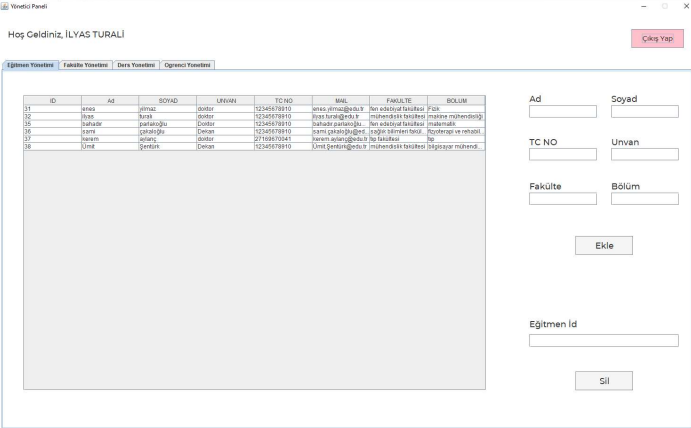
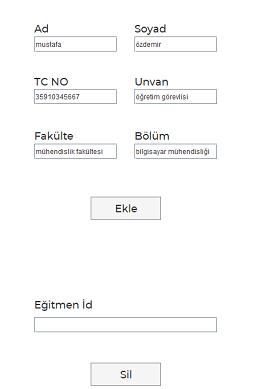
The code above works when the add instructor button is pressed. According to this code, it is first checked that the fields are filled. Afterwards, if the fields are full, the data is assigned to the related object with a setter. Then the method of adding the instructor to the database works in the if block. The table is updated according to the boolean type result returned from here and the user is informed. Finally, the fields are cleared.

public boolean addInstructor(String instructorFirstName, String instructorLastName, String identityNumber, String degree, String facultyName, String departmentName) {

		String query = "INSERT INTO instructors (first_name,last_name,degree,tc_no,faculty_name,department_name,department_id) VALUES (?,?,?,?,?,?,?)";
		boolean kontrol = true;
		try {
			state = conn.createStatement();
			preparedStatement = conn.prepareStatement(query);
			preparedStatement.setString(1, instructorFirstName);
			preparedStatement.setString(2, instructorLastName);
			preparedStatement.setString(3, degree);
			preparedStatement.setString(4, identityNumber);
			preparedStatement.setString(5, facultyName);
			preparedStatement.setString(6, departmentName);
			preparedStatement.setInt(7, dp.getFetch(departmentName).getId());
			if(preparedStatement.executeUpdate() == 0)      //Sorguyu çalıştırır
				kontrol = false;
		} catch (SQLException e) {
			e.printStackTrace();
		}

		return kontrol;
	}
public void updateInstructorModel() {
		DefaultTableModel clearModel = (DefaultTableModel) table_instructor.getModel();
		clearModel.setRowCount(0);

		instructor2.getAllInstructors().forEach(e -> {
			instructorData[0] = e.getId();
			instructorData[1] = e.getFirst_name();
			instructorData[2] = e.getLast_name();
			instructorData[3] = e.getDegree();
			instructorData[4] = e.getIdentityNumber();
			instructorData[5] = e.getMail();
			instructorData[6] = e.getFacultyName();
			instructorData[7] = e.getDepartmentName();
			instructorModel.addRow(instructorData);
		});

	}
// ********** INSTRUCTOR Model **********
		instructorModel = new DefaultTableModel();
		Object[] colInstructor = new Object[8];
		colInstructor[0] = "ID";
		colInstructor[1] = "Ad";
		colInstructor[2] = "SOYAD";
		colInstructor[3] = "UNVAN";
		colInstructor[4] = "TC NO";
		colInstructor[5] = "MAIL";
		colInstructor[6] = "FAKULTE";
		colInstructor[7] = "BOLUM";
		instructorModel.setColumnIdentifiers(colInstructor);
		instructorData = new Object[8];
		instructor.getAllInstructors().forEach(e -> {
			instructorData[0] = e.getId();
			instructorData[1] = e.getFirst_name();
			instructorData[2] = e.getLast_name();
			instructorData[3] = e.getDegree();
			instructorData[4] = e.getIdentityNumber();
			instructorData[5] = e.getMail();
			instructorData[6] = e.getFacultyName();
			instructorData[7] = e.getDepartmentName();
			instructorModel.addRow(instructorData);
		});

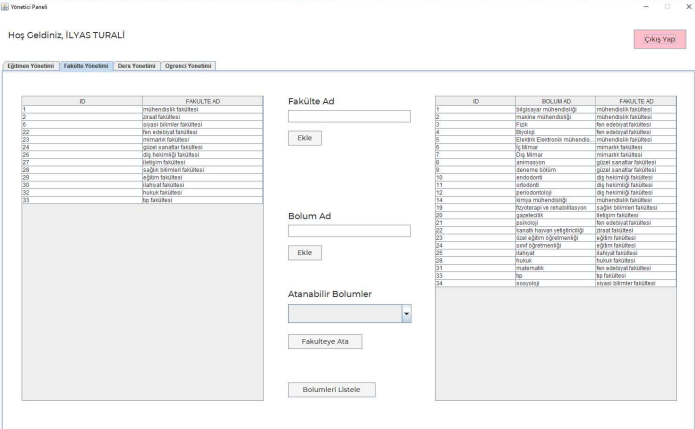
With this panel, the administrator can view the faculties and departments in the system. Along with these, new faculties or departments can be added to the system. If there is an unassigned department, it can be assigned to the relevant faculty by selecting it from the "Assignable departments" menu..
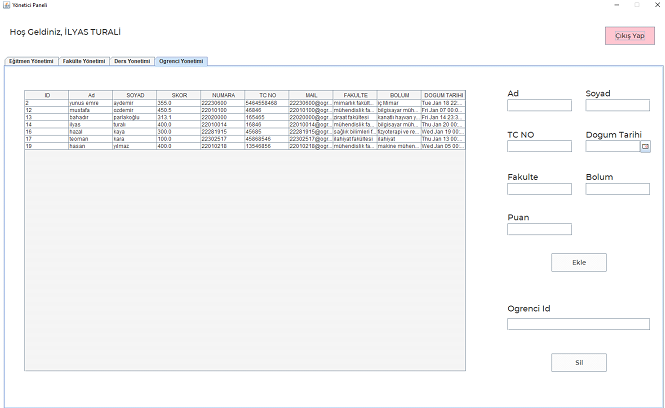
In this panel, the administrator can view students, update or delete existing students, as well as adding new students..
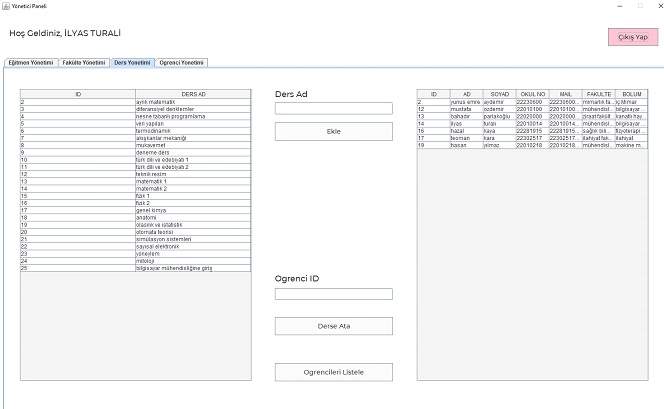
In this panel, the administrator can assign an existing student to a lecture, add a new lecture to the system, or update or delete an existing lecture.
