- You have information on videos for a show, a list of images associated with a show, and a list of video ads associated with a show all considered "assets".
- Each asset has an ID, a name, a type indicator, a URL, and an expiration date.
- Videos have a field that indicates if it is a movie, a full episode or a clip.
- Image assets can be represented by a base asset.
- Ad assets include a field for a product description.
- Containers describe a collection of assets.
- Containers can be considered a "show" with information that includes an ID, name, description, and assets.
- Create a program that generates at least one container with many assets (at least one of each type) with all properties set.
- The program should visit each asset and print information about that asset specific to the type of asset
- Java 1.8
- Gradle 4.0 (Building the deployment package)
- Clone the repository or download the zip file to a local file and unzip it.
- Bring in the project in your favorite IDE as a Gradle Project or if Windows recognizes gradle on PATH open a command prompt and redirect to the directory that the project was unzipped.
- Invoke the gradle command 'gradle clean build' to generate the executable jar. You should see a bootJar task get executed which will package the executable jar in the build\libs directory as rocket-coding-challenge-1.0.jar.
- From there you can execute 'java -jar rocket-coding-challenge-1.0.jar' where you will see the following output.

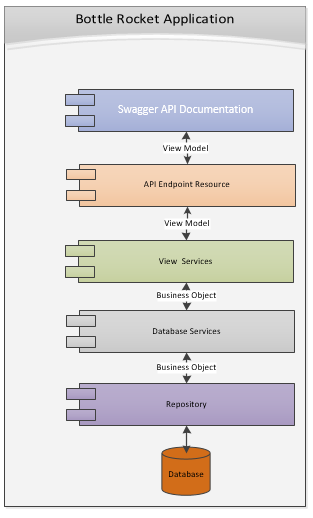
The application was developed as a micro service application using Spring Boot that can be deployed out on cloud provider of your choice. The application has a REST based API endpoints that enable any user interface to consume the content through standard HTTP calls.The application is self-contained as a fat jar with embedded Tomcat 8.5.31 web server already included within it. The application is leveraging an embedded in-memory H2 database that stores the database schema to remove any install dependencies but can easily be swapped out to bind to a JPA compliant RDBMS as needed (e.g MySQL, Postgres, Oracle).
The application leverages the Factory Pattern to encapsulate creation logic for media assets that are relevant to the media container. For this initial coding challenge, a ShowAssetFactory was developed to encapsulate the specific logic on instantiating the videos, images, and advertisements related to a story. New Factories can be developed in the future that support creating new media assets as new media containers such as Movies, and Music Albums with minimal updates. The application also leverages the Adapter pattern to do the necessary transforms between the Business Object representation and the View representation on the object to provide an easily consumable payload for the interface.
The Application has been designed with a clear separation of concerns that provide the necessary interfaces between the database access tier and view model tier that enable flexibility of swapping out the implementations as needed in the future. Application also leverages dependency injection principles to bring in dependant components and services that support these layers.
The application was designed with flexibility in mind and being able to introduce new media assets in the future as needed that inherit from Media Asset base table. The below is the ERD model developed to support the requirements.
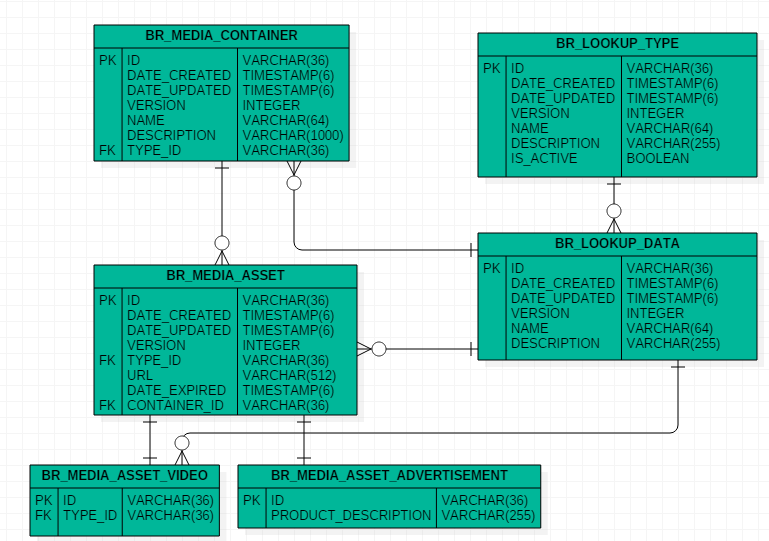
The Lookup Endpoint Resource is a set of API interfaces to retrieve common lookup information such as the various types of media assets, the types of video for video assets to capture movie, full episode, or clips. These lookup references are associated with the major business objects such as the media containers and media assets that are associated with the media container.
If you want to access the Swagger API documentation, once the application is launched redirect to http://localhost:8080/api where you will see the below screenshot with description on the endpoints.

If you want to see a collection of shows that were loaded with sample media assets associated for the 2 shows loaded into the database you can invoke a GET request against http://localhost:8080/v1/bottlerocket/media/containers/types/SHOW to validate the results.
You should see a representative JSON result come back from the API as shown here:

If you want to see a specific show information and its associated media assets associated a user can invoke a GET request at http://localhost:8080/v1/bottlerocket/media/containers/{id} with the identifier for the media container based on the previous endpoint's response output.
- Authentication/Authorization of Endpoints to protect API resource data access using OAuth 2 JSON Web Tokens (JWT).
- Add creation/update endpoints (POST/PUT) to support creation of new media containers, media assets, and even new lookup options for the Container Types, Media Types, and Video Types.
- Add a GCP Cloud Function/AWS Lambda endpoint that interacts with a open source API such as Trakt.tv to consume live media content such as shows and pulls associated content for the show.
I hope this sample application provides you a demonstraton of my expertise in providing Bottle Rocket the out of the box thinking and work ethic in going above and beyond the customer requirement to provide a compelling experience to our customers to make Bottle Rocket the partner of choice.