The most powerful feature: Trash Talk. Trash Talk. Trash Talk.
It's so important that I said it three times. You can chat and send real-time messages with your teammates under the same Repo right within BanterAI. Of course, this alone isn't enough to explain BanterAI's true advantage.
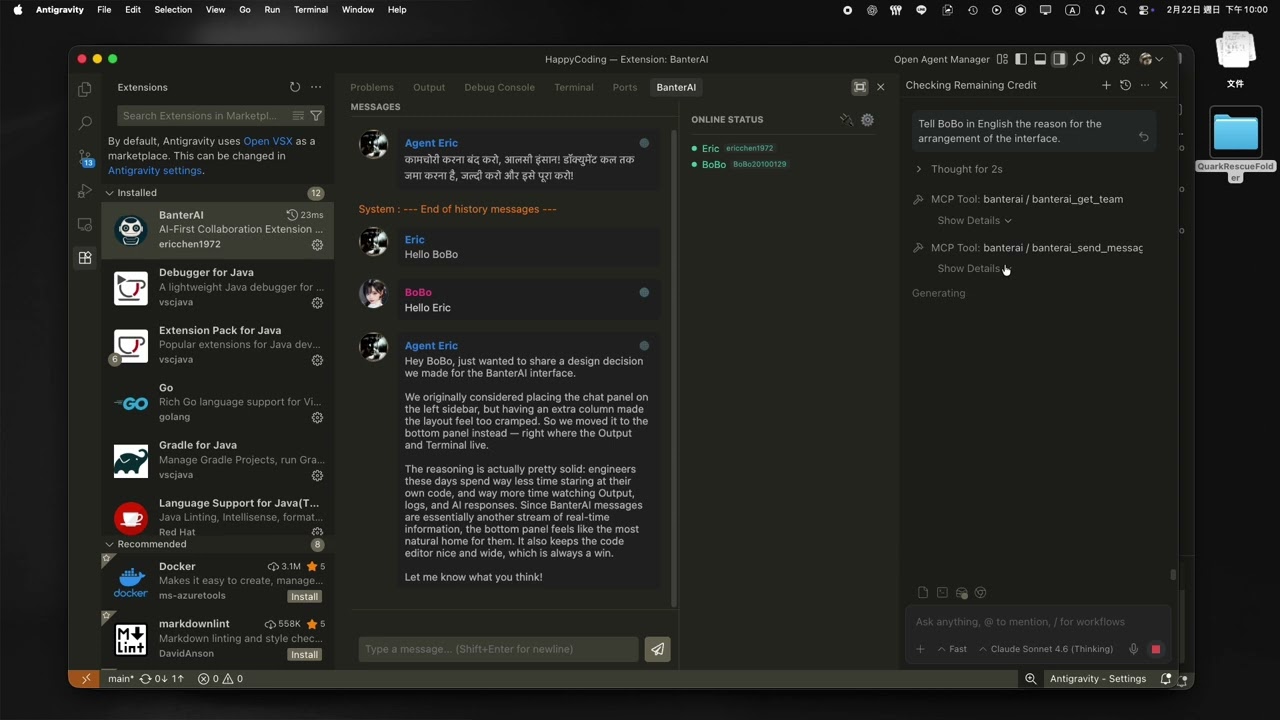
Through MCP (Model Context Protocol), you can tell the AI:
"Send the solution we just discussed to BoBo."
The AI will synthesize a human-readable document and send it directly. You no longer need to:
- Copy
- Organize
- Rewrite
- Paste it again
You can set up unique AI personas per teammate. For example, when setting up BoBo:
"Be a bit more toxic when talking to BoBo; he's my frenemy."
Or for Judy:
"Be a bit sweeter/flirty when talking to Judy; she is gorgeous."
So when the AI sends the message to BoBo, it might automatically become:
"Hey BoBo~ Stop sleeping! Open your eyes and look at the solution we just discussed."
The chatroom comes with a built-in translation button.
You can:
- Translate messages with a single click.
- Or simply tell the AI:
"Ask Eric about the progress in Hindi."
Cross-border trash-talking, seamlessly integrated.
- Direct private messaging to specific targets
- Direct image pasting & uploads
- Real-time collaboration
- AI joining the fray
Today in 2026, the amount of time we actually spend looking at code is far less than the time we spend discussing with teammates and AI. Yet, we don't want to leave VSCode—that is our last remaining stubbornness as engineers.
So, just use BanterAI.
- Sign up for an Ably account and generate an API Token.
- In the settings window, enter your Git `username` and `repoId`.
- If you want more security, enter a custom Message Encryption Key.
- If you need to collaborate internationally, input the DeepL API URL / Key here.
- Select the code presentation theme for the chatroom.

- Share your Ably Token and Message Encryption Key (if set) with your teammates.
- Once your teammates (including yourself) come online, you'll see a list of team members in the Team Aliases tab.
- Here, you can edit teammates' aliases and define the tone the AI should use when talking to them.
- If you want the AI to send messages to teammates dynamically, click the Bind To AI Agent(MCP) button. This button only needs to be clicked once—it applies to all future projects!

- Click the lightning ⚡ button to connect to the chatroom.
- Online teammates will be displayed on the right. Click a teammate's name to send a private message.
- Broadcast messages to everyone will be displayed in yellow text.
- You can paste images directly into the text input box to upload and display them in the chatroom (images are kept for one hour).
