You earned well this year.
Do you know where it went?
Just ask Claude.
A local-first, AI-native CLI for overseas stock investors.




npm install -g firma-app
Track your portfolio, log trades, and analyze monthly cash flow — all from your terminal, all stored on your machine. Drop-in MCP integration means Claude reads, writes, and reasons about your finances directly. No vendor lock-in. No cloud sync. No financial data leaving your laptop.

You:     How is my portfolio doing?
Claude:  Total market value is $147,509, up +$55,870 (+60.9%) from cost basis.
         TSLA (392 shares) is driving most of the gain.

You:     Spending feels high this month. How does it compare to last year?
Claude:  March 2026 expenses were $3,050 — up 18% vs. March 2025.
         Savings rate dropped from 41% to 34%.

You:     I just bought 15 shares of AAPL at $211. Log it.
Claude:  Done — AAPL 15 shares @ $211.00 recorded for 2026-04-25.

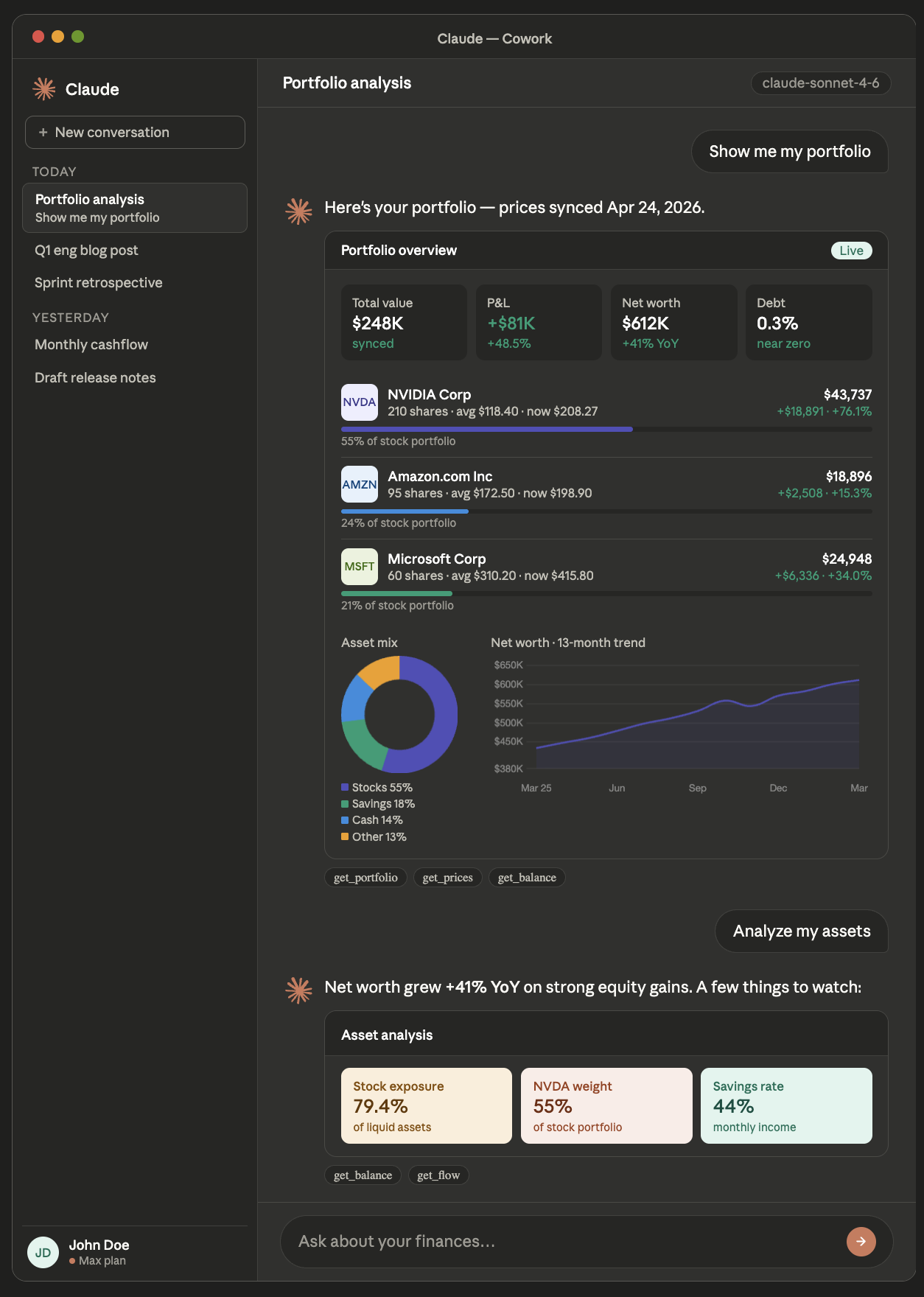
You:     Give me a full overview of my finances with charts.
Claude:  [renders live portfolio dashboard — holdings, net worth trend, asset mix, cash flow]
- Local-first by design. Your transactions, balances, and cash flow live in
~/.firma/firma.db— a single SQLite file. Nothing syncs anywhere unless you ask it to. - MCP-native. Every CLI command has a matching MCP tool, so Claude can do everything you can — analyze, log, reconcile — through natural conversation.
- Built for overseas investors. Multi-currency support (USD, KRW, EUR, JPY, and more), fxratesapi auto-conversion, and Finnhub-powered prices for U.S. equities.
- Transactions as source of truth. No holdings table to drift out of sync — your portfolio is always derived from your trade log. Buy/sell/deposit/dividend/tax all supported.
- Developer-first UX.
--jsonoutput on every read command, scriptable, pipe-friendly. Three clean verb groups:add,show,report.
# 1. Install
npm install -g firma-app

# 2. Set your Finnhub key (free at finnhub.io)
firma config set finnhub-key YOUR_KEY

# 3. Connect Claude Desktop
firma mcp install
# Restart Claude Desktop — that's it.

# 4. Add your first trade and sync prices
firma add txn
firma sync
Already have data? Skip to firma show portfolio and let Claude take it from there.
All financial data is stored in ~/.firma/firma.db — a local SQLite file only you can access. Nothing is sent to Firma servers.
- Prices → Finnhub, called directly with your own API key
- Exchange rates → open.er-api.com (no auth required)
- Claude reads data → local process-to-process via MCP protocol
Your numbers never leave your machine.
Three verb groups: add (input), show (read, --json everywhere), report (aggregated, --json everywhere).
| Command | What it does |
|---|---|
firma add txn |
Record a transaction (buy / sell / deposit / dividend / tax) |
firma add balance [-p YYYY-MM] |
Monthly asset & liability snapshot |
firma add flow [-p YYYY-MM] |
Monthly income & expense entry |
firma add monthly [-p YYYY-MM] |
Balance + flow in one flow (month-end) |
firma show portfolio |
Holdings overview with P&L (auto-syncs prices) |
firma show txns [ticker] |
Transaction history with running avg cost |
firma show balance / flow [-p YYYY-MM] |
Stored entries for a period |
firma show news / insider / financials / earnings <ticker> |
Finnhub data |
firma report |
Net worth trend + cash flow charts |
firma report balance / flow / settle |
Targeted views |
firma report -c USD |
Display in USD, EUR, JPY, CNY, or GBP |
firma edit txn [id] |
Edit a transaction |
firma edit balance / flow [period] |
Edit a monthly snapshot (existing values pre-filled) |
firma delete txn [id] |
Delete a transaction |
firma delete balance / flow [period] |
Delete all entries for a period (alias rm) |
firma sync |
Fetch latest prices from Finnhub |
firma mcp install |
Register MCP server in Claude Desktop |
firma config set finnhub-key KEY |
Set Finnhub API key |
firma config set db-path PATH |
Use a custom database location |
Available in Claude Desktop after firma mcp install. Same add_* / show_* / report_* shape as the CLI.
| Tool | What it does |
|---|---|
add_txn / edit_txn / delete_txn |
Stock transaction CRUD |
add_balance / add_flow |
Upsert (acts as edit when the composite key matches) |
delete_balance / delete_flow |
Drop entries by period (or single composite key) |
show_portfolio |
Holdings with P&L, avg cost, market value |
show_txns |
Transaction history (filterable by ticker) |
show_balance / show_flow |
Stored entries (filterable by period) |
show_prices |
Cached price snapshots |
show_news / show_insider / show_financials / show_earnings |
Finnhub passthroughs |
report_settle |
Single-period summary with net_worth + net_flow |
sync_prices |
Refresh prices from Finnhub |
See CONTRIBUTING.md for architecture overview and extension points.
Requires Node.js 22+ and Yarn Berry.
corepack enable
yarn install

yarn dev:cli show portfolio    # CLI dev mode
yarn typecheck                 # Full type check
Default DB is ~/.firma/firma.db. To use a separate file during development:
firma config set db-path ./dev.dbMIT © Evan Moon