Bug: Page becomes empty when an input is displayed in a "popup" in Chrome on Android #24465

Description

Description: Page becomes empty when an input is displayed in a "popup"; works on desktop, doesn't work in Android Chrome. This is a very specific scenario, please see the example repo and steps below. I must say, I'm not 100% sure this is a react problem, and I have already opened an issue with Chrome just in case; and, of course, it could be my mistake, too! Thank you for taking a look in advance.
React version: I've tried both with "react": "^18.0.0" and "react": "^17.0.2", same problem in both. The example repo is built with 18.0.0.
Desktop Chrome version (where the example works): Version 100.0.4896.127 (Official Build) (arm64)
Android Chrome version (with the bug): 100.0.4896.127 or newer 101.0.4951.41 on Android 9, Build/ppr1.180610.011.
Steps To Reproduce
I have built this little app specifically to reproduce the bug. I apologise that it's more than a couple of lines, but this is the smallest example I could boil it down to.
https://github.com/smartpuffindev/chrome_bug_input
Specifically, the code in 1d6b1fa is showing the problem.
I deployed it here for the convenience of testing: https://chrome-bug-input.netlify.app/
Steps to reproduce:
Try the following both on Chrome desktop and on Android. Observe the difference after step 4.
(1) Clone the repo, run npm install and npm start. Or go to this link (already deployed): https://chrome-bug-input.netlify.app/
(2) Open the page on desktop and on an Android phone in Chrome v.101.0.4951.41 (I think it's the last version at the moment). Observe that there is one input "input111" and one button "Step1: Open popup".
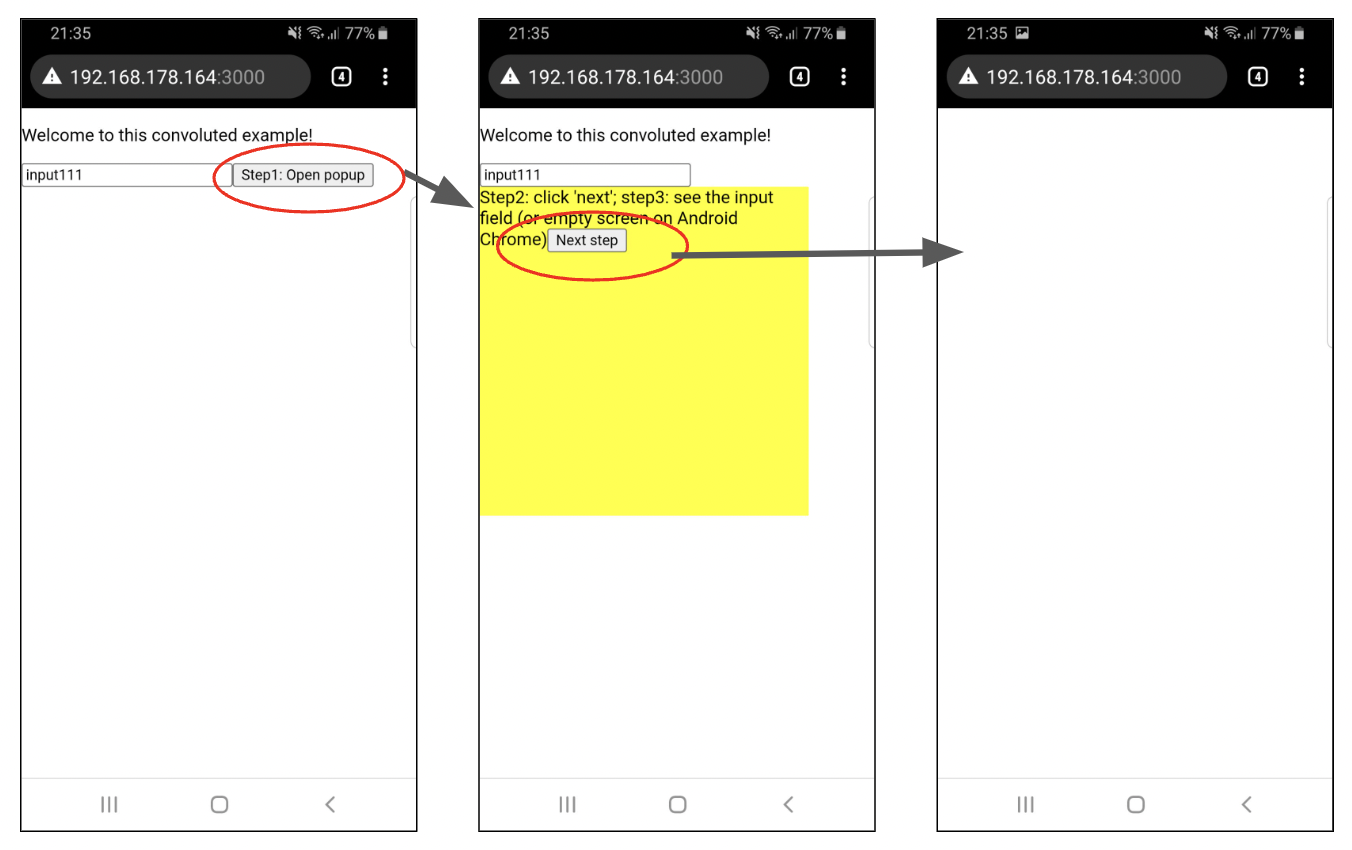
(3) Click the "Step1: Open popup" button. Observe a yellow "popup" with one button "Next step" inside.
(4) After clicking the "Next step" button, observe the yellow popup.
Expected result:
(5) The yellow popup now contains an input with text '123' inside. This is what I see on desktop.
Actual result:
(5) On Android Chrome, everything disappears from the page, I see an empty white page as if there's an empty html. See screenshot:
Link to code example:
https://github.com/smartpuffindev/chrome_bug_input
Deployed here for convenience:
https://chrome-bug-input.netlify.app/
The current behavior
On desktop: the yellow popup displays the input field on step 5.
On mobile: everything disappears from the page, I see only a white screen.
The expected behavior
I expect the page on Android to show the yellow popup and the input inside it, just like in desktop Chrome.
See screenshot below for what it should look like on Android.
Additional info
Please note that if you make a change in the code and don't refresh the page (but it's refreshed automatically with npm start), sometimes the problem disappears, and the popup with the input opens as expected. But if you refresh the page with the refresh button, then the problem is back again.
There are several possible changes in the code I can make to make the problem "go away" - these are not fixes, but perhaps they may help investigate:
(1) On the step 2, there is only one input shown on the page, with the text "input111". If this input is removed altogether, the Android Chrome behaves exactly like it is expected.
(2) It also behaves as expected if there are two or more input on the "original" page, like this:
<input value="input111" onChange={()=>{}} />
<input value="input222" onChange={()=>{}} />
See screenshot:

(3) Alternatively, if the end input with the value "123" has en empty value, it also behaves as expected:
{step === 2 && <input value="" onChange={()=>{}} />}
(4) Another option: if the yellow "popup" doesn't have position:absolute in the style, like this - then it works:
<div style={{ background: 'yellow', width: '300px', height: '300px' }}>
(5) Finally, if the last input you see on step 5 is replaced with another element, it works:
{step === 2 && <p>This is not an input</p>}
If all inputs are replaced with textarea, the problem is the same. However, if there are inputs on the original page and a textarea inside the popup, then it works.
I've tried adding different keys (key="111" etc) to each input, thinking that React might try to reuse the controls somehow, and it didn't help.
I hope this is clear, even though I explained it in a convoluted way, perhaps. There is a possibility that this is my mistake, please let me know if I messed up something - I'm still new to react, will be happy to hear that the problem is mine.
Please let me know if you need more info. Thanks in advance!