Rewrite of Ninjas, a sample slicer audio plugin. This plugin uses the DPF for the creation of audio plugins in lv2 and vst2 formats. A stand alone jack app is also compiled
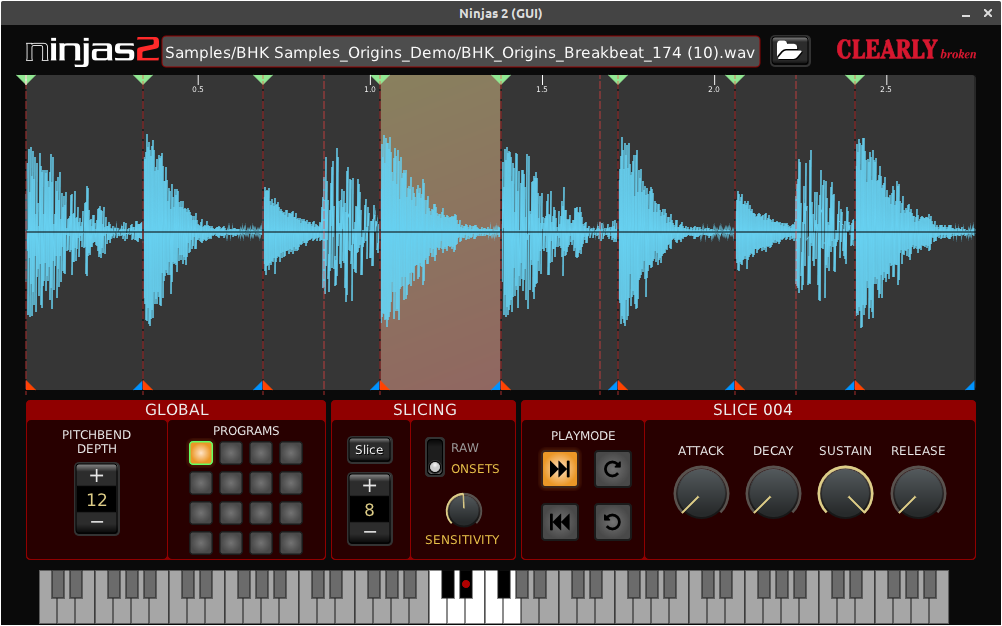
Easy to use sample slicer, quick slicing of sample and mapping slices to midi note numbers. The target platform is Linux.
Primarily targeted at chopping up loops or short ( ≈ 10 - 20 seconds) samples. Think drum loops, vocal chops etc. Currently there's no limit on imported sample lenght. User can play the slices using midi notes and change the pitch with midi pitchbend.
-
- load samples in audio formats as provided by libsndfile
- load mp3
- highlight slice when midi note is received
- maximum of 128 slices
- slices 0 to 67 are mapped to midi note 60 to 127
- slices 68 to 127 are mapped to midi note 0 to 58
- slices can me snapped to onsets as detected by aubio
- each slice has ADSR
- each slice has 4 playmodes :
- one shot forward
- one shot reverse
- loop forward
- loop reverse
- pitching of samples (+/- 12 semitones) via midi pitchbend
- user editable slice start and end points
- note: slices can not overlap
- dragging the top marker edits both start and end point, keeping the slices continious
- dragging the bottom markers edits the the start or end point of a slice.
- programs : store and retrieve up to 16 configurations of slices
- normal click restores state
- shift click copies current state to new location
- play marker in waveform display
- add/remove slices in waveform display : double click within 10 px of slice start/end to add or remove slice
-
- exponential curves in ADSR
- adding a bar:beat:ticks ruler for easier lining up slice points
-
- timestretch and pitch samples using rubberband
- overlay slice info on slices in waveform display
- resizable user interface
Dependencies
- libgl1-mesa-dev
- libx11-dev
- libsndfile1-dev
- libsamplerate0-dev
If you want a standalone jack binary install either libjack-dev or libjack-jackd2-dev
git clone --recursive https://github.com/rghvdberg/ninjas2.git
cd ninjas2
make
There is no make install/path/to/ninjas2/bin/, just copy the binaries to a appropiate location.
