


Language-aware formatting and inline diagnostics for fenced code blocks in Markdown files.
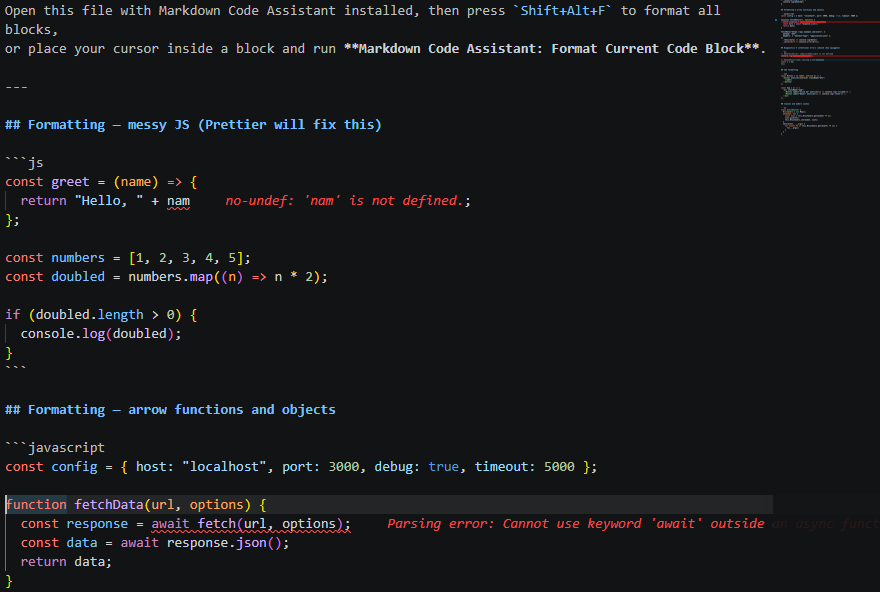
Markdown Code Assistant treats the code examples inside your .md files as first-class citizens — routing them through the same formatters you use for standalone source files, and surfacing errors directly in the Markdown editor.
- Format code blocks — sends each fenced block through Prettier, Black, or shfmt and writes the result back, leaving all surrounding Markdown untouched.
- Inline diagnostics — runs syntax and lint checks on code blocks and maps errors back to their exact lines in the Markdown file (Problems panel + gutter icons + inline text).
- Status bar item — a
✓ Markdown Code Assistindicator in the status bar shows when a Markdown file is active, transitions to⚠ N issueswhen diagnostics find problems, and briefly shows✓ Formatted N blocksafter a format operation. - Ignore directive — add
@md-assistant-ignoreto any fence's info string to exclude that block from formatting and diagnostics entirely (e.g.```js @md-assistant-ignore). - Zero-install shell support — shell (
sh) formatting delegates to the mkhl.shfmt extension (auto-installed); ShellCheck diagnostics delegate to timonwong.shellcheck (auto-installed). No system tools required. - Zero-install Python formatting — delegates to the ms-python.black-formatter extension (auto-installed). Python itself is not required for formatting.
- Deep Python diagnostics — Ruff runs fully in-process via
@astral-sh/ruff-wasm-nodejs(bundled, no install required). Catches undefined names, unreachable code, style issues, and more. Falls back topyflakesCLI, thenpy_compileif WASM fails. - SQL formatting + diagnostics —
prettier-plugin-sqlis bundled; SQL blocks are formatted in-process and parse errors are surfaced as diagnostics. No external tools required. - Format on Save — optional auto-format whenever you save a Markdown file.
- Format Document —
Shift+Alt+Fformats all code blocks via VS Code's built-in shortcut. - Graceful degradation — if a required tool is not available, the extension shows a clear message and skips those blocks without affecting others.
| Requirement | Notes |
|---|---|
| VS Code ≥ 1.85 | |
| Python runtime | Only for Python block diagnostics fallback (pyflakes / py_compile) — not needed when Ruff WASM runs |
| ms-python.black-formatter | Python formatting — auto-installed on activation. Python itself is not required. |
| mkhl.shfmt | Shell (sh) formatting — auto-installed on activation. No system shfmt needed. |
| timonwong.shellcheck | Shell (sh) diagnostics — auto-installed on activation. No system shellcheck needed. |
Prettier, prettier-plugin-sh, prettier-plugin-sql, js-yaml, postcss, parse5, ESLint, the TypeScript compiler, and @astral-sh/ruff-wasm-nodejs are all bundled — no installation required.
Search for Markdown Code Assistant in the Extensions view (Ctrl+Shift+X).
code --install-extension md-code-assist-0.1.0.vsixOpen a Markdown file, then use the Command Palette (Ctrl+Shift+P):
| Command | Description |
|---|---|
Markdown Code Assistant: Format All Code Blocks |
Format every fenced block in the file |
Markdown Code Assistant: Format Current Code Block |
Format only the block the cursor is inside |
Markdown Code Assistant: Show Code Block Diagnostics |
Run diagnostics on all blocks |
Markdown Code Assistant: Diagnose Current Code Block |
Run diagnostics on the block at cursor |
| Language | Fence labels |
|---|---|
| JavaScript | js, javascript |
| TypeScript | ts, typescript |
| JSON / JSONC | json, jsonc |
| YAML | yaml, yml |
| HTML | html |
| CSS / SCSS / Less | css, scss, less |
| GraphQL | graphql, gql |
| Markdown (nested) | markdown, md |
| SQL | sql |
| Language | Extension | Purpose |
|---|---|---|
| Python | ms-python.black-formatter | Formatting |
Shell (sh) |
mkhl.shfmt | Formatting |
Shell (sh) |
timonwong.shellcheck | Diagnostics |
If the VS Code extensions above are unavailable, the extension falls back to the system CLI tools if installed:
| Language | Tool | Purpose | Install |
|---|---|---|---|
| Python | pyflakes | Diagnostics (undefined names) | pip install pyflakes |
| Python | Black | Formatting | pip install black |
Shell (sh) |
shfmt | Formatting | brew install shfmt |
Shell (sh) |
shellcheck | Diagnostics | brew install shellcheck |
All settings are under mdCodeAssist.* and can be set at User, Workspace, or Folder scope.
| Setting | Default | Description |
|---|---|---|
format.enabledLanguages |
["javascript","typescript","python","json","yaml","html","css","shell","graphql","markdown","sql"] |
Languages to format |
format.triggerMode |
"onCommand" |
When to format: onCommand, onSave, onType |
diagnostics.enabledLanguages |
["javascript","typescript","python","json","yaml","css","html","shell","sql"] |
Languages to diagnose |
diagnostics.triggerMode |
"onCommand" |
When to diagnose: onCommand, onSave, onType |
formatters.blackPath |
"black" |
Path to Black CLI executable (fallback) |
formatters.shfmtPath |
"shfmt" |
Path to shfmt CLI executable (fallback) |
decorations.showGutterIcons |
true |
Colored gutter icons for diagnostics |
decorations.showInlineErrors |
true |
Inline error text after affected lines |
| Mode | Behavior |
|---|---|
"onCommand" |
Default. Nothing runs automatically — you call the command when you want results. |
"onSave" |
Runs every time you save the Markdown file. |
"onType" |
Watch mode — runs continuously as you edit (debounced 500 ms). |
Tip: Prefix any fence with
@md-assistant-ignoreto permanently exclude a block from all processing:```python @md-assistant-ignore
Example — format and diagnose on save:
Example — watch mode (format and diagnose as you type):
{
"mdCodeAssist.format.triggerMode": "onType",
"mdCodeAssist.diagnostics.triggerMode": "onType"
}Example — full custom setup:
{
"mdCodeAssist.format.enabledLanguages": [
"javascript",
"typescript",
"python",
"json",
"yaml",
"html",
"css",
"shell",
"graphql",
"sql"
],
"mdCodeAssist.diagnostics.enabledLanguages": [
"javascript",
"typescript",
"json",
"yaml",
"css",
"html",
"shell",
"python",
"sql"
],
"mdCodeAssist.format.triggerMode": "onSave",
"mdCodeAssist.diagnostics.triggerMode": "onSave"
}- Architecture — pipeline diagrams, module layout, design decisions
- Contributing — dev setup, code style, adding formatters, test guidelines
{
  // Format and diagnose every time the file is saved
  "mdCodeAssist.format.triggerMode": "onSave",
  "mdCodeAssist.diagnostics.triggerMode": "onSave"
}