Did you like background log manager? Give a ⭐️

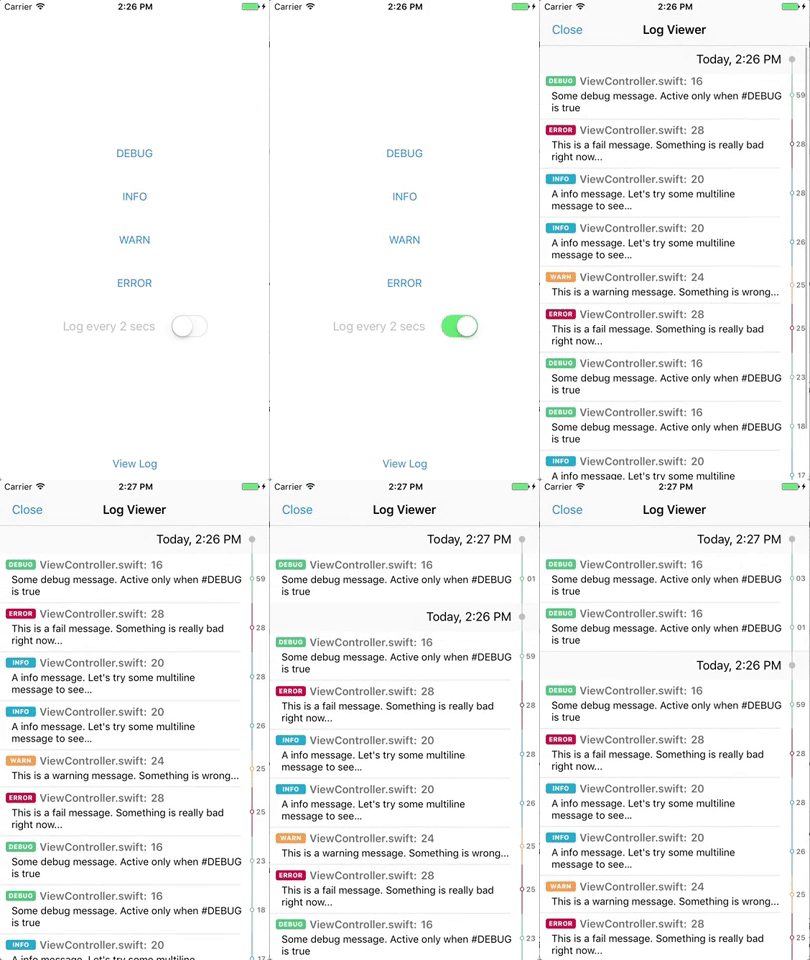
BackLogger is a simple log manager that uses a superfast SqlLite database to store your logs.
- Four types of log:
debug,info,warn,error - Log file, function, line
- Swift 3.0
- Really Fast!
- Nice log viewer interface
- Log drivers: Console and Sql drivers included. You can write your own driver if you need
- Highly customizable
- Well documented
- and more...
CocoaPods is a dependency manager for Cocoa projects. You can install it with the following command:
$ gem install cocoapodsTo integrate BackLogger into your Xcode project using CocoaPods, specify it in your Podfile:
source 'https://github.com/CocoaPods/Specs.git'
platform :ios, '8.0'
use_frameworks!

pod 'BackLogger'
Then, run the following command:
$ pod installIf you want to use our log viewer add this line to your Podfile:
pod 'BackLogger/UI'Backlogger UI requires minimum iOS 9.
Carthage is a decentralized dependency manager that builds your dependencies and provides you with binary frameworks.
You can install Carthage with Homebrew using the following command:
$ brew update
$ brew install carthage
To integrate SideMenu into your Xcode project using Carthage, specify it in your Cartfile:
github "leoneparise/backlogger" "master"
Backlogger provides 4 log functions:
debug(message:String)info(message:String)warn(message:String)error(message:String)Under the hood, these functions uses LogManager shared instance to log your data. LogManager is the Backlogger's main class and has the following signature:
public class LogManager {
  /// Callback used to receive a log event. This function is called when ANY LogManager saves a log.
  public var didLog: DidLogCallback?

  /// Drivers
  public var drivers: [LogDriver]

  /// Main driver is always the first driver in drivers attribute.
  public var mainDriver: LogDriver?

  /// Share instance. Can be customized to meed your needs
  public static var shared: LogManager

  /// Get all logs. Depends if the mainDriver provides this feature
  public func all(byType type: LogType? = nil, offset: Int = 0) -> [LogEntry]?

  /// Log into all drivers
  public func log(file: String = #file, line: UInt = #line, function: String = #function, type: LogType = .debug, message: String)
}
To disable the log database in prodution, put this code in your application(_:didFinishLaunchWithOptions:) method:
if let sqlLogDriver = SqlLogDriver(), let consoleLogDriver = ConsoleLogDriver() {
    #if DEBUG
        LogManager.shared.drivers = [sqlLogDriver, consoleLogDriver]
    #else
        LogManager.shared.drivers = [consoleLogDriver]
    #endif
}
If you want to receive log events, you can use the NotificationCenter and listen to Notification.Name.LogManagerDidLog notification. The object is the LogEntry struct used to store logs. You can achieve the same result setting the function didLog in ANY LogManager instance.
To view your logs you can use our Log Viewer view controller. Just instantiate our BackLoggerViewController and prent in your code:
self.present(BackLoggerViewController(), animated: true)- Save to server in background
- Evict past logs
- Filter and search in Log Viewer View Controller.