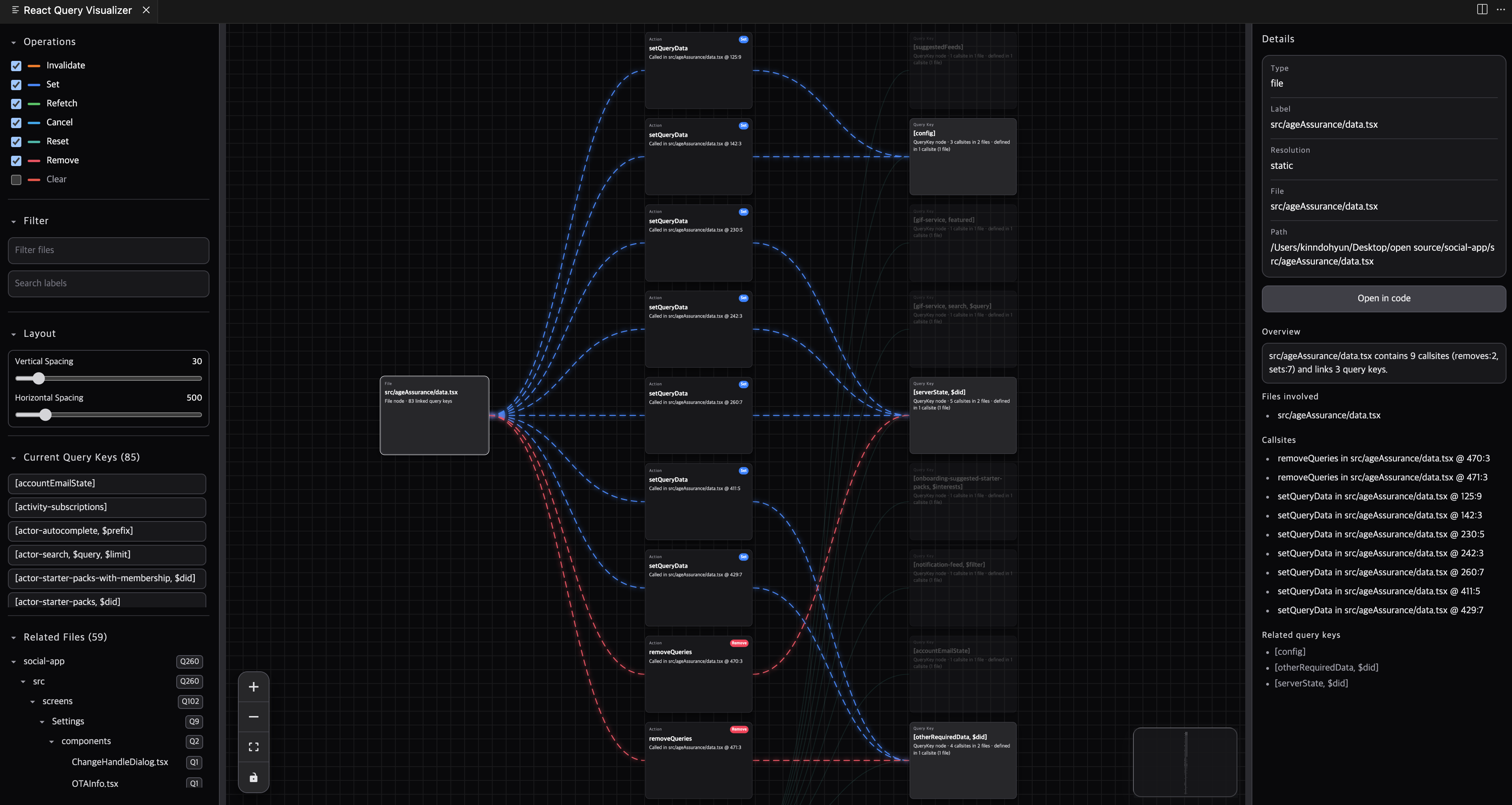
React Query Visualizer is a VS Code extension for TanStack Query (React Query) that helps you debug query keys, cache invalidation/refetch flows, and impacted files with static source analysis.
Useful for searches like React Query visualizer, TanStack Query debugger, React Query dependency graph, invalidateQueries tracker, and React Query VS Code extension.


This project is open source: https://github.com/fe-dudu/react-query-visualizer
If this extension saves you debugging time, please Star ⭐ this repo on GitHub
If this tool helps you, please star the repository and contribute improvements through issues and pull requests.
The extension scans your project on demand and builds a graph:
File -> Action -> QueryKey
It helps answer:
- Where query keys are defined
- Which callsites invalidate, refetch, reset, or clear query caches
- Which files and projects are most impacted
- On-demand scanning (
Scan Now,Scan With Scope) - React Flow graph view with details panel and code reveal
- File/action/query-key linkage with callsite locations
- Wildcard/prefix/exact query-key matching
- Predicate/exact option support for
invalidateQueries,refetchQueries,resetQueries - Monorepo-aware grouping and project-based impact boundaries
- Large-graph safety with query-key grouping/collapsing
- Tunable layout controls in panel (
verticalSpacing: default 30, range 0-300;horizontalSpacing: default 500, range 100-3000) - Related files tree with impact badges
useQueryuseInfiniteQueryuseSuspenseQueryuseSuspenseInfiniteQueryuseQueriesuseSuspenseQueriesusePrefetchQueryusePrefetchInfiniteQueryqueryClient.fetchQueryqueryClient.prefetchQueryqueryClient.ensureQueryDataqueryClient.fetchInfiniteQueryqueryClient.prefetchInfiniteQueryqueryClient.ensureInfiniteQueryData
queryOptionsinfiniteQueryOptions
queryClient.invalidateQueriesqueryClient.refetchQueriesqueryClient.resetQueriesqueryClient.removeQueriesqueryClient.setQueryDataqueryClient.setQueriesDataqueryClient.clearrefetch()from hook results
- Operation filters control mutation relations (
invalidate,refetch,reset,clear). - Query key details include:
- Files involved
- Callsites
- Declared in (when declaration callsites are detected)
React Query Visualizer: Focus Activity ViewReact Query Visualizer: Open Graph PanelReact Query Visualizer: Scan NowReact Query Visualizer: Scan With ScopeReact Query Visualizer: Reveal In Code
rqv.scope.foldersrqv.scope.includerqv.scope.exclude
rqv.scan.maxFileSizeKBrqv.scan.useGitIgnore
rqv.graph.renderer(react-flow)rqv.graph.direction(LR)rqv.graph.layoutEngine(dagre)rqv.graph.verticalSpacing(default:30, min:0, max:300)rqv.graph.horizontalSpacing(default:500, min:100, max:3000)
Requirements:
- Node.js 24.8.0 (
.nvmrc) - pnpm 10+
- Install dependencies:
nvm use
pnpm install- Build:
pnpm run build- Type-check:
pnpm run type-check- Package VSIX:
pnpm run package:vsixExtension publish is automated with GitHub Actions for both marketplaces:
- Workflow file:
.github/workflows/publish-vscode-extension.yml - Trigger: push to
mainor manual run (workflow_dispatch) - Release strategy: Changesets (
.changeset/*) - Secrets:
AZURE_ACCESS_TOKEN(used asVSCE_PATfor VS Code Marketplace)OVSX_ACCESS_TOKEN(used asOVSX_PATfor Open VSX)
Typical release flow:
- Add a changeset in your feature PR (
pnpm changeset) - Merge PR to
main(workflow creates/updates a version PR) - Merge version PR (workflow publishes to VS Code Marketplace and Open VSX)
See contribution guide: CONTRIBUTING.md
Contributions of any size are welcome:
- parser and query-key inference improvements
- graph UX/layout improvements
- performance and stability
- docs and examples
MIT