
- Course Information
- Instructor Information
- Course Description
- Prerequisites
- MDC Learning Outcomes
- Course Competencies
- Required Textbook and Materials
- Supplemental Materials
- Technology Requirements
- Course Content
- Coursework Requirements
- Grading
- Miami Dade College Policies and Guidelines
- Additional Resources
- Syllabus Changes Policy
- Course Policies
- Course ID: CAP 2791C: Power BI - Data Preparation and Modeling
- Class Number: 7391
- Credit: 4 Credits
- Term: Spring 2025
- Term Dates: 1/6/2025 to 5/2/2025
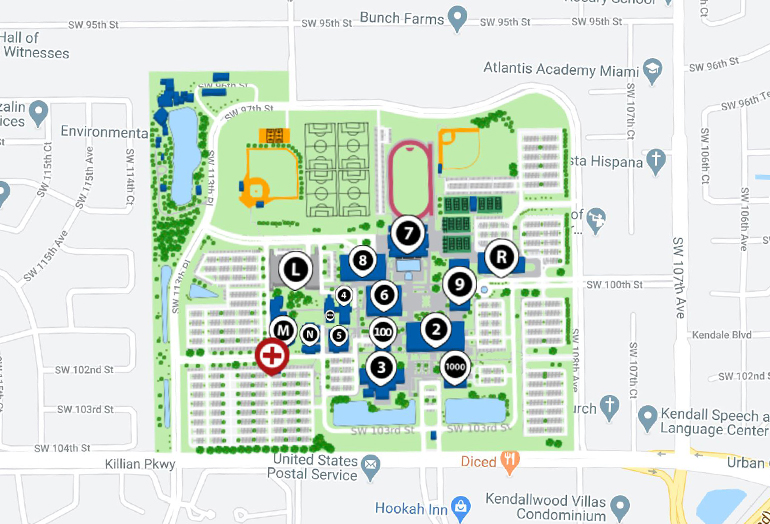
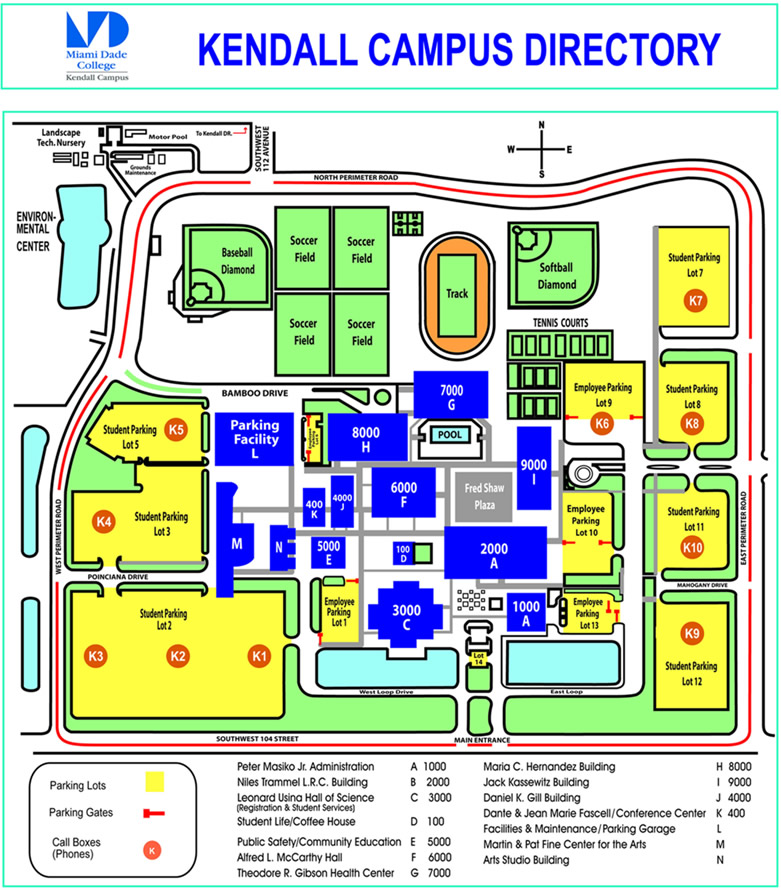
- Room: 6355-01 Kendall Building 6
- Name: Professor C. Marquez
- Inbox: Please use "Inbox" in Canvas (Required communication tool with instructor)
- Email: xxxx@mdc.edu (Use only if experiencing technical difficulties and cannot access the course)
- Phone: 305-237-2080
- Office Hours: Monday: 9:30 AM to 10:30 AM EST or by appointment
- Response Policy: 24 hours Monday through Friday when the college is in session
This course will discuss the various methods and best practices that are in line with business and technical requirements for modeling, visualizing, and analyzing data with Power BI. The course will also show how to access and process data from a range of data sources including both relational and non-relational data. This course will explore how to implement proper security standards and policies across the Power BI spectrum, including datasets and groups. Additionally, the course will discuss how to manage and deploy reports and dashboards for sharing and content distribution.
This course is designed for individuals who develop reports that visualize data from both cloud and on-premises data platforms. No prior experience with Power BI is required. However, students should have:
- A fundamental understanding of core data concepts.
- Knowledge of working with relational and non-relational data in the cloud.
- Knowledge of data analysis and visualization concepts.
- Basic familiarity with computer technology, cloud computing, and the Internet.
This course addresses the following MDC learning outcomes:
- Ingest, clean, and transform data.
- Model data for performance and scalability.
- Design and create reports for data analysis.
- Apply and perform advanced report analytics.
- Manage and share report assets.
The student will demonstrate the ability to:
- Identify different types of data sources (local and remote) and connect to them.
- Change data source settings, select a storage mode, and use PBIDS files.
- Use Microsoft Dataverse and describe its various benefits.
- Choose appropriate query types, use parameters, and identify query performance issues.
- Use an XMLA endpoint for third-party client applications.
- Create a dataflow and describe its various benefits.
The student will demonstrate the ability to:
- Examine data structures.
- Identify data anomalies.
- Interrogate column properties and data statistics.
The student will demonstrate the ability to:
- Resolve inconsistencies, unexpected or null values, and data quality issues.
- Apply user-friendly value replacements.
- Identify and create appropriate keys for joins.
- Evaluate and transform column data types.
- Apply data shape transformations to table structures.
- Combine queries.
- Apply user-friendly naming conventions to columns and queries.
- Leverage the Advanced Editor to modify Power Query M code.
- Configure data loading and resolve data import errors.
The student will demonstrate the ability to:
- Define tables and configure table and column properties.
- Define quick measures.
- Flatten out a parent-child hierarchy.
- Define role-playing dimensions.
- Define relationship cardinality and cross-filter direction.
- Design the data model to meet performance requirements.
- Create a common date table.
- Define the appropriate level of data granularity.
- Apply sensitivity labels.
The student will demonstrate the ability to:
- Apply cross-filter direction and security filtering.
- Create calculated tables, hierarchies, and calculated columns.
- Implement row-level security roles and object-level security.
- Set up the Q&A feature.
The student will demonstrate the ability to:
- Describe the benefits of the DAX library.
- Use DAX to build complex measures.
- Use CALCULATE to manipulate filters.
- Implement Time Intelligence.
- Replace numeric columns with measures.
- Use basic statistical functions to enhance data.
- Create semi-additive measures.
The student will demonstrate the ability to:
- Remove unnecessary rows and columns.
- Identify poorly performing measures, relationships, and visuals.
- Improve cardinality levels by changing data types and using summarization.
- Create and manage aggregations.
- Use Query Diagnostics.
- Windows 10+ or a Virtual Machine or a Browser.
- Introduction to Business Intelligence
- Types of Data Analysis
- Descriptive, Diagnostic, Predictive, Prescriptive, Cognitive
- Univariate, Bivariate, and Multivariate Analysis (with examples and exercises)
- Roles in Data Analytics
- Power BI Ecosystem: Desktop, Service, and Mobile
- Introduction to Power BI Environment
- Deliverable (to be provided by the instructor). 10 points
- Identifying and Connecting to Data Sources
- Storage Modes: Import vs. DirectQuery
- Resolving Data Import Errors
- Deliverable (to be provided by the instructor). 10 points
- Data Profiling Options in Power Query
- Query Performance and Optimization Techniques
- Combining Data: Append and Merge Queries
- Deliverable (to be provided by the instructor). 10 points
- Resolving Data Quality Issues
- Shaping and Transforming Data Tables
- User-friendly Naming Conventions
- Deliverable (to be provided by the instructor). 10 points
- Star Schema Design
- Creating and Managing Relationships
- Role-playing Dimensions and Hierarchies
- Deliverable (to be provided by the instructor). 10 points
- DAX Syntax and Concepts
- Calculated Columns, Measures, and Tables
- Creating Quick Measures
- Deliverable (to be provided by the instructor). 10 points
- Time Intelligence Functions
- Filter Context and CALCULATE Function
- Semi-additive Measures
- Deliverable (to be provided by the instructor). 10 points
- Using Variables in DAX for Optimization
- Performance Analyzer in Power BI
- Query Diagnostics
- Deliverable (to be provided by the instructor). 10 points
- Power BI Report Structure and Best Practices
- Choosing Effective Visualizations
- Conditional Formatting and Tooltips
- Deliverable (to be provided by the instructor). 10 points
- Report Navigation and Filtering
- Using Bookmarks, Buttons, and Drillthrough
- Accessibility Features in Power BI
- Deliverable (to be provided by the instructor). 10 points
- Difference between Reports and Dashboards
- Pinning Visuals and Pages to Dashboards
- Designing Mobile Layouts
- Deliverable (to be provided by the instructor). 10 points
- Using AI Insights and Key Influencers Visual
- Clustering and Outlier Detection
- What-If Parameters and Scenario Analysis
- Deliverable (to be provided by the instructor). 10 points
- Configuring Static and Dynamic Row-level Security
- Creating and Managing Workspaces
- Publishing Reports and Assigning Roles
- Deliverable (to be provided by the instructor). 10 points
- Guidelines for Final Project (Worth 100 Points)
- Reviewing Key Concepts
- Individual/Group Consultation
- Final Project Submission (Worth 100 Points)
- Class Presentations (Worth 50 Points)
- Peer Feedback and Instructor Evaluation
Refer to the official MDC Policies and Guidelines document for detailed information.
- MDC Kendall Entec: Provides resources and support for engineering and technology students at Miami Dade College Kendall Campus.
- MDC College Calendar: Stay updated on important dates, including registration deadlines and holidays.
- MDC Access: Offers support services for students with disabilities, ensuring accessibility and equal opportunity.
- MDC Single Stop: A one-stop resource to help students with financial and personal challenges by connecting them to benefits and resources.
- Canvas: Access course materials, assignments, and communication tools.
- College Policies: Review the college's policies for online learning.
- Kendall Campus Map 1: Detailed map of the Kendall Campus.
- Kendall Campus Map 2: Another map view of the Kendall Campus.
The professor reserves the right to make changes to this syllabus, including course content, schedule, and grading criteria. Any changes will be communicated to students in a timely manner through Canvas.
- A 10% deduction will be applied for each calendar day an assignment is late.
- After 4 days, the assignment will receive a score of 0.
- Each assignment is due on Sunday of the assigned week by 11:59 PM EST (e.g., if assigned on a Wednesday, it is due the following Sunday).
- Attendance is mandatory.
- Authorized absences (based on MDC policies) are permitted, but students are responsible for making up any missed work.
- Attendance accounts for 10% of the final grade.
- Respectful behavior is expected at all times.
- Disruptive behavior, including the use of mobile devices during class for non-academic purposes, is not allowed.
- Active listening and respectful participation in discussions are required.
- Participation is critical to the learning process.
- Students are expected to contribute to class discussions and group activities.
- Failure to participate may negatively impact the final grade.
- Weekly Assignments: 130 Points
- Final Presentation: 50 Points
- Final Project: 100 Points
- Total: 280 Points
| Grade | Percentage | Points |
|---|---|---|
| A | 90% – 100% | 252 – 280 |
| B | 80% – 89% | 224 – 251 |
| C | 70% – 79% | 196 – 223 |
| D | 60% – 69% | 168 – 195 |
| F | Below 60% | Below 168 |