[Feature] Add ability to create Menu groups#384
[Feature] Add ability to create Menu groups#384mallardduck wants to merge 11 commits intofilamentphp:developfrom
Conversation


|
@adam-code-labx how similar is this to your sub resources pattern? |
|
I'm curious to see how an alternative "sub resource" concept would look too. IMHO between this PR and #320 - the filament system would have a pretty robust way to manage sub-resource forms and the navigation grouping. Granted I made these PRs, but I think one strength of this pattern for Navigation groups is that it's very similar to what I've seen how Nova does things. While copying nova isn't necessarily the goal here -behind the way I've implemented this- I do think that providing similarly simple APIs would reduce friction for new users. Especially for users already familiar with Nova hoping to try something open-source. |

|
Hey @danharrin @mallardduck this is good approach for grouping the navigation and could work well for the plugin architecture. My suggestion for the Filament core "Content" in your example should be a resource, perhaps with new trait IsGroupResource which will allow you to set any resource as the parent resource. instead of setting navigationGroupMap you can set everything in the usual navigation properties and set the extra property to define navigationGroup. Within this parent resource class you can setup all the logic for blog etc and then create the posts, categories, tags resources too extend this parent class to share functionality across the resources in the same group. Another idea is to perhaps use this parent resource as a mini overview displaying stats and summary of the resources in this group. Also for the navigation improvements If you check out my last PR I have already started to isolate the Navigation away from the Livewire component so this can simply be used from any component or injected directly in controller and used for tests etc. Also useful if we we need to set multiple navigations. https://github.com/laravel-filament/filament/blob/587c5a5699ab58415ad4b6cebb5488ac84e0a85f/src/Services/NavigationService.php This also cleans up NavigationMenu component. I am a little limited on time at the moment, but I will see if I can put a few extra hours in this weekend to finish at least one of these PR's 😅 |
|
I may need to re-read that to fully understand what you're suggesting. However the "Content" group example here is just that purely a navigational group. Nothing about the Content navigation item has/owns a resource itself nor was it intended to. However the system I've laid out could be extended to allow the top level group to be a link. To facilitate the group page for stats and overview of the group you've discussed. If that's the desired behavior then it could totally support that. Personally though, I've started avoiding that UX pattern in my menu's as it adds unnecessary complexity for non-sighted users. For those users it's often much better for the button to simply open/close the submenu and then have an "Overview" item as the first one in the group. I guess TBH I'm also not following how the jetstream package will tie into overall navigation. Unless do you just mean that code will be refactored into the core package? Well either way just let me know if I need to make changes to this and I'll be happy to make changes. Or if it just won't be useful with w/e plans you guys seem to have feel free to close it and reuse any thing that is still helpful. |
I think you misunderstand how this all works if you think that setting
While I do think there's a benefit of letting a resource be a Group as well as a resource - I do not think that is required for all use cases. With this PR users technically only have to add a single line of code to a resource to group them. Setting that will group everything under a submenu. If all groups had to be Resources as you suggest then -even those that have no model- would have and need to hack around a lot of core concepts of However I think that the suggestion to allow a Resource to implement that interface would be a great way to support both concepts at the same time. Obviously it will need to change for w/e other changes you're planning to make, but this code I added here: if ($resource::hasNavigationGroup()) {
NavigationGroup::group($resource::$navigationGroup)->push(...$resource::navigationItems());
} else {
$this->items->push(...$resource::navigationItems());
}Could end up looking like: if ($resource::hasNavigationGroup()) {
if ($resource instanceof IsResourceGroup) {
NavigationGroup::make($resource::$navigationGroup, null, $resource::$navigationGroupIcon, $resource::$navigationSort)
} else {
NavigationGroup::group($resource::$navigationGroup)->push(...$resource::navigationItems());
}
} else {
$this->items->push(...$resource::navigationItems());
} |
|
@mallardduck This sounds good to me. @danharrin Can I suggest if you can please approve this PR before I work further to extend sub resources, which I am hoping to get some time to work on this Sunday. Thanks. |
|
@adam-code-labx - Legit, I've got some changes in the pipeline I'm working on now. |
|
As I've been working on these changes for supporting the concept of multiple menus...I'm wondering if we should split that into a second effort @danharrin? I.e. I will simply push the commits support for Pages to be sorted into groups so they are symmetrical. This would not include:
However both of those could be added in after @adam-code-labx has been able to wrap up and send over their PRs too. Unless having these changes in right now would help your efforts, Adam? In that case I could still shoot it all over as updates on this PR. |
|
@mallardduck Yeah would prefer to wait until your PR is completed and merged. |
|
@danharrin & @adam-code-labx - I think this is ready for a look over and merge when deemed acceptable. |
 mallardduck
changed the title
mallardduck
changed the title
|
Also - I've prepared this PR for the docs: https://github.com/laravel-filament/docs/pull/11 |

|
Hey @ryanscherler, could I have a design review on this please? |

|
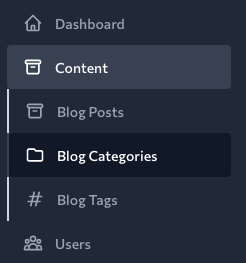
I like this idea a lot - one consideration would be to not have the left borders that seem to be alternating in the menu items? |
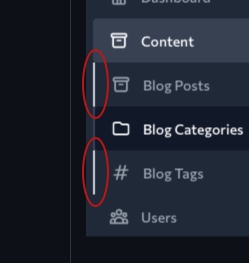
|
Another consideration is not having a background for both the group and the selected item, keep the text white for the group, and then a background on the actual selected item. Keeps things more simple design-wise. |
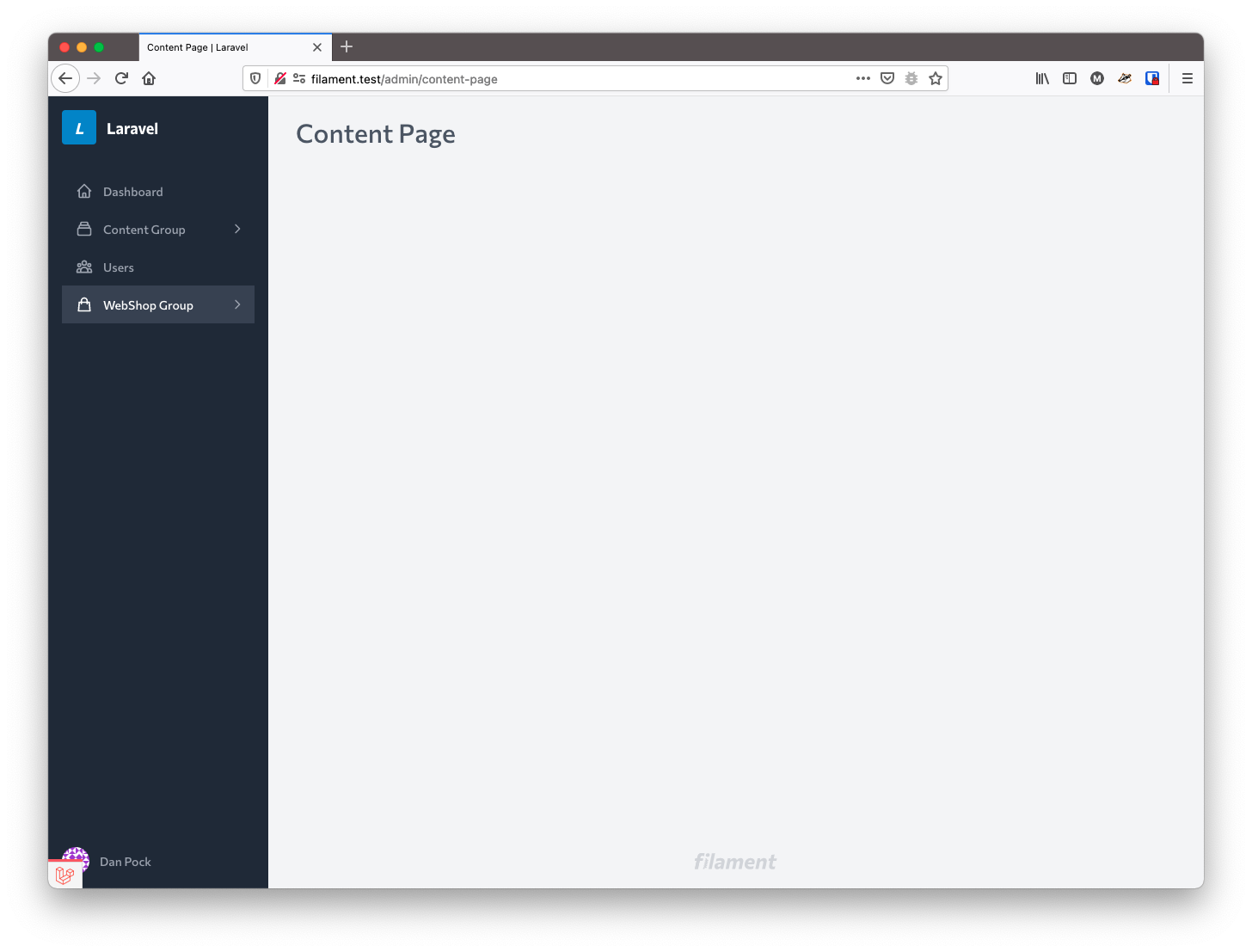
They are not alternating - well I mean in this example they are - however that's an affect of the fact that the middle page is selected. I thought the left boarder color state should also be modified along with the main button color to indicate it being selected. Here's a full page screenshot to help clarify what you're seeing there:
|
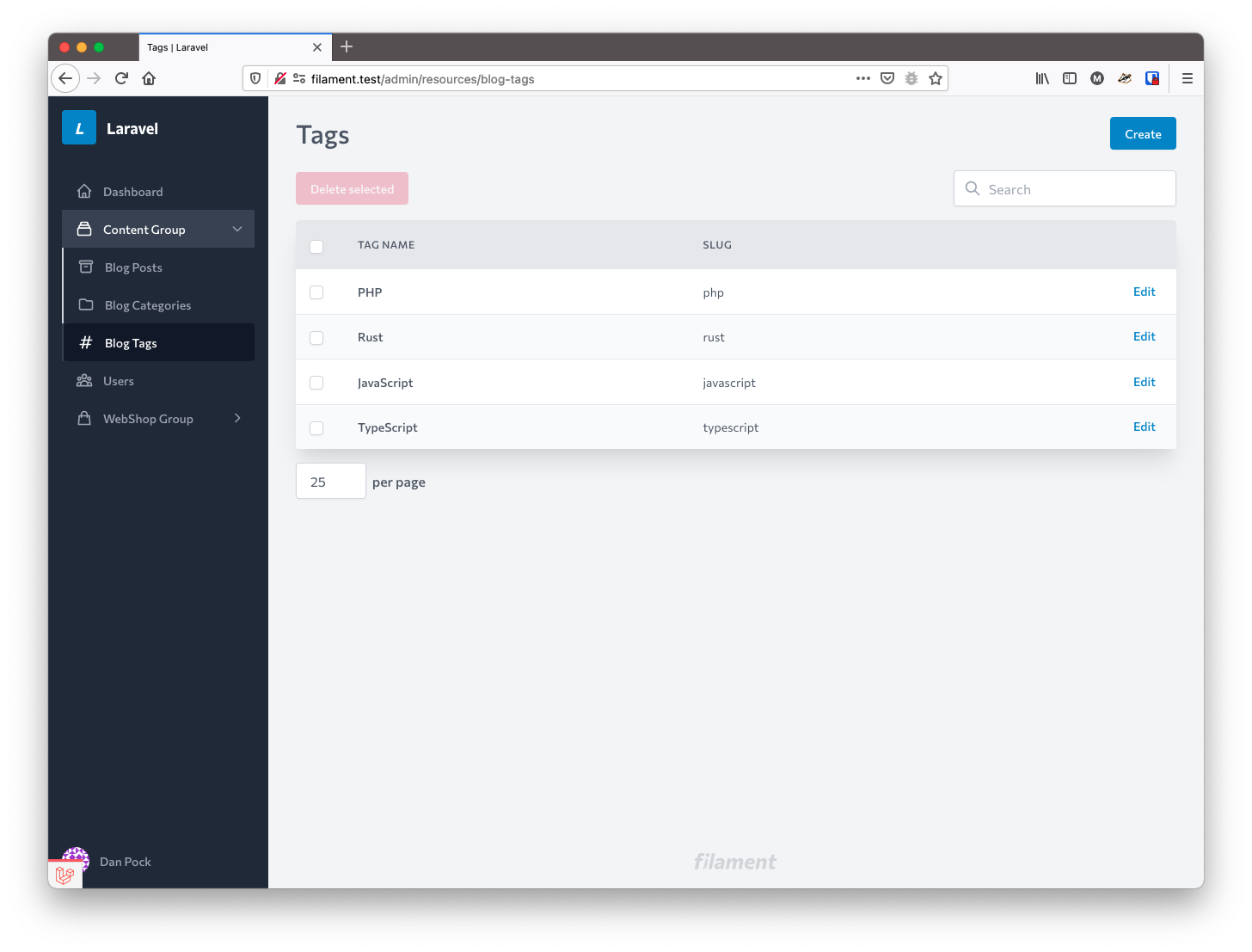
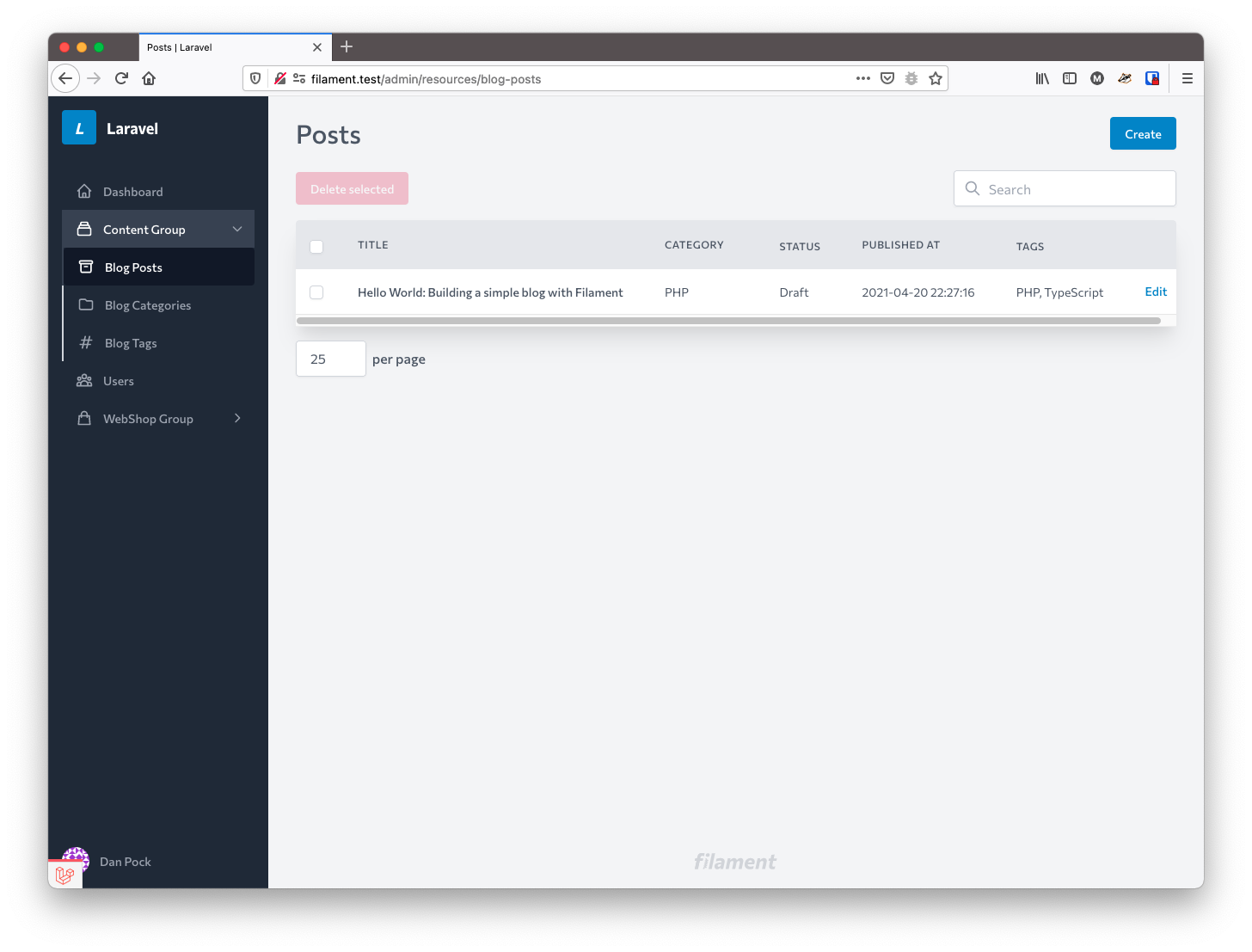
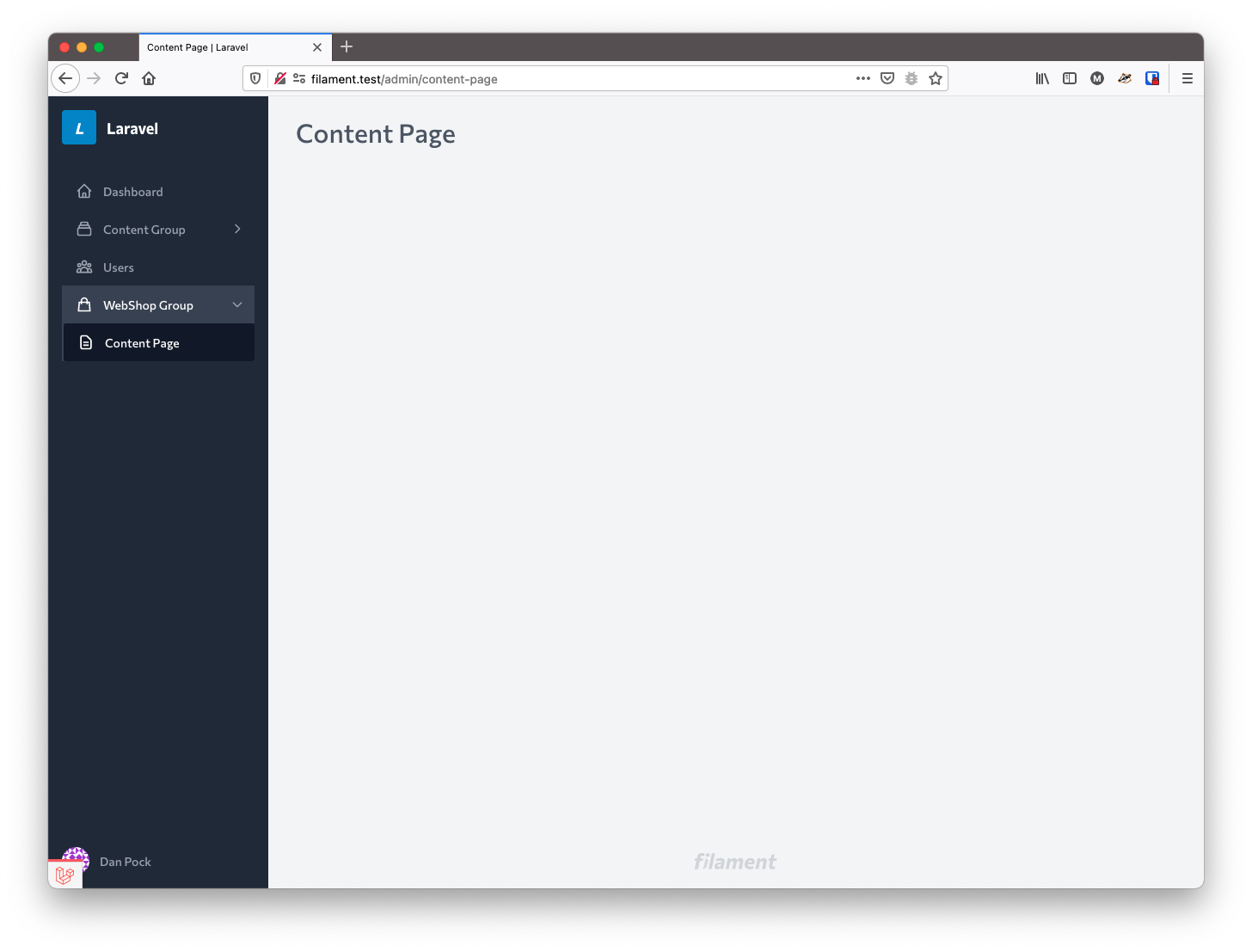
While not having a state based background for the group could be an option, it would mean that when a group is closed you loose sight of what group the page you're on is within. That may not be a deal breaker, but it does make things less intuitive to new users. For instance these screenshots may show the value in having a group level state too. Even if it's different from the existing styles - hopefully this helps show why some sort of state will be helpful: When closed it could be ambiguous what group/sub-menu the active page is under. As you could imagine with more groups and page to be linked in the nav this concern could become an issue. Especially since it also puts an onus on the user to know what group pages/links exist under. By doing that it -IMHO- creates a tough situation is and when a page/link moves groups. Since the menu's design wouldn't make that explicit they'd rely more on memory, so any change to what's in their memory needs to be done with more caution. I'm all for simple and totally interested in providing a great UX out of the box. I just hope the end solution is one that preserves some of the implicit state that my initial designs provide. I think this PR is open to reviewer modifications if you'd like to play around with it and refine that aspect. It may help since it's hard to explain the choices I made based on the varying menu configuration and state based styles to cover all cases well. Or if you want to shoot some ideas back and forth that's cool too - whatever works. |
|
I think that just indenting the sub group items might be enough - the borders just seem odd to me? Better to go simple if we can?
… On Apr 25, 2021, at 1:33 PM, Dan ***@***.***> wrote:
Another consideration is not having a background for both the group and the selected item, keep the text white for the group, and then a background on the actual selected item. Keeps things more simple design-wise.
While not having a state based background for the group could be an option, it would mean that when a group is closed you loose sight of what group the page you're on is within. That may not be a deal breaker, but it does make things less intuitive to new users.
It also puts an onus on the user to know what group pages/links exist under. By doing that it -IMHO- creates a tough situation is and when a page/link moves groups. Since the menu's design wouldn't make that explicit they'd rely more on memory, so any change to what's in their memory needs to be done with more caution.
I'm all for simple and totally interested in providing a great UX out of the box. I just hope the end solution is one that preserves some of the implicit state that my initial designs provide.
I think this PR is open to reviewer modifications if you'd like to play around with it and refine that aspect. It may help since it's hard to explain the choices I made based on the varying menu configuration and state based styles to cover all cases well. Or if you want to shoot some ideas back and forth that's cool too - whatever works.
—
You are receiving this because you were mentioned.
Reply to this email directly, view it on GitHub, or unsubscribe.
|
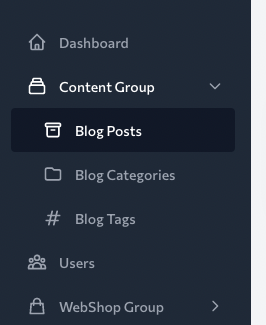
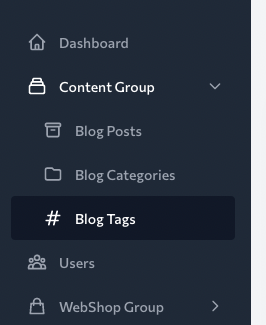
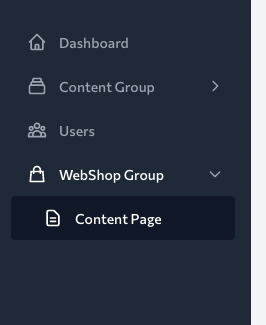
When this feature was hacked together initially I did not have the border at all and only used an indent. Hmm. I wonder if we should make this aspect of the rendering configurable to some extent? Maybe that's a consideration for later though since it doesn't seem that crucial. I'll remove the border and set a decent sized indent - i'm guessing |
|
@ryanscherler - Here's updated previews:
|
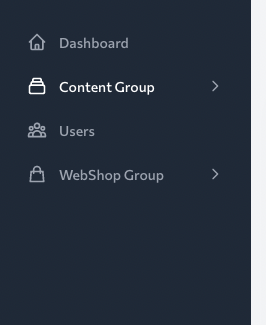
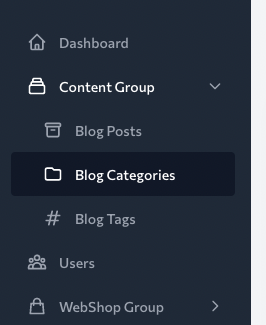
|
@danharrin I love it! This is exactly what I was thinking. |
|
Hey, thanks for your work on this! I've had a chat with @ryangjchandler and we feel the best path forward is to hold off merging this feature until the next major version. We would really like to rebuild our navigation API and include this concept from the core, but doing so would bring breaking changes with it. Thanks again! I will close this PR for now and revisit it in the next few months, when it's ready to be merged. |
|
Hey @danharrin sorry not had time to add anything yet for the sub resources feature. Can I make a suggestion instead of closing this PR how about creating new branch for example "v2-review" then merging this PR. Once I get around to completing my work on sub resources. I will also merge into this new branch so you guys can review this later for future releases 😏 |

I think this PR would look very different in a v2 due to the changes we want to make to the Navigation API, so it's not really worth opening a v2 branch quite yet. Of course, the PR will still be here (closed) so we can come back later on & revive it. |

|
well can't wait for Admin v2... I'm really doing some hacky stuff just to accomplish this on v1... |
|
Hey guys, just got onto making this feature for v2. At the moment, I've gone with the ability to set a Then, to adjust the order of these groups, you may Filament::registerNavigationGroups([
'Blog',
'Content',
]);@Larsklopstra created an excellent prototype design for this feature, but there is not collapse functionality. This may be added at a later date:
Thoughts? :) |
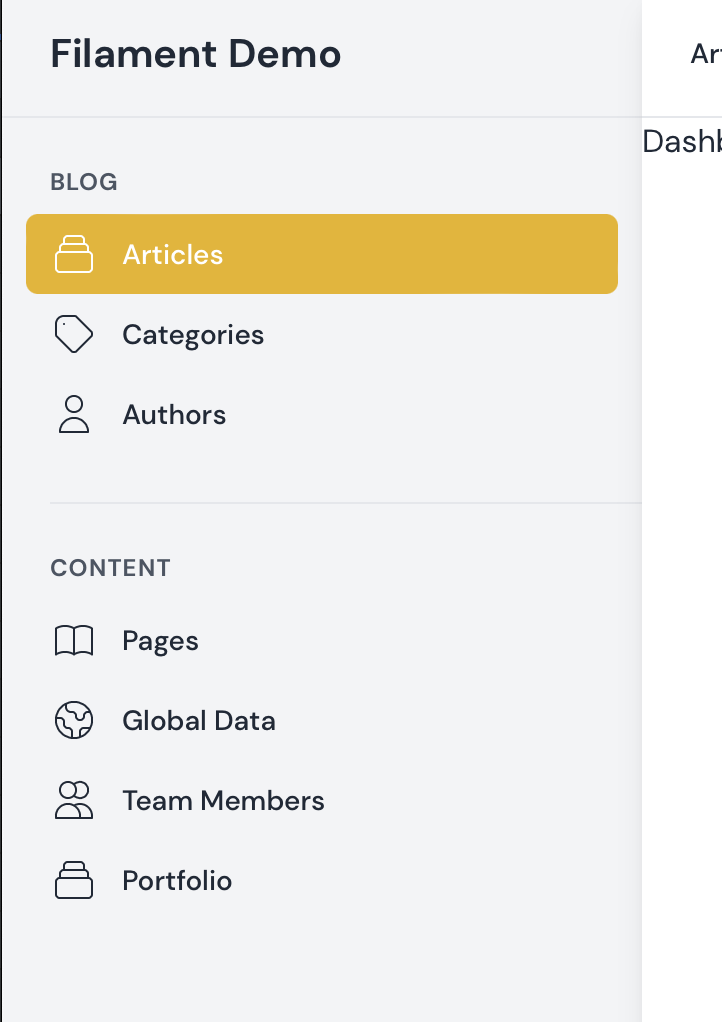
|
Hi @danharrin this looks great! I will be in touched with you towards the end of the week to discuss one of my own projects I am working on and how I plan to utilise filament v2 throughout this project. I would love to get you onboard as one of our 1st few partners for FREE of course. Catch up soon 😁 |

|
any update on this to add on up comming filament version |
https://filamentadmin.com/docs/2.x/admin/navigation#grouping-navigation-items |
|
I am developing the Inhouse server inventory application. There is huge list of menus that needs to added. So the sidebar becomes very lenghty. It would be nice to add expand/collapse types of menu so that it will be minimal list.
|
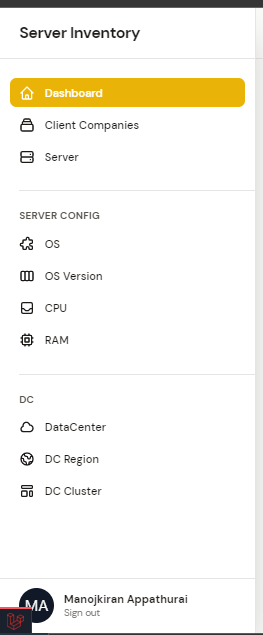

|
Also for creating settings pages it would be cool to group them in a Settings group and make it collapsible |
|
Feel free to create a PR to make these collapsible. Not sure they should be by default though. |
Yeah I think it should be optional indeed. When I have some free time, I can try and make them collapsible |
8 participants


Feature Summary
This PR adds a comprehensive API that allows grouping of
ResourceandPageelements in the Navigation.The method to do so range from very simple single line of code additions, to an enhanced version of that with Mapped groups, or simply making a
PageorResourceitself the top level group element.Effectivly this feature provides this in two flavors:
PageorResourcethat implementsIsGroupItem.Simple Groups:
Any resources that defines a
$navigationGroupproperty will be grouped by overlapping names.This should be the menu label text for the group - with proper spaces and capitalization you'd like.
So in this example there would be a new Content Group sub menu with both these in it.
Simple Groups with Mapped Resources
The second method mimics how Laravel allows for Eloquent
morphMapto be used. In eloquent this maps long class names into uniform database values - for us it maps non-Pageand non-Resourcegroups into a single location.This method should be seen as an enhancement of the prior one. Since ultimately this is required to control the sort and icon settings for any Simple Groups. This would be something you could add in your
AppServiceProvider::registerlike this:Note: This could be something most useful for the Filament plugins. For instance when a plugin might want to register a group. In theory this should allow all plugins to use the navigationGroupMap without stepping on each others toes.
Dynamic Groups for Resources:
There are two very simple changes one would need to make a Resource into a Group. Simply adding the
IsGroupIteminterface and theImplicitGroupFromResourcetrait. And that should be all they need to do. Like:And with just those added the Resource will now be a top-level Group item.
Then to add another resource to this group do:
Dynamic Groups for Pages:
There are two very simple changes one would need to make a Resource into a Group. Simply adding the
IsGroupIteminterface and theImplicitGroupFromResourcetrait. And that should be all they need to do. Like:And with just those added the Resource will now be a top-level Group item.
Then to add another resource to this group do:
Results
Simple Groups:
Item within SubMenu Selected
Dynamic Groups: