Some folders don't appear on Local Disk in Files app #2480

Description

Describe the bug
In Local Disk (E:) I have 205 GB and it's full/ only 7.42 GB free. The problem is not of these files is shown in Files - Preview.
even the app reads it's full. and on Files explorer everything is ok.
To Reproduce
Steps to reproduce the behavior:
- Go to 'Drivers'
- Click on 'Local Disk'
- See error
Expected behavior
I should see my files.
Screenshots
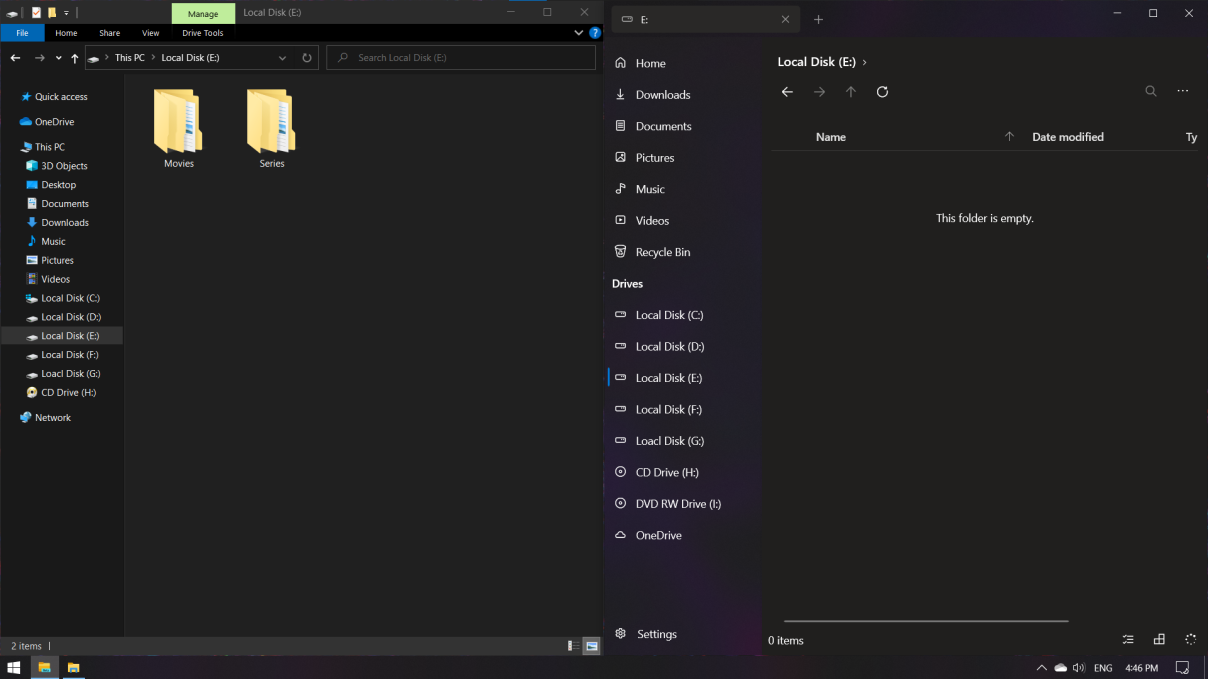

**Desktop (please complete the following information): **
-
OS:
Edition | Windows 10 Pro
Version | 20H2
OS build | 19042.630
Experience | Windows Feature Experience Pack 120.2212.31.0 -
App version: [v0.21.0]
Additional context
I use Microsoft store version
Log file
debug.txt
debug_fulltrust.txt