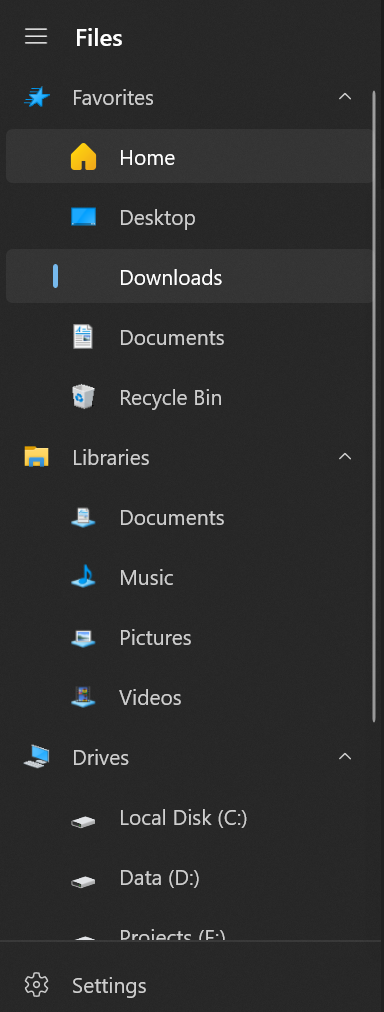
Missing Download Icon on Sidebar #5343

Description

Explain the bug
As I have just joined the insider program and downloaded it, I found out that the download icon was missing on the sidebar.
To reproduce
- Open Files
- See the missing download icon
Expected behavior
Show a download icon on the sidebar instead of a transparent background.
Logfile
Upload the log file here for us to understand your issue better.
- You can access it from Settings->About->Open log location.
or - Copy the debug.log and debug_fulltrust.log from the following directory, and upload the files here.
%localappdata%\Packages\49306atecsolution.FilesUWP_et10x9a9vyk8t\LocalState
debug.log
debug_fulltrust.log
Screenshots
System Information
- OS Version: Windows 10 21H1 OS Version 2009 (Build 19043.1081)
- App version: v1.5.46.0
Additional comment
The download icon doesn't seem to appear although I have restarted the app. Additionally, I have also deleted the cache.db, debug.log, and debug_fulltrust.log, however it returns the same result.