Pinouts
This is the pinout for the default hueBerry configuration
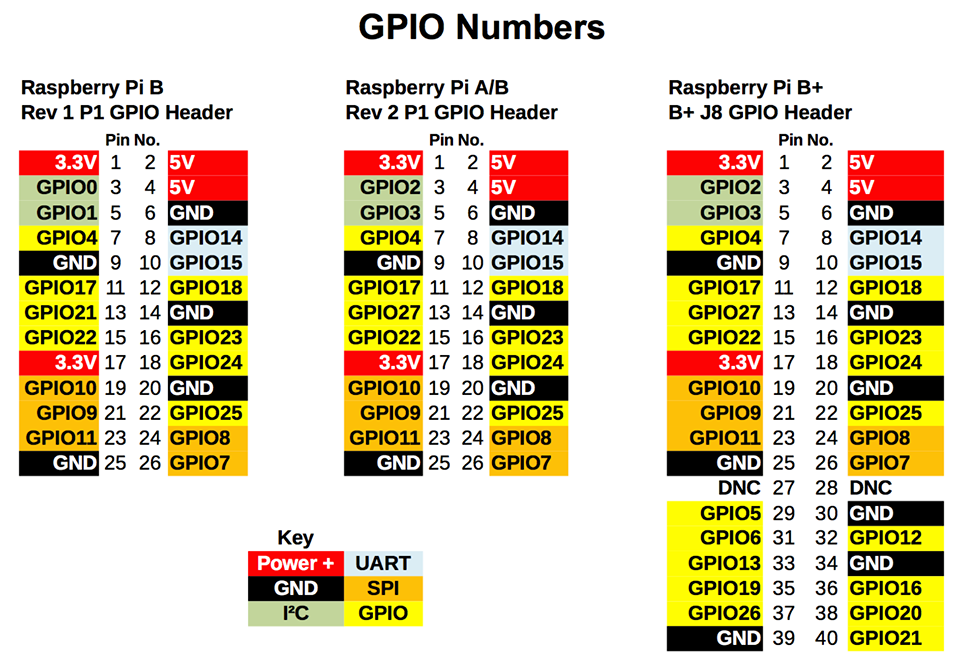
Please follow the diagram above, with the pins labeled GPIO
Raspberry pi -> Device GPIO 16 - D+: Rotary Encoder GPIO 20 - D-: Rotary Encoder GPIO 21 - SW: Rotary Encoder Button GND - D GND: Rotary Encoder GND - Switch GND: Rotary Encoder
images/raspberry_pi_RaspberryPi_I2C_bb. GND - GND: I2C SSD1306 128x64 display https://learn.adafruit.com/assets/17603 RST - Not connected (Chinese displays don't have this unfortunately)