

🦄 Web app for consumers to explore, download, and publish data assets.




Pleuston [
ˈplustən]: organisms that live in the thin surface layer existing at the air-water interface of a body of water as their habitat
🐲🦑 THERE BE DRAGONS AND SQUIDS. This is in alpha state and you can expect running into problems. If you run into them, please open up a new issue. 🦑🐲
Main issues right now:
- assets can only be purchased if they're hosted in Azure storage account
- orders screen is not fully working
This repository houses Pleuston, the reference web app for consumers to explore, download, and publish data assets within the Ocean Protocol network.
- Connect to all required Ocean Protocol components: Keeper & Aquarius
- Register and publish data assets
- Explore, buy, and download data assets
Pleuston is a single page React app, initially bootstrapped with create-react-app, but ejected from it.
- Node.js >=8
- npm
- Ocean Protocol components
- MetaMask
To start development with Pleuston you first have to get all the other Ocean Protocol components up and running.
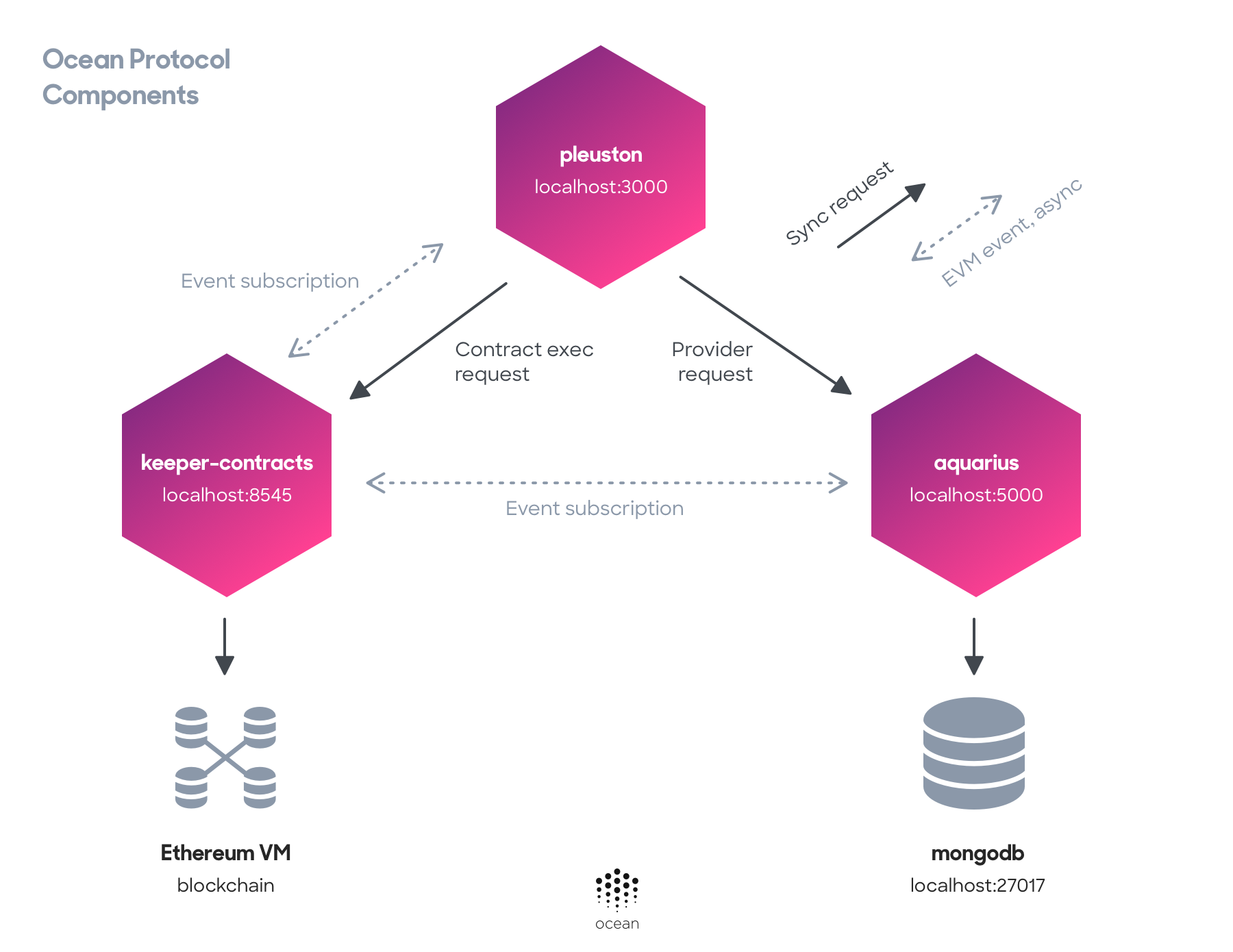
The simplest way is to use our main script utilizing docker-compose from the 🐳 docker-images repository, and pass the option to skip the Pleuston image in there:
git clone git@github.com:oceanprotocol/docker-images.git
cd docker-images/

./start_ocean.sh --no-pleuston --latest
This will start up all required components:
You now have a locally running Aquarius backend application exposed under http://localhost:5000.
You now have a locally running RPC client with all the contracts from keeper-contracts deployed to it, exposed under http://localhost:8545.
As of right now, pleuston requires asset files to be stored in Azure Cloud Storage before registering them through the UI. For more convenience we will integrate connections to various cloud storage providers.
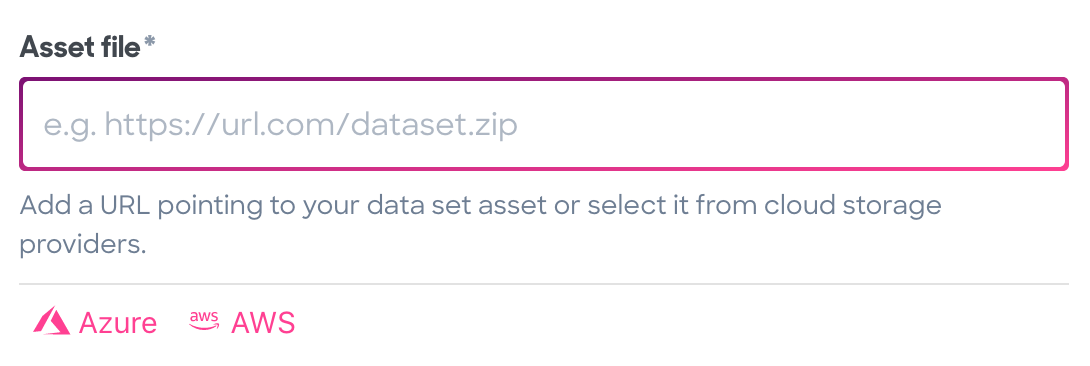
App includes an Connection to Amazon Web Services, so you can retrieve and register assets stored in an S3 bucket. Setting AWS connection requires the setup of Cognito authentication service with proper Access-policies to specific bucket. Pleuston side configuration for AWS can be cound in config/cloudStorage.js
App includes an OAuth connection to your Azure account. Once authorized, assets can be chosen from a file list within pleuston.
Note: Currently, Azure Storage only allows listing containers with OAuth credentials. Listing blobs in containers and operations on blobs can't be done with OAuth credentials until that feature is out of preview. Until then, manually added credentials are required in config/cloudStorage.js
After the Docker containers from the above step are up, you can start your local development version of Pleuston:
git clone git@github.com:oceanprotocol/pleuston.git
cd pleuston/

npm i
npm start
This should output a message as follows:
Compiled successfully!

You can now view @oceanprotocol/pleuston in the browser.

Local: http://localhost:3000/Be sure to login into your MetaMask account and either select:
- the
Kovantest network, or Localhost 8545
The latter will connect you to the RPC client running inside Docker.
You can inspect a full production build by creating it first, and then run a local web server on top of the build output, e.g. serve:
# create production build
npm run build

serve -s build/
# go to http://localhost:5000For a new patch release, execute on the machine where you're logged into your npm account:
./bumpversion path

## Configuration

All required components to get _Pleuston_ running are pre-configured and started with the above `docker-compose` command, and the web app is configured to connect to them.

If you want to change and run _Pleuston_ against your own deployed components, head over to the [`config/ocean.js`](./config/ocean.js) file and modify the respective values.

To run your application over SSL, set the scheme values in [`config/ocean.js`](./config/ocean.js) to `https`:

```js
module.exports = {
    nodeScheme: 'http',
    nodeHost: 'localhost',
    nodePort: 8545,

    aquariusScheme: 'http',
    aquariusHost: 'localhost',
    aquariusPort: 5000,

    brizoScheme: 'https',
    brizoHost: 'localhost',
    brizoPort: 8030,

    parityScheme: 'http',
    parityHost: 'localhost',
    parityPort: 8545,

    secretStoreScheme: 'http',
    secretStoreHost: 'localhost',
    secretStorePort: 12001,

    secretStoreThreshold: 0,
    secretStorePassword: 'unittest',
    secretStoreAddress: '0xed243adfb84a6626eba46178ccb567481c6e655d'
}Automatic tests are setup via Travis, executing npm test.
The tests run:
- linting checks with ESLint and Stylelint
- basic rendering tests for components with Jest
While code coverage status will be reported in the console and on Travis, coverage information won't be uploaded to Codacy for any Pull Request from a forked repo. That is because of a security restriction in Travis.
Code linting is setup with ESLint and stylelint following eslint-config-oceanprotocol and stylelint-config-bigchaindb.
There's a npm script setup which runs only linting tests:
npm run lintCopyright 2018 Ocean Protocol Foundation Ltd.
Licensed under the Apache License, Version 2.0 (the "License");
you may not use this file except in compliance with the License.
You may obtain a copy of the License at
http://www.apache.org/licenses/LICENSE-2.0
Unless required by applicable law or agreed to in writing, software
distributed under the License is distributed on an "AS IS" BASIS,
WITHOUT WARRANTIES OR CONDITIONS OF ANY KIND, either express or implied.
See the License for the specific language governing permissions and
limitations under the License.