In our team we have a habit to create branches in a way that they nest in different categories: feat / doc / fix / etc...
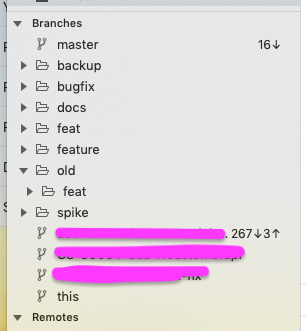
This is great, but in Fork it obstructs the visibility I have on currently checked out branch that is highlighted in bold. As the tree structure of branches in the sidebar might be collapsed (see screenshot). Would it be possible to also highlight parent "folder" so that I can easily see where is my branch hidden?
For example if my current branch is feat/123-add-new-feature.
- Current behaviour:
feat folder in sidebar is not highlighted, 123-add-new-feature leaf node in sidebar is highlighted.
- Proposed new functionality:
feat folder in sidebar is highlighted, 123-add-new-feature leaf node in sidebar is highlighted.
Why is this important? I very often use right-click -> copy branch name. And this is only possible by clicking on the branch in sidebar. But in general I think this would be a nice feature to have.

In our team we have a habit to create branches in a way that they nest in different categories: feat / doc / fix / etc...
This is great, but in Fork it obstructs the visibility I have on currently checked out branch that is highlighted in bold. As the tree structure of branches in the sidebar might be collapsed (see screenshot). Would it be possible to also highlight parent "folder" so that I can easily see where is my branch hidden?
For example if my current branch is
feat/123-add-new-feature.featfolder in sidebar is not highlighted,123-add-new-featureleaf node in sidebar is highlighted.featfolder in sidebar is highlighted,123-add-new-featureleaf node in sidebar is highlighted.Why is this important? I very often use right-click -> copy branch name. And this is only possible by clicking on the branch in sidebar. But in general I think this would be a nice feature to have.