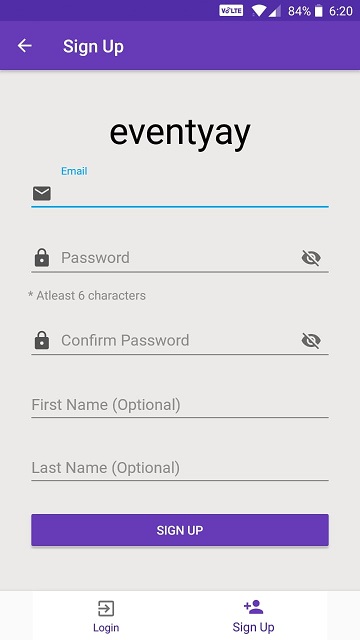
Feat : Updated SignUp UI with password constraints #587
Conversation


|
Please follow commit guidelines |


|
I'll commit code for constraints today itself, and then if you want I can squash all commits. |

| <TextView | ||
| android:layout_width="wrap_content" | ||
| android:layout_height="wrap_content" | ||
| android:hint="@string/password_constraints"/> |

There was a problem hiding this comment.
This textview is not required IMO
There was a problem hiding this comment.
I think at the time of signup we should tell user about the constraints. It is not required in login page.
|
Please Review my PR. |
|
This should be handled in a way that if the password does not follow constraints, show them a warning or error. Not always |
|
@iamareebjamal Okay sir, so should I place a toast whenever user enters a password less than 6 characters? |
|
No, display TextInputLayout error |
|
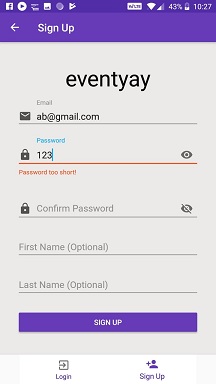
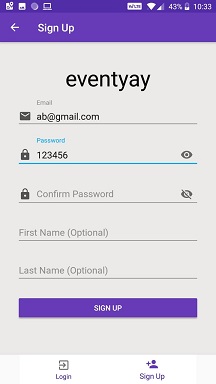
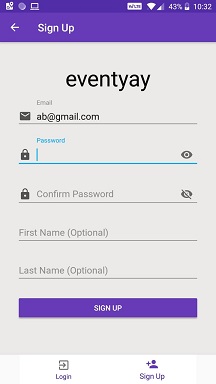
@iamareebjamal I have taken care of the error message this time. Now until and unless user writes a password greater than or equal to 6 characters this warning in red will be displayed (it will not be displayed initially when length of password is zero or when user clears the password field) |
 simarsingh24
left a comment
simarsingh24
left a comment
simarsingh24
left a comment
There was a problem hiding this comment.
Why are you fixing length to 6? I guess we ill have to ask the mentors for the limit @iamareebjamal what are your views?
|
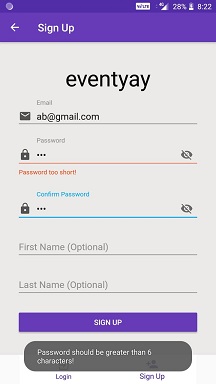
Explanation for latest commit ( b737bc4 ) : What if user clicks the sign up button even after seeing the warning? Later the application let user to signup, but now it will show a toast as shown below and won't let user to signup until and unless user obeys the password constraints. |
|
@simarsingh24 When I posted the issue no one commented on this thing! You can tell me the limit, no problem. |

|
|
||
| signUpActivityViewModel.error.observe(this, Observer { | ||
| Toast.makeText(context, it, Toast.LENGTH_LONG).show() | ||
| Toast.makeText(context, it, Toast.LENGTH_LONG).show() |

| else -> textInputLayoutPassword.error = "Password too short!" | ||
| } | ||
| } | ||
| override fun beforeTextChanged(p0: CharSequence?, p1: Int, p2: Int, p3: Int) {} |
There was a problem hiding this comment.
Add comments about empty body
| } | ||
| } | ||
| override fun beforeTextChanged(p0: CharSequence?, p1: Int, p2: Int, p3: Int) {} | ||
| override fun onTextChanged(p0: CharSequence?, p1: Int, p2: Int, p3: Int) {} |
There was a problem hiding this comment.
Add comments about empty body
| error.value = "Passwords do not match!" | ||
| return true | ||
| } | ||
| if(password.length <6){ |
There was a problem hiding this comment.
Newline above this line and space before and after parens
app/src/main/java/org/fossasia/openevent/general/auth/SignUpFragmentViewModel.kt
Outdated
Show resolved
Hide resolved
| textInputLayoutPassword.error = null | ||
| textInputLayoutPassword.isErrorEnabled = false | ||
| } | ||
| else -> textInputLayoutPassword.error = "Password too short!" |
There was a problem hiding this comment.
Previously I wrote 'If else' statement here but then kotlin gave me this suggestion(to use when)! If you want I can roll back to 'If else' statement
There was a problem hiding this comment.
Yes, please move back to if else. When is like switch case and should be used when there are multiple cases
| rootView.passwordSignUp.addTextChangedListener(object : TextWatcher{ | ||
| override fun afterTextChanged(p0: Editable?) { | ||
| when { | ||
| (passwordSignUp.text.toString().length>=6 || passwordSignUp.text.toString().isEmpty()) -> { |
There was a problem hiding this comment.
Second case is redundant. First case already checks that the string can't be empty
There was a problem hiding this comment.
@iamareebjamal Suppose user writes a password of less than 6 characters (error message appears), now user clear the password field (now because the password field is empty there should not be any error message, this situation is same as if user didn't type any password)
There was a problem hiding this comment.
@iamareebjamal My second case is if the string is empty then also remove the error message!
There was a problem hiding this comment.
Yeah alright, my mistake. I didn't see the condition quite clearly 👍
|
Please merge this PR |

| redirectToMain() | ||
| }) | ||
|
|
||
| rootView.passwordSignUp.addTextChangedListener(object : TextWatcher{ |
There was a problem hiding this comment.
Add space after TextWatcher
| } | ||
|
|
||
| if (password.length < 6) { | ||
| error.value = "Password should be greater than 6 characters!" |
app/src/main/res/values/strings.xml
Outdated
| <!--settings profile dialog--> | ||
| <string name="message">Are you sure you want to log out?</string> | ||
| <string name="cancel">Cancel</string> | ||
| <string name="password_constraints">* Atleast 6 characters</string> |
There was a problem hiding this comment.
Now it is not used! I'll remove this today itself!

@shikhart98 Simply follow these steps :
|
|
@liveHarshit its all sorted now :) |
@shikhart98 But you have nine commits, so you need to squash them. Simply follow the steps. |

|
squash your commits |


5 participants


ScreenShot:
Fixes #585