
Deep-learning monitoring for pets, babies, and elderly care — running entirely in your browser.
safeos.sh · frame.dev · Discord




SafeOS Guardian is a supplemental experimental tool. It does not replace caregivers, medical monitoring equipment, or veterinary monitoring. Technology fails. Maintain direct supervision of children, pets, and elderly family members at all times.
SafeOS Guardian is a Progressive Web App that turns any device with a camera and microphone into a deep-learning monitoring station. It loads TensorFlow.js and Transformers.js into the browser, runs every model on-device, and raises severity-tiered alerts when something matches. No frames leave the device. No telemetry. No account required for the local-only flow.
Once the models have cached after first load, the entire detection pipeline runs offline.
Fastest — pull the prebuilt images (no clone, no build):
# downloads ONLY the compose file (the run recipe, ~120 lines of YAML — not source code)
curl -O https://raw.githubusercontent.com/framersai/safeos/master/docker-compose.ghcr.yml
docker compose -f docker-compose.ghcr.yml up -d
docker compose then pulls the prebuilt images ghcr.io/framersai/safeos-api and …/safeos-ui (nothing is compiled locally), downloads and caches the Ollama vision models, and starts everything. UI at http://localhost:3000, API at http://localhost:3001.
Or pull the images straight from the registry with the Docker CLI:
docker pull ghcr.io/framersai/safeos-api:latest
docker pull ghcr.io/framersai/safeos-ui:latest
The two images run together: safeos-ui is the interface you open, safeos-api is the backend it talks to for notifications and the local-AI bridge. The compose starts both, plus Ollama, and wires them on one network. (docker run … safeos-api on its own gives you just the headless API.)
Local AI with Ollama: the compose runs an Ollama container and pre-pulls its models on first start, so local scene analysis works with no extra setup. To use an Ollama instance you already run, set OLLAMA_HOST in .env (e.g. http://192.168.1.50:11434). Choose which models to cache with OLLAMA_MODELS (default moondream llava:7b; add llama3.2-vision:11b if you have ~16 GB RAM). Frames only reach Ollama when in-browser detection is ambiguous, and nothing leaves your network. Details in docs/DOCKER.md.
Build from source instead:
git clone https://github.com/framersai/safeos.git
cd safeos
cp .env.example .env            # optional — add only the keys you want
docker compose up -d --build
NVIDIA GPU: add -f docker-compose.gpu.yml to either command. Full reference and troubleshooting: docs/DOCKER.md.
Browser PWA only (no server, no Docker):
cd apps/guardian-ui
pnpm install
pnpm dev                        # http://localhost:3000
Models download on first use, then run entirely offline.
SafeOS Guardian is built by Frame — the same team behind AgentOS, an open-source agent runtime with cognitive memory grounded in HEXACO personality traits, and Paracosm, an agent swarm simulation engine where AI characters with persistent memory inhabit shared world models. Same local-first philosophy: deep learning that runs on the user's device, not in someone else's cloud.
If you want to dig deeper:
- Frame — the company building local-first AI runtimes
- AgentOS — the agent framework, currently scoring 85.6% on LongMemEval-S with built-in PII redaction and configurable guardrails
- Paracosm — agent swarm simulation with citation-verified events
- github.com/framersai — all the open-source repos
| Scenario | What SafeOS Guardian does |
|---|---|
| Pet monitoring | Eating, bathroom, distress, prolonged stillness, off-limits intrusion. |
| Baby & toddler | Crying, sustained motion, breathing anomalies, falls, in-frame hazards. |
| Elder care | Falls, confusion, prolonged inactivity, distress, wandering out of frame. |
| Lost & Found | Match a missing pet or person against 1–5 reference photos via color + edge fingerprints. |
| Wildlife & outdoor | Backyard trail-cam, livestock, predator detection. Runs offline on cheap hardware. |
| Authority / emergency | At-risk areas or shelters; severity-routed alerts via the optional server. |
| Small-business security | Perimeter watch, after-hours intrusion, customer-traffic counts. Escalating push + audio. |
| Personal safety | Lone-worker check-ins; doorbell detection for d/Deaf households; live-in caregiving. |
SafeOS is a supplemental tool. It augments human attention; it does not replace it. Privacy laws around recording vary by jurisdiction — only deploy on premises and people you have authority to monitor.
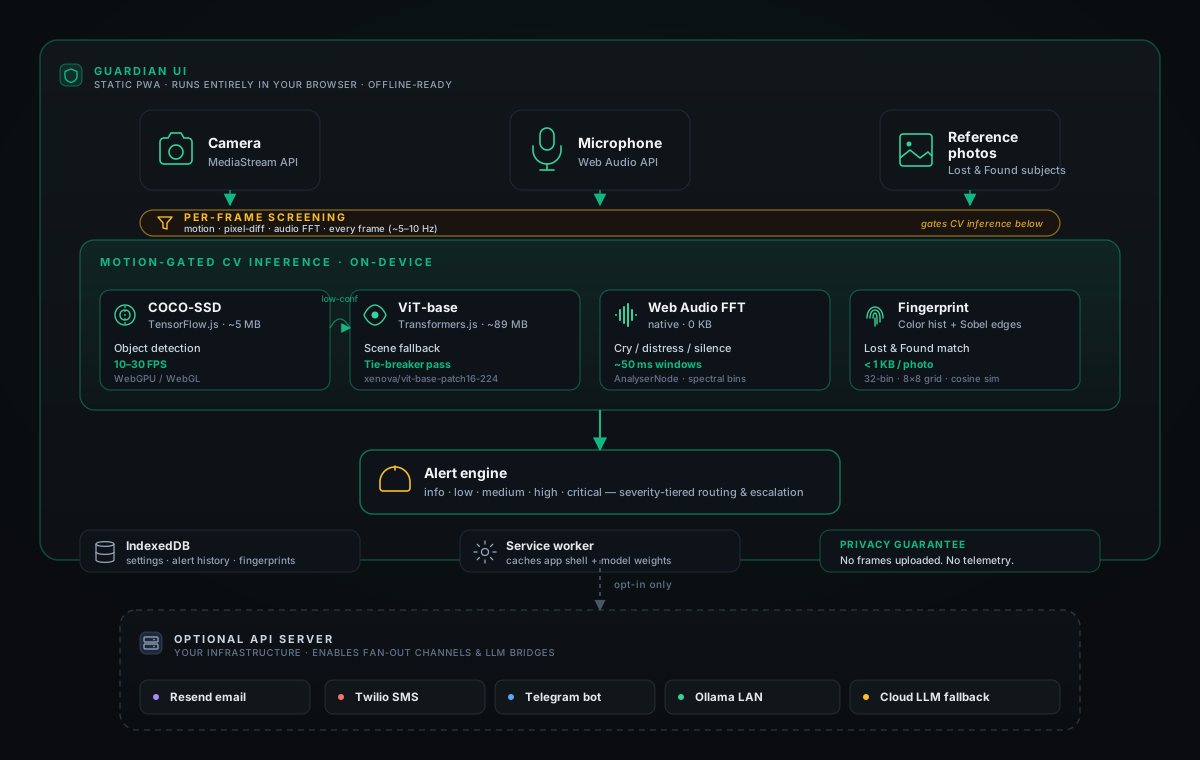
The solid path runs entirely in the browser, offline, after first load. The dashed path engages only when you deploy the optional API server and opt into individual integrations.
- First load. The Next.js app shell loads from any static host (GitHub Pages, Vercel, Netlify, Cloudflare Pages). The service worker caches the shell, fonts, and JS chunks on first visit.
- Model fetch. TensorFlow.js downloads the COCO-SSD weights (~5 MB, quantized) from the
tfjs-modelsCDN when you open the monitor view. The service worker caches the response via the Cache Storage API; subsequent loads serve from cache. - Backend selection. TF.js auto-selects the fastest available backend: WebGPU where supported, WebGL otherwise, WASM SIMD as a fallback. Laptops hit 20–30 FPS on WebGL; mobile lands at 10–15 FPS.
- Per-frame screening. A
setIntervalloop at 200 ms samples the<video>element into a hidden<canvas>, runs pixel-diff motion detection and an FFT pass over the Web AudioAnalyserNode, and tracks pixel-change counts. Cheap enough to run continuously without a GPU context. Code:apps/guardian-ui/src/components/CameraFeed.tsx. - Gated inference. When motion, audio, or pixel-change crosses the per-scenario threshold, the frame is handed to TF.js. COCO-SSD's
model.detect()returns bounding boxes, class labels, and confidence. The model can sustain 10–30 FPS, but the pipeline only invokes it on triggered frames: typically a fraction of a Hz outside sustained activity. Gate:apps/guardian-ui/src/lib/person-detection.ts. - Tie-breaker pass. When COCO-SSD's top prediction sits below threshold, the frame routes to a quantized ViT-base (~89 MB, Xenova/vit-base-patch16-224) under Transformers.js. Heavier, but better at fine-grained scene labeling. Secondary check, not primary path.
- Audio parallel path. The Web Audio API's
AnalyserNodesamples FFT bins from the microphone every ~100 ms; thresholds detect cry/distress, glass break, sustained silence. No model needed. - Lost & Found fingerprinting. Reference photos reduce to a 32-bin color histogram, top-5 dominant colors (k-means), and an 8×8 Sobel edge grid. The matcher samples the live feed at 1–2 FPS and compares by cosine similarity. Under 1 KB per photo. Code:
apps/guardian-ui/src/lib/visual-fingerprint.ts. - Alert engine. Matches feed a severity router (info / low / medium / high / critical). Each severity has its own escalation: volume-ramping local audio, browser push, optional fan-out to email / SMS / Telegram via the API server.
- Storage stays local. Settings, alert history, and fingerprints persist in IndexedDB. The rolling video buffer keeps only the last 5–10 minutes in memory; older frames overwrite.
The optional API server (src/) only enters the picture when you opt into fan-out channels (Resend, Twilio, Telegram), multi-device WebSocket sync, or a bridge to a local Ollama install for richer scene reasoning.
Every model runs client-side. Sizes are quantized model weights served from a CDN and cached by the service worker on first load.
| Job | Model | Framework | Size | Source |
|---|---|---|---|---|
| Object detection (motion-gated; 10–30 FPS when firing) | COCO-SSD (MobileNetV2 backbone) | TensorFlow.js Models | ~5 MB | tfjs-models |
| Scene classification fallback | Xenova/vit-base-patch16-224 |
Transformers.js | ~89 MB | Hugging Face |
| Audio analysis | FFT bins via Web Audio API | native | 0 KB | MDN |
| Visual fingerprinting | Color histograms + Sobel edges | hand-rolled | < 1 KB / photo | apps/guardian-ui/src/lib/visual-fingerprint.ts |
When detection is ambiguous, you can route the frame to a local Ollama install on the same network. Nothing leaves your LAN.
| Model | Size | Latency | Use |
|---|---|---|---|
moondream |
~1.7 GB | ~500 ms | Fast triage |
llava:7b |
~4 GB | 2–5 s | Detailed analysis |
llama3.2-vision:11b |
~7 GB | 5–10 s | Complex reasoning |
When local resources are exhausted (e.g. on a low-end phone with no Ollama box on the LAN), you can configure cloud fallback through your own API keys. Each provider receives only the frames that local models couldn't classify with confidence.
gemini-flash-1.5via OpenRoutergpt-4o-minivia OpenAIclaude-3-haikuvia Anthropic
SafeOS Guardian fans out alerts across four channels, routed by severity:
| Severity | Browser push | Email (Resend) | SMS (Twilio) | Telegram |
|---|---|---|---|---|
| info / low | ✓ | — | — | — |
| medium | ✓ | ✓ | — | ✓ |
| high | ✓ | ✓ | ✓ | ✓ |
| critical | ✓ | ✓ | ✓ | ✓ |
Browser push works straight from the static PWA. Email via Resend, SMS via Twilio, and Telegram via a bot fan out from the optional API server — those three providers can't be called safely from the browser (no CORS, and the keys would leak in client JS), so the server is what holds the credentials and makes the outbound calls. All three integrations are opt-in.
Resend sends severity-routed alert email when something matches. Free tier covers 3,000 emails/month.
Two ways to wire it up:
- Server-wide key (operator pays). Set
RESEND_API_KEY,EMAIL_FROM, andEMAIL_REPLY_TOin the API server's.env. Every user of that deployment can opt in to email alerts without bringing their own key. Transactional auth email (verification + reset) requires this path. - Bring your own key (per user). In the app, go to Settings → Notifications, toggle on email alerts, and enable Use my own Resend account. Paste a Resend API key + a verified sender. The key stays in your browser's local storage and is only sent to the API server when an alert dispatches.
Email only fires when the toggle is on AND a recipient address is set. See apps/guardian-ui/src/app/help/integrations/resend for the full setup walkthrough or read src/lib/alerts/email.ts for the implementation.
- Rolling buffer. Camera frames live in memory for 5–10 minutes, then overwrite.
- No cloud uploads in PWA-only mode. Period.
- No telemetry. No analytics SDK, no model-improvement uploads, no Sentry beacon.
- IndexedDB only. Settings, alert history, and reference photos stay in browser-local storage.
- Optional integrations are opt-in. Twilio, Telegram, Ollama, and cloud fallback fire only when you configure them.
The Quickstart above is the fast path. To run the pieces directly with pnpm:
pnpm install
pnpm dev          # API (3001) + UI (3000) together
# or run them separately:
pnpm run api      # API on 3001
pnpm run ui       # UI on 3000
Static PWA build — deploy apps/guardian-ui/out to any CDN:
pnpm build:ui # writes apps/guardian-ui/outLocal LLM (optional) — point OLLAMA_HOST at your install:
brew install ollama         # macOS; see ollama.com for other platforms
ollama serve
./scripts/pull-ollama-models.sh # pulls moondream + llava:7bCopy .env.example to .env. Every variable is optional unless you deploy the API server.
# Local LLM
OLLAMA_HOST=http://localhost:11434

# Cloud fallback (only configure what you want to use)
OPENROUTER_API_KEY=sk-or-...
OPENAI_API_KEY=sk-...
ANTHROPIC_API_KEY=sk-ant-...

# Server-side notifications
TWILIO_ACCOUNT_SID=AC...
TWILIO_AUTH_TOKEN=...
TWILIO_FROM_NUMBER=+1...
TELEGRAM_BOT_TOKEN=...

# Email alerts via Resend (optional, recommended)
RESEND_API_KEY=re_...
EMAIL_FROM="SafeOS Guardian <alerts@yourdomain.com>"
EMAIL_REPLY_TO="team@yourdomain.com"

# Browser push (requires the API server to sign payloads)
VAPID_PUBLIC_KEY=...
VAPID_PRIVATE_KEY=...
Sensitivity thresholds live in src/lib/analysis/profiles/. Each scenario has its own profile.
packages/safeos/
├── apps/guardian-ui/        # Next.js PWA — runs the models in your browser
│   └── src/
│       ├── app/             # Routes (dashboard, monitor, history, settings)
│       ├── components/      # CameraFeed, AlertPanel, LostFoundSetup, …
│       ├── lib/             # visual-fingerprint, motion-detection, websocket
│       └── stores/          # Zustand stores (monitoring, lost-found, onboarding)
│
├── src/                     # Optional Express API
│   ├── api/                 # HTTP + WebSocket routes
│   ├── lib/
│   │   ├── analysis/        # Frame analyzer + cloud fallback
│   │   ├── alerts/          # Escalation, Twilio, Telegram, browser push
│   │   ├── audio/           # Distress / cry detection
│   │   ├── ollama/          # Local LLM client
│   │   └── webrtc/          # Signaling
│   └── queues/              # Job queues (analysis, human review)
│
├── tests/                   # vitest — unit + integration
├── docker-compose.yml       # Full stack: UI + API + Ollama + model cache
├── docker-compose.prod.yml  # Production (Caddy HTTPS)
├── docker-compose.gpu.yml   # NVIDIA GPU override
└── Dockerfile               # Multi-stage: backend (tsx), frontend (nginx), dev
pnpm test            # all tests
pnpm test:coverage   # with coverage
pnpm test:watch # watch modeThe PWA is a static export. Deploy apps/guardian-ui/out to any CDN — GitHub Pages, Vercel, Netlify, Cloudflare Pages. No server is required.
The API server (and optional local AI) run via Docker Compose — see docs/DOCKER.md:
docker compose up -d --build                              # full stack, local
docker compose -f docker-compose.prod.yml up -d --build   # production, Caddy HTTPS
To build the API as a single image, target the stage:
docker build --target backend -t safeos-api .
docker run -p 3001:3001 --env-file .env safeos-api
Or run it under PM2 (the server runs through tsx, not a compiled bundle):
pm2 start npm --name safeos-api -- run start:apiSee CONTRIBUTING.md. The four ground rules:
- Privacy first. Never persist more than the task requires.
- Fail safe. Default to alerting when uncertain.
- Offline first. Core features must work without internet.
- Accessibility. WCAG AA contrast, keyboard navigation, screen-reader-friendly labels.
MIT. Part of Frame's 10% for Humanity initiative — this service stays free, forever.
- TensorFlow.js and the
tfjs-modelsteam for the COCO-SSD port. - Hugging Face and Xenova for Transformers.js and the quantized ViT weights.
- Ollama for making local vision models trivial to run.
- Resend for transactional + alert email with a generous free tier.
- The Frame team and the people on Discord who keep stress-testing this thing.
Remember: this tool supplements, never replaces, human care.