Creatures
Monsters in the game are represented by a FoundryVTT actor type called creature. To create a new creature you need to open your game world, select the Actors Directory tab from the FoundryVTT menu and click on the Create Actor button. This will popup a small dialog into which you can enter the name for your new creature. Next select the 'creature' option from the type dropdown field and click on the Create New Actor button. A base record will be created for your new creature and the create dialog will be replaced with one that looks something like the following...
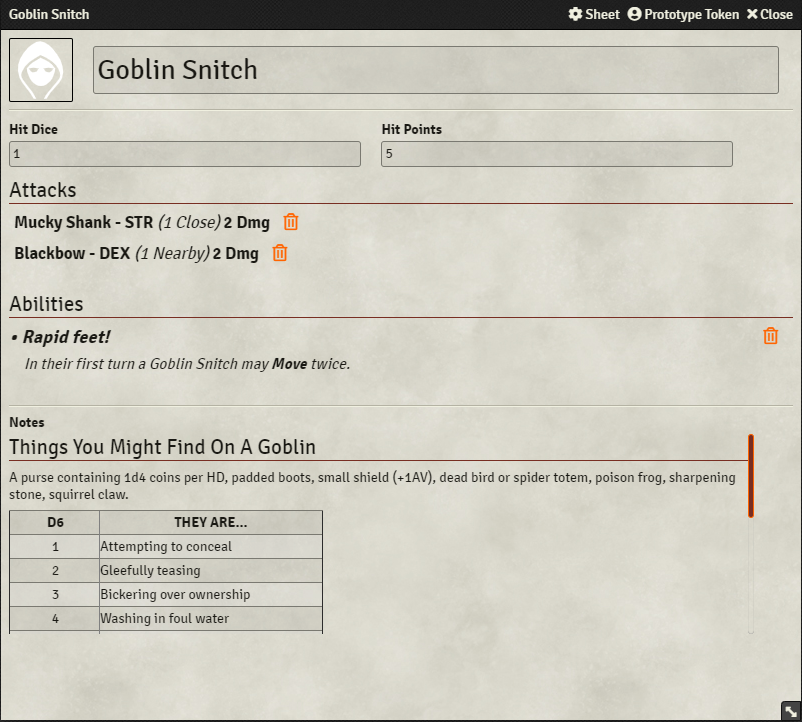
On this dialog you can edit the name of your creature and provide a representative image for it too if you so want by clicking on the picture in the top left hand corner of the dialog. Below this are two fields - one labelled Hit Dice and one labelled Hit Points. You can enter the creatures number of hit dice in the first and it's total hit point pool the second field.
Below the hit dice and hit points fields are sections labelled Attacks and Abilities respectively. These will be used to display the creatures action options and special abilities. You can drag and drop abilities and creature attacks (see the section below on creature attacks) from the FoundryVTT items directory directly on to the creature sheet to add these items to your creature and they will be listed automatically.
At the bottom of the dialog is an area for an creature description. Roll your mouse over this area and Foundry will display an edit icon. Click on this icon and you'll get an edit area into which you can enter your description for the creature. Remember to click the Save button on the edit area tool bar when you're happy with what you've entered.
Creature attacks differ from adventurer attacks in The Black Hack 2nd Edition RPG and are therefore defined separately. To create a new creature attack you need to open your game world, select the Items Directory tab from the FoundryVTT menu and click on the Create Item button. This will popup a small dialog into which you can enter the name for your new attack. Next select the 'creature-attack' option from the type dropdown field and click on the Create New Item button. A base record will be created for your new creature attack and the create dialog will be replaced with one that looks something like the following...
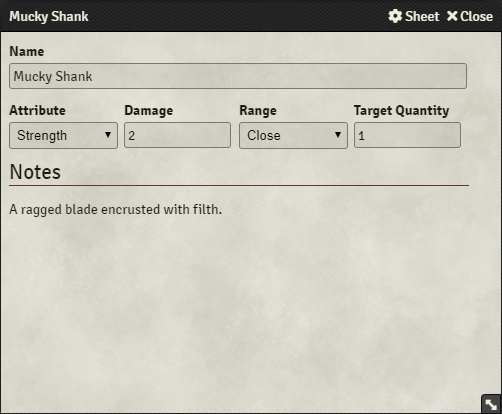
On this dialog you can change the name of the attack in the upper most field. Beneath this are four fields - one labelled Attribute, one labelled Damage, one labelled Range and one labelled Target Quantity. The Attribute field lists the attribute the characters must test when defending against the creatures attack. The Damage field lists the damage taken for failing to defend against the attack. The Range field details the reach of the attack and the Target Quantity field details the maximum number of targets that can be affected by the attack.
At the bottom of the dialog is an area for an creature attack description. Roll your mouse over this area and Foundry will display an edit icon. Click on this icon and you'll get an edit area into which you can enter your description for the creature attack. Remember to click the Save button on the edit area tool bar when you're happy with what you've entered.