Releases: fujiba/imgs2xl
Releases · fujiba/imgs2xl
Release list
v0.4.1 Standalone GUI Binaries (gimgs2xl), Custom Brand Icon, and Bug Fixes

What's Changed
- Standalone Binaries (
gimgs2xl): Added automated builds for standalone macOS (gimgs2xl.app) and Windows (gimgs2xl.exe) binaries using Nuitka. - Brand-New App Icon: Introduced a new app icon featuring the vibrant fujiba orange (
rgb(242, 56, 15)) color palette. - macOS Exit Bug Fix: Fixed an issue where clicking the exit confirmation button would not close the standalone macOS application.
- macOS Gatekeeper Docs: Updated README with guidelines on how to bypass the macOS quarantine warning for unsigned binaries.
- Requirement Updates: Bumped minimum Python requirement to
>= 3.11.
v0.4.0: Enhanced Tag Management UI & Centered Thumbnails
🚀 Features & Improvements
- Centered Square Thumbnails: Excel cells containing images are now generated as perfect squares based on the thumbnail size, and the image is precisely centered within the cell.
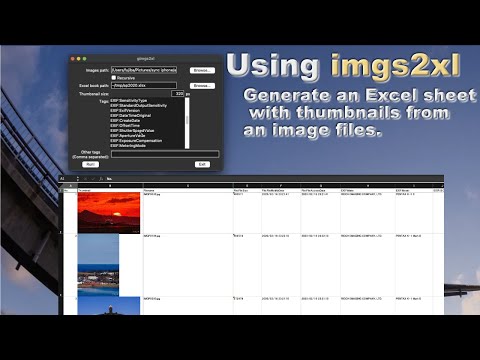
- Dual-Listbox UI for Tags: Completely revamped the GUI's tag selection interface. It now features a dual-listbox layout ("Available Tags" on the left, "Selected Tags" on the right) with
Add ->and<- Removebuttons, making it much easier to manage large lists of tags. - Double-Click Tag Assignment: You can now double-click tags in the GUI to quickly move them between the Available and Selected lists.
- Full Path Export Option: Added a new
--fullpathCLI argument and a corresponding GUI checkbox. When enabled, the "Filename" column in the Excel output will contain the full absolute file path instead of just the file name. - IPTC Date/Time Formatting:
IPTC:DateCreatedis now automatically formatted asYYYY/MM/DD, andIPTC:TimeCreatedis formatted asHH:MM:SSfor better readability in the generated Excel sheet.
🛠 Fixes & Refactoring
- GUI Window Resize: The default GUI window size has been widened to
800x400to properly accommodate the new dual-listbox layout. - Robust Image Scanning: Improved the manual "Scan Tags" feature in the GUI. Scanning an image to find custom tags now properly appends new tags to the list without resetting your existing selections.
- Row Height Limit: Added a safeguard to cap the maximum Excel row height at
409.5points to comply with Excel's internal limits and prevent generation errors.
v0.3.0 support custom tags
Features & Enhancements
Enhanced XMP Metadata Extraction: Improved the fallback mechanism for XMP-* tags. The tool now accurately resolves standard XMP namespaces (e.g., XMP-dc:Creator) and non-colon tags (e.g., XMP-Title), while still maintaining robust extraction for custom namespaces (e.g., XMP-fujiba:*) that might be dropped during parsing.
Fixes
- Python 3.13 Compatibility: Replaced the deprecated and removed imghdr standard library with the robust filetype package for image format detection.
- Tag Whitespace Handling: Fixed an issue where EXIF tags containing accidental leading or trailing whitespace (such as from manual GUI inputs) failed to match metadata keys.
Maintenance & Infrastructure
- Migrated to uv & PEP-621: Completely overhauled project dependency management and build configurations. Transitioned from Pipenv and setup.cfg to a modern pyproject.toml managed by uv.
- Secured Supply Chain: Implemented strict dependency version pinning to mitigate supply chain attack risks.
- CI/CD Modernization: Updated GitHub Actions workflows and the Makefile to leverage the lightning-fast uv and its native uv publish capabilities instead of Pipenv and Twine.
- PyPI Ready: Established and verified the automated workflow for publishing the package to PyPI and TestPyPI.
What's Changed
- v0.2.0 by @fujiba in #6
- Fixed a crash problem caused by a some file. by @fujiba in #14
- fix: version info by @fujiba in #15
- カスタムタグ対応 by @fujiba in #16
- カスタムタグ対応、uv移行、PyPI登録 by @fujiba in #17
Full Changelog: v0.2.1...v0.3.0
Contributors

fujiba