Home

By gasha#3656
Welcome to the Sheety wiki!
Sheety is a rotation builder for RuneScape 3.
This Wiki will serve as documentation for the tool and will give information about Sheety's features and how to use them.
- Latest version
- File → Make a Copy
- Don't request edit permissions!

There are many ways to make a rotation. You can combine abilities and check if the adrenaline works out or try something specific and fix it until it works.
If you are new to making rotations, enable the Next Ability Highlight setting to see when to cancel channeled abilities.
To make your first rotation you may try to map already existing rotations from PvME.
Up to 5 abilities can be used every tick, and they have to be separated with +:

vuln + assault + escape
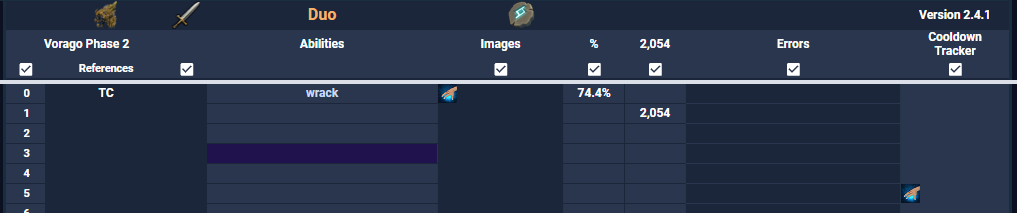
Each column has a different use and a checkmark 
You may disable these checkboxes to improve the performance and loading times of the sheet.
This column will display time. It can be Ticks (if the checkbox is enabled) or Seconds (if it is disabled).
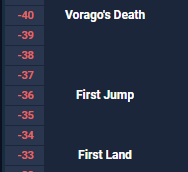
References can be changed in the Reference Editor tab of the sheet.
They can show useful information such as a mechanic starting (for example: Vorago's Reflect) or notes needed for that tick.
The Editor also changes the first tick of that reference, damage reductions and allows you to add notes to every tick.
When ticks are red it means that damage is nulled on that tick. This can be due to a specific mechanic or a phase transition.
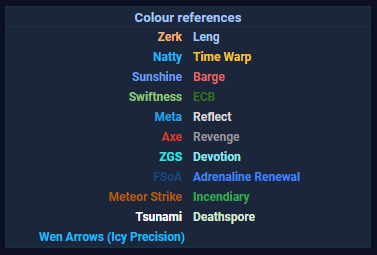
This is where you input your rotation. Colour references will appear to the left, showing when certain abilities are active.These abilities are:
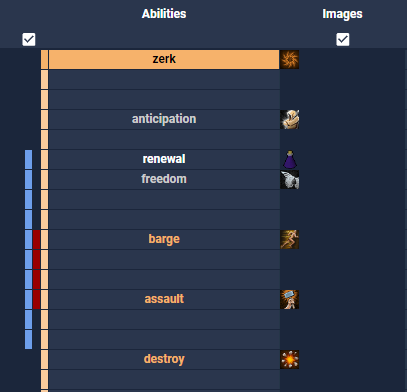
In this image Zerk is highlighted and an orange highlight appeared on the left side, showing the duration of Zerk.
This also happens the Renewal and GBarge timers.
Images will appear next to the rotation (right side) to show each ability. There are 5 columns of images for abilities, and a 6th column that displays stacks (Wen arrows, Exsanguinate and Incite Fear stacks).
Adrenaline is based on a priority system, where the adrenaline is calculated for every new input on that tick to prevent adrenaline overflow.
Damage calculations come from Ability Damage Maths in the form of pre-stored calculations to save resources in both sheets.
Errors will be shown for diverse reasons such as: needing to use Limitless, wrong ability name, insufficient adrenaline, casting abilities under their required adrenaline, GCD errors, cooldowns and so on.
Displays when an ability comes off cooldown so it can be used again.