1- Download the Consoleapp-main.zip file, from here
2- Unzip the file.
3- Open file appsettings.json in any text editor
Set the appropriate values of: ClientId and ClientSecret
You can create a new set of ClientId and ClientSecret, by registering and logging in https://test.deribit.com/. Visit the API documentation in https://docs.deribit.com/.
"ClientId": "[Your client ID here]",
"ClientSecret": "[Your client secret here]",
"WebSocketUrl": "wss://test.deribit.com/ws/api/v2",
The default value of this setting is wss://test.deribit.com/ws/api/v2, which is the test environment of the Deribit API. If you want to connect to a different environment, you must set this value accordingly.
"KeepAliveIntervalInSeconds": 300,
Websocket protocol keep-alive interval (in seconds). If the server doesn’t get any package after this time interval the socket connection is closed.

"InstrumentName": "BTC-PERPETUAL",
The instrument to be used in the channel subscription. Currently this is the only instrument allowed

"TickerInterval": "raw",

"BookInterval": "raw",
Ticker and Book interval: Is the frequency of notifications. Currently this is the only interval allowed.

"HeartBeatInterval": 30
Interval (in seconds) to configure the heartbeats
In this solution, the Console application provides the information for the BTC-PERPETUAL channel specifically.
4- Once you have set the desired settings, save the appsettings.json.
5- Run the ConsoleApp
Method 1: Execute the ConsoleApp.exe file contained in the Consoleapp-main folder that you unzipped.
Method 2:
* Open the Windows PowerShell or any other system console application.
* Use the corresponding console command to move to the unzipped folder path.
* Execute the ConsoleApp.exe file.
Once the console is executed:
1- The Deribit API availability is checked.
2- The Heartbeat is set up.
3- The app subscribes to the corresponding channels (the only instrument supported is BTC-Perpetual).
4- The upcoming ticker updates are written in the console.
- .Net 7
- Microsoft Windows
As a team, we have set up a series of tasks that we carry over every day in order to meet the goals agreed on each iteration. In our case, the iterations may last from 1 to 3 weeks depending on the project's complexity. For this case, we have decided to have just two iterations of one week each.
Each iteration starts with a Planning meeting: The objective of this meeting is to choose the functionalities to implement and clear doubts that the project team may have. Likewise, it helps to align the client's expectations with the team’s understanding of the project.
Daily review meetings: We carry out this kind of meeting from Monday to Friday. Each meeting may last around 20 minutes. The purpose is to focus on what the team accomplished on the previous day, what it will be working on the current day, and discover if any blockers or impediments prevent the team members from progressing in their tasks.
We could have other meetings on demand to discuss and find a solution to any technical issues that may appear during the development process.
We have created a communication channel dedicated to the project in order to have direct and effective communication between all team members.
The team decided to follow an agile approach to estimate the effort to fulfill the project.
Based on the recommendations provided by Scrum, once the project features were broken down into tasks, the team assigned effort points to each of them. We used the practical Fibonacci approach that is described in the image below.
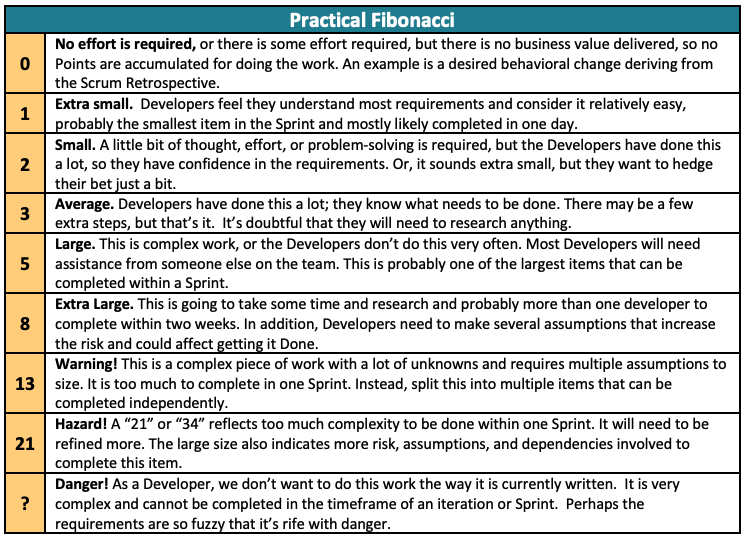
Besides, the team gave each of the effort tags a corresponding amount of hours.
| Effort | Time in hours | |
|---|---|---|
| Min | Max | |
| No effort is required | 0 | 1.5 |
| Extra small | 1.6 | 4 |
| Small | 4.1 | 7 |
| Average | 7 | 12 |
| Large | 12 | 40 |
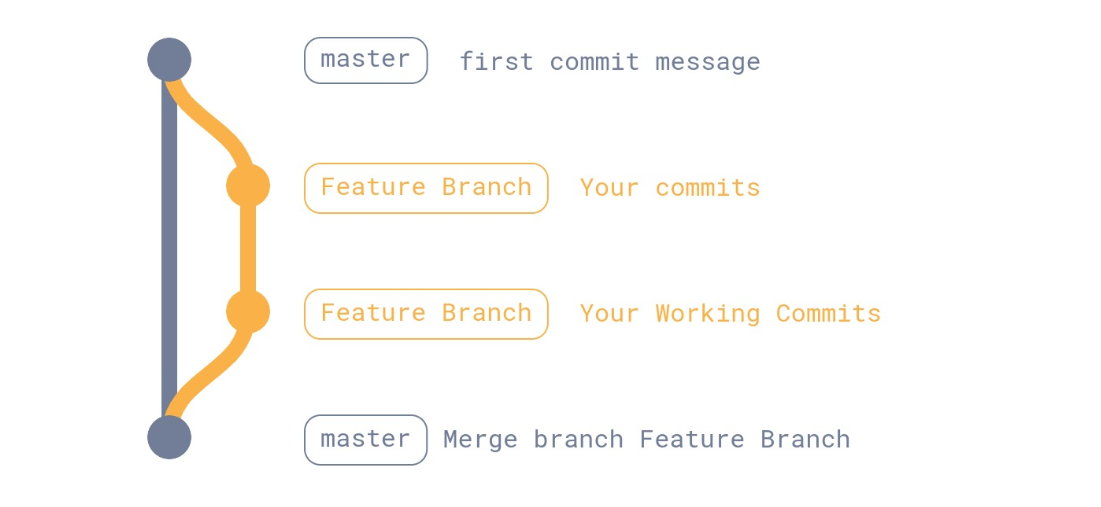
You can expand the code base of this project. To contribute code to the project, you should:
1- Create a feature branch or a repository fork
2- Commit all your changes to this branch (please notice we use semantic commits)
3- Once your code is functional, make a pull request to main (recommendation: make your code to be reviewed and approved by at least 2 other team members)