External Dependencies
External dependencies refer to any file outside the repository that the code uses as an input. For instance, this can include data files that are too large to be committed directly. Robustly documenting external dependencies is one of our golden rules and users should pay special attention to understanding the procedure for this and making sure it is followed faithfully.
Frequently, producing output requires using code libraries that do not come with the standard installation of a software. External code libraries should be properly documented to guarantee replicability.
For code libraries supported by official software repositories (e.g., PyPi for Python, CRAN for R, and SSC for Stata), add the name of code library to the appropriate script in /setup/ (i.e., requirements.txt for Python, setup_r.R for R, and setup_stata.do for Stata).
For code libraries unsupported by official software repositories, save the code library to /lib/. Code libraries saved in /lib/ should contain a README.txt containing provenance information.
The paths to all external files should be specified in config_user.yaml. No script in a module should ever reference a path to an external file directly. Instead, a module's build script should create symbolic links to the relevant external files in the module's /external/ directory using the paths specified in config_user.yaml. Code in the module can then reference the links in /external/.
When specifying external files in config_user.yaml, the paths should point to the top level directory containing the external files. Additional pathing to individual files/subdirectories should instead be specified when creating symbolic links within a build script. The motivation behind this is to accurately reflect that it is the location of the top level directory, not the contents of the top level directory, that is user-specific.
Suppose you want to use external data from Dropbox in a module. First, you would add the Dropbox path to your config_user.yaml. In this case, we will add the Dropbox path to the key dropbox.
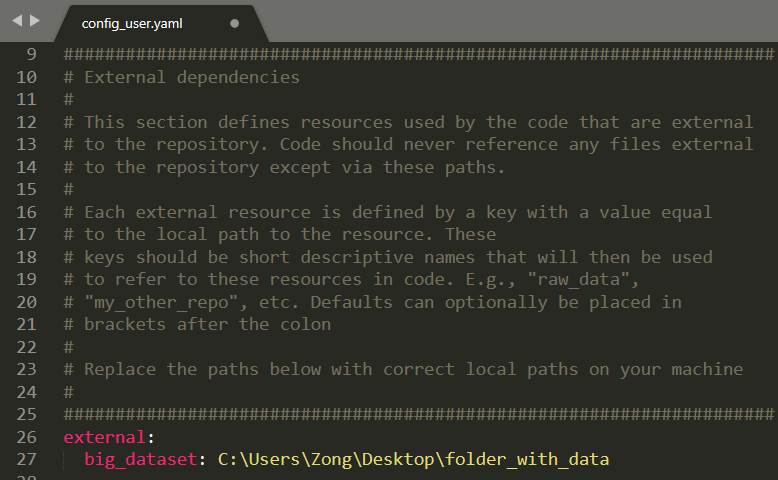
Then, in the module, include in an external.txt file the following line:

Our source is {dropbox}. The curly brackets here tell the make.py script to substitute {dropbox} for the value under the key dropboxinconfig_user.yaml(in this caseC:\Users\Zong\Dropbox). Had our source been {dropbox}\folder\, then the make.py script would use C:\Users\Zong\Dropbox\folder.\
Now run your make.py script, which will generate the appropriate symbolic link.

It is possible that you may wish to save the outputs of your project external to its Github repository (e.g., on Dropbox). When saving an external output, it is important to always record the following information: (i) in the external directory where the output file is saved, include documentation containing when the file was saved as well as the repository and commit hash used to generate it, (ii) in the repository generating the output file, include documentation containing where the file is externally saved as well as its size and last modification date.
A specific instance of needing external outputs is when a module creates a large intermediate file that must be stored outside of Github. The following protocol should be used:
- In the module, save the large intermediate file in subdirectory
/output_local/. - Manually save the large intermediate file outside of the repository (e.g., on Dropbox), making sure to save the required documentation.
- For any downstream modules that use the large intermediate file, follow standard procedure for using an external file as a dependency. Do not reference to the file in
/output_local/.