
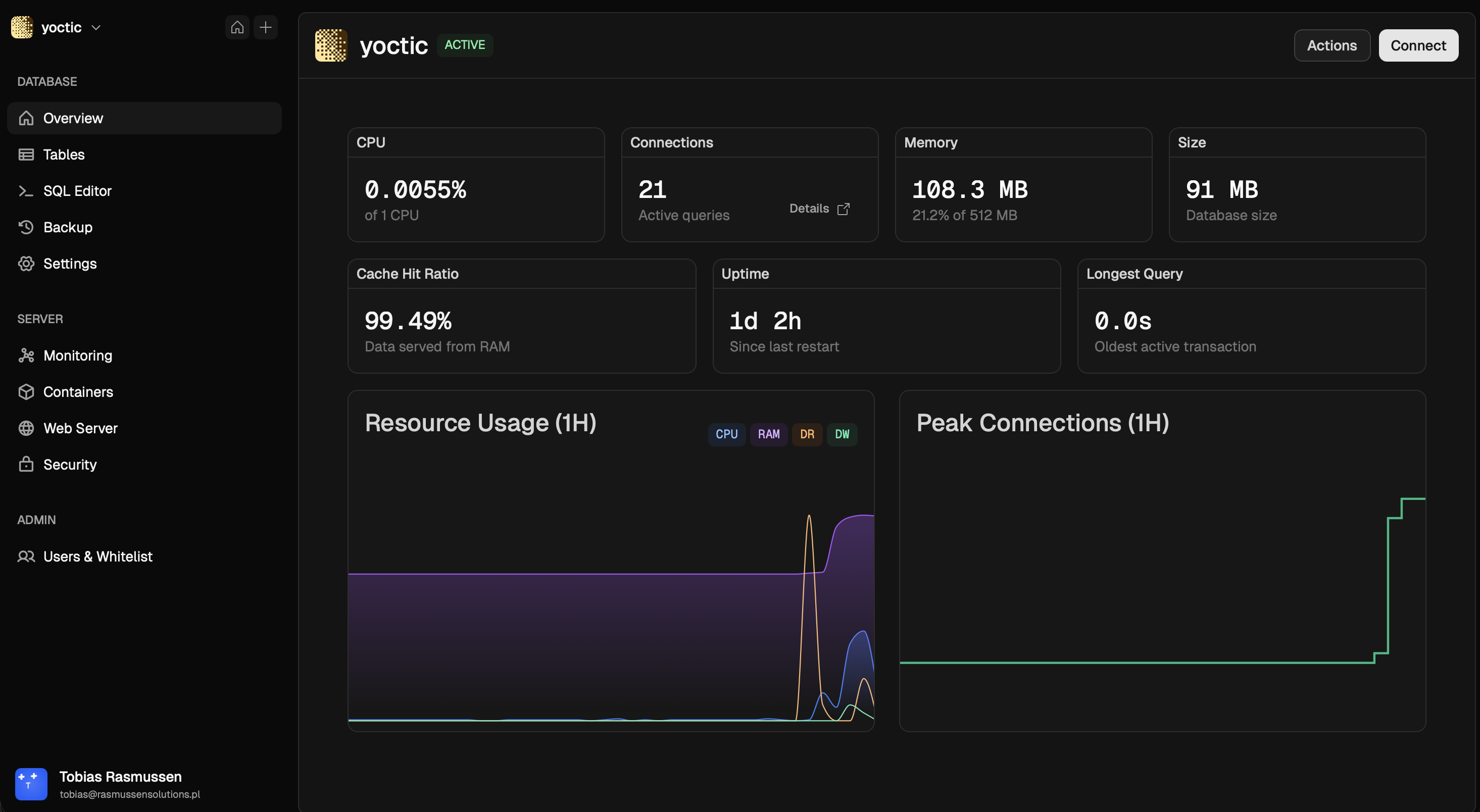
Baseful is an open-source, self-hostable platform for managing PostgreSQL databases, inspired by the developer experience of Neon.
It gives you a web dashboard, a built-in Postgres proxy with token-based auth, backup workflows, monitoring, and container lifecycle management on your own infrastructure.
- Postgres database provisioning and lifecycle controls
- Token-based connection strings through a built-in proxy on port
6432 - SQL editor and table explorer in the web UI
- Database metrics and active connection monitoring
- Backup + restore flows with S3-compatible object storage support
- Optional backup encryption (PGP public key)
- User auth, admin whitelist management, and profile settings
- Domain + SSL provisioning support for dashboard access
Baseful is an early-stage project, actively developed and production-tested on Ubuntu 24.04 LTS VPS, but some important capabilities are still being expanded.
Current focus areas include:
- Stronger and more granular connection limit controls
- Additional production hardening and operational safeguards
- Further UX and workflow improvements across database operations
Baseful is a monorepo with:
backend/: Go (gin) API + Postgres proxy + Docker orchestration + SQLite metadata DBfrontend/: React + Vite dashboard- Root
Dockerfile: multi-stage build (frontend + backend) - Root
docker-compose.yml: singlebasefulservice with Docker socket access (this is under reconsideration)
Baseful manages Postgres database containers through the local Docker engine and places them on the baseful-network Docker network.
- Ubuntu 24.04 LTS VPS (production-tested target)
- Docker Engine
- Docker Compose (
docker composeplugin ordocker-compose) - Git
- Open ports:
3000(dashboard/API in Docker setup)6432(database proxy)80and443(domain/SSL features)
- Baseful is intended for VPS deployment.
- Production testing has been done on Ubuntu 24.04 LTS.
- Development has been done on a MacBook Air M4 (2025).
One-command install:
curl -sSL https://raw.githubusercontent.com/getbaseful/baseful/refs/heads/main/install.sh | bashWhat the installer does:
- Installs Docker/Git if missing
- Clones Baseful into
/opt/baseful - Creates
.envfrombackend/.env.example - Generates a secure
JWT_SECRET - Auto-detects
PUBLIC_IP - Creates
baseful-network - Builds and starts Baseful with Docker Compose
- Optionally applies security hardening (
ufw,fail2ban, unattended upgrades)
After install:
- Dashboard:
http://<PUBLIC_IP>:3000 - Proxy:
<PUBLIC_IP>:6432
git clone https://github.com/getbaseful/baseful.git
cd baseful
cp backend/.env.example .env
Set at minimum in .env:
JWT_SECRET(32+ chars)PUBLIC_IP(server IP or DNS name)
Create the Docker network (required):
docker network create baseful-networkStart:
docker compose up -d --buildOpen:
http://localhost:3000(or your server IP/domain on port3000)
From repo root:
cp backend/.env.example .env
export PORT=8080
export DB_PATH=./backend/data.db
Ensure Docker network exists:
docker network create baseful-networkRun backend:
cd backend
go run .In a second terminal:
cd frontend
npm install
npm run dev
Vite proxies /api and /uploads to http://localhost:8080.
- Open Baseful in your browser
- Register the first account (first user becomes admin)
- Create a project
- Create your first Postgres database
- Generate/rotate tokens and use the provided connection string via proxy
:6432
View logs:
docker compose logs -fCheck proxy logs (install-script path):
tail -f /var/log/proxy/proxy.logUpdate an existing install:
curl -sSL https://raw.githubusercontent.com/getbaseful/baseful/refs/heads/main/install.sh | bash -s -- updateUninstall (destructive):
bash uninstall.shImportant environment variables:
PUBLIC_IP: used when generating connection detailsJWT_SECRET: auth signing secret (must be strong)PROXY_PORT: default6432PROXY_SSL_ENABLED: enable/disable proxy TLS behaviorPROXY_IDLE_TIMEOUT: default30mPROXY_QUERY_TIMEOUT: default5mPROXY_REVOCATION_CHECK: token revocation checksDOCKER_NETWORK: defaultbaseful-network
In Docker Compose mode, PORT is set to 3000 for the web/API service.
By default, Docker Compose mounts:
./backend-data-> SQLite app data (/app/data)./caddy-data-> Caddy certificates/state/var/log/proxy-> proxy logs
Back up these paths for disaster recovery.
- Baseful container has access to
/var/run/docker.sockto manage database containers. - Restrict host access and firewall exposed ports.
- Use strong
JWT_SECRETand rotate tokens when needed. - Prefer TLS + domain setup for production deployments.
- Enable encrypted backups when using external object storage.
This repository is licensed under Functional Source License 1.1 (FSL-1.1-ALv2) with a future Apache-2.0 license grant. See LICENSE.