Releases: ginlix-ai/LangAlpha
Release list
Desktop v0.2.4

The LangAlpha desktop app for langalpha.ai. Sign in and you are running, with nothing to host yourself.
Running your own stack? Download the self-hosted build instead.
| Platform | Download |
|---|---|
| macOS (Apple Silicon) | LangAlpha-0.2.4-arm64.dmg |
| macOS (Intel) | LangAlpha-0.2.4-x64.dmg |
| Windows (x64) | LangAlpha-0.2.4-x64.exe |
| Windows (ARM64) | LangAlpha-0.2.4-arm64.exe |
| Linux (AppImage) | LangAlpha-0.2.4-x86_64.AppImage |
| Linux (.deb) | LangAlpha-0.2.4-amd64.deb |
Looking for the newest version? langalpha.ai/download always has it.
On Windows, SmartScreen may warn on first run. Click More info, then Run anyway.
Desktop v0.2.4 (self-hosted)
The LangAlpha desktop app for your own stack. On first launch it asks for the address.
Want the hosted version instead? Get it at langalpha.ai/download, where there is no server to run.
| Platform | Download |
|---|---|
| macOS (Apple Silicon) | LangAlpha-oss-0.2.4-arm64.dmg |
| macOS (Intel) | LangAlpha-oss-0.2.4-x64.dmg |
| Windows (x64) | LangAlpha-oss-0.2.4-x64.exe |
| Windows (ARM64) | LangAlpha-oss-0.2.4-arm64.exe |
| Linux (AppImage) | LangAlpha-oss-0.2.4-x86_64.AppImage |
| Linux (.deb) | LangAlpha-oss-0.2.4-amd64.deb |
On Windows, SmartScreen may warn on first run. Click More info, then Run anyway.
The desktop app and LangAlpha update separately. This is a shell: a window onto the stack you run. It updates itself from here, so this page is a record rather than something to watch. LangAlpha updates when you update your own deployment, and a new LangAlpha does not need a new desktop build.
Coming from a build that shipped without an updater? Install this one by hand; everything after it is automatic.
v2026.09.07

Highlights
Streaming and Transcript Motion
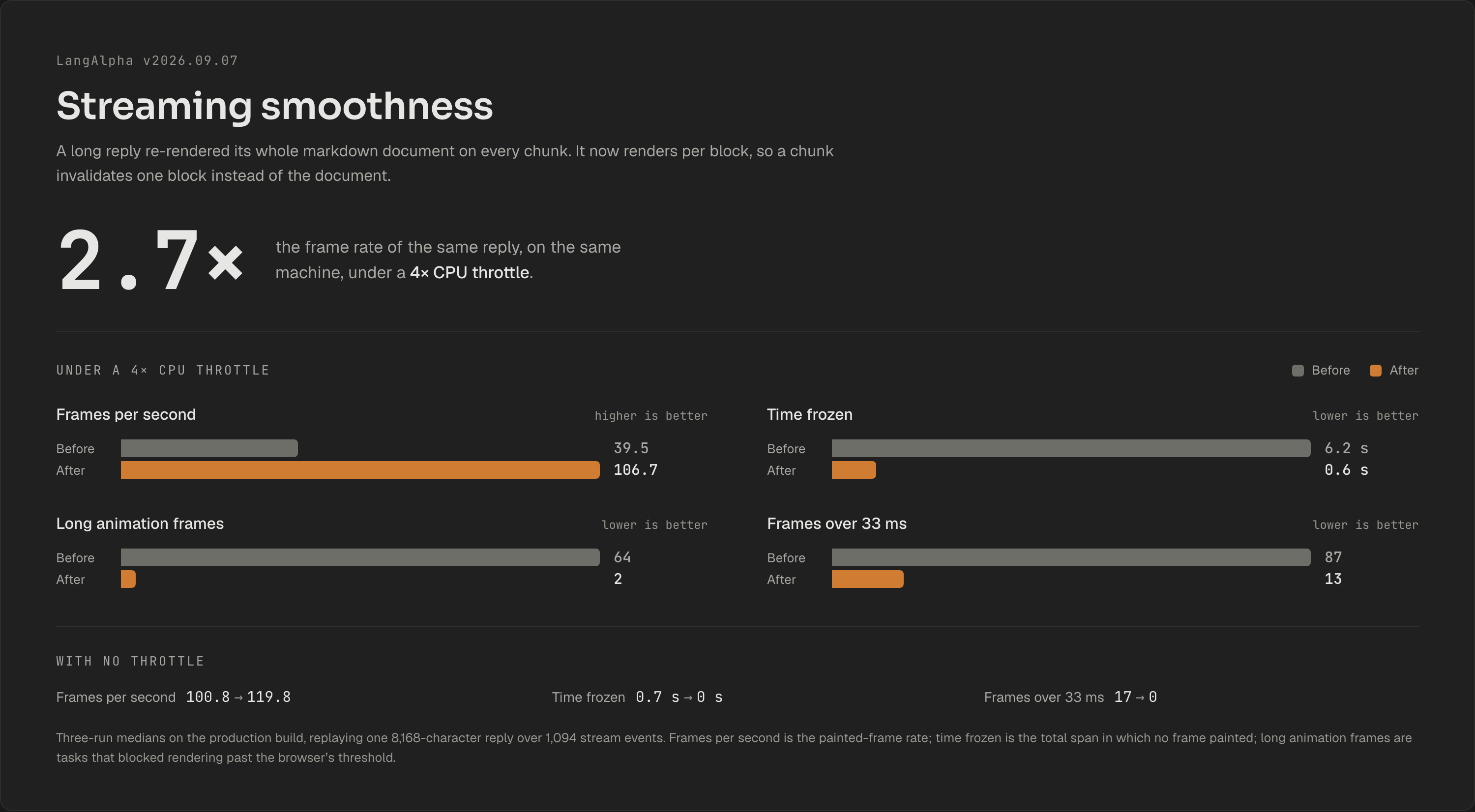
A long reply used to stutter as it streamed: the whole markdown document re-rendered on every chunk, so the page froze at each heading, list and code block. On an 8,000-character reply under a 4x CPU throttle that was 39.5 fps with 6.2 seconds spent frozen. The reply now renders per block under stable keys, and the same test runs at 106.7 fps with 0.6 seconds frozen.
- Reconnect applies the backlog in one pass. Reloading mid-run replayed buffered events one at a time, so the transcript blinked, flung to the top and re-typed the reply. The stream now carries a
caught_upmarker at the replay-to-live boundary and the client flushes everything before it in a single pass. - Live rows animate between measured pixel heights. Folding a tall reasoning row handed the animation library
height: auto, Chromium clamped the scroller to the shorter content, and the viewport jumped up by the row's height. Rows now measure their own content. - The follow pins per frame instead of chasing with smooth scroll. The view trailed the bottom during fast reasoning and slid on every fold. A resize observer holds a near-bottom reader at the bottom in the frame the transcript grows, and an upward scroll re-arms the follow only at the bottom itself.
- A hidden tab settles before its first painted frame. Returning from another browser tab showed rows folding one by one and reasoning text re-typing itself. Animations are skipped while the document is hidden.
- Where a finished reply lands is a setting. Settings, under User Info, gains "When a reply finishes": "Stay at the end" (the default) or "Show the start of the reply".
Model Catalog
Six new models, all at 1M context or above:
- GPT-6 Astra, on both OpenAI routes, 1.05M context, five reasoning rungs defaulting to medium.
- Claude Fable 5.1, 128K output ceiling, five rungs defaulting to high, with no off rung because its thinking is adaptive and always on.
- Gemini 3.8 Flash and Qwen3.8 Flash, both reading video alongside text, images and PDFs.
- GLM-5.3 and GLM-5.3-Flash on both routes. The Flash variant is the multimodal one; the flagship is text only.
- DeepSeek V4 Flash Vision, marked experimental.
Each entry declares only the rungs its endpoint accepts, so a level that would come back a 400 is not offered as a button. Astra and Fable 5.1 also ship OAuth twins for anyone who has connected their own ChatGPT or Claude subscription.
Retired: Kimi K2.5 and K2.6 with their coding variants, MiniMax M2.7, GLM-5.1, the GLM-5 and GLM-5v turbo pairs, Qwen3.7 Flash and Gemini 3.1 Flash Image. The catalog ends at 54 entries, 48 selectable.
Per-Model Tuning
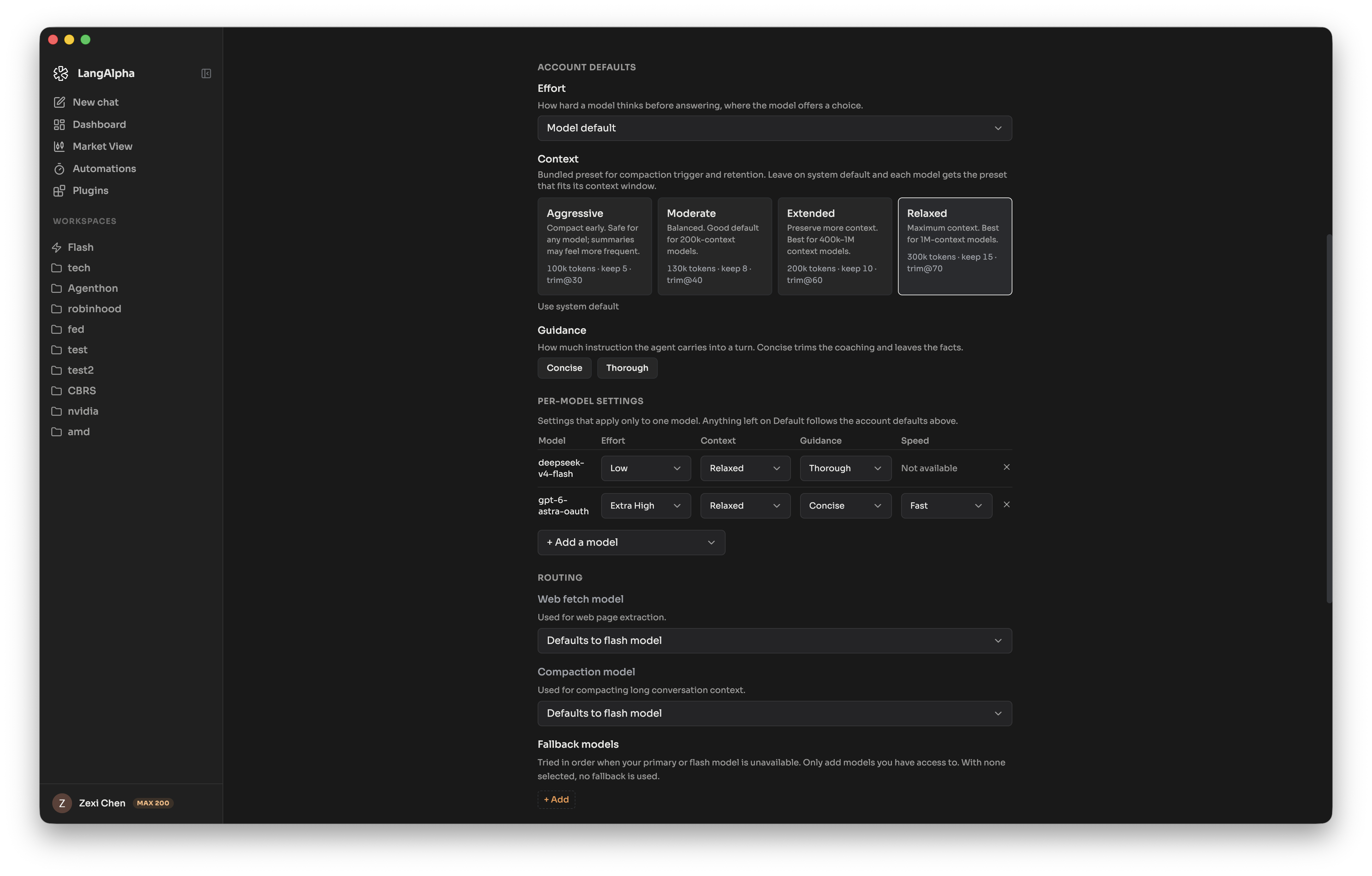
Reasoning effort, compaction profile, prompt guidance and speed were account-wide values applied to every client a turn built, so one compaction threshold governed a 200K model and a 1M one alike, and a fixed four-rung ladder was offered to every model regardless of what it accepts.
Each now resolves per model and per client, so a pinned subagent and a fallback each resolve against their own ladder. A model's profile beats the account value; the request beats both.
- A level outside a model's ladder rounds to the nearest one it honors rather than falling away silently.
- Compaction follows the context window when a model names no profile of its own.
- Per-model effort follows the account, not the device. The composer menu wrote these to browser storage, so the choice stayed on one machine. Existing keys are lifted into the account profile on first sight and deleted.
- Settings, under Models, gains a detail level. Advanced adds a per-model matrix over effort, context, guidance and speed, where a cell names the value it inherits and a setting the model has no control for reads "Not available", so an empty cell always means inherited.
Brokerage Capability Consent
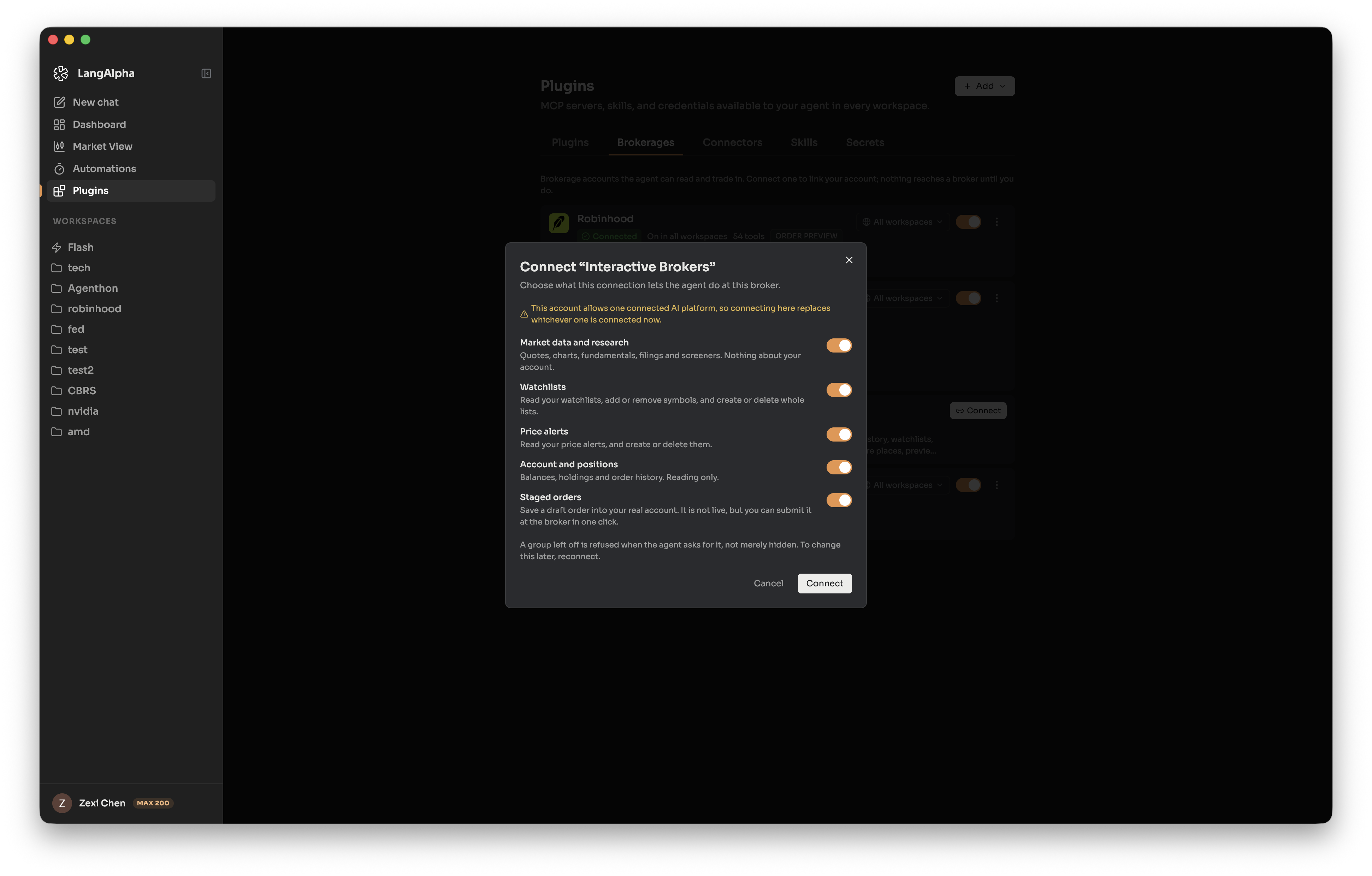
Connecting a brokerage was all or nothing: authorizing once handed the agent every tool the vendor publishes, order placement included, with no way to decline part of it.
The grant is now partial and explicit. Connecting opens a dialog listing the capability groups that broker offers, from market data and watchlists to live orders. The selection is enforced per call at the egress relay, before the vendor token is attached, and declined tools are dropped from the prompt, the generated wrappers and the sandbox docs.
- Live orders are off unless you turn them on. Every other group is pre-ticked. Interactive Brokers' staged orders write a draft into the real account, so that group is marked as needing care and granted by default.
- The policy is a denylist that fails closed, with the vendor resolved from the server's URL rather than the row's name, so a connection named after one broker and pointed at another cannot borrow the wrong policy.
- Webull joins Robinhood, Interactive Brokers and moomoo, covering 259 curated tools.
- Changing a grant means reconnecting. There is no partial edit, which is why a connected row keeps its Reconnect button.
Existing connections need one action. Every brokerage connected before this release is backfilled with what it could already do, minus live orders, because nobody was asked and a backfill must not pass as consent. A moomoo or Robinhood connection that was placing orders will have those calls refused until it is reconnected and the group granted deliberately.
Workspace File Persistence
A workspace's files are backed up when it stops and restored when it starts. Three things did not survive the round trip.
- Modes, symlinks and empty directories are recorded and reapplied. Backup walked regular files only and wrote no permissions; restore never called
chmod. A script marked executable came back without the bit, a symlink came back as nothing, an empty directory vanished. Files backed up before this release carry no recorded mode and fall back to a default. - A file containing a NUL byte round-trips intact. Bytes were stored as Postgres text, which cannot hold a NUL, so the byte was dropped while the recorded hash still described the original.
- A failed restore is recorded rather than mistaken for a deletion. Backup read "absent from the sandbox" as "the user deleted it", which is exactly what a half-finished restore looks like. Pruning is now withheld until a restore completes clean.
The agent's deliverables also move from a shared results/ folder into the task's own directory. Nothing rewrites paths already recorded in a memo or memory file, so an older note may point somewhere that no longer holds the file.
Desktop App
macOS builds are now signed, notarized and stapled, disk image included, since Gatekeeper assesses a downloaded image by its own signature and refused an unsigned one however well notarized its contents were. An email confirmation started in the desktop app now finishes there, handed back through the app's URL scheme rather than redeemed by the browser that opened it. Windows and Linux builds remain unsigned.
Download the hosted build, or the self-hosted build to point at your own stack.
Changelog
New Features
- store workspace file bytes as content-addressed objects (#394) (51c7a66)
- llms: add GPT-6 Astra and bump the OpenAI SDK stack (#392) (792d17e)
- web: finish a desktop email confirmation in the app, not the browser (f949119)
- mcp: gate brokerage tools on the capabilities the user granted (#391) (e228166)
- desktop: sign and notarize macOS builds (86b7663)
- models: add Gemini 3.8 Flash and Claude Fable 5.1 (#389) (7f4599c)
- models: resolve tuning per model, and per client (#384) (cda3e82)
Bug Fixes
- web: focus ring, transcript spacing and a named settings control (#400) (435a5a4)
- llms: scope the raw-reasoning rescue to DashScope streams (#398) (c0d6a28)
- web: streaming transcript bounce, follow lag, word hops and turn-end landing (#399) (7511bd2)
- workspace: name the workspace from its row, not from agent.md (#397) (7ee093d)
- llms: surface Qwen reasoning and DashScope stream failures (#396) (61ec00c)
- web: settle a hidden tab's streaming animations on the first frame back (#395) (9d44675)
- web: smooth streaming end to end: one-pass reconnect, per-block markdown, spinner in the pauses (#393) (de48502)
- desktop: give each edition its own updater cache (2e12223)
- web: land signup on check-inbox for every accepted response (e39b415)
- models: give Haiku 4.5 a thinking budget (29e89d2)
- desktop: name the update manifest for the version's channel (340ea62)
- web: keep a field unringed after a trip out of the window (#390) (3e53d0e)
- web: stop a token-refresh storm from signing users out (#387) (f83ee75)
Improvements
- models: declare where each model's reasoning level is written (#388) (65a7a5d)
- models: refresh the model catalog and take ratings from Artificial Analysis (#386) (5df5e74)
Documentation
- desktop: correct the release status for signing and feeds (3e9f6b7)
Full Changelog: v2026.09.01...v2026.09.07
7 features, 13 fixes, 2 improvements, 1 doc change, 23 changes total
Desktop v0.2.3
The LangAlpha desktop app for langalpha.ai. Sign in and you are running, with nothing to host yourself.
Running your own stack? Download the self-hosted build instead.
| Platform | Download |
|---|---|
| macOS (Apple Silicon) | LangAlpha-0.2.3-arm64.dmg |
| macOS (Intel) | LangAlpha-0.2.3-x64.dmg |
| Windows (x64) | LangAlpha-0.2.3-x64.exe |
| Windows (ARM64) | LangAlpha-0.2.3-arm64.exe |
| Linux (AppImage) | LangAlpha-0.2.3-x86_64.AppImage |
| Linux (.deb) | LangAlpha-0.2.3-amd64.deb |
Looking for the newest version? langalpha.ai/download always has it.
On Windows, SmartScreen may warn on first run. Click More info, then Run anyway.
Desktop v0.2.3 (self-hosted)
The LangAlpha desktop app for your own stack. On first launch it asks for the address.
Want the hosted version instead? Get it at langalpha.ai/download, where there is no server to run.
| Platform | Download |
|---|---|
| macOS (Apple Silicon) | LangAlpha-oss-0.2.3-arm64.dmg |
| macOS (Intel) | LangAlpha-oss-0.2.3-x64.dmg |
| Windows (x64) | LangAlpha-oss-0.2.3-x64.exe |
| Windows (ARM64) | LangAlpha-oss-0.2.3-arm64.exe |
| Linux (AppImage) | LangAlpha-oss-0.2.3-x86_64.AppImage |
| Linux (.deb) | LangAlpha-oss-0.2.3-amd64.deb |
On Windows, SmartScreen may warn on first run. Click More info, then Run anyway.
The desktop app and LangAlpha update separately. This is a shell: a window onto the stack you run. It updates itself from here, so this page is a record rather than something to watch. LangAlpha updates when you update your own deployment, and a new LangAlpha does not need a new desktop build.
Coming from a build that shipped without an updater? Install this one by hand; everything after it is automatic.
Desktop v0.2.1
The LangAlpha desktop app for langalpha.ai. Sign in and you are running, with nothing to host yourself.
Running your own stack? Download the self-hosted build instead.
| Platform | Download |
|---|---|
| macOS (Apple Silicon) | LangAlpha-0.2.1-arm64.dmg |
| macOS (Intel) | LangAlpha-0.2.1-x64.dmg |
| Windows (x64) | LangAlpha-0.2.1-x64.exe |
| Windows (ARM64) | LangAlpha-0.2.1-arm64.exe |
| Linux (AppImage) | LangAlpha-0.2.1-x86_64.AppImage |
| Linux (.deb) | LangAlpha-0.2.1-amd64.deb |
Looking for the newest version? langalpha.ai/download always has it.
On Windows, SmartScreen may warn on first run. Click More info, then Run anyway.
Desktop v0.2.1 (self-hosted)
The LangAlpha desktop app for your own stack. On first launch it asks for the address.
Want the hosted version instead? Get it at langalpha.ai/download, where there is no server to run.
Installers for each platform are attached below.
On Windows, SmartScreen may warn on first run. Click More info, then Run anyway.
These builds do not update themselves. Watch this page for new versions.
Desktop v0.2.0
The LangAlpha desktop app for langalpha.ai. Sign in and you are running, with nothing to host yourself.
Running your own stack? Download the self-hosted build instead.
| Platform | Download |
|---|---|
| macOS (Apple Silicon) | LangAlpha-0.2.0-arm64.dmg |
| macOS (Intel) | LangAlpha-0.2.0-x64.dmg |
| Windows (x64) | LangAlpha-0.2.0-x64.exe |
| Windows (ARM64) | LangAlpha-0.2.0-arm64.exe |
| Linux (AppImage) | LangAlpha-0.2.0-x86_64.AppImage |
| Linux (.deb) | LangAlpha-0.2.0-amd64.deb |
Looking for the newest version? langalpha.ai/download always has it.
On Windows, SmartScreen may warn on first run. Click More info, then Run anyway.
Desktop v0.2.0 (self-hosted)
The LangAlpha desktop app for your own stack. On first launch it asks for the address.
Want the hosted version instead? Get it at langalpha.ai/download, where there is no server to run.
Installers for each platform are attached below.
On Windows, SmartScreen may warn on first run. Click More info, then Run anyway.
These builds do not update themselves. Watch this page for new versions.
v2026.09.01
Highlights
Account-level connectors and the credential vault
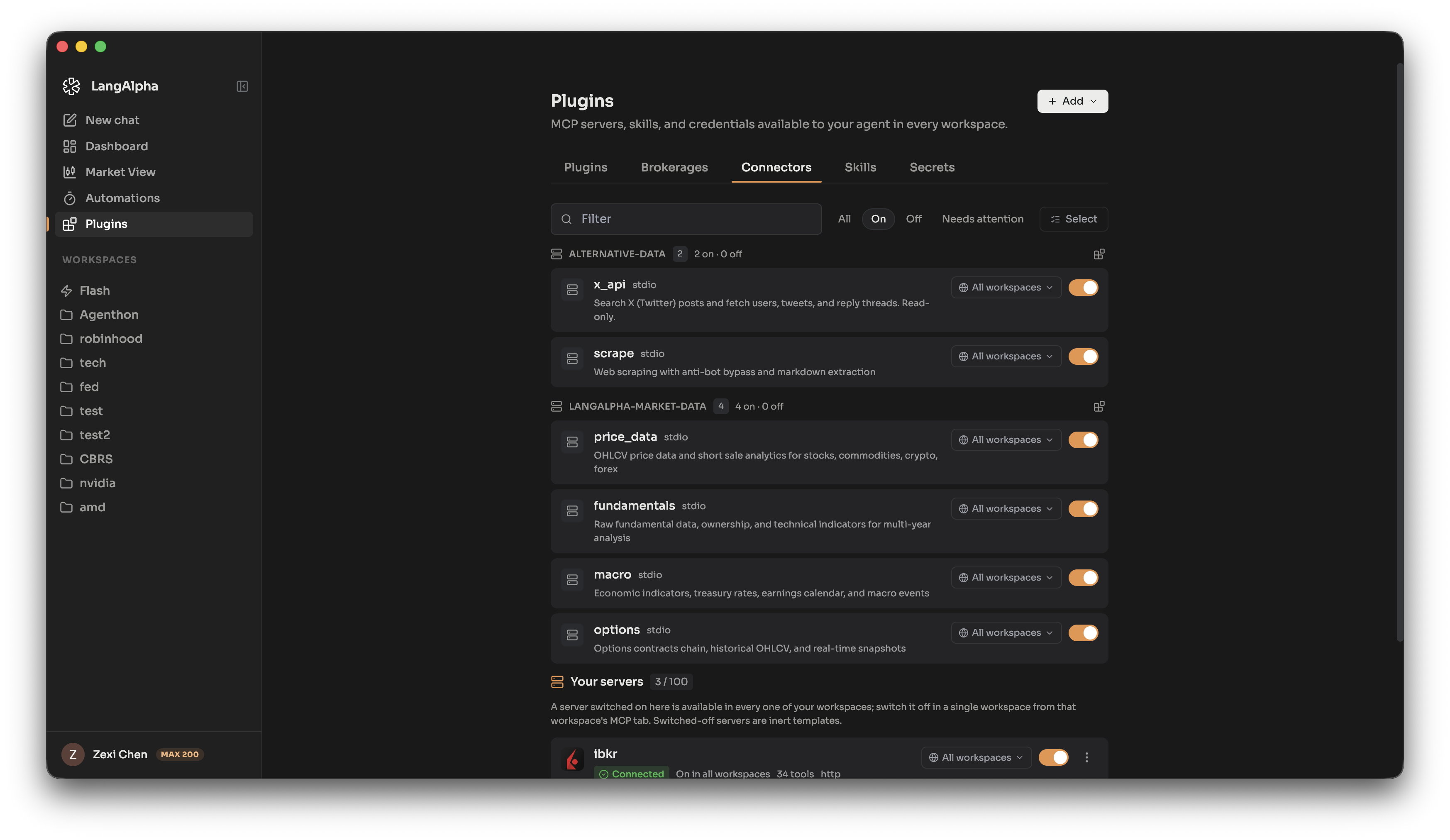
MCP servers and their credentials were configured per workspace, so a server set up in one workspace had to be set up again in the next.
Both now have an account-level tier that every workspace inherits, and a workspace secret of the same name still overrides the account value. Stored values are encrypted at rest with pgcrypto and reach configs and generated code only as ${vault:NAME} references.
Servers that authenticate with OAuth connect in a click rather than a pasted token, and their vendor token never enters the sandbox. Sandbox code calls a relay on the host, which attaches the Authorization header itself and reads the token fresh on every call, so a revocation takes effect immediately. Each grant pins its destination against DNS rebinding and carries its own method and tool allowlists. Servers that authenticate with an API key behave as they did before, resolving the value inside the workspace's own sandbox.
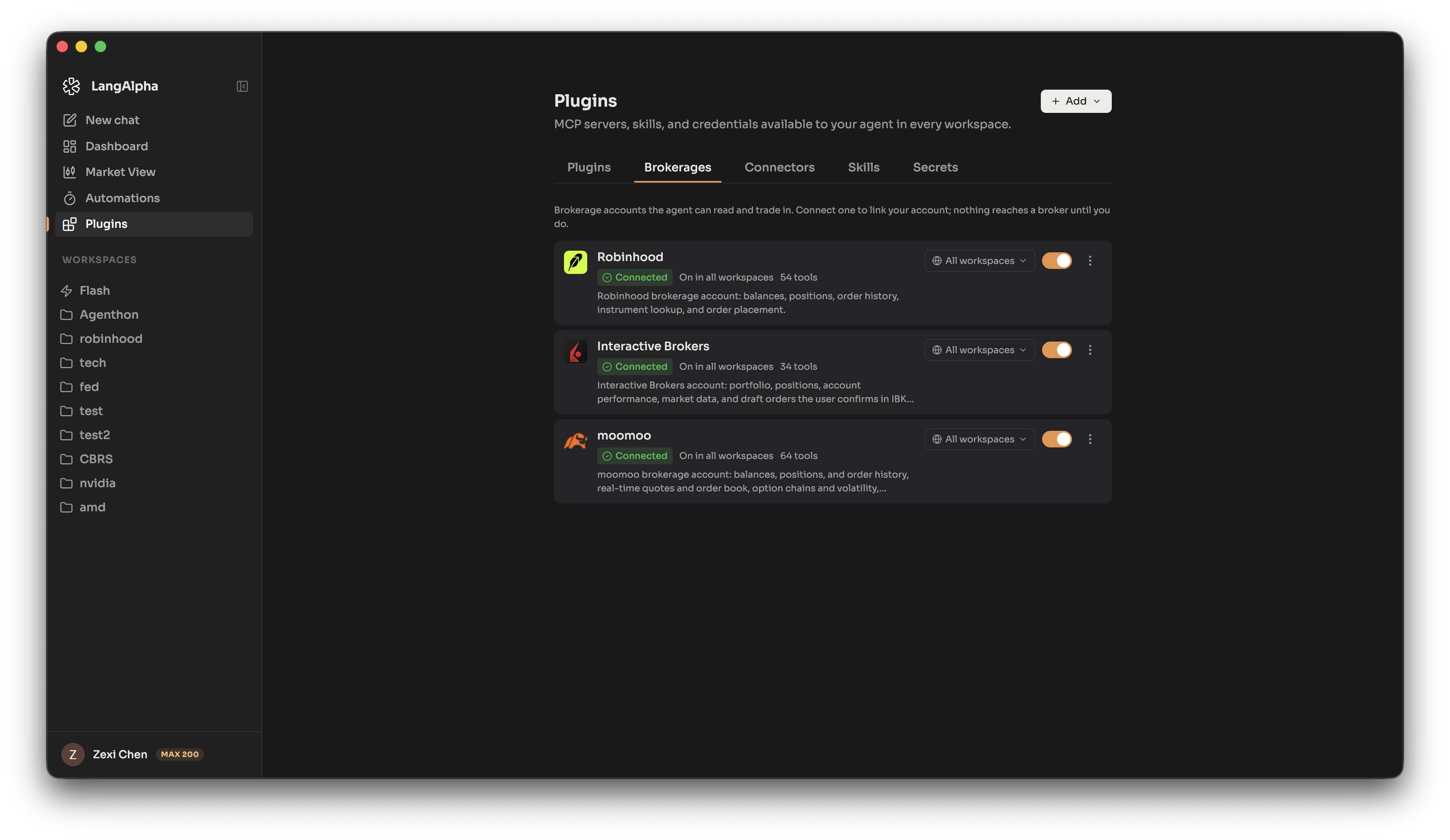
Brokerage connectors
Connecting a brokerage meant knowing the MCP endpoint and pasting it, and that address is where an OAuth token ends up. Three connectors now ship as a registry in source: Robinhood, Interactive Brokers and moomoo. A Brokerages tab lists all three, nothing exists until one is turned on, and past the first connect each is an ordinary account-level MCP server.
Vendor behavior a client cannot discover for itself travels as a flag on the registry entry, so the interface states what a vendor will do before the click instead of after.
- Robinhood accepts only a loopback callback. Its authorization server allowlists the RFC 8252 native-app profile and refuses a hosted redirect_uri, rendering its own error page instead of redirecting. The row is marked and the click refused in the browser, rather than ending on a dead page with nothing to read.
- Robinhood and Interactive Brokers allow one connected AI platform per account, dropping the previous one when a new grant lands. Both rows carry a standing warning, and connecting asks for confirmation first.
- moomoo performs dynamic client registration and accepts a hosted https redirect_uri, so it connects from the browser. It is the one connector verified end to end against a live account.
Agent Plugins
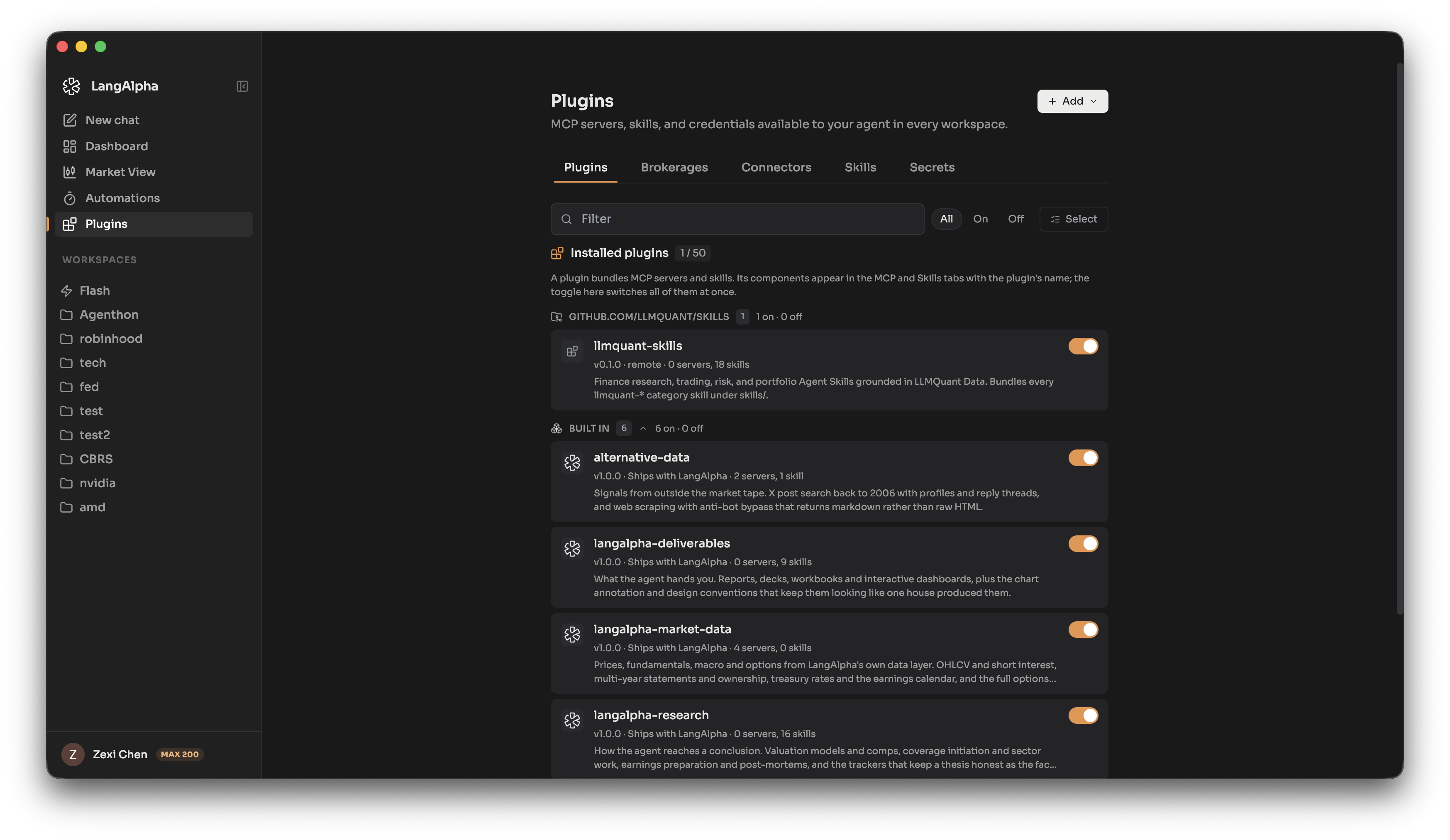
The MCP servers and skills the product ships were declared as a list in configuration beside two loose directories, while an uploaded package arrived as a manifest carrying its own files. Any surface that wanted to show both had two shapes to handle.
Everything is now an Agent Plugins 1.0.0 package, the same format a user uploads. Installation takes a zip or tar upload, or a public https URL pointing at a git forge or an archive, and a source holding several plugins returns a chooser rather than an error.
- A plugin is one switch. Disabling it withdraws every component it owns, enforced by a single join predicate on the two queries that deliver servers and skills. It also revokes live grants, so a sandbox already holding one stops reaching the server instead of continuing for hours.
- The shipped set disables the same way. An individual built-in server can be switched off for one account, and so can an entire shipped bundle.
- Skills gained an account tier. A zip carrying
SKILL.mduploads to account or workspace scope, moves between tiers afterwards, and its slash command can be renamed on the row. - Rows draw the vendor's own mark. Connector rows use the icons an MCP server publishes in its handshake, which the client previously discarded. Anything without one keeps the monogram it had.
The page hosting this was Connectors and is now Plugins, with tabs for plugins, brokerages, connectors, skills and secrets. Old links and in-flight OAuth callbacks still resolve to it.
The chat minimap
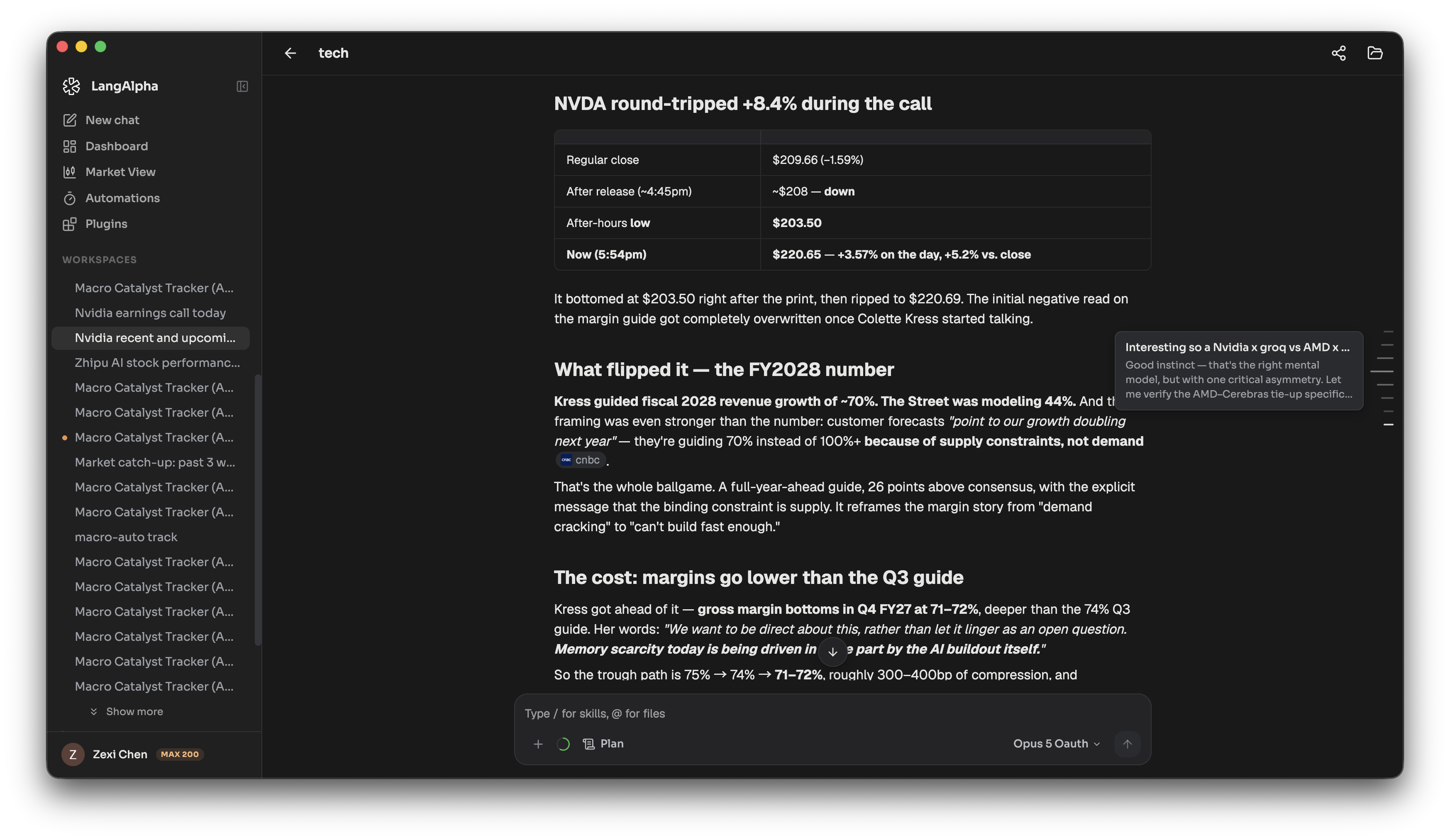
The minimap drew one bar per user message from raw text sliced at 60 characters, so markdown syntax showed verbatim in the preview, and hovering expanded the whole column. Clicking a bar called scrollIntoView and told the scroll controller nothing. During a live turn, a click on any recent turn clamped at the scroll maximum, the controller read that position as sitting at the bottom, and the next streamed chunk pulled the reader back to the end.
The rail now draws one tick per prompt-and-reply pair, folding consecutive prompts into a single tick that keeps the first bubble's id. A hover card shows the prompt above a few lines of flattened reply text, with a skeleton while the turn is still in flight. Clicking sets an anchor pin below the viewport top that re-measures on every content resize, so layout settling above the target cannot drag the landing.
The rail appears on the main transcript from two turns onward, on screens wider than 767 pixels, and hides while a right panel is open.
Desktop app
langalpha gains an Electron shell, a wrapper around the hosted web app that carries no bundle of its own, only an entry URL, so a web deploy reaches it without a desktop release.
Sign-in goes through the system browser rather than an embedded webview, with the shell catching the callback on a loopback port it asks the operating system for, and the PKCE exchange staying in the renderer that started the flow. Reports and widgets save as real PDF files carrying tagged reading order and an outline, neither of which a browser print produces. A failed load gets a named screen instead of a blank window, separating offline, a captive portal, an unreachable server and one that answered badly. On macOS the window is frameless with its own draggable chrome.
Builds are not distributed yet. Signed builds will follow in a later release.
Changelog
New Features
- mcp: SDK v2 + user-level connectors, vault, and a host-side egress relay (#349) (15107b8)
- plugins: Agent Plugins standard support and the reworked Plugins page (#363) (8e541b2)
- Skills user tier, per-user builtin disables, and the Plugins page (#359) (e787925)
- plugins: shipped servers and skills as bundles, plus vendor logos (#370) (c2ebaa6)
- mcp: add Robinhood and IBKR brokerage connectors (#366) (f989d09)
- mcp: ship moomoo as a brokerage connector (#377) (0f3a167)
- web: rebuild the chat minimap as a tick rail with turn previews (#372) (9c3d829)
- llms: refresh the model catalog and guard scheduled repricings (#353) (e0875c5)
- credits: pause a running turn when its user runs out of credits (#380) (0923bef)
- desktop: an Electron shell, and the window chrome it needs from web (#357) (b548d26)
- desktop: save a report or a widget as a real PDF (#362) (19194d2)
- sign in on any free port, drag any window, ring only for the keyboard (#371) (8e54cda)
Bug Fixes
- web: settle a HITL card whose interrupt replays after its answer (#383) (a324d17)
- web: ring a text field for the keyboard, not for the mouse (#381) (47de2af)
- mcp: mark Robinhood one connection per account (#374) (f5232fa)
- web: give every control one focus ring, charts included (#373) (c593703)
- usage: stop a zeroed usage payload from passing as per-call data (ce108ec)
- usage: derive the BYOK stamp from billing_type, not from cost (24dfa8f)
- prefs: stop an empty model catalog from wiping saved model preferences (#369) (d0c997f)
- web: stop submenus opening on top of their parent menu (#368) (d238327)
- pricing: count DeepSeek peak days on the vendor clock, not UTC (#365) (5f99002)
- desktop: declare homepage and author so the .deb builds (#358) (6aebeca)
- web: treat a dropped link as a wait, not a failure (#356) (841606a)
- web: recover a tab running a build the server no longer serves (#355) (8d178c2)
- tracking: bill on the manifest key, honor DeepSeek peak hour rates (#354) (7c66fd8)
- workspaces: fence the per-worker sandbox cache against Postgres (#351) (5893c04)
- egress: name a vendor redirect instead of relaying a bare 3xx (#352) (8dbcfdc)
- web: stop our dark color-scheme from whiting out TradingView embeds (#348) (4f56db6)
Performance
Improvements
New Contributors
A warm welcome and thank you to our new contributors this release:
Full Changelog: v2026.08.05...v2026.09.01
12 features, 16 fixes, 1 performance improvement, 1 improvement, 30 changes total
