Add sort MRVA results by last updated#1362
Conversation


1. Refactor references of `Stargazers` to `RepositoryMetadata` since
   the query is now more generic.
2. Update the graphql query to request last updated as well as stars
3. Update web view to display last updated
4. Update sort mechanism for last updated

A few notes:

1. I used `Intl.RelativeTimeFormat` to humanize the times. It wasn't as
   simple as I had hoped since I need to also make a guess as to which
   unit to use.
2. The icon used by last updated is not quite what is in the wireframes.
   But, I wanted to stick with primer icons and I used the closest I can
   get.
3. The last updated time is retrieved when the query is first loaded
   into vscode and then never changes. However, this time is always
   compared with `Date.now()`. So, opening the query up a week from now,
   all of the last updated times would be one week older (even if the
   repository has been updated since then).

   I don't want to re-retrieve the last updated time each time we open
   the query, so this timestamp will get out of date eventually.

   Is this confusing as it is?
 aeisenberg
force-pushed
the
aeisenberg/last-update-sort
branch
from
aeisenberg
force-pushed
the
aeisenberg/last-update-sort
branch
from
e1d93c1 to
e43b4e6
Compare

|
@aeisenberg Oh! Based on previous designs done by Christian those icons are from the VS Code SVG icon library . @charisk @jf205 Any guidance/thoughts here? GitHub's "Pull Requests and Issues" extension and every extension I've installed so far use that icon library. It feels odd that we want to switch iconography style when we are trying to provide a "native" experience inside the editor. |
|
@aeisenberg I've just noticed that we aren't using the native OS "right click" menu style to display the sorting options (see example below). Any reason why we are using an "Action list" instead?
|
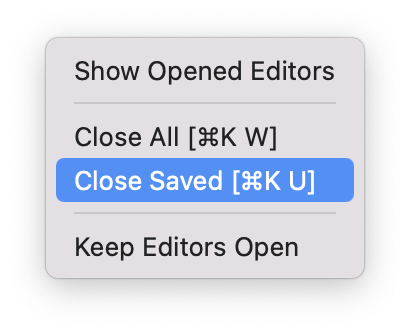

 shati-patel
left a comment
shati-patel
left a comment
shati-patel
left a comment
There was a problem hiding this comment.
This looks good to me, noting the design questions here and on Slack 🖼️
The last updated time is retrieved when the query is first loaded
into vscode and then never changes. However, this time is always
compared withDate.now(). So, opening the query up a week from now,
all of the last updated times would be one week older (even if the
repository has been updated since then).
I don't want to re-retrieve the last updated time each time we open
the query, so this timestamp will get out of date eventually.
Is this confusing as it is?
I agree that re-retrieving the "last updated" time seems excessive. I think this is fine as-is for now, since the sort order will be correct, even if the exact timestamp isn't.
(I don't really have any better ideas anyway 😅 Unless there's a happy medium where we retrieve the "last updated" time once a week or something 🤔 )
| @@ -0,0 +1,63 @@ | |||
| import * as React from 'react'; | |||
There was a problem hiding this comment.
[very minor]
Typo in filename: LasstUpdated -> LastUpdated

|
@asiermartinez thanks for the feedback. As we mentioned elsewhere, the main confusion is that we decided to use primer as our UI components, so the icons and styles are a little bit off. We're taking that up as another issue. Regarding your comment about the context menu, it will be difficult to use a native menu since this is a webview component and we must use web-based DOM components. We might get something closer if we move to the vscode-webview-ui-toolkit. |
|
I think the best approach for LastUpdated time is to calculate the duration (ie- the time between the last updated and now) when we download the values, not when we display them. At least this way, things will be fixed once they are downloaded. I'll make that change. |
The `lastUpdated` value is now the duration between timestamp of the
last time the repo was updated and time the file was downloaded.
This fixes the duration and it won't change over time.
|
I addressed my comment above and @shati-patel's comment. @asiermartinez's is bigger and requires a deeper discussion. It also doesn't affect the correctness of this feature. Can we get this merged and then continue working on the styles? |

| import { CalendarIcon } from '@primer/octicons-react'; | ||
| import styled from 'styled-components'; | ||
|
|
||
| const Calendar = styled.span` | ||
| flex-grow: 0; | ||
| text-align: right; | ||
| margin-right: 0; | ||
| `; | ||
|
|
||
| const Duration = styled.span` | ||
| text-align: left; | ||
| width: 8em; | ||
| margin-left: 0.5em; | ||
| `; | ||
|
|
||
| type Props = { lastUpdated?: number }; | ||
|
|
||
| const LastUpdated = ({ lastUpdated }: Props) => ( | ||
| Number.isFinite(lastUpdated) ? ( | ||
| <> | ||
| <Calendar> | ||
| <CalendarIcon size={16} /> | ||
| </Calendar> |

There was a problem hiding this comment.
I suggest we change CalendarIcon to RepoPushIcon. We show the date from the last push to the repo, and this icon encapsulates that better.
| import { CalendarIcon } from '@primer/octicons-react'; | |
| import styled from 'styled-components'; | |
| const Calendar = styled.span` | |
| flex-grow: 0; | |
| text-align: right; | |
| margin-right: 0; | |
| `; | |
| const Duration = styled.span` | |
| text-align: left; | |
| width: 8em; | |
| margin-left: 0.5em; | |
| `; | |
| type Props = { lastUpdated?: number }; | |
| const LastUpdated = ({ lastUpdated }: Props) => ( | |
| Number.isFinite(lastUpdated) ? ( | |
| <> | |
| <Calendar> | |
| <CalendarIcon size={16} /> | |
| </Calendar> | |
| import { RepoPushIcon } from '@primer/octicons-react'; | |
| import styled from 'styled-components'; | |
| const RepoPush = styled.span` | |
| flex-grow: 0; | |
| text-align: right; | |
| margin-right: 0; | |
| `; | |
| const Duration = styled.span` | |
| text-align: left; | |
| width: 8em; | |
| margin-left: 0.5em; | |
| `; | |
| type Props = { lastUpdated?: number }; | |
| const LastUpdated = ({ lastUpdated }: Props) => ( | |
| Number.isFinite(lastUpdated) ? ( | |
| <> | |
| <RepoPush> | |
| <RepoPushIcon size={16} /> | |
| </RepoPush> |
@aeisenberg Left a comment about switching the calendar icon. But yes, once we resolve that we can move forward. |
|
Changed the icon. |

 charisk
left a comment
charisk
left a comment
charisk
left a comment
There was a problem hiding this comment.
Looking good! Just have some suggestions.
| import * as sinon from 'sinon'; | ||
| import { Credentials } from '../../../authentication'; | ||
| import { cancelRemoteQuery, getStargazers as getStargazersCount } from '../../../remote-queries/gh-actions-api-client'; | ||
| import { cancelRemoteQuery, getRepositoriesMetadata as getStargazersCount } from '../../../remote-queries/gh-actions-api-client'; |
There was a problem hiding this comment.
This needs renaming to avoid confusion.
There was a problem hiding this comment.
Hmmm...auto-rename refactoring in vscode does some surprising things. Let me fix this.
| }); | ||
|
|
||
| // All these are approximate, specifically months and years | ||
| const MINUTES_IN_MILLIS = 1000 * 60; |
There was a problem hiding this comment.
What do you think about moving all this into a separate module? Then it can be easily re-used and unit tested.
There was a problem hiding this comment.
Perhaps we can start a time.ts and have this functions like this one (in the future we could move https://github.com/github/vscode-codeql/blob/main/extensions/ql-vscode/src/remote-queries/remote-queries-interface.ts#L255 there as well)
There was a problem hiding this comment.
Sure. I can separate this out. I'd prefer to do this in a separate PR.
| text-align: left; | ||
| width: 2em; | ||
| margin-left: 0.5em; | ||
| margin-right: 1.5em; |
There was a problem hiding this comment.
This is a drawback of using margins instead of VerticalSpace and HorizontalSpace - you end up updating the CSS of components that are not relevant to things you add. Would you consider using VerticalSpace instead?
There was a problem hiding this comment.
My preference would still be to use css to do the layout and avoid empty DOM elements, but I will follow the layout that's already being done here and use VerticalSpace.
There was a problem hiding this comment.
Hmmm...VerticalSpace isn't working here because of how flexbox is being used. The Star element has a flex-grow: 2;, which means that it grabs relatively more space than other elements in the flex layout. Since VerticalSpace implicitly has flex-grow: 0;, it will shrink to its minimum width.
I could avoid using flex-grow at all and use spacing dom elements for layout, but that sort of defeats the purpose of using flex-box.
There was a problem hiding this comment.
I've been using Box for layouts. Feel free to ignore my suggestion for now.
| }); | ||
|
|
||
| // All these are approximate, specifically months and years | ||
| const MINUTE_IN_MILLIS = 1000 * 60; |
There was a problem hiding this comment.
What do you think about moving these and humanizeDuration in a new time.ts module?
shati-patel
left a comment
shati-patel
left a comment
There was a problem hiding this comment.
Nice! Thanks for doing this 😻
4 participants


StargazerstoRepositoryMetadatasincethe query is now more generic.
A few notes:
I used
Intl.RelativeTimeFormatto humanize the times. It wasn't assimple as I had hoped since I need to also make a guess as to which
unit to use.
The icon used by last updated is not quite what is in the wireframes.
But, I wanted to stick with primer icons and I used the closest I can
get.
The last updated time is retrieved when the query is first loaded
into vscode and then never changes. However, this time is always
compared with
Date.now(). So, opening the query up a week from now,all of the last updated times would be one week older (even if the
repository has been updated since then).
I don't want to re-retrieve the last updated time each time we open
the query, so this timestamp will get out of date eventually.
Is this confusing as it is?
@asiermartinez: Do you have a better icon for me to use?
Checklist
ready-for-doc-reviewlabel there.