


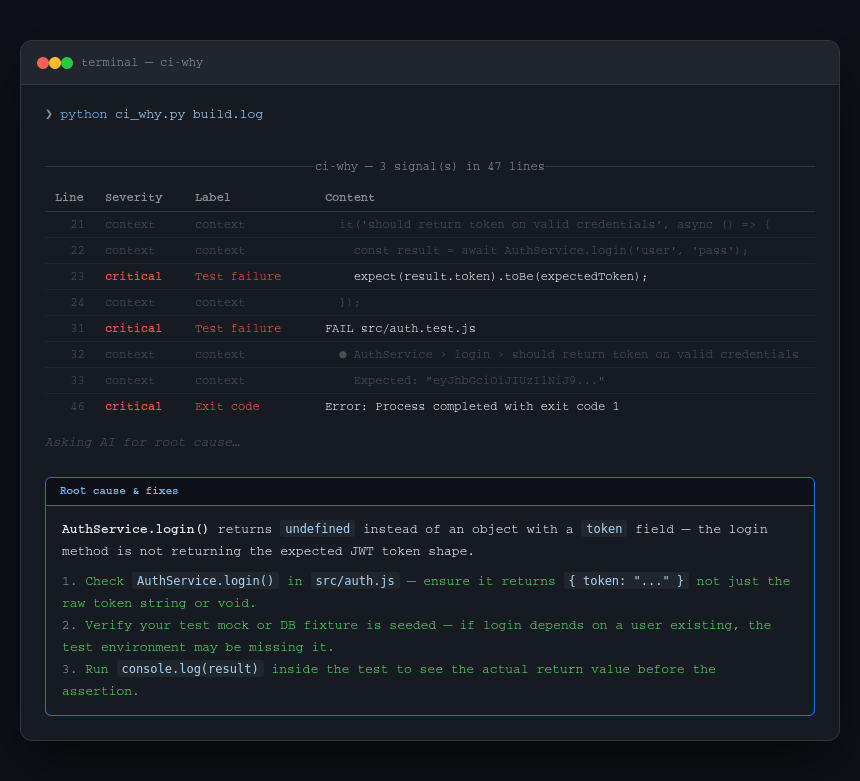
CI logs are noisy. A failed GitHub Actions run gives you hundreds of lines of downloading, copying, grouping, and progress output — and somewhere buried in it is the 3 lines that actually matter.
ci-why strips the noise, extracts the signal lines with context, and optionally asks Claude to explain the root cause and give you concrete fix steps.
No CI platform lock-in. Works on any log you can pipe or point at a file.
pip install ci-whyOr with pipx (recommended for CLI tools — keeps it isolated):
pipx install ci-why# From a log file
ci-why build.log
# Pipe directly from GitHub CLI
gh run view --log | ci-why -
# Pattern analysis only — no API call
ci-why build.log --no-ai
# Just the raw extracted failure lines (great for piping)
ci-why build.log --raw
# More context lines around each failure
ci-why build.log --context 5
# Scan only the last N lines (for huge logs)
ci-why build.log --max-lines 10000Set your Anthropic API key to get plain-English root cause analysis and fix steps:
export ANTHROPIC_API_KEY=sk-ant-...
ci-why build.log
Without the key, ci-why still works — it shows the extracted failure lines using pattern matching only. The AI explanation is additive, not required.
ci-why detects failure signals across Python, Node, Go, Rust, and generic CI output:
| Signal | Examples |
|---|---|
| Test failures | FAIL, AssertionError, Jest ●, pytest FAILED |
| Errors & tracebacks | Traceback (most recent call last), panic:, fatal error |
| Exit codes | Process completed with exit code 1 |
| Missing modules | ModuleNotFoundError, Cannot find module |
| Build errors | Build failed, SyntaxError, compilation error |
| Dependency errors | npm ERR!, yarn error, pip error, ERESOLVE |
| Network / timeout | Connection refused, ECONNREFUSED, timed out |
| Lint / type errors | ESLint, mypy, ruff, TypeScript TS2345: |
| Permission errors | Permission denied, EACCES |
Noise filtered out: download progress, [debug] lines, file copy progress, GHA group markers, already-installed notices.
Arguments:
  SOURCE        CI log file path, or '-' to read from stdin.

Options:
  --no-ai       Skip AI explanation; show pattern matches only.
  --raw         Print extracted failure lines as plain text and exit.
  -c, --context Lines of context around each failure (default: 2, max: 10).
  --max-lines   Truncate log to this many lines before scanning (default: 50000).
  --help        Show this message and exit.
GitHub Actions log via CLI:
gh run view 1234567890 --log | ci-why -GitLab CI — download job log and analyse:
curl -H "PRIVATE-TOKEN: $GITLAB_TOKEN" \
  "https://gitlab.com/api/v4/projects/123/jobs/456/trace" | ci-why -
Save just the failure lines to a file:
ci-why build.log --raw > failures.txtUse in a script — exit code reflects whether failures were found:
ci-why build.log --no-ai --raw || echo "Failures detected"git clone https://github.com/gitwingo/ci-why
cd ci-why
pip install -e .If sniff-schema has been useful to you, consider supporting its development:

- GitHub: @gitwingo
- Reddit: u/gitwingo
- X / Twitter: @gitwingo
MIT © gitwingo