


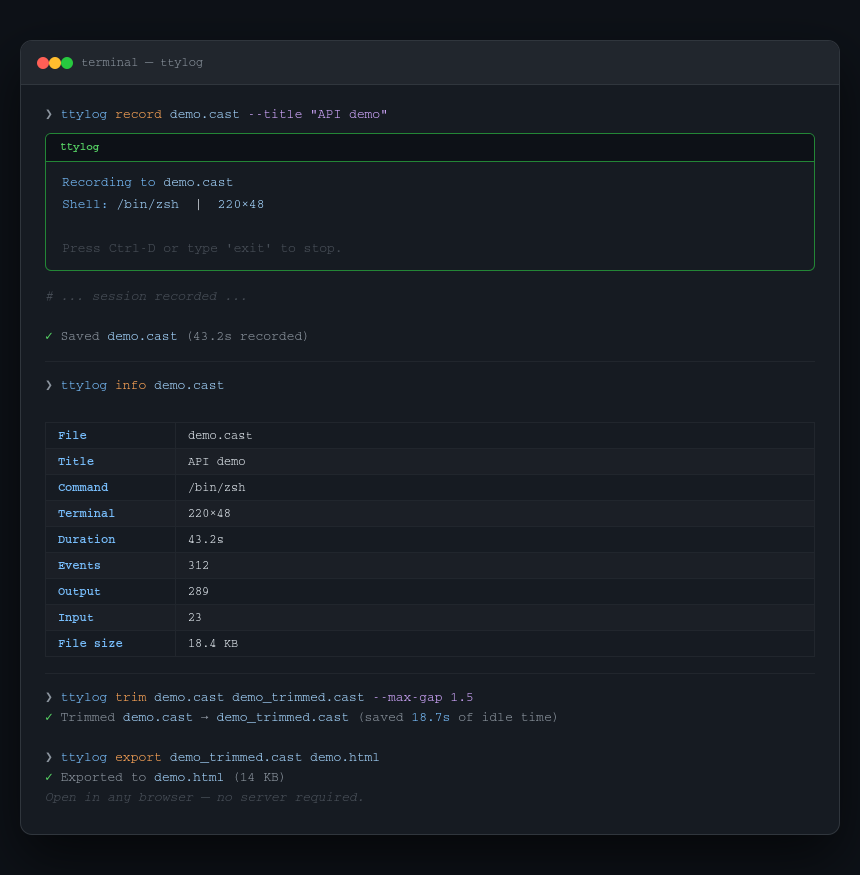
ttylog (TeleTYpewriter log) records your terminal session to a standard .cast file (asciinema v2 format), lets you trim out the idle gaps, replay it in your terminal, and export it as a fully self-contained HTML file you can open in any browser — no server, no asciinema account, no upload required.
The exported HTML embeds the player and the recording in a single file. Send it in a Slack message, attach it to a GitHub issue, drop it in docs. It just works.
pip install ttylogOr with pipx:
pipx install ttylogNote: Recording (
ttylog record) requires Linux or macOS — it uses Unix PTY. Playback, trimming, and HTML export work on all platforms including Windows.
# Record your default shell
ttylog record session.cast

# Record a specific command
ttylog record session.cast --command "python demo.py"

# Add a title
ttylog record session.cast --title "Deploy walkthrough"

# Suppress the startup banner
ttylog record session.cast --quiet
Press Ctrl-D or type exit to stop recording.
# Replay at normal speed
ttylog play session.cast

# Replay at 2× speed
ttylog play session.cast --speed 2

# Replay at 0.5× (slow motion)
ttylog play session.cast --speed 0.5# Trim gaps longer than 2 seconds (default)
ttylog trim session.cast session_trimmed.cast
# Custom gap threshold
ttylog trim session.cast session_trimmed.cast --max-gap 1.5# Export as self-contained HTML — no server needed
ttylog export session.cast session.htmlOpen session.html in any browser. The recording plays automatically. No internet connection required — the player is embedded.
ttylog info session.castShows title, command, terminal dimensions, duration, event count, and file size.
ttylog uses the standard asciinema v2 .cast format. Files recorded with ttylog are fully compatible with:
| Tool | Use |
|---|---|
| asciinema.org | Upload and share online |
| agg | Convert to animated GIF |
| svg-term | Convert to SVG |
| asciinema-player | Embed in your own website |
You can also use files recorded with asciinema directly with ttylog trim, ttylog export, and ttylog info.
ttylog record  OUTPUT         Record a terminal session to a .cast file
ttylog play    SOURCE         Replay a session in the terminal
ttylog export  SOURCE OUTPUT  Export a session as self-contained HTML
ttylog trim    SOURCE OUTPUT  Remove idle gaps from a recording
ttylog info    SOURCE         Show metadata and statistics
--command, -c   Command to run instead of $SHELL
--title,   -t   Session title
--quiet,   -q   Suppress startup banner
--speed, -s Playback speed multiplier (default: 1.0, range: 0.1–10.0)
--max-gap, -g Max idle gap in seconds (default: 2.0)
Recording requires a Unix PTY and is not supported natively on Windows. Use WSL2 to record sessions. Playback (ttylog play), export (ttylog export), trim (ttylog trim), and info (ttylog info) all work natively on Windows.
git clone https://github.com/gitwingo/ttylog
cd ttylog
pip install -e .If ttylog has been useful to you, consider supporting its development:

- GitHub: @gitwingo
- Reddit: u/gitwingo
- X / Twitter: @gitwingo
MIT © gitwingo