AI tools make pretty HTML reports. They're hard to give feedback on.
html-collab wraps any single-file HTML report in a review layer. Comment,
suggest edits, reply, resolve — all in the file itself. Then either paste a
brief back to the AI that wrote it, or send the file to your team and merge
their reviews.
One .html file. No server. No account.


100% coded by GPT-5.5 and Opus 4.7, with minimal oversight.
Use at your own risk.
AI tools generate beautiful single-file HTML reports. The moment you want
feedback on one, you're stuck: email it as an attachment and lose all
comments, or paste it into a doc and lose the layout. html-collab keeps the
file as a single .html you can move anywhere, and adds the behaviours you
expect from Word and Docs — plus a clean structured export so the next
revision can be done by a human or an agent.
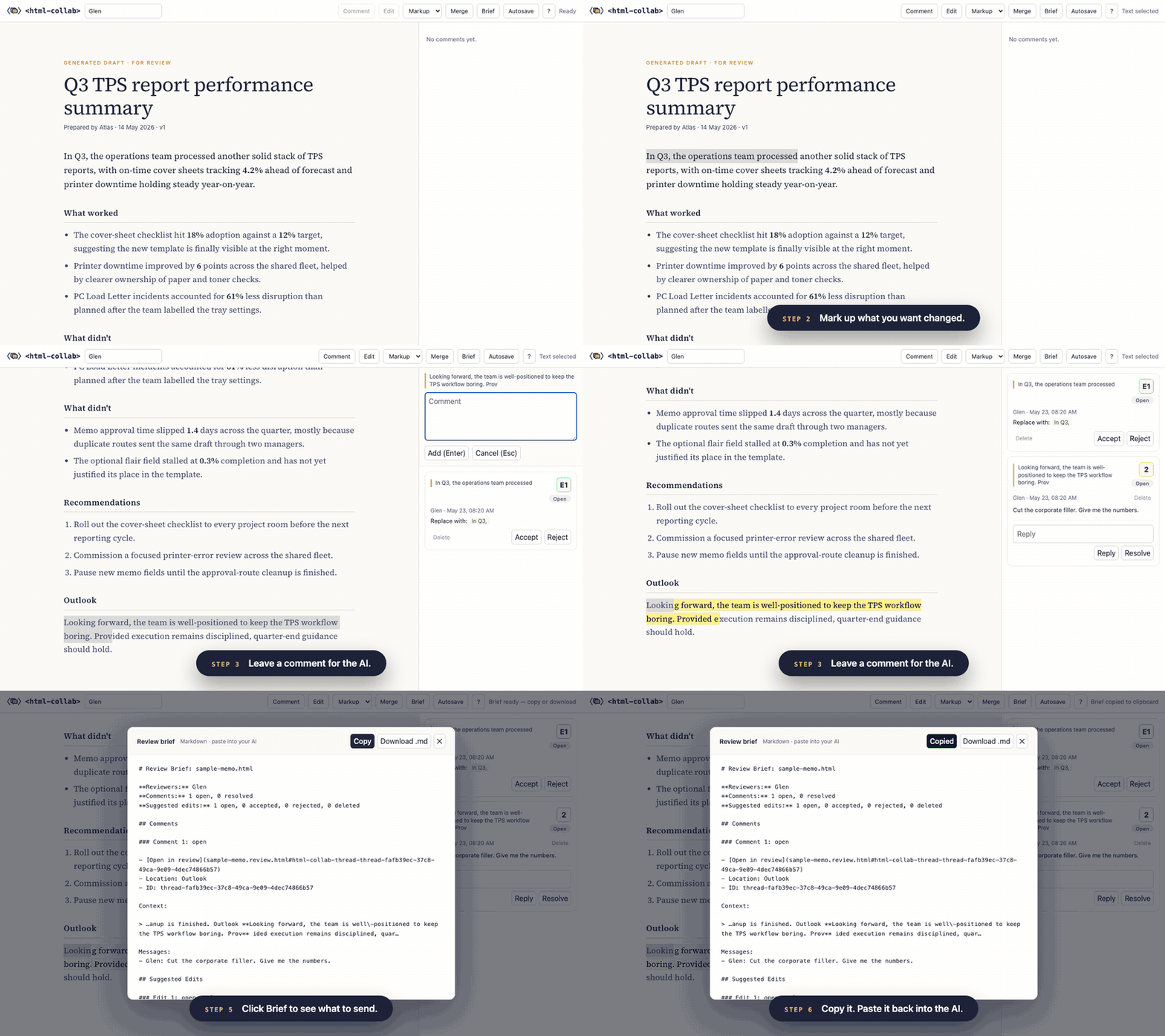
Mark up the report. Export a brief. Hand it back to the AI.
Open the guided tour →
- Highlight any text and press
cto comment, oreto suggest an edit. Right-click works too. - Reply to threads, resolve them, reopen them, delete them. History is kept.
- Suggested edits can be replacements, inserts, or deletions. Toggle between the tracked-change markup and a clean preview.
- Autosave back to the same local file when a Chromium browser asks for permission. Safari and Firefox keep changes in the tab until you export or save another way.
Send your edited file to anyone else with html-collab merge to combine
copies, and html-collab extract to pull out a brief.
Requires Node.js 18+ and npm. No clone or install step is needed:
npx html-collab wrap report.html --out report.review.htmlThe command writes a self-contained review file and prints a short summary. Small source files grow by roughly 90 KB because the review UI is embedded inside the HTML.
If the source links to other local .html pages, wrap warns but still
writes the review file. Only the input page is wrapped and commentable; linked
pages are not bundled into the review workflow.
Open report.review.html in your browser, mark it up, then export a brief:
npx html-collab extract report.review.html --format markdown --out brief.mdUse npx html-collab ... anywhere you see a bare html-collab command below.
Solo, with your AI. Your AI just generated a report. You want it tighter. Wrap it, mark up the bits you want changed, export the brief, paste the brief back into the same chat. The AI redrafts. Re-wrap and go again if you want another round.
npx html-collab wrap report.html --out report.review.html
# Open report.review.html in your browser. Mark it up. Click Brief.
npx html-collab extract report.review.html --format markdown --out brief.md
With your team. Send the wrapped file the way you'd send anything else. Each reviewer marks up their own copy in the browser. Merge their copies into one file. Export a brief at the end, or just keep working in the merged file.
npx html-collab wrap report.html --out report.review.html
# Send the file. Reviewers open it, mark it up, send their copy back.
npx html-collab merge yours.review.html theirs.review.html --out merged.review.html
npx html-collab extract merged.review.html --format markdown --out brief.md
Same file. Same comments. Pick the loop that matches what you're doing.
Open the guided tour on GitHub
Pages. It's a designed page that walks through what html-collab does, with
example comments and edits already loaded. Highlight any text and press c
to add your own. Everything runs locally inside the file. Nothing leaves
your browser. To keep your changes, use a Chromium browser and choose a local
review file when Autosave asks where to save.
html-collab --help
html-collab --version
html-collab wrap    <input.html>        --out <output.review.html>
html-collab unwrap  <input.review.html> [--apply-edits] --out <output.html>
html-collab merge   <a.review.html> <b.review.html> [more...] --out <merged.review.html>
html-collab extract <input.review.html> --format <markdown|json|text|agent> --out <brief>
html-collab skill   --out html-collab.SKILL.md
Use npx html-collab ... if you have not installed the CLI globally, or
npm install -g html-collab to add html-collab to your PATH.
The browser Brief button in the toolbar uses the same markdown brief
format and anchor IDs as html-collab extract --format markdown. Use the
button while you're marking up; use the CLI when you want JSON, plain text,
or an agent-oriented plan via --format <json|text|agent>.
The skill command writes an optional agent workflow file you can drop into
a local skills directory or paste into an agent prompt.
Running wrap on a file that is already wrapped is refused with a clear
error rather than silently double-wrapping. Run unwrap first if you want
to start fresh, or just keep marking up the existing review file.
unwrap --apply-edits only applies suggested edits that have been accepted
in the browser. Open, rejected, and deleted edits are skipped and reported in
the command summary. Ambiguous edits fail instead of guessing, so the output
is never silently wrong.
Comments and edits are stored as an append-only operation log embedded directly in the HTML file. Each op has a stable ID, an actor, and a logical clock. The review chrome lives in an iframe-isolated runtime so it never touches the original report's styles or scripts. Normal review copies merge deterministically by deduplicating on operation ID and sorting by clock. The brief export reads the same embedded log, so what an agent sees matches what the side panel shows. This is not a full CRDT — concurrent edits to the same field are resolved by deterministic tiebreak rather than semantic merge.
A .review.html file is still an HTML file. Open review files only from
people or systems you trust; html-collab does not sanitize the original
report's scripts, forms, images, or links. The review layer stores comments
and edits in the local file and does not upload them anywhere, but the
browser behavior of the original HTML is still the original HTML's behavior.
For mission, principles, and workflows, see the project notes. For a fresh external sanity check, use the independent user test prompt.
Working today:
wrap,unwrap,merge, andextractCLI commands- Comments, replies, resolve, reopen, delete (history preserved)
- Suggested edits — replace, insert, delete — with accept and reject
- Right-click menu and
c/ekeyboard shortcuts on selected text - Replace suggestions toggle between tracked-change markup and a clean preview
- Autosave when a Chromium browser grants file-write permission
- Briefs with stable thread IDs, anchor offsets, and deep links back into the matching threads in the review file
On the roadmap: region comments, advanced anchor recovery, optional auth, audit and tamper detection, optional live sync.
Issues and PRs welcome. See CONTRIBUTING.md for what's in scope and the test expectations. For security vulnerabilities, see SECURITY.md.