
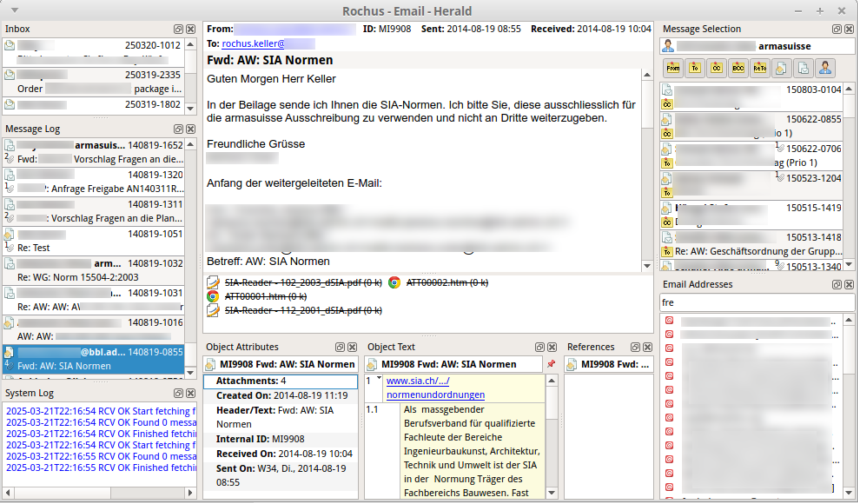
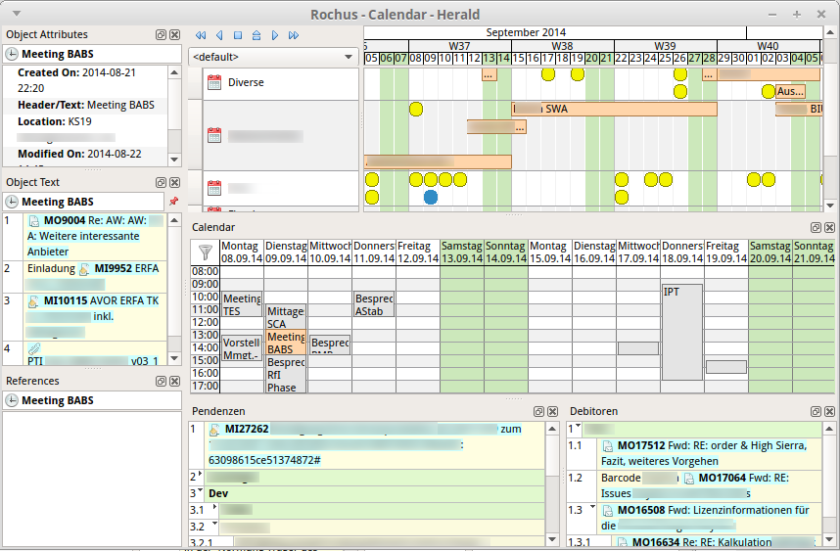
Herald is a personal information manager (PIM) application with integrated email, calendar, schedule board, outliner and full-text search. Herald has sophisticated cross-link capabilities, supporting active links between all object types. It is also possible to reference Herald objects from other applications such as CrossLine and vice versa. These unique features make Herald a much more useful tool than the usual e-mail clients with integrated calendars. It has been in development and continuous operation since 2013.
I actually implemented Herald due to frustration about the low degree of suitability of existing tools for my own information management. At the time I started to implement Herald (and CrossLine) I was working as a manager and consultant for some large defence projects. The majority of communication and the administration of appointments and action items based and depended mostly on email. The commonly available tools were simply unable to cope with the amount and complexity of information generated in the countless sub-projects.
Herald is best used in combination with CrossLine, so emails, tasks, deadlines and appointments can be referenced and managed in the relevant context.
There are no pre-compiled versions yet.
This version of Herald uses LeanQt. Follow these steps if you want to build Herald yourself:
- Create a new directory; we call it the root directory here.
- Download https://github.com/rochus-keller/BUSY/archive/refs/heads/master.zip and unpack it to the root directory; rename the resulting directory to "build".
- Download https://github.com/rochus-keller/LeanQt/archive/refs/heads/master.zip and unpack it to the root directory; rename the resulting directory to "LeanQt".
- Download https://github.com/rochus-keller/GuiTools/archive/refs/heads/master.zip and unpack it to the root directory; rename the resulting directory to "GuiTools".
- Download the Herald source code from https://github.com/rochus-keller/Herald/archive/master.zip and unpack it to the root directory; rename the resulting directory to "Herald".
- Download https://github.com/rochus-keller/Mail/archive/refs/heads/master.zip and unpack it to the root directory; rename the resulting directory to "Mail".
- Download https://github.com/rochus-keller/QLucene/archive/refs/heads/master.zip and unpack it to the root directory; rename the resulting directory to "QLucene".
- Download https://github.com/rochus-keller/Oln2/archive/refs/heads/leanqt.zip and unpack it to the root directory; rename the resulting directory to "Oln2".
- Download https://github.com/rochus-keller/Stream/archive/refs/heads/leanqt.zip and unpack it to the root directory; rename the resulting directory to "Stream".
- Download https://github.com/rochus-keller/Txt/archive/refs/heads/leanqt.zip and unpack it to the root directory; rename the resulting directory to "Txt".
- Download https://github.com/rochus-keller/Udb/archive/refs/heads/leanqt.zip and unpack it to the root directory; rename the resulting directory to "Udb".
- Download http://software.rochus-keller.ch/Sqlite3.zip and unpack it to the root directory, so that there is an Sqlite3 subdirectory.
- Open a command line in the build directory and type
cc *.c -O2 -lm -o luaorcl /O2 /MD /Fe:lua.exe *.cdepending on whether you are on a Unix or Windows machine; wait a few seconds until the Lua executable is built. - Now type
./lua build.lua ../Herald(orlua build.lua ../Heraldon Windows); wait until the Herald executable is built; you find it in the output subdirectory.
NOTE that if you build on Windows you have to first run vcvars32.bat or vcvars64.bat provided e.g. by VisualStudio (see e.g. here for more information) from the command line to set all required paths and environment variables.
If you already have a LeanCreator executable on your machine, you can alternatively open the root_directory/Herald/BUSY file with LeanCreator and build it there using all available CPU cores (don't forget to switch to Release mode); this is simpler and faster than the command line build.
If you need support or would like to post issues or feature requests please use the Github issue list at https://github.com/rochus-keller/Herald/issues or send an email to the author.