Client
###Connect / Disconnect to a server
     var client = new GemClient( Profile: "GemChat"
                                 ServerName: "GemServer" ,
                                 IP: "127.0.0.1",
                                 Port: 14242);

     client.RunAsync(() => new ConnectionApprovalMessage
                               {
                                   Message = "Incoming client",
                                   Sender = "Example",
                                   Password = "1234"
                               });
     //....
     //....
     client.Disconnect();
###Configure behavior
OnReceivedServerNotification A server notification is received
HandleErrors An error has occurred
HandleWarnings A warning has occurred
OnConnected Connects
OnConnecting Is initiating handshake
OnDisconnected Disconnects
OnDisconnecting Sends a disconnect message
     GemClient.Profile("GemChat")
              .OnReceivedServerNotification((notification)=>
              {
                  (notification.Type==NotificationTypes.Message)?
                  Console.WriteLine("Received message {0}",
                                     notification.Message) :
                  Console.WriteLine("Received unhandled notification");
              });

     GemClient.Profile("GemChat")
              .OnConnected((client,incomingMessage)=>
              {
                   Console.WriteLine("Connected to {0}",
                                     incomingMessage.SenderConnection);
                   this.NotifyOthers();
              }
              //this indicates if the behavior is appended
              //or overrides the previous behaviors
              append:true);
###Execute a console command
     //The commands' output
     GemNetworkDebugger.Echo = Console.WriteLine;

     string command = "echo i'm executing commands remotely!!!";
     GemClient.SendCommand(commmand);
###Notify the server
GemClient.SendNotification("what's up?");
###Send Messages via Network Package
Simply by decorating your POCO class with the [NetworkPackage("profile")] attribute
More info about network packages
###Lightweight Network Outgoing Messages
     INetworkEvent sayEvent = GemClient.Profile("GemChat")
                  .CreateNetworkEvent
                  //creates a network event that sends two strings
                  //and handles the incoming message with Say()
                  .HandleWith(this, x => new Action<string,string>(x.Say));

     sayEvent.Send(name, message).
The incoming message is handled by the function Say() that its signature matches Action<string,string>
     public void Say(string name, string message)
     {
         Console.WriteLine(String.Format("{0} : {1}", name, message);
     }
You can get how long the client is running by using
    INetworkEvent onLocationChange = GemClient.Profile("Shooter")
                                    .CreateNetworkEventWithRemoteTime
                                    .AndHandleWith(this, x =>
                                     new Action<string, string, double>(x.Say));
And by changing the method's signature to
   public void Say(string name, string message, double time)
   {
       Console.WriteLine(String.Format("{0} - {1} : {2}", time, name, message);
   }
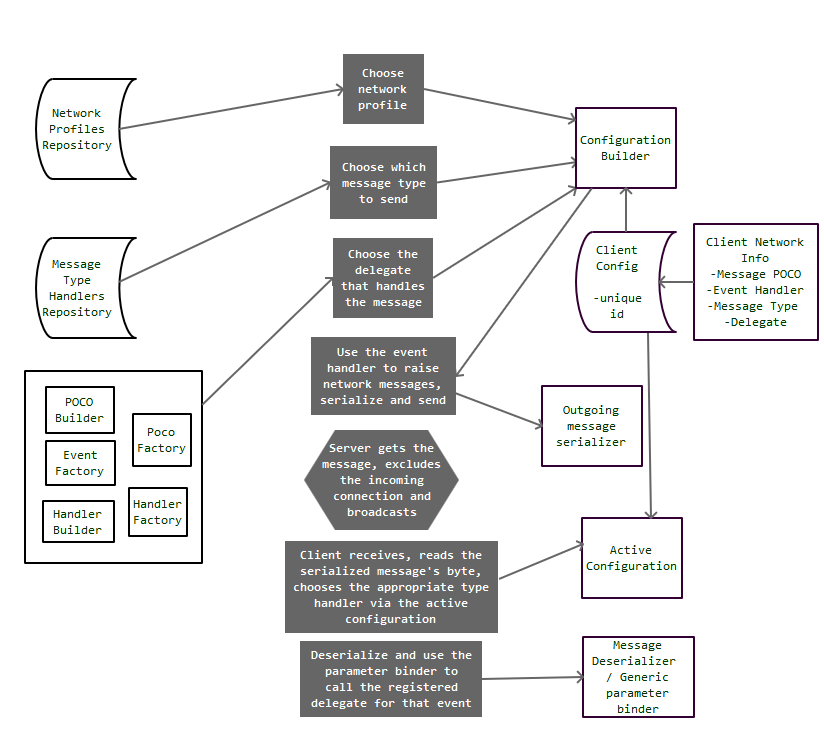
###Abstract Network Message Flow