This workshop is for Python developers who want to learn how to detect SQL injection attacks, and prevent them easily using SQLAlchemy / Gramex.
References:
- SQL Injection Cheat Sheet shows how to create SQL injection attacks.
- bobby-tables.com shows how to prevent SQL injection attacks.
- Install Python version 3.7+
pip install banditto detect SQL injection vulnerabilitiespip install sqlalchemyorpip install gramexto run the app
In this exercise, you'll see how a SQL injection attack works.
Fork this repo into your namespace. Use git to clone your fork.
The database users.db has usernames and email IDs. Let's query it.
Run python users.py and type alpha. It shows the email ID for alpha as alpha@example.org.
$ python users.py
>>> ENTER USER NAME: alpha
... EMAIL ID FOR alpha is alpha@example.org
users.py constructs a SQL query by querying the user name like this:
def queryfunction(args):
    query = f'SELECT user, email FROM users WHERE user = "{args["user"][0]}"'
    return query
Let's attack the system by exploring what other tables are in it. Type this EXACT string:
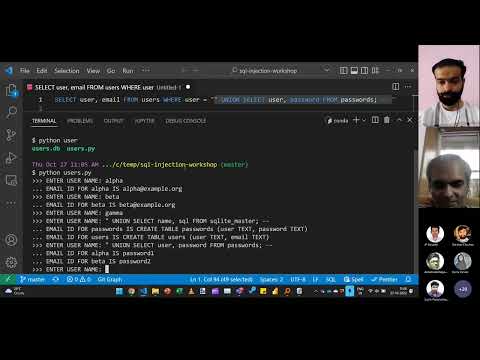
" UNION SELECT name, sql FROM sqlite_master; --
You'll see this response. Clearly, it's not the email IDs. You can see every table in the database!
>>> ENTER USER NAME: " UNION SELECT name, sql FROM sqlite_master; --
... EMAIL ID FOR passwords IS CREATE TABLE passwords (user TEXT, password TEXT)
... EMAIL ID FOR users IS CREATE TABLE users (user TEXT, email TEXT)
From this, you know that there are 2 tables:
passwords, withuserandpasswordfieldsusers, withuserandemailfield
Now type this EXACT string:
" UNION SELECT user, password FROM passwords; --`
Now you'll see every user's passwords!
>>> ENTER USER NAME: " UNION SELECT user, password FROM passwords; --
... EMAIL ID FOR alpha IS password1
... EMAIL ID FOR beta IS password2
You can also run gramex, visit http://localhost:9988, and enter the same strings.
The result is the same.
Run bandit -r . in your folder.
Or you can run builderrors by adding this to .gitlab-ci.yml:
validate:
  image: gramener/builderrors
  script: builderrors
You should see this error, indicating that there's a possible SQL injection.
Test results:
>> Issue: [B608:hardcoded_sql_expressions] Possible SQL injection vector through string-based query construction.
   Severity: Medium   Confidence: Low
   CWE: CWE-89 (https://cwe.mitre.org/data/definitions/89.html)
   Location: ./users.py:7:11
   More Info: https://bandit.readthedocs.io/en/1.7.4/plugins/b608_hardcoded_sql_expressions.html
6       # VERY BAD IDEA to insert user-generated strings into a SQL query!!
7       return f'SELECT user, email FROM users WHERE user = "{args["user"].pop()}"'
8
Remember:
- Always run bandit / builderrors to check for SQL injection attacks.
- Never insert user-generated strings into a SQL statement.
In users.py, replace def queryfunction() with:
def queryfunction(args):
    return 'SELECT user, email FROM users WHERE user = :user'
Using :user automatically picks up the ?user= argument from the args variable.
If you want to modify the user arguments, use the prepare function in users.py.
For example, define this prepare() function to convert all user arguments to lowercase:
def prepare(args):
    '''Convert all user arguments to lowercase'''
    for index in range(len(args['user'])):
        args['user'][index] = args['user'][index].lower()
Now if you enter the user name as ALPHA or Alpha, it still picks up alpha:
>>> ENTER USER NAME: ALPHA
... EMAIL ID FOR alpha IS alpha@example.org
>>> ENTER USER NAME: Alpha
... EMAIL ID FOR alpha IS alpha@example.org
You can also run gramex, visit http://localhost:9988, and enter the same strings.
The result is the same.
Run bandit -r . in your folder. You should not see any errors.
- Commit and push the fixes to your fork. Check on Gitlab that CI/CD > Pipelines passes without errors
- Create an issue titled
Exercise submission. Add a link to your repo and submit the issue.
To mark a submission as correct:
- Check if the build errors pass
- Check if
users.pyhas valid a SQL SELECT query with:userand without formatting