Repository navigation
Releases
K2 OpenKlipper v0.4.25-alpha.1

K2 OpenKlipper v0.4.25-alpha.1
Fixes from a full code review: a first print on a new K2 no longer stops at
the bed voltage check, and several faults that could lose a print or go
unnoticed are closed.
Please keep the reports coming. A klippy.log and what you saw are the most
useful things to send.
Tested on one K2
A 9-pad test print ran through the whole print start and finished cleanly on
this code, and these were each checked on the printer:
- The first print on a new K2 no longer stops at the bed voltage check.
BED_POWER_CALIBRATErefused to run insideSTART_PRINT, the one place it
runs by itself, so the print ended there until you ran it by hand. - A runout outside a print no longer sticks. Filament leaving the sensor
during a manual load left the printer marked as paused, and the next print
could not pause and ignored a real runout.START_PRINTnow clears it. - A second
PAUSEdoes nothing. It no longer lifts and parks again or
overwrites the temperatures Resume returns to. RESUMEwith nothing paused no longer heats anything.RELOAD_GCODE_MACROSis refused during a print. Re-reading the config
can stall the K2's CPU long enough to shut the MCU down.- Typing errors give an error message instead of shutting Klipper down:
MOTOR_VALUES INDEX=,MOTOR_BUS_SEND PAYLOAD=andCALIB_PICK VALUES=
were tried on the printer.FLOW_CAL_RUN FLOWS=,PA_LOG_STOPon a full
disk, saving slot records on a full disk, a motor bus that cannot open and
CFS bus errors at print start have the same fix.
Not tested on a printer yet
These need a real fault to trigger, so they have only been through the
offline tests. Please tell me how they behave if you meet one:
- Runout refill works in the first few layers. It stopped with "CFS move
requires Z" because the pause only lifts 2 mm. - Resume after a failed colour change re-arms the CFS feed when the
filament was already at the nozzle. - A stopped hotend fan switches the nozzle off as well as pausing, so it
does not sit hot with no heatsink airflow. Resume reheats it. - A failed home no longer ends motor fault watching for the rest of the
session. - Loading the rear spool during a long pause uses the print's temperature,
so the print does not carry on at the load's temperature. - K2 Plus: the chamber over-temperature cut-off can now fire. It needed
heater power, which is already off by then. - Power-loss resume refuses a part too tall for the Z reference instead of
pushing it into the nozzle, and excluded objects stay excluded.
The full list is in CHANGELOG.md.
Updating
Mainsail's Update button, the touchscreen's Machine page, or
OKL_UPDATE CONFIRM=1. Your settings are kept.
Alpha software on your own printer: stay near it for the first prints.
K2 OpenKlipper v0.4.24-alpha.1
K2 OpenKlipper v0.4.24-alpha.1
The max flow test now runs up to 40 mm³/s and no longer reports "no limit"
when the force falls away.
Please keep the reports coming. A klippy.log and what you saw are the most
useful things to send. The test now writes every step to the log, so a log
from a run that looks wrong is very useful.
Max flow test
Run it with FLOW_CAL_STATIC SLOT=A (any slot). It is still off at print
start unless you turn it on.
- The ramp goes up to 40 mm³/s instead of 24. Nearly half of the runs on
one K2 found no limit by 24. - It is one continuous run that stops at the limit. A pause partway makes
every later step read low, so the ramp never picks up again once it stops. - Force falling under the line now counts as a limit. Before, only force
going over the line did, so a run could end with "no cap needed" when the
filament had stopped being pushed through properly. - A sudden loss of force stops the ramp at once (the idea is FlowTune's),
and a noisy start to the ramp needs a bigger bend before it counts.
Tested on one K2 with Elegoo PETG at 250 C: two runs gave 14.0 and 12.5 mm³/s
and stopped at 18 to 20 mm³/s, using about 120 mm of filament. The limit on
PETG bends gently, so expect a mm³/s or two between runs. A filament with no
limit runs all the way to 40, about 400 mm. Not tested yet: PLA, other
PETGs, or a K2 Plus.
Print time
- Print time no longer jumps to days in the history. A CFS check at print
start could add the host's uptime to it. Not confirmed yet on a finished
print.
The full list is in CHANGELOG.md.
Updating
Mainsail's Update button, the touchscreen's Machine page, or
OKL_UPDATE CONFIRM=1. Your settings are kept.
Alpha software on your own printer: stay near it for the first prints.
K2 OpenKlipper v0.4.23-alpha.1
K2 OpenKlipper v0.4.23-alpha.1
Power-loss resume no longer pulls the part off the bed, and Klipper on an
external host reconnects after a USB drop.
Please keep the reports coming. A klippy.log and what you saw are the most
useful things to send.
Power-loss resume
PLR_RESUMEheats up before anything moves. The nozzle stops on the
part and the plastic sets round it. Resume lowered the bed with the nozzle
cold, so the part came off the bed with it. It now waits for the bed, then
for the nozzle at full print temperature, and only then moves. A resume
takes a few minutes longer to get going, and the nozzle may leave a small
mark where it was sitting. Not confirmed yet: this has not been run on
a real stopped print, so stay with the printer for your first one.
Klipper on an external host
-
The relay reconnects after a USB drop. It kept its dead USB ports open
after a disconnect, so Klipper got no answer from the boards until the K2
was rebooted. It now opens them again when the host comes back. Klipper
still has to restart after a drop and a print in progress is still lost,
but the K2 no longer needs a reboot. Tested with a real USB disconnect on a
K2 running Klipper on an external host: ready again in 30 s with no manual
restart.The relay runs on the K2 and does not come with the update. If you use an
external host, copyhost/k2/relay.pyto/mnt/UDISK/k2-hostlink/and
reboot the K2.
Not run on a K2 Plus.
The full list is in CHANGELOG.md.
Updating
Mainsail's Update button, the touchscreen's Machine page, or
OKL_UPDATE CONFIRM=1. Your settings are kept.
Alpha software on your own printer: stay near it for the first prints.
K2 OpenKlipper v0.4.22-alpha.1
K2 OpenKlipper v0.4.22-alpha.1
A warped bed now gets a mesh instead of an error, and a change aimed at the
Stepper too far in past shutdown when a dense mesh finishes.
Please keep the reports coming. A klippy.log and what you saw are the most
useful things to send.
Bed mesh
- The mesh guard no longer stops a mesh on a warped bed
(#3, thanks
masteryodha). The guard compares each point to its neighbours, so real
curve looks abnormal, above all at the edges. With more than
mesh_guard_max_pointsof those it gave up and left no mesh at all. It now
warns, re-checks the worst points and finishes.BED_MESH_CHECKstill
judges the result at print start, so a bed that is too far out still stops
there (variable_mesh_max_deviationandvariable_mesh_max_slopeunder
[gcode_macro START_PRINT]). - The last probe lift finishes before the mesh is built
(#4, thanks
mylife4aiurr). Building a dense mesh holds up Klipper for up to a second on
the K2's board, and theM400s in v0.4.21-alpha.1 only ran after the
build. Not confirmed yet: the shutdown has only been seen with Klipper
on the printer's own board and a 19x19 or 21x21 mesh. If you can run one,
please trymesh_pps: 2, 2and report back.
Probing
- A probe that runs out of travel now says what to check: the bed stopping
short (KZ_ALIGN_MEASURE CONFIRM=1, thenposition_endstop) or a dirty
nozzle.
Docs
docs/CFS-PROTOCOL.mdhas Lamar1007's stock K1 filament change sequence,
the measuring wheel and box state decodes, and Creality's address scheme.
Tested on a K2 running Klipper on an external host: a 5x5 mesh with the new
wait, the guard forced over its limit, and a forced probe miss. Not run on a
K2 Plus.
The full list is in CHANGELOG.md.
Updating
Mainsail's Update button, the touchscreen's Machine page, or
OKL_UPDATE CONFIRM=1. Your settings are kept.
Alpha software on your own printer: stay near it for the first prints.
K2 OpenKlipper v0.4.21-alpha.1
K2 OpenKlipper v0.4.21-alpha.1
A proper nozzle scrub, a full purge when printing by object, choosing the
slot for each filament from the touchscreen, and a fix aimed at the
Stepper too far in past shutdown at the purge line.
This release turns things on rather than hiding them behind options, so
please report what breaks. A klippy.log and what you saw are the most useful
things to send.
Nozzle scrub
Traced from Creality's own NOZZLE_CLEAR code: tap for height, scrub hot,
fans on, scrub again further along the strip, then stay down on the strip
until the nozzle reaches 140 C and lift.
| Hot strokes | Cool strokes and park | |
|---|---|---|
| K2 | X160-170 | X175-180 |
| K2 Plus | X185-195 | X200-205 |
- Print start now scrubs from 180 C (it was 140 C). The tap and scrub take
about 2 minutes 20 seconds. - It presses 0.32 mm below the height tap (it was 0.1). On one K2, 0.1 left
the tip dirty and 0.32 got it clean. Creality presses 0.6. - The K2 Plus now scrubs by default, and this has not been run on a K2
Plus. Check the positions in step 7 of
K2-PLUS-BETA.md before your first print.
variable_scrub_strip: Falseunder[gcode_macro START_PRINT]in
printer-overrides.cfgturns it off.
Colour changes
- Printing by object gets the full purge. Between two slots of the same
material the purge could be as short as 30 mm, and by object has no prime
tower or infill to take the rest, so the next object's first layers
blended. These files now purge at least the stock 160 mm. T0-T3wait for queued moves before touching the CFS
(#5, thanks
Promotheux). Your Orca profile picks up the sameM400when you re-import
it, but files sliced with an older profile are covered too. Not confirmed
yet on a K2 running Klipper on its own board. If you had this crash,
please try a few prints without your ownM400and report back.- Choose the slot each filament prints from
(#3, thanks
masteryodha): on the touchscreen's file details, orCFS_TOOL_MAPfrom the
console. You can also pick the rear spool with a CFS fitted, which is the
least tested part of this release. - Low colour changes no longer pause on the bed mesh offset.
RESUMEloads and purges a new spool after a runout, and reheats after a
long pause.
Bed mesh and homing
- The print-start mesh waits for the toolhead around
BED_MESH_CHECK, from
mylife4aiurr's test in
#4. One run so far,
somesh_pps: 1, 1is still the advice above about 13x13. - A failed mesh check no longer aborts the print while cleaning the nozzle.
- K2 Plus: set the measured
position_endstopwhenever it isn't 349.5. The
guide used to say only above 1 mm, and 0.6 mm was enough to fail the nozzle
tap on one printer.
Also in this release
- The stepper threads use both of the K2's cores. 12% faster in a batch test
on the K2's own board, not yet measured on a real print. - The chamber camera recovers from a USB drop instead of serving its last
frame. - Camera WebRTC mode: viewer limit, always 720p, safer start.
- Other filament brands sync to their own Orca preset.
- go2rtc's web UI and config editor are off the network.
- The touchscreen stays on for the sleep time after a print.
The full list is in CHANGELOG.md.
Updating
Mainsail's Update button, the touchscreen's Machine page, or
OKL_UPDATE CONFIRM=1. Your settings are kept.
Alpha software on your own printer: stay near it for the first prints.
K2 OpenKlipper v0.4.20-alpha.1
K2 OpenKlipper v0.4.20-alpha.1
Camera WebRTC mode (H.264): much lighter on the printer's WiFi. Opt-in,
in testing. MJPEG stays the default; nothing changes unless you switch.
Creality's own camera apps (cam_app + webrtc_local) have the camera
compress to H.264 and send it over WebRTC, but Mainsail and Fluidd could not
talk to them. harkcam now translates. Measured on a K2 on 5 Nov 2026:
| MJPEG (harkcam, 10 fps) | WebRTC (H.264) | |
|---|---|---|
| Data per viewer | about 820 KB/s (up to 1.5 MB/s in a bright scene) | about 224 KB/s |
| Picture | 1280x720, 10 fps | 1280x720, 15 fps |
| Printer CPU | ffmpeg + harkcam | webrtc_local about 4% |
Thanks to nur00 for the idea and the first measurements
(#4).
Try it
- In
harkcam.cfg(Mainsail: Machine > config files) setmode: webrtc,
then runsh /mnt/UDISK/harkcam/start.shover SSH, or reboot. - Mainsail: Settings > Webcams > your chamber camera: Service
"WebRTC (go2rtc)", URL Stream
http://<printer IP>:8080/api/ws?src=k2. Fluidd: the same camera type
and URL. http://<printer IP>:8080/is a test page that plays the stream on its
own.
To go back: mode: mjpeg, run start.sh again, and set the camera back to
MJPEG-Streamer with /webcam/?action=stream.
Good to know
- No snapshots in this mode. The camera sends one format at a time, so
time-lapse, AI failure detection and anything reading
/webcam/?action=snapshotneedmode: mjpeg. - Use the go2rtc camera type, not MediaMTX:
webrtc_localonly connects
when the browser's network candidates come with its offer, and only the
go2rtc type sends them in time. harkcam collects them for about a second,
so the picture takes 1-2 s to appear. - Tested in Mainsail and on the test page on a K2, with the camera apps
started by hand. The automatic start on the normal chamber-camera port
(through Creality's ownauto_uvc.sh) is new: reports welcome, with
/tmp/harkcam.logand
/mnt/UDISK/creality/userdata/log/webrtc_local.logif it does not show. - Creality's camera apps run on CPU0, away from Klipper's CPU, like harkcam.
Update
Mainsail's Update button, the touchscreen's Machine page, or
OKL_UPDATE CONFIRM=1 in the console. Your harkcam.cfg and
printer-overrides.cfg are kept; the camera stays in MJPEG mode until you
change it.
Everything from v0.4.19-alpha.1 is included. See CHANGELOG.md.
K2 OpenKlipper v0.4.19-alpha.1
K2 OpenKlipper v0.4.19-alpha.1
Start a print from the touchscreen, and a quicker screen.
Print a file
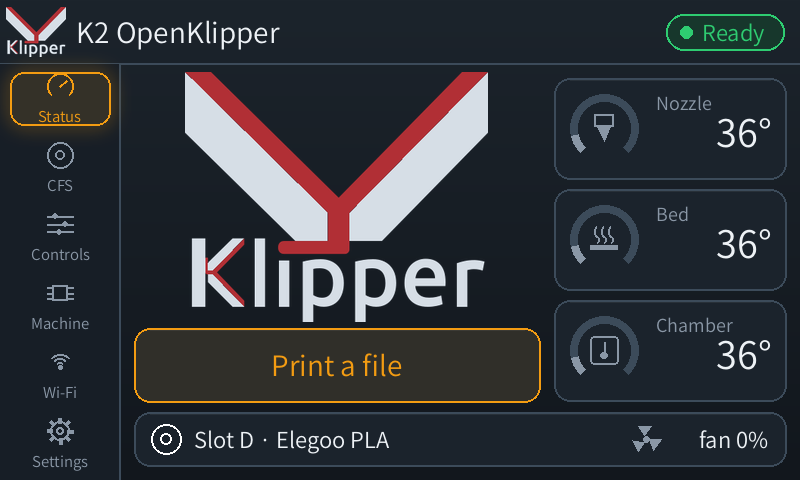
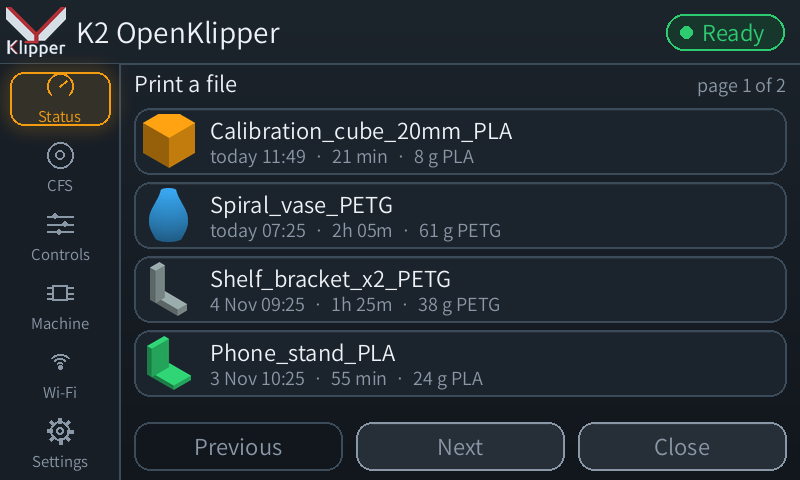
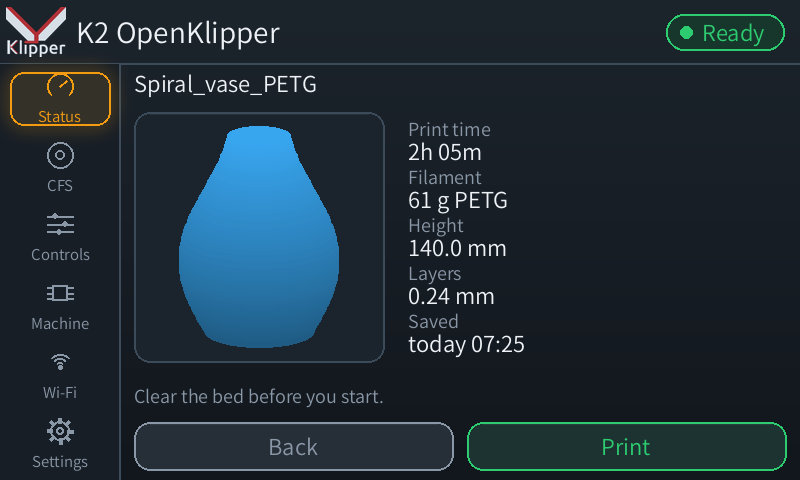
The Status page has a Print a file button when the printer is idle. It
lists your print files newest first, four to a page, each with the slicer's
thumbnail, when it was saved, the print time and the filament. Tap one to
see a large preview and its details, then Print to start it.
 |
 |
 |
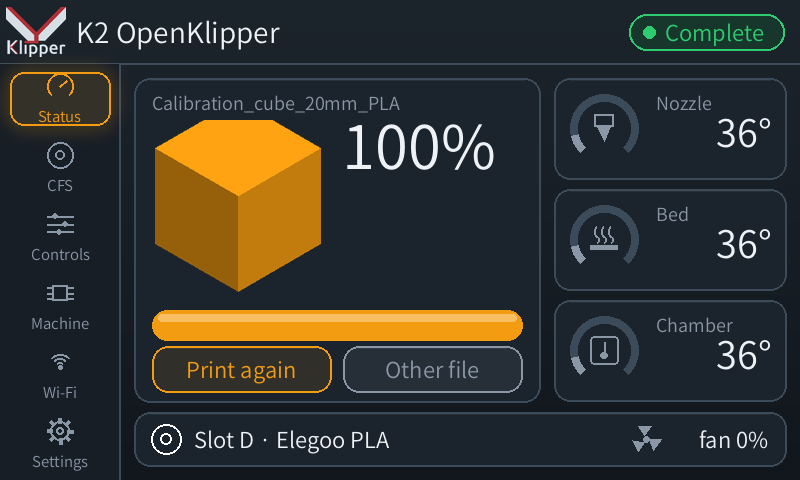 |
- After a print, Print again opens the same file's details (so you
clear the bed first) and Other file opens the list. - The button is hidden while printing or while the printer is busy (homing,
cleaning). If Moonraker refuses a start, the reason shows under the
preview. - Thanks to masteryodha for pointing out that the screen had no way to pick
a file (#3).
A quicker touchscreen
Measured on the K2's own processor, with the same look:
| Before | Now | |
|---|---|---|
| Change page | 513 ms | 219 ms |
| Open a box (temperatures, fans, a question) | 806 ms | 251 ms |
| Redraw the Status page | 93 ms | 61 ms |
The logo and text sizes are worked out once instead of on every frame, the
glow round a box and the dimming behind it are drawn in a cheaper way, and the
page slide is shorter (3 frames instead of 7) with boxes appearing at once.
transitions: smooth in harkscreen.cfg brings back the longer
animations, and transitions: off drops the slide.
Update
Mainsail's Update button, the touchscreen's Machine page, or
OKL_UPDATE CONFIRM=1 in the console. The touchscreen restarts with the
new version; your harkscreen.cfg and printer-overrides.cfg are kept.
With Klipper on a separate PC, the K2's screen brings itself up to date
from the PC's version while idle.
Everything from v0.4.18-alpha.3 is included, including the camera fix. See
CHANGELOG.md.
K2 OpenKlipper v0.4.18-alpha.3
K2 OpenKlipper v0.4.18-alpha.3
Camera fix: watching the camera could stop a print. The camera stream
on the printer sent 720p at 15 frames a second to every viewer, about
1.3 MB/s each with the chamber light on. That slowed the printer's WiFi
until the toolhead board missed its moves and Klipper shut down (MCU 'nozzle_mcu' shutdown: Stepper too far in past), and two viewers took the
network down altogether. Thanks to nur00 for finding and measuring it
(#4).
- The camera now runs at 10 frames a second shared by every viewer:
live streams and snapshots draw on one budget, so a second open tab gets
half the frames instead of doubling the data sent. - At most 2 streams stay open; a new one closes the oldest, so a
fullscreen camera page never comes up blank. - New
harkcam.cfgin your config folder (editable in Mainsail): picture
size, frames a second and the stream cap. On a weak WiFi signal,
fps: 5orsize: 640x480leaves more room. Run
sh /mnt/UDISK/harkcam/start.shor reboot after a change. - The update restarts a running camera, so nothing else to do.
Printers running Klipper on an external host are not affected (their camera
is served by the host), and nothing else changed in this release.
Update: Mainsail's Update button, the touchscreen's Machine page, or
OKL_UPDATE CONFIRM=1 in the console. Your printer-overrides.cfg is kept.
Everything from v0.4.18-alpha.2 is included; see
CHANGELOG.md.
K2 OpenKlipper v0.4.18-alpha.2
K2 OpenKlipper v0.4.18-alpha.2
Hotfix for v0.4.18-alpha.1: update before printing. On alpha.1 a CFS
print start could shut Klipper down ("Internal error on command
CFS_SLOT_APPLY") when the slot's hotend PID profile was applied. Found on the
first real print after the release and fixed here; nothing else about the
print start changed.
Also in this release: console messages from the motors and the CFS read as
words (Motors X, Y: stall mode 2, print protection ..., X: ok) instead of
bus frames; the raw frames still go to klippy.log, and console_frames: True
in [k2_motor_bus] or [k2_cfs] brings them back to the console.
Everything from v0.4.18-alpha.1 is included: flow calibration at print start,
fan rpm and health, bed power on 110 V, the K2 Plus out of beta with belt
tensioning and saved Z tilt, maintenance counters, the boot animation and the
rest. See the v0.4.18-alpha.1 notes
and CHANGELOG.md.
K2 OpenKlipper v0.4.18-alpha.1
K2 OpenKlipper v0.4.18-alpha.1
Alpha firmware for the Creality K2 / K2 Combo (F021) and the K2 Plus (F008).
Supervise prints and keep the rollback path. Update with the Update button
in Mainsail or on the touchscreen (your printer-overrides.cfg is kept), or
install with the one-line installer in docs/INSTALL.md.
Highlights
- Flow calibration at print start: the printer measures where its
hotend stops keeping up and caps that print to it (off by default, one
line to turn on). - Fan rpm in Mainsail and on the touchscreen, with a health check at
every print start and a measured minimum speed for the part fan. - 110 V printers get their bed power back: the mains voltage is checked
once and the right power and PID set applied. - K2 Plus out of beta: no install gate, automatic belt tensioning, saved
Z tilt. - Power-loss recovery, silent colour-change retries and per-slot CFS
counts (from the 2 November part of this release). - A new boot animation, and Creality's kept for anyone who wants it back.
Printing
- Max flow measured at the chute (
hark_flow_cal): 8 mm^3/s upwards in 3 s
steps on the strain gauge; the knee is where the pressure leaves the line
by 4%, the cap is 3 mm^3/s under it, held withSET_MAX_FLOWfor that
print only. Turn on with[gcode_macro _FLOW_AUTO] variable_on_print_start: 1;FLOW_CAL_STATICruns it by hand. - Extruder motor reads fixed (they were one request behind), plus
MOTOR_VALUES,MOTOR_LOG_START/STOPandMOTOR_GET_PROBE. - Power-loss recovery (
PLR_RESUME CONFIRM=1, touchscreen Discard/Resume),
a failed colour change pauses instead of ending the print andRESUME
retries it, loads retry silently, per-slot counts with a warning for a
slot that keeps failing, Orca's own purge length for every change, CFS
loads ~10 s faster, PETG purges with the part fan off, cutter calibration
with the X/Y motors, a stuck nozzle-sensor pin shaken free.
Fans
tachometer_pinon the part, hotend and PTC fans: rpm everywhere.
[fan_feedback]removed. Rpm is true at full speed only (the fans are
powered through their PWM); 0 means stopped.FAN_CHECK/FAN_HEALTHkeep each fan's full-speed rpm and warn with
!!when one slows 15% or stops;_FAN_AUTOruns it at every print
start.FAN_MIN_CALfinds the lowest duty the part fan keeps turning at
andM106never asks for less.
Bed heater
hark_bed_power(K2): the mains test from Creality's firmware (30 C at
half power, 0.35 C/s divide) runs once before the first print and picks
the 110 V or 220 V power and PID set;voltage: 110|220forces it;
BED_POWER_CALIBRATE,BED_POWER_STATUS,BED_POWER_SET.
Touchscreen
- Fans box: part fan rpm (or its usual), a Hotend fan line, colours for a
slow or stopped fan. - Boot animation: the Hark Tech badge, "K2 OpenKlipper", harktech.co.uk.
OKL_BOOTANIM=keepkeeps Creality's;OKL_BOOTANIM=/folderinstalls your
own from a logo (tools/bootanim/make_bootanim.py,
docs/SCREEN-CUSTOMISE.md). Creality's set is backed up anduninstall.sh
restores it. - Time zone picker, USB eject, chamber target and the other screen fixes
from v0.4.15-v0.4.17 are included.
K2 Plus
- Install without
OKL_K2PLUS_BETA=1: tested on a real K2 Plus since 31
October (no CFS; a CFS-equipped Plus is still untested). BELT_TENSION_STATUSandBELT_TENSION CONFIRM=1drive the automatic
tensioners (stock's routine, 140 N). Not yet run on a real printer: step
10 of the K2 Plus guide.Z_TILT_APPLY_SAVEDand_Z_TILT_START mode: "saved"skip the tilt probe
at print start once a printer has proven stable.- Stock extruder PID, bed check 120 s, Z tilt at 300 mm/s (nur00's review).
Also
MAINTENANCE_STATUS/MAINTENANCE_DONE: hours, grams and cuts against
Creality's maintenance thresholds, listed when a print ends.FIRST_LAYER_PAUSE ENABLE=1,SILENT_MODE ENABLE=1, and an optional
second extruder PID set above 280 C.- docs/PROJECT-STATUS.md: what is still only in Creality's firmware.
Upgrade notes
- The first print after this update heats the bed 30 C at half power
before its own heat-up, once, to check the mains voltage (K2 only). To
skip it:[gcode_macro _BED_POWER_AUTO] variable_on_first_print: 0, or
[hark_bed_power] voltage: 220in printer-overrides.cfg. - Every print start now blasts the part fan for 3 s and reads the hotend
fan at the chute (_FAN_AUTO); turn off withvariable_on_print_start: 0if you prefer. - The flow calibration is off until you turn it on (above); it adds about
25 s and 70 mm of filament to a print start. - The boot animation changes at this update unless you install with
OKL_BOOTANIM=keep. [fan_feedback]in a printer-overrides.cfg of your own must go: its pins
are the fans' tachometers now.
Full list in CHANGELOG.md.