Resizing issue #1530
Resizing issue #1530
Conversation


src/utils.ts
Outdated
| /** @internal */ | ||
| static updateScrollResize(event: MouseEvent, el: HTMLElement, distance: number): void { | ||
| let scrollEl = this.getScrollParent(el); | ||
| if (scrollEl === null) return; |
src/utils.ts
Outdated
| scrollEl.scrollBy({ behavior: 'smooth', top: event.clientY - distance}); | ||
| } | ||
|
|
||
| if (bottom) { |
src/gridstack-dd.ts
Outdated
|
|
||
| // Saving `minRow` and adding new ones for resizing | ||
| minRow = this.opts.minRow; | ||
| this.opts.minRow = this.getRow() + 100; |
There was a problem hiding this comment.
big no no - don't arbitrary add 100 rows!
we should only add 1 extra row (when computing the needed rows) IFF the item you are resizing/moving is at the bottom (node.y+node.h). don't need to mod minRow for this...
src/utils.ts
Outdated
| } | ||
| } | ||
|
|
||
| /** @internal */ |
There was a problem hiding this comment.
put a real comment on your code. seems reasonable given we do something similar (though quite different code. I will have to diff into the scroll as I didn't write that)
| /** @internal */ | ||
| private temporalRect: Rect; | ||
| /** @internal */ | ||
| private scrollY: number; |
There was a problem hiding this comment.
do we need that in JQ version as well ?
src/h5/dd-resizable.ts
Outdated
| private _resizeStart(event: MouseEvent): DDResizable { | ||
| this.originalRect = this.el.getBoundingClientRect(); | ||
| const scrollEl = Utils.getScrollParent(this.el); | ||
| this.scrollY = scrollEl === null ? 0 : scrollEl.scrollTop; |
There was a problem hiding this comment.
this.scrollY = scrollEl ? scrollEl.scrollTop : 0;
src/h5/dd-resizable.ts
Outdated
| private _getChange(event: MouseEvent, dir: string): Rect { | ||
| const oEvent = this.startEvent; | ||
| const scrollEl = Utils.getScrollParent(this.el); | ||
| const scrolled = scrollEl === null ? 0 : (scrollEl.scrollTop - this.scrollY); |
src/h5/dd-resizable.ts
Outdated
| /** @internal */ | ||
| private _resizeStart(event: MouseEvent): DDResizable { | ||
| this.originalRect = this.el.getBoundingClientRect(); | ||
| const scrollEl = Utils.getScrollParent(this.el); |
There was a problem hiding this comment.
cache this since you need it in all 3 methods and continuously, or does it change over time ?
There was a problem hiding this comment.
This changes over time. When there is no scroll because the layout is small scrollEl is null and eventually when the layout grows returns the scrollable element.
There was a problem hiding this comment.
right, so you could scrollEl = scrollEl || Utils.getScrollParent(this.el) and cache it once it appears, unless it changes values ?
quick looking it appears to go up recursively so maybe it could be different elements over time... so maybe not.


|
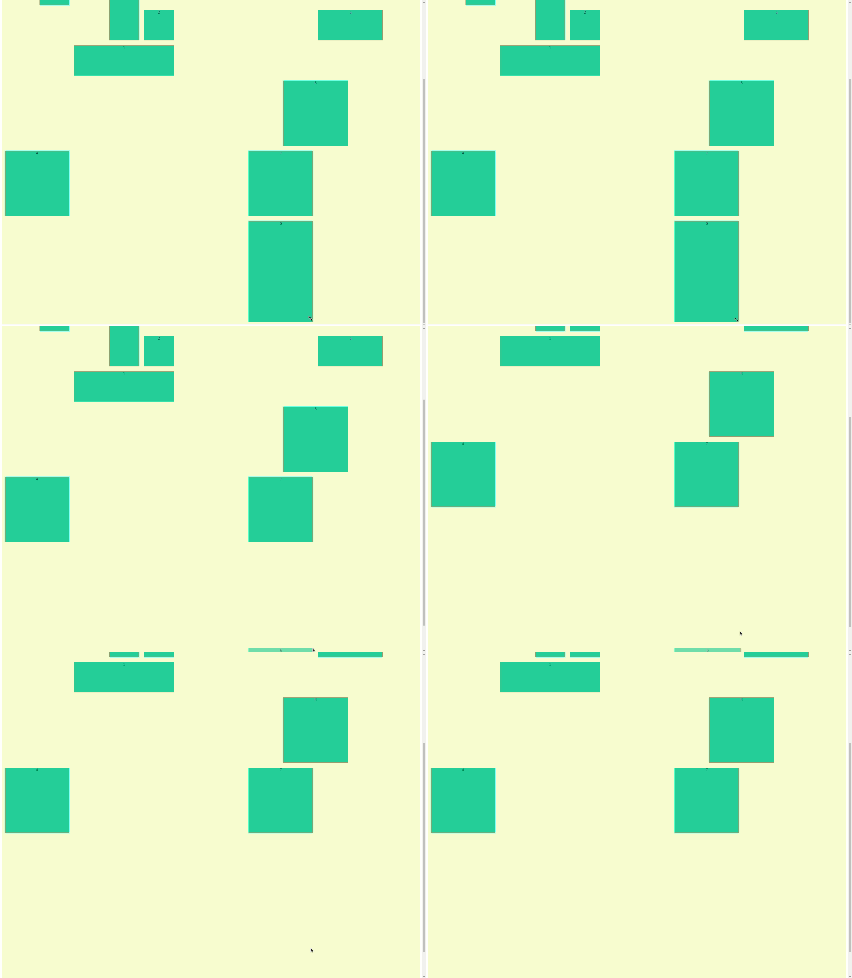
Thanks for the tips @adumesny. I need some help with the placeholder and the view of the item while resizing. There is two case that I'm not sure how to solve. When the item is at the bottom and the mouse pointer goes out of the
|


|
I'll take a look in the next couple days... I just spend entire weekend re-writing collision so need to take a break from gridstack |
|
The resize is working. The problem was the scrollable parent, sometimes got lost.
|

|
sorry, taking a look now. I had to fix some Safari mac issues and released I also tweaked on we do resizing (event handling really). |
 adumesny
left a comment
adumesny
left a comment
adumesny
left a comment
There was a problem hiding this comment.
that looks reasonable (minor doc comments). Can you update to the latest dev code so I can push it in ?
I need to cherry pick as well to verify it works. Have you tried how tat affects the JQ version as well ?
| } else if (el.scrollHeight > el.clientHeight) { | ||
| returnEl = el; | ||
| if (el === null) return document.documentElement; | ||
| const style = getComputedStyle(el); |
There was a problem hiding this comment.
is getComputedStyle() better than checking the simple el.scrollHeight > el.clientHeight because you want to remember what parent MIGHT scroll later ? (in case you don't already scroll ?) - please add comment.
There was a problem hiding this comment.
Yes, also with el.scrollHeight > el.clientHeight sometimes is selecting a non scrollable parent.
There was a problem hiding this comment.
interesting. didn't think that would be possible... but I realize the call you have return the first that could scroll which is safer anyway... but always return the doc as least, which might not scroll so it should return NULL and have that be handled ideally...
There was a problem hiding this comment.
Exactly, the best option would be returning NULL when there isn't a scrollable parent but in this case, we need to prevent gridstack to continue growing.
I was using the example float.html to check my changes. I think in this example the ideal would be that gridstack stops growing when there is no more page because the element that is scrolling is the document not the container that wraps gridstack.
There was a problem hiding this comment.
And we need to manually prevent gridstack to grow because:
In my case, I have two screens one on top of another and I have the browser with the webpage with gridstack on the screen above.
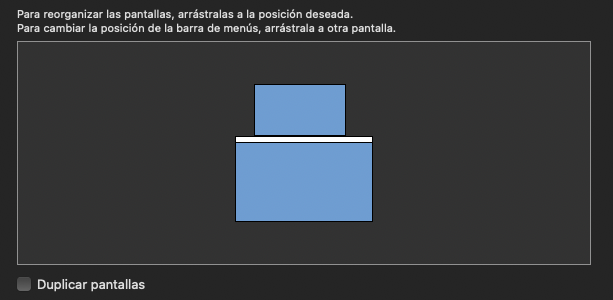
When I try to resize or drag and drop an item to the bottom my mouse continue on the screen bellow so gridstack still growing even when the page can't scroll. Once I stop there is no scrollable parent so the documentElement is resized to wrap everything.
There was a problem hiding this comment.
well we have a maxRow to prevent grid from growing past that size, but you are saying that if none of the parents can scroll (by default divs will auto scroll unless you have overflow: hidden or something) then we should stop growing so we don't clip, which makes sense... Looks like you are checking for overflow | overflow-y for and auto or scroll
you don't need 2 screens to test this. browser smaller than full screen will do that too...
if you want to take a stab at it that would be great. _prepareDragDropByNode() should cache if we can not v-scroll and prevent move/size past the max somehow.
There was a problem hiding this comment.
I'll take a look at this over the week (probably weekend, I'm quite busy right now) :)
| /** @internal */ | ||
| private _resizeStart(event: MouseEvent): DDResizable { | ||
| this.originalRect = this.el.getBoundingClientRect(); | ||
| this.scrollEl = Utils.getScrollParent(this.el); |
No problem at all. Thanks for merging and sorry for the comments, I can open a PR to add some comments if you want. |
|
no need, I took care of it I believe. thanks for fixing this issue! |
2 participants


Description
As discussed in #1001 the resizing with scrolling is not working.
I'm trying to solve it here but I'm having some troubles. Now is working fine but I'm resizing the layout adding some rows on
resizestartbecause when while resizing an item there is a back and force with the number of cells creating a strange behaviour.Checklist
yarn test)