GPGWrap is a lightweight Linux desktop GUI for common OpenPGP tasks using the system gpg binary.
It provides a simple interface for encrypting, decrypting, signing, and verifying text or files, plus basic key management and key generation.
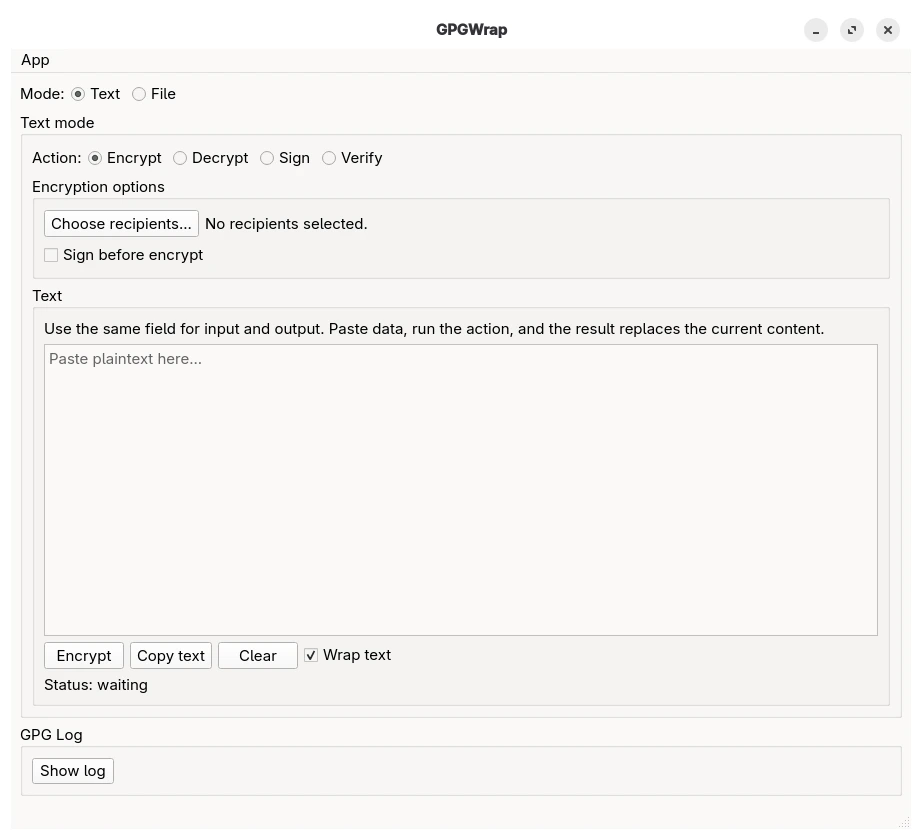
- Encrypt text
- Decrypt text
- Sign text
- Verify clear-signed text
- Verify detached signatures
- Encrypt files
- Decrypt files
- Sign files
- Verify file signatures
- Import keys from file
- Import armored keys directly from clipboard
- Export public keys
- Copy public key to clipboard
- Delete keys
- Generate new keys
- Sign public keys (local or exportable) after fingerprint verification
- Set ownertrust independently of key signing
- Linux desktop environment
- Python 3.10+
gpggpg-agentpinentry
pipx install gpgwrapInstall directly from GitHub:
pipx install git+https://github.com/h0ek/gpgwrap.gitgpgwrapCtrl+E— switch to Encrypt and run the action in the current modeCtrl+D— switch to Decrypt and run the action in the current mode
After installation, you can install the desktop entry and icon for the current user:
gpgwrap-install-desktopAfter that, GPGWrap should appear in your application menu.
- GPGWrap uses the system GnuPG installation.
- Your keys remain managed by your local GPG setup.
- The application is intended for desktop Linux use.
- If a message decrypts successfully but the signer public key is missing, GPGWrap will still show the decrypted plaintext and report that signature verification could not be completed.
pipx upgrade gpgwrapIf you installed GPGWrap from GitHub, you may need to force reinstall to get the latest version:
pipx install --force git+https://github.com/h0ek/gpgwrap.gitRemove the application:
pipx uninstall gpgwrapRemove desktop entry and icon (optional):
rm ~/.local/share/applications/gpgwrap.desktop
rm ~/.local/share/icons/hicolor/256x256/apps/gpgwrap.png

